


La mayor mentira: bases de datos estáticas "verificadas"
Usted paga a un proveedor de datos empresariales decenas de miles de dólares por una hoja de cálculo que contiene cincuenta mil contactos. El representante de ventas le asegura que los datos se limpiaron la semana pasada. Pero la realidad de la economía moderna es que los datos comienzan a pudrirse en el momento exacto en que se compran. En tres meses, un tercio de esos objetivos han cambiado de trabajo, las empresas locales han cambiado de nombre, los sitios web de las empresas han migrado y sus correos electrónicos fríos, cuidadosamente elaborados, rebotan a un ritmo alarmante. Está pagando un precio superior por un activo en decadencia.
Para combatir esto, los equipos de crecimiento más agresivos abandonan las listas estáticas y construyen sus propios canales de investigación dinámicos. Pero el flujo de trabajo manual es angustioso: busque una empresa local en Google Maps, copie el dominio, abra el sitio web de la empresa para extraer un correo electrónico de contacto, abra LinkedIn para localizar al director ejecutivo y pegue todo en una hoja maestra de seguimiento. Se necesita 10-15 minutos por perfil enriquecido – matemáticamente imposible de escalar utilizando mano de obra humana.
Cuando los equipos de ingeniería intentan automatizar esto, crean una pesadilla fragmentada: Google Places API (exorbitantemente cara), una API scraper LinkedIn (inevitablemente prohibida) y scrapers Python personalizados (fallan en diseños no estándar). El resultado es un Frankenstein frágil y dependiente de la nube que requiere un desarrollador de tiempo completo para seguir funcionando. Pero, ¿qué pasaría si pudiera abandonar por completo las frágiles API e implementar un único agente de IA local que controle visualmente su navegador en las tres plataformas?
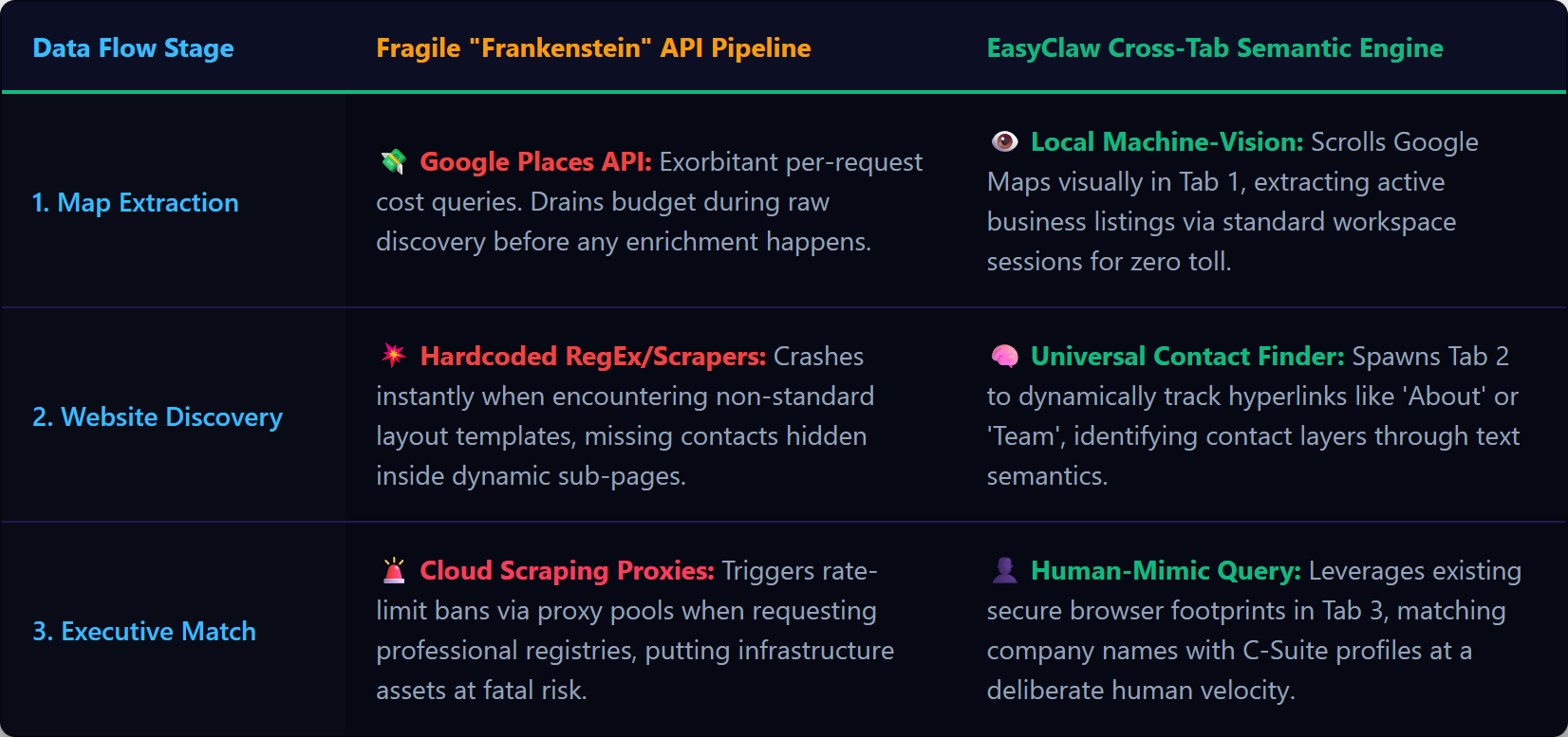
Las bases de datos estáticas decaen en cuestión de meses; EasyClaw crea listas de clientes potenciales B2B en vivo y de múltiples fuentes mediante referencias cruzadas de Google Maps, los sitios web de la empresa y LinkedIn en tiempo real.
Por qué los Cloud Scrapers fallan en el enriquecimiento de múltiples fuentes
Los raspadores de nube tradicionales están diseñados para entornos de dominio único altamente estructurados. Un proceso de enriquecimiento B2B es inherentemente caótico. Comienzas en Google Maps con su complejo lienzo dinámico que altera constantemente el DOM para frustrar a los raspadores. Luego, pasa al sitio web de la empresa objetivo: cada empresa utiliza un creador diferente (WordPress, Webflow, React personalizado). Un raspador de nube que depende de selectores de CSS falla porque no puede predecir dónde se encuentra el correo electrónico "Contáctenos" en un sitio web local aleatorio. Finalmente, consulta LinkedIn a través de un punto final en la nube y los algoritmos de seguridad marcan inmediatamente la IP del centro de datos.
Si intenta resolver este problema mediante Zapier o Make, pagará un impuesto por paso en cada acción. Un negocio desde Maps, búsqueda de datos de sitios web, consulta LinkedIn: docenas de tareas en la nube. Escalar a miles de clientes potenciales arruina su presupuesto de software en días.
EasyClaw evita este fallo mediante automatización web semántica. No analiza el código subyacente invisible a través de servidores remotos. Toma el control físico de su navegador Chrome o Edge, abre pestañas, mira la pantalla usando modelos locales de visión artificial y comprende el concepto semántico de un "correo electrónico de contacto", ya sea que esté oculto en un pie de página, oculto en una ventana emergente o pegado a un banner.
Four-Phase Multi-Source Pipeline Setup
Phase 1: Equipando su buscador de leads B2B local
Habilitar el Web Automation & Navigation habilidad en EasyClaw. Le enseña al agente cómo abrir y cerrar nuevas pestañas de forma segura sin bloquear la sesión del navegador principal, maneja el desplazamiento infinito en Google Maps y restringe la descarga de archivos no verificados de sitios web desconocidos de la empresa. El agente está autorizado a leer texto y extraer cadenas; no está autorizado a interactuar con archivos del sistema más allá de guardar su informe final de Excel.
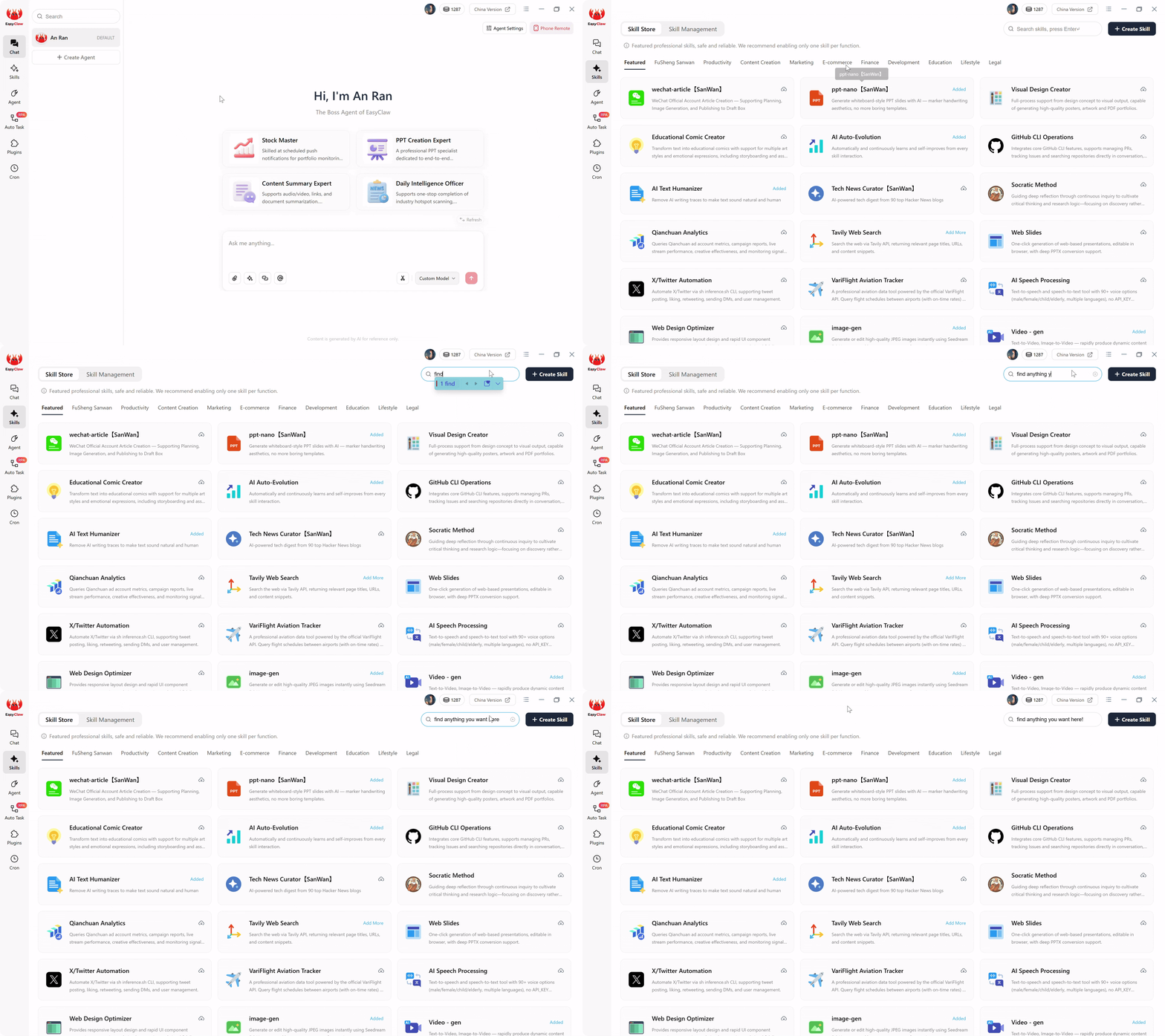
Habilite la habilidad Web Automation & Navigation para brindarle a su agente el vocabulario para la búsqueda de clientes potenciales B2B multiplataforma, desde Google Maps hasta LinkedIn.
Phase 2: Escritura del mensaje de tarea automática multiplataforma
Cuando se construye una automatización que abarca múltiples plataformas, se articula la lógica operativa en un lenguaje sencillo. Un mensaje listo para producción para el enriquecimiento de múltiples fuentes:
"Abra el navegador y navegue hasta Google Maps. Busque 'Fabricantes de HVAC comerciales en Ohio'. Extraiga el nombre de la empresa, el número de teléfono y la URL del sitio web de los primeros 20 listados. Mantenga estos datos en la memoria.
A continuación, para cada URL de sitio web, navegue hasta ese sitio web. Escanee visualmente la página de inicio y la página de contacto en busca de cualquier dirección de correo electrónico pública. Adjunte correos electrónicos encontrados; marque los que faltan como 'NULL'.
A continuación, navegue hasta LinkedIn. Para cada nombre comercial, busque el nombre más "CEO" o "Director". Filtrar a Personas. Extraiga el nombre completo y la URL del perfil LinkedIn del resultado principal.
Finalmente, cierre pestañas adicionales. Cree un archivo Excel local 'Ohio_HVAC_Enriched_Leads' con los datos consolidados: nombre de la empresa, teléfono, sitio web, correo electrónico, nombre del director ejecutivo, URL LinkedIn del director ejecutivo. Asegúrese de que no haya duplicados y guárdelo."
El LLM compila este párrafo multicondicional en un script RPA reforzado que mantiene datos en la memoria en arquitecturas web completamente diferentes. Acaba de crear un sofisticado proceso de ingeniería de datos multidominio en un solo párrafo.
Phase 3: Ejecución sigilosa (economía de token cero)
Si utilizara una herramienta de automatización de IA en la nube para este flujo de trabajo, cada navegación a un nuevo sitio web de una empresa de HVAC requeriría capturar todo el HTML, enviarlo a un servidor LLM externo y quemar costosos tokens solo para preguntar "¿dónde está el correo electrónico?" Hacer esto para miles de clientes potenciales cuesta una fortuna. EasyClaw elimina esto: el razonamiento de la IA ocurrió una vez en el momento de la compilación. El script RPA local analiza diseños variados utilizando modelos de extracción livianos en la memoria. Los procesos de extracción diarios se queman zero LLM tokens.
Phase 4: Configuración del motor desatendido
Cree una tarea cron denominada "Ejecución de enriquecimiento nocturno de HVAC" a las 2:00 a. m. todos los días. Vincúlalo con: "Ejecute la tarea automática 'Enriquecimiento de HVAC de Ohio'. Deduplicar con el archivo de ayer. Cuente los perfiles completamente enriquecidos". Cambie los resultados de envío a Slack/WhatsApp/Telegram. A las 8 a.m., sus SDR ven: "Enriquecimiento nocturno completo. 45 clientes potenciales de HVAC nuevos y completamente enriquecidos extraídos de Maps y LinkedIn. Archivo de Excel guardado en el escritorio". Los datos tienen horas, no meses.
Pro Tips from the Data Trenches
Semantic Contact Hunting
No indique al agente que simplemente "busque el símbolo @". Muchos sitios web modernos ocultan los correos electrónicos en imágenes o requieren navegar a un formulario de contacto. Aprovechar la comprensión semántica: "Si un correo electrónico no es visible de inmediato, busque hipervínculos etiquetados como 'Contacto', 'Acerca de nosotros' o 'Equipo'. Haga clic en esos vínculos y escanee las páginas siguientes antes de darse por vencido". Esta persistencia humana aumenta drásticamente las tasas de éxito de la extracción.
In-Memory Deduplication
Las empresas Google Maps suelen aparecer varias veces en diferentes categorías. Indique al agente: "Mantenga una lista interna de nombres comerciales en la memoria. Antes de abrir una nueva pestaña para el sitio web de una empresa o LinkedIn, verifique que el nombre comercial no exista ya en su memoria. Omita los duplicados inmediatamente".
Por qué EasyClaw reemplaza toda la pila de datos de su proveedor
La industria de las ventas B2B ha quedado atrapada en un círculo vicioso: comprando listas costosas y en rápido deterioro de intermediarios de datos, experimentando tasas de conversión terribles y obligando al personal de ventas altamente remunerado a buscar manualmente mejores objetivos. Ese fracaso arquitectónico termina aquí.
EasyClaw implementa un investigador digital implacable que utiliza tu propio navegador para saltar entre Google Maps, los sitios web de la empresa y LinkedIn, compilando bases de datos estructuradas en tiempo real directamente en su disco duro sin costos de API y sin datos obsoletos.
Busque y extraiga listados de empresas con teléfono, dirección y sitio web, sin costo de API de Places.
Escaneo semántico de páginas de inicio, páginas Acerca de y páginas de Contacto en busca de correos electrónicos y nombres de ejecutivos.
Verifique el empleo, extraiga títulos actuales y capture URL de perfil, todo a través de su sesión autenticada.
Las tres fuentes de datos se fusionaron en un libro de trabajo estructurado, sin duplicados y listo para su divulgación.
Ventajas
- Cero costos de API: sin lugares Google, sin tarifas de API LinkedIn
- Datos en tiempo real: extraídos hoy, no hace 90 días
- La verificación cruzada de múltiples fuentes mejora la precisión
- Totalmente local: los datos nunca tocan un servidor de terceros
- Nivel gratuito disponible: no se requiere tarjeta de crédito
Limitaciones
- Requiere una computadora de escritorio con Chrome/Edge instalado
- No apto para compilaciones de bases de datos de millones de registros.
| Fuente de datos | Canalización local EasyClaw | Pila de nube tradicional |
|---|---|---|
| Google Maps | ✓ Visual extraction via real browser | ✗ Google Places API: costoso por solicitud |
| Company Websites | ✓ Semantic scanning adapts to any layout | ~ CSS-selector scrapers break on custom sites |
| ✓ Authenticated session, residential IP | ✗ Datacenter IPs: prohibido en unos días |
Frequently Asked Questions
El fin de los datos estáticos
Durante años, la industria de ventas B2B ha estado atrapada en un círculo vicioso: comprando listas costosas y en rápido deterioro de intermediarios de datos, experimentando terribles tasas de conversión en frío y obligando al personal de ventas altamente remunerado a investigar manualmente mejores objetivos. Eso es un fracaso arquitectónico.
Construir un canal altamente específico y multiverificado no debería requerir decenas de miles de dólares para los proveedores de datos o API en la nube frágiles y costosas que se estropean en el momento en que un sitio web rediseña su página de inicio. Al adoptar una arquitectura de interfaz de usuario web local con EasyClaw, evita las limitaciones de los raspadores de nube y el gasto de las bases de datos estáticas.
Implementa un investigador digital implacable que utiliza su propio navegador, salta entre distintas plataformas web sin problemas y compila bases de datos estructuradas en tiempo real directamente en su disco duro. Abra la interfaz de tareas automáticas, defina su perfil de cliente ideal y su secuencia de enriquecimiento en un solo párrafo, y observe cómo sus operaciones de prospección más agotadoras se transforman en un proceso diario automatizado, sin mantenimiento y perfectamente nuevo, empoderando a los equipos de SDR, gerentes de ventas y líderes de crecimiento a nivel mundial.