


La mentira de las seis cifras de las plataformas de automatización de marketing
Marketo y HubSpot han convencido a toda una generación de especialistas en marketing de que generación de demanda la automatización requiere un presupuesto de software de seis cifras. La narrativa: necesita una plataforma de automatización de marketing para la captura de formularios, un motor de puntuación de clientes potenciales para separar los prospectos atractivos de los pateadores de neumáticos, un sistema de nutrición de correo electrónico para alimentar contenido por goteo e integración de CRM para entregar clientes potenciales calificados a las ventas. Cada capacidad se encuentra detrás de un nivel de precios: la captura de formularios en Professional, la puntuación de clientes potenciales requiere Enterprise, el generador de flujo de trabajo visual tiene un costo adicional. Para cuando tengas un funcional estrategia de generación de demanda que captura, califica y nutre clientes potenciales, usted está pagando $800-$3000/mes – y no he gastado ni un dólar en contenido que realmente genere demanda.
El sucio secreto: la funcionalidad principal de la automatización del marketing no es tecnológicamente compleja. El envío de un formulario activa un disparador. El disparador evalúa las condiciones. Si las condiciones coinciden, se envía un correo electrónico. Si no, el líder espera. Esta es una declaración si-entonces con una API de correo electrónico adjunta, y la industria convenció exitosamente a los compradores de que vale la pena pagar una hipoteca cada mes.
Evolución de las reglas a la generación de demanda impulsada por la IA
Las plataformas de automatización de marketing operan sobre árboles de decisión: si un cliente potencial descarga la guía de precios, suma 10 puntos. Si su puntuación supera los 50, envíe una invitación de demostración. Si no lo abren dentro de 3 días, muévalos a un nuevo compromiso. Cada regla requiere configuración manual y las reglas interactúan de maneras que se vuelven exponencialmente más difíciles de administrar. Agregue una tercera pista de nutrición para el lanzamiento de un nuevo producto y estará desenredando las condiciones que podrían enviar accidentalmente correos electrónicos de lanzamiento de producto a alguien que se dio de baja de las actualizaciones del producto.
EasyClaw reemplaza el árbol de decisiones con una capa de razonamiento de IA que evalúa cada cliente potencial de manera integral. El agente lee el perfil de la empresa del cliente potencial, su puesto de trabajo, el contenido específico con el que interactuó, cómo lo encontró y cualquier interacción previa con la marca. Luego emite un juicio, como lo haría un especialista en marketing humano, sobre dónde se encuentra este cliente potencial en el proceso de compra. Un vicepresidente de ingeniería en una empresa SaaS de 200 personas que descargó un documento técnico obtiene un camino de crianza diferente al de alguien que hizo clic en un anuncio de LinkedIn y dejó un correo electrónico genérico. La IA reconoce esta diferencia porque razona sobre el contexto, no suma una puntuación.
3-Step Launch: Generación de demanda automatizada en su escritorio
Step 1: Habilite las habilidades Browser Tool y XLSX
Permitir Browser Tool para monitorear los canales de entrada (verificar los paneles de envío de formularios, escanear las bandejas de entrada en busca de respuestas, revisar las notificaciones sociales) e investigar clientes potenciales durante la calificación. Permitir XLSX para leer bases de datos de clientes potenciales existentes, escribir nuevas capturas y actualizar estados de crianza. Si la crianza implica enviar correos electrónicos directamente, Browser Tool se encarga de redactarlos y enviarlos a través de su Gmail real o Outlook con el ritmo adecuado.
Step 2: Deje que la IA genere su script de canalización de generación de demanda
Abra el chat y describa sus canales entrantes (paneles de formularios, bandeja de entrada de correo electrónico, análisis de contenido, menciones sociales), criterios de ICP en detalle, fomente las preferencias de contenido y las reglas de transferencia de CRM. La IA genera un script que cubre: captura de señales entrantes en todos los canales, calificación de IA en categorías MQL/Suscriptor/No apto con resúmenes respaldados por investigaciones, generación de contenido personalizado que hace referencia al comportamiento específico de cada cliente potencial y transferencia estructurada de CRM con seguimiento de estado.
El script de canalización de generación de demanda generado por IA cubre la captura entrante, la calificación de IA, el contenido de fomento personalizado y la transferencia de CRM.
El canal no cuenta las puntuaciones de los clientes potenciales en una base de datos. Investiga, razona y decide, como lo haría un gerente de marketing, no como lo haría una regla de flujo de trabajo. Esa es la diferencia entre la automatización del marketing y una auténtica estrategia de generación de demanda impulsado por IA.
Step 3: Programar y calibrar
Cree un trabajo cron "canal de generación de demanda": cada hora para campañas pagas que generen tráfico constante, cada 2 a 4 horas para campañas entrantes orgánicas. Inmediato: "Leer y ejecutar demand-gen-pipeline.md en mi espacio de trabajo". Run draft-only mode durante la primera semana — revise cada mensaje de crianza y decisión de calificación antes de permitir que el agente envíe directamente. Una vez que confíes en el criterio de la IA (2-3 ciclos de revisión manual), cambia al modo de envío.
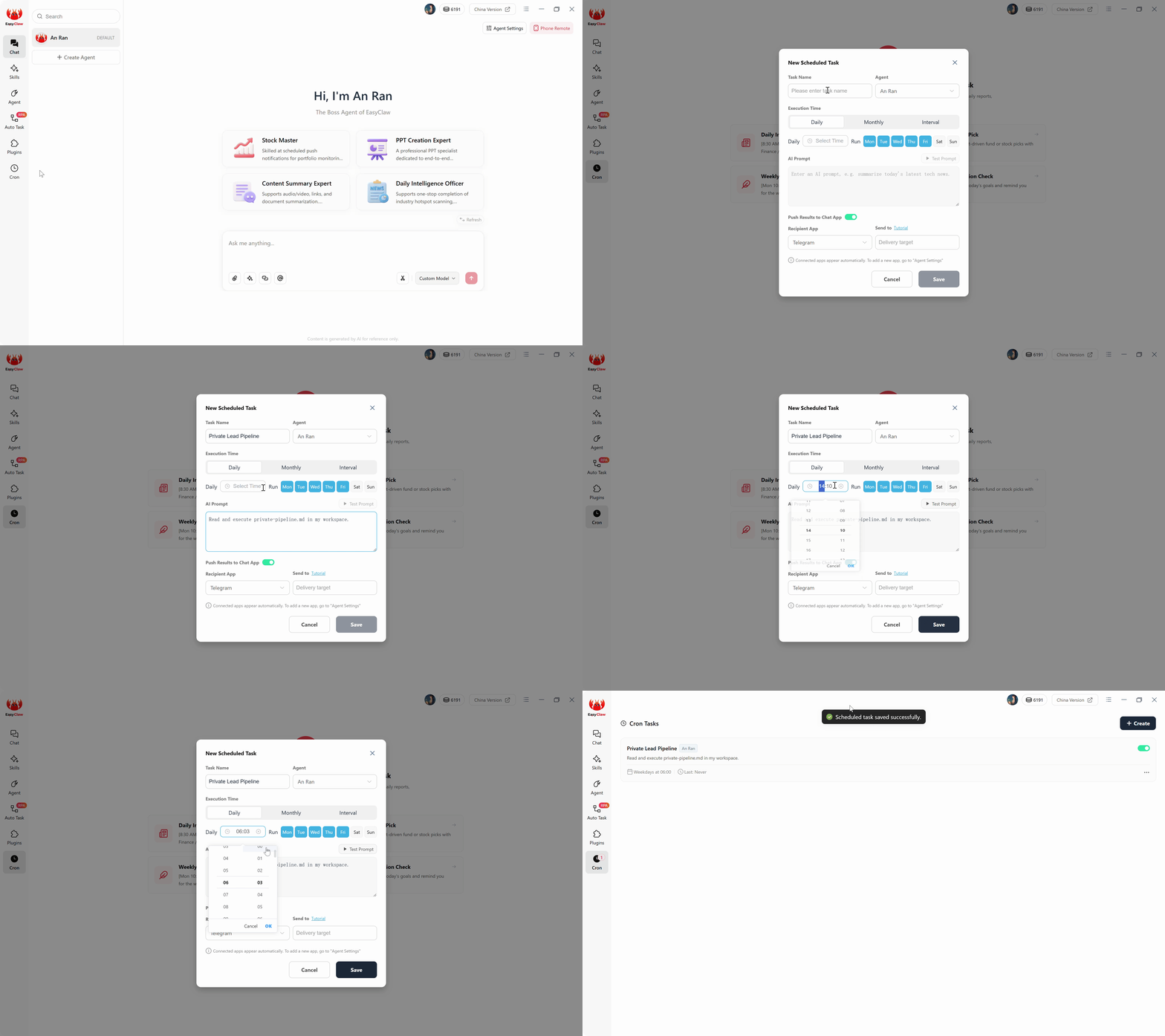
Cree un trabajo Cron que ejecute el canal de generación de demanda según un cronograma: cada hora para campañas pagas, cada 2 a 4 horas para campañas entrantes orgánicas.
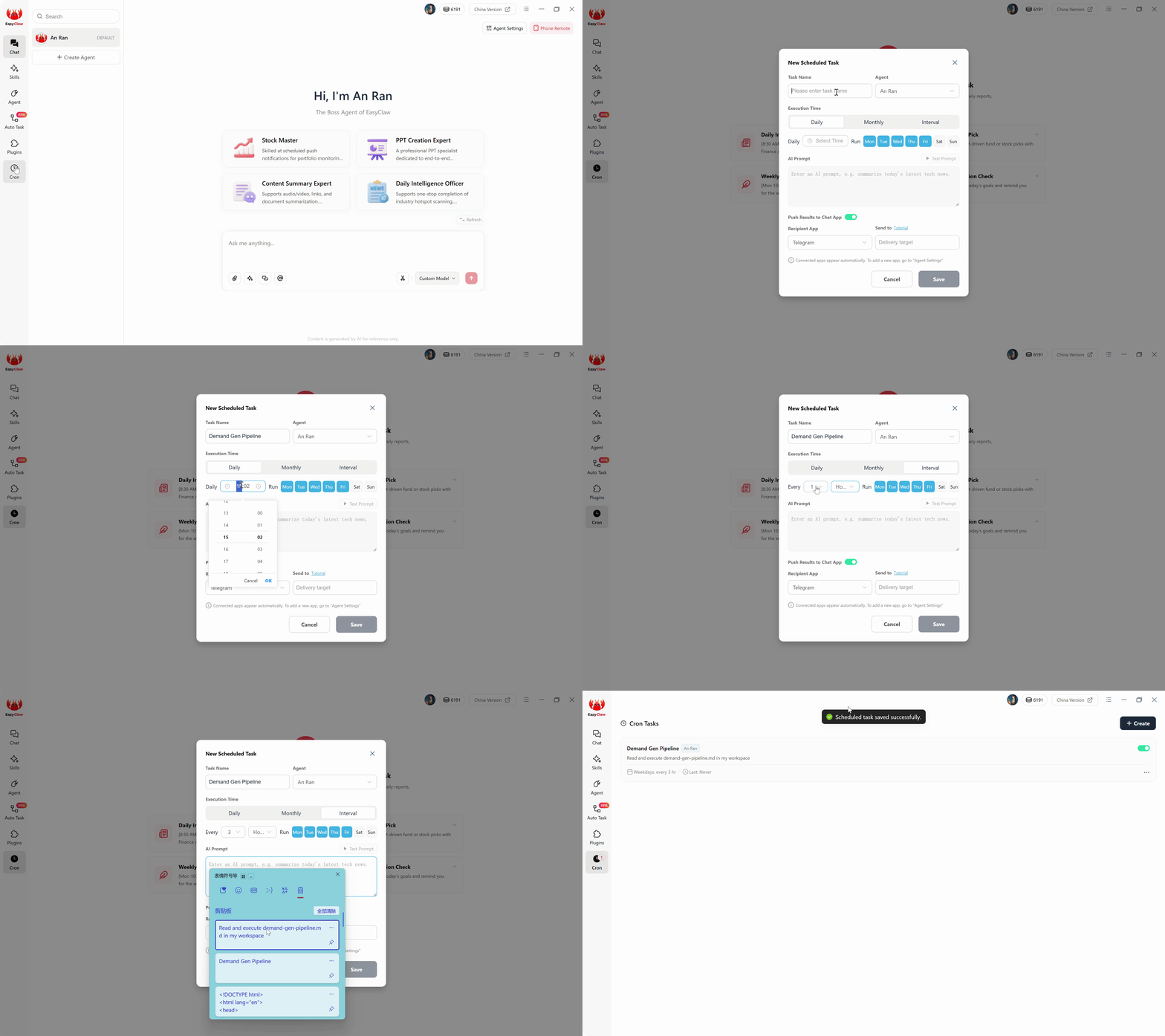
Revise los resultados de la ejecución de la canalización: MQL calificados, mensajes de apoyo enviados y clientes potenciales sincronizados con CRM, todo visible en su panel.
Traditional Platform frente a la generación de demanda de IA local
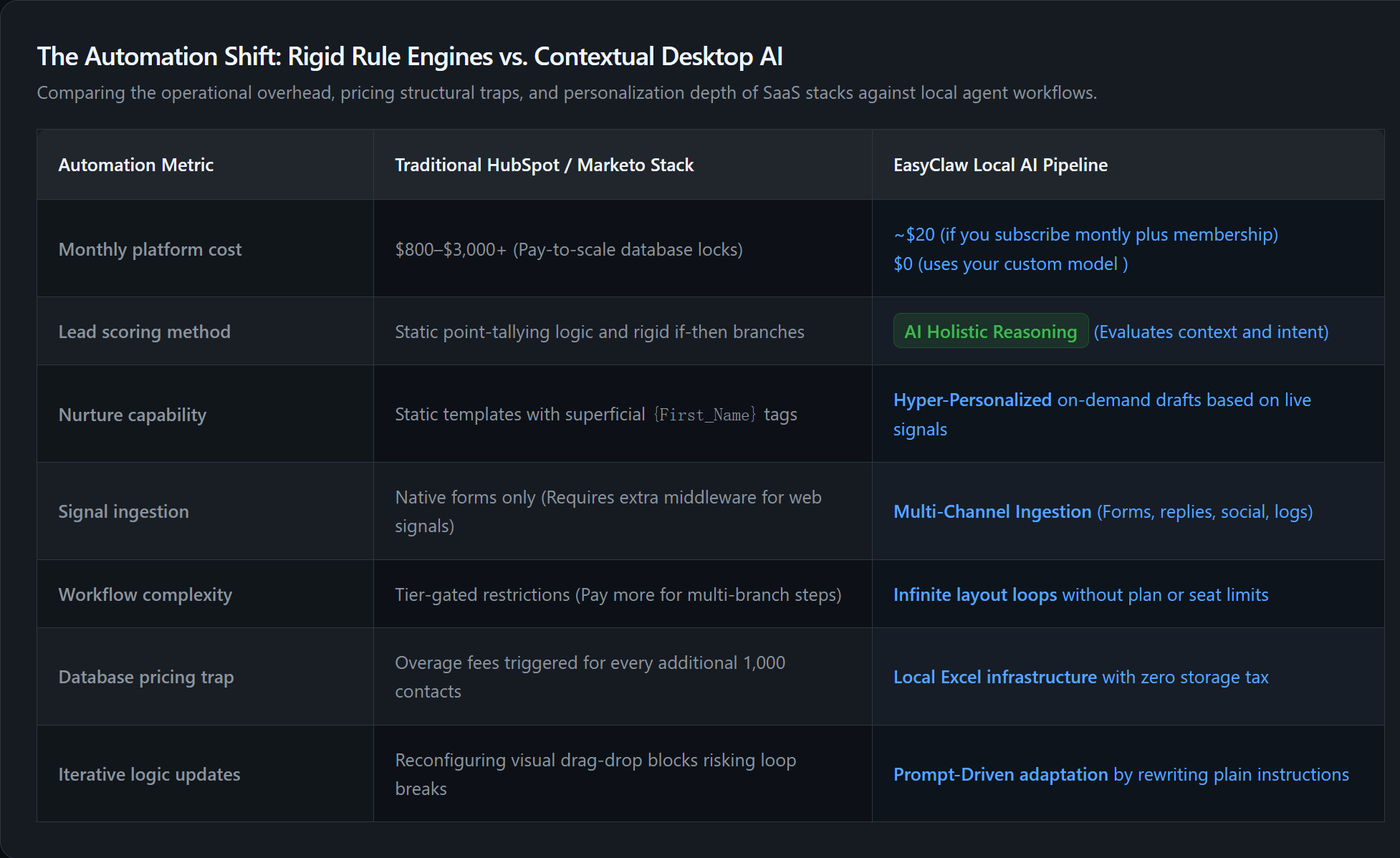
| Métrica de automatización | HubSpot / Pila de Marketo | Canalización de IA local EasyClaw |
|---|---|---|
| Monthly Platform Cost | $800 – $3,000+ | $0 beyond AI subscription |
| Lead Qualification | Rule-based point scoring | AI context-aware reasoning |
| Nurture Personalization | Template + variable merge | Per-lead content referencing actual behavior |
| Workflow Adaptation | Rebuild rules in visual editor | Update a paragraph, regenerate script |
| Data Ownership | Platform-controlled database | Local Excel: eres dueño de todo |
| Contact Limits | Pricing tier constrained | Unlimited: el hardware es el único límite |
Por qué EasyClaw reemplaza su plataforma de automatización de marketing
A estrategia de generación de demanda impulsado por IA de escritorio no es una versión más barata de Marketo, sino más inteligente. La plataforma por la que solían pagar los especialistas en marketing era la automatización. La plataforma que acaba de construir es inteligencia. La diferencia es visible en cada correo electrónico que escribe su canalización y en cada decisión de calificación que toma.
Monitoriza paneles de control, bandejas de entrada de correo electrónico, análisis de contenido y menciones sociales, todo desde un solo agente.
Investiga la empresa y la función de cada cliente potencial antes de clasificarlo, sin sumar puntuaciones estáticas.
Genera contenido enriquecedor que hace referencia a lo que cada cliente potencial interactuó específicamente y al contexto de su empresa.
MQL marcados con resúmenes de calificación: su equipo de ventas sabe exactamente por qué cada cliente potencial está listo.
Ventajas
- $0 beyond AI subscription frente a $800-3000/mes
- Clientes potenciales calificados por IA, no contactos calificados por reglas
- Contactos Unlimited: sin restricciones de nivel de precios
- Propiedad total de los datos: nada en una base de datos de plataforma
- Se adapta mediante lenguaje natural, sin reconstrucción del flujo de trabajo
Limitaciones
- El escritorio debe ejecutarse para la ejecución cron
- No reemplaza la suite CRM completa de HubSpot
Preguntas frecuentes sobre la generación de demanda automatizada
Intelligence, Not Just Automation
Marketo y HubSpot construyeron sus negocios sobre una propuesta de valor sencilla: automatizar las partes repetitivas de la generación de demanda para que los equipos de marketing puedan centrarse en la estrategia y el contenido. Esa propuesta de valor era válida cuando la alternativa era realizar un seguimiento manual de cada envío de formulario y enviar cada seguimiento manualmente. Pero la automatización que proporcionan no vale entre 800 y 3000 dólares al mes cuando un agente de IA de escritorio puede realizar las mismas funciones con mayor inteligencia en cada paso.
Su canalización EasyClaw captura señales entrantes de cada canal que especifique. Califica a los clientes potenciales investigando su empresa y su función, no sumando puntos de un modelo de puntuación estático. Genera contenido educativo que hace referencia al comportamiento real del cliente potencial y al contexto de la empresa. Sincroniza clientes potenciales calificados con su CRM y le notifica las respuestas que necesitan una respuesta humana. Todo esto se ejecuta en su escritorio, según una programación cron, sin que una plataforma de automatización de marketing le facture por contactos, correos electrónicos o pasos del flujo de trabajo.
A estrategia de generación de demanda impulsado por IA de escritorio no es una versión más barata de Marketo. Es uno más inteligente. La plataforma por la que solían pagar los especialistas en marketing era la automatización. La plataforma que acaba de construir es inteligencia. Para los directores de marketing, gerentes de generación de demanda y equipos de crecimiento de organizaciones globales, la diferencia es visible en cada correo electrónico que escribe su canal y en cada decisión de calificación que toma.