


Un agente útil debe recordar las convenciones de su proyecto, su estilo de respuesta preferido, las herramientas instaladas en su entorno, las decisiones ya tomadas y los errores que no debe repetir. Por eso son importantes las características de la memoria del Hermes Agent. No son sólo una capa de personalización. Son la diferencia entre un chatbot que comienza de nuevo cada mañana y un agente que agrava el contexto con el tiempo. La pregunta práctica no es "¿Puede el agente recordarlo todo?" Se trata de "¿Qué se debe mantener cerca, qué se debe buscar más tarde y qué se debe olvidar deliberadamente?".
Memory es la capa de control para el trabajo de agentes de larga duración

Un buen sistema de memoria reduce las explicaciones repetitivas. Un sistema de mala memoria crea suposiciones obsoletas, riesgos ocultos y comportamientos confusos.
Cuando las personas prueban por primera vez agentes de IA, normalmente se centran en el uso de herramientas. ¿Puede navegar? ¿Puede ejecutar código? ¿Puede abrir una terminal? ¿Puede escribir archivos? Estas cosas son importantes, pero no son el principal obstáculo. El problema más difícil aparece después de la tercera o cuarta sesión. Le dice al agente que su backend usa Go, su rama provisional tiene un comando de implementación diferente, su equipo evita ciertos patrones de copia y sus resúmenes de SEO deben seguir una estructura fija. El agente se desempeña bien en esa sesión. Luego, al día siguiente, vuelve a hacer las mismas preguntas preparatorias o produce un trabajo que viola una decisión que ya tomó.
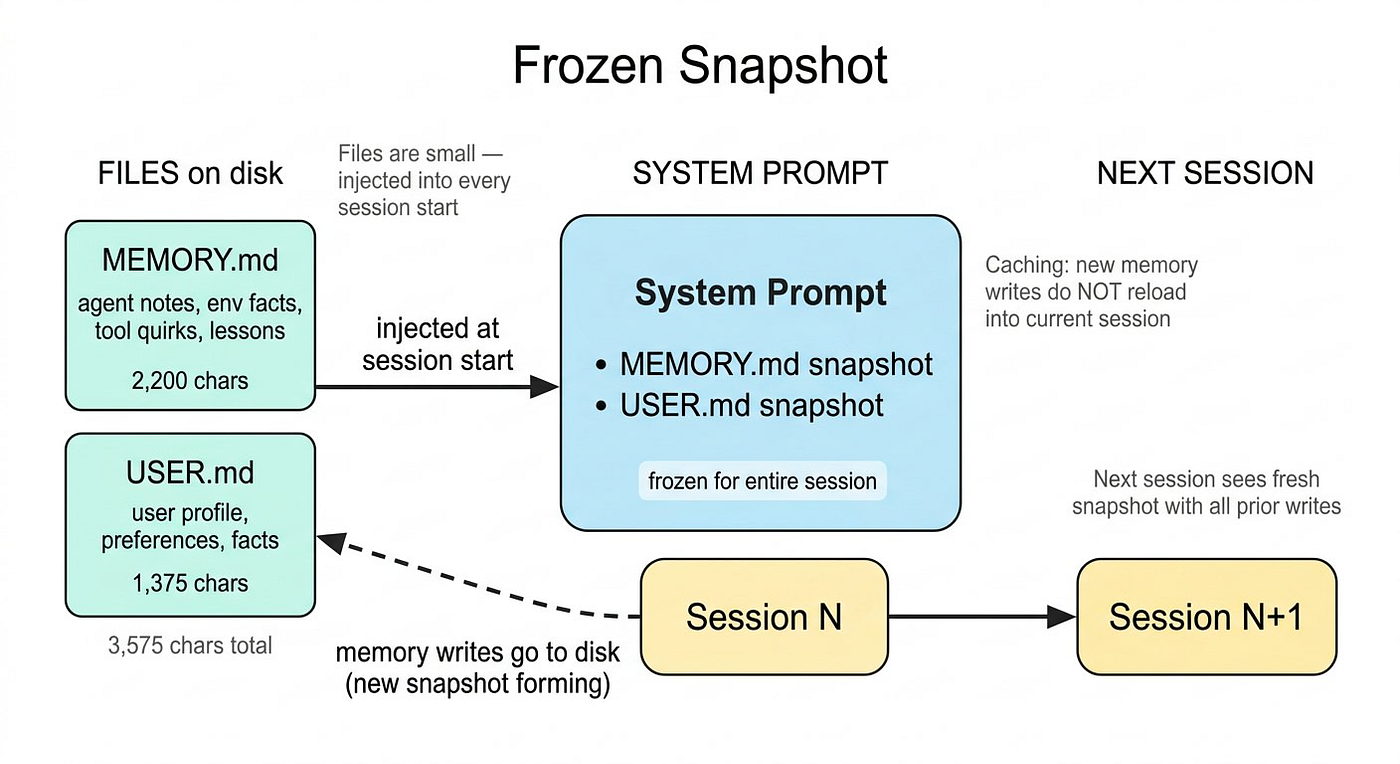
Ahí es donde la memoria se convierte en una característica del flujo de trabajo. Sin memoria persistente, cada tarea requiere rehidratar el contexto manualmente. O pega instrucciones antiguas, mantiene plantillas de indicaciones largas o tolera correcciones repetidas. Ninguno de ellos escala bien. Hermes Agent aborda esto con un modelo de memoria en capas. Su memoria incorporada está limitada y seleccionada intencionalmente. Almacena datos compactos sobre el usuario, el entorno y el contexto operativo aprendido del agente. Esto es diferente a volcar la transcripción completa en una base de datos vectorial y esperar que la recuperación funcione.
Lo que realmente recuerda el agente Hermes
Hermes separa la memoria persistente en dos categorías prácticas. La primera es la memoria del agente: notas sobre el entorno, proyectos, convenciones, flujos de trabajo y lecciones aprendidas. Aquí es donde un agente puede almacenar que un repositorio usa pnpm, que las pruebas se ejecutan a través de un destino Makefile específico o que un servidor intermedio necesita un puerto SSH no predeterminado. El segundo es la memoria del usuario: preferencias, estilo de comunicación, expectativas, rol y hábitos de flujo de trabajo. Aquí es donde el agente podría recordar que usted prefiere respuestas concisas, que no le gustan las afirmaciones especulativas o que desea que los borradores de SEO estén estructurados de una manera particular.
Esa distinción es importante porque no todos los recuerdos tienen la misma función. La preferencia del usuario debe dar forma a la comunicación. Un hecho del proyecto debería dar forma a la ejecución. Una nota de tarea completada debería evitar que se vuelva a trabajar. Una solución alternativa a la herramienta debería reducir el tiempo de depuración futuro.
User memory     = how to work with me
Project memory  = how this environment works
Task memory     = what already happened
Searchable log  = what we may need to find later
External memory = what should scale beyond local notes
Ésta es la razón por la que "más memoria" no es automáticamente mejor. Si cada detalle de la conversación se convierte en una instrucción permanente, el agente se vuelve ruidoso. El objetivo no es el recuerdo total. El objetivo es una continuidad útil.
Por qué Bounded Memory es una característica, no una limitación
A primera vista, una pequeña tienda de recuerdos parece restrictiva. En la práctica, obliga a una mejor higiene de la memoria. El error que cometen muchos equipos es tratar la memoria de los agentes como un almacén. Almacenan notas de reuniones, registros sin procesar, fragmentos de código largos, transcripciones de clientes y recordatorios vagos. Posteriormente, el agente recupera fragmentos que están técnicamente relacionados pero operativamente inútiles. Peor aún, puede tratar la información obsoleta como actual.
El diseño de memoria limitada de Hermes empuja al agente hacia la compresión. En lugar de guardar una sesión de depuración completa, debería guardar la lección:
Bad memory:
On Tuesday, we debugged the deployment script for two hours...

Good memory:
Project deploys to staging with `make deploy-staging`; required env vars
are in `.env.staging.local`; do not use production credentials during test deploys.
La segunda entrada es más corta, más segura y más útil. Le dice al agente qué hacer la próxima vez sin preservar una narrativa innecesaria. Esto es importante para el trabajo real porque la memoria se inyecta en el contexto operativo del agente. Todo lo que se almacene allí puede influir en decisiones futuras. Si la memoria se vuelve inflada, obsoleta o contradictoria, la conducta del agente se degrada. Una capa de memoria compacta mantiene limpio el contexto "siempre disponible".
Core Memory, Session Search, External Providers
Tres capas de memoria: memoria central curada para hechos siempre disponibles, búsqueda de sesiones para recuerdos episódicos y proveedores externos para escalar.
Layer 1: Memoria curada central
La memoria central contiene los hechos que el agente siempre debe conocer. Esto incluye preferencias duraderas, convenciones de proyectos estables, hechos ambientales y correcciones repetidas.
User prefers draft articles in a natural Medium tone, with short paragraphs,
practical examples, and no exaggerated marketing claims.

Project `content-pipeline` uses Python 3.11, Poetry, Playwright, and a local
SQLite queue. Run tests with `poetry run pytest`.
Estas entradas no son transcripciones. Son conocimientos operativos comprimidos.
Layer 2: Búsqueda de sesión
No todos los detalles merecen un recuerdo permanente. En ocasiones el agente sólo necesita localizar una discusión previa. Para eso, la búsqueda de sesiones es más apropiada. Imagine que le dijo al agente hace tres semanas por qué se retrasó la migración de una base de datos en particular. Es posible que no sea necesario inyectar eso de forma permanente en cada mensaje futuro. Pero cuando preguntas: "¿Qué decidimos sobre la migración?" el agente debería poder buscar sesiones pasadas y recuperar el intercambio relevante. Esta distinción es importante. La memoria central es para hechos que deberían dar forma al comportamiento por defecto. La búsqueda de sesiones es para recordar episodios.
Layer 3: Proveedores de memoria externa
Hermes también admite proveedores de memoria externa. Aquí es donde la memoria se vuelve más escalable y especializada. Dependiendo del proveedor, el agente puede utilizar búsqueda semántica, modelado de usuarios, sincronización en segundo plano, extracción de memoria o herramientas específicas del proveedor. Esto es útil cuando el agente pasa de la productividad personal a los flujos de trabajo en equipo. Un solo desarrollador puede estar bien con la memoria local compacta y la búsqueda de sesiones. Un equipo de contenido, un grupo de investigación o un equipo de operaciones puede necesitar un recuerdo más amplio de resúmenes, campañas, perfiles de usuario, historiales de proyectos y flujos de trabajo recurrentes. La pregunta sobre la arquitectura es: ¿qué debería permanecer local, qué debería permitirse realizar búsquedas y qué debería gestionar un proveedor de memoria?
Un flujo de trabajo práctico: agente de contenido SEO con Memory
Suponga que utiliza Hermes Agent para respaldar un flujo de trabajo de contenido SEO. El agente investiga temas, crea esquemas, redacta artículos, verifica oportunidades de enlaces internos y prepara contenido para un CMS. Sin memoria, cada artículo comienza con una configuración repetitiva: use la voz de nuestra marca, evite el clickbait, mencione el producto de forma natural, no abuse de las viñetas, siga nuestras reglas de enlaces internos, use párrafos cortos, no invente estadísticas. Después de algunas sesiones, esto se vuelve molesto. Después de unas pocas docenas de sesiones, se convierte en una carga oculta en el flujo de trabajo.
Con memoria, el agente debe persistir en las reglas estables: el usuario escribe artículos de SEO para lectores tecnológicos extranjeros; estilo: analítico, práctico, párrafos cortos, sin exageraciones, sin estadísticas falsas, sin exceso de palabras clave; Las menciones de productos deben ser naturales y estar integradas en el contexto del flujo de trabajo.
La memoria de estilo Hermes es fuerte para la continuidad y el razonamiento del agente. EasyClaw es más relevante cuando el flujo de trabajo del contenido necesita moverse entre herramientas de escritorio, interfaces CMS, hojas de cálculo, pestañas de investigación y pasos de publicación sin convertir cada acción en una integración API personalizada. En una operación práctica de contenido, no pensaría en estas herramientas como si "una reemplaza a la otra". Yo pensaría en capas. La memoria de Hermes puede preservar el contexto de razonamiento: reglas de marca, estándares de contenido, decisiones previas y lecciones de flujo de trabajo. EasyClaw puede ayudar a ejecutar el complicado trabajo entre aplicaciones que ocurre después de que existe el borrador: mover contenido a un CMS, verificar el formato, preparar metadatos o coordinar tareas de publicación entre herramientas.
La clave es evitar almacenarlo todo. Para un flujo de trabajo de SEO, las buenas entradas de memoria pueden incluir: voz de la marca: audiencia tecnológica extranjera, clara y profesional, sin afirmaciones exageradas; estructura del artículo: gancho dentro de las primeras 150 palabras, H2 cada 2 a 4 párrafos, ejemplos antes de las recomendaciones, CTA suave solo cerca del final; Regla de SEO: mencione la palabra clave principal de forma natural en el título, la introducción, un H2 y la conclusión; Evite el relleno repetitivo de palabras clave de concordancia exacta. Estos recuerdos son compactos, duraderos y guían la acción.
Qué no guardar
La característica de la memoria más subestimada es el olvido. Un sistema de memoria que nunca olvida se convierte en un lastre. Puede preservar preferencias obsoletas, datos de depuración temporales, detalles de campañas vencidas o suposiciones de proyectos antiguos. En los flujos de trabajo de los agentes, la memoria obsoleta suele ser peor que ninguna memoria porque es posible que el usuario no se dé cuenta de que el agente depende de ella. No guarde registros sin procesar, borradores de artículos completos, rutas de archivos temporales, estados únicos del navegador o datos que sean fáciles de redescubrir. No guarde credenciales confidenciales. No guarde recuerdos vagos como "al usuario le gusta el SEO" o "el proyecto es importante". Esas entradas consumen espacio sin mejorar las decisiones.
Una mejor prueba es: "¿Este hecho ayudará al agente a tomar una mejor decisión en una sesión futura sin necesidad de mantener una conversación completa?" Si la respuesta es no, pertenece al historial de sesiones, a un documento de proyecto o a ninguna parte.
Cómo diseñar una política Memory antes de automatizar el trabajo
Antes de utilizar en gran medida las funciones de memoria del Hermes Agent, defina una política de memoria simple. Esto no tiene por qué ser complicado. Sólo necesita evitar el desorden accidental. Utilizo cuatro categorías. Primero, guarde las preferencias estables del usuario: tono, formato, profundidad técnica, preferencia de idioma y expectativas recurrentes. En segundo lugar, guarde las convenciones estables del proyecto: estructura del repositorio, comandos de prueba, reglas de implementación, reglas de formato CMS, convenciones de nomenclatura y detalles de la cadena de herramientas. En tercer lugar, guarde las correcciones repetidas: si el usuario corrige el mismo comportamiento dos veces, probablemente pertenezca a la memoria. Cuarto, guarde las lecciones que eviten errores futuros: si el agente descubre que un comando falla debido a una peculiaridad del entorno local, guarde la solución alternativa. Todo lo demás debe tratarse con cautela.
# Check active memory provider
hermes memory status
# Configure external memory provider
hermes memory setup
# Disable external provider when testing local-only behavior
hermes memory off
La elección exacta del proveedor depende de su flujo de trabajo. Para una configuración local de un solo usuario, la memoria integrada más la búsqueda de sesiones pueden ser suficientes. Para la personalización a escala de equipo, de múltiples perfiles o de sesiones cruzadas, un proveedor externo puede valer la pena por la complejidad adicional.
Un diagrama de flujo Memory simple para flujos de trabajo de agentes
Aquí hay un flujo de decisión práctico que utilizo cuando decido si algo pertenece a la memoria:
flowchart TD
    A[New information appears] --> B{Will it matter in future sessions?}
    B -- No --> C[Do not save]
    B -- Yes --> D{Is it stable or repeated?}
    D -- No --> E[Keep in session history]
    D -- Yes --> F{Is it compact and safe?}
    F -- No --> G[Summarize, redact, or skip]
    F -- Yes --> H{Does it guide behavior?}
    H -- No --> E
    H -- Yes --> I[Save to memory]
Esto mantiene la memoria operativa. La cuestión no es recordar los hechos por sí mismos. El punto es mejorar el comportamiento futuro.
La compensación del rendimiento: contexto siempre activo frente a recuperación bajo demanda
Memory crea una compensación de rendimiento. La memoria siempre activa es rápida porque está disponible inmediatamente. Pero también consume contexto e influye en cada respuesta. La recuperación bajo demanda es más limpia porque el agente sólo busca cuando es necesario. Pero requiere que el agente sepa cuándo buscar. Por eso es útil la separación de Hermes entre memoria persistente y búsqueda de sesiones. La memoria central debe contener un pequeño conjunto de hechos por los que vale la pena pagar en cada sesión. La búsqueda de sesiones debería incluir la larga cola de discusiones anteriores.
Por ejemplo, "El usuario prefiere respuestas concisas" pertenece a la memoria central. "Comparamos tres complementos de CMS en marzo" probablemente pertenezca a la búsqueda de sesiones. "El proyecto utiliza un script de compresión de imágenes personalizado antes de la carga" puede pertenecer a la memoria central si afecta las tareas de publicación repetidas. Cuanto mejor sea su clasificación, más confiable será el agente.
Industry Relevance: Por qué Memory es importante más allá de los asistentes personales
Memory está adquiriendo importancia porque los agentes de IA están pasando del chat a las operaciones. En los equipos de software, la memoria ayuda a los agentes a comprender las convenciones del proyecto, los entornos locales, los errores recurrentes y las decisiones de implementación anteriores. En los equipos de contenido, la memoria preserva la voz de la marca, las reglas editoriales, la estrategia de palabras clave y los flujos de trabajo de publicación. En las operaciones con los clientes, la memoria puede ayudar a los agentes a mantener la continuidad entre los casos, las reglas de escalamiento y las preferencias específicas del cliente, siempre que la privacidad y la gobernanza se manejen con cuidado.
El patrón común es la continuidad. El trabajo real no es un solo mensaje. Es una cadena de decisiones relacionadas a lo largo de días o semanas. Los equipos no quieren un agente que simplemente responda bien de forma aislada. Quieren un agente que recuerde lo suficiente para evitar desperdiciar la atención. Ese es el valor real de las funciones de memoria del Hermes Agent. Hacen que el agente sea menos dependiente de indicaciones perfectas. En lugar de obligar al usuario a repetir el contexto operativo cada vez, el agente continúa con las partes que importan.
El riesgo: Memory puede convertirse en un mensaje invisible
La misma característica que hace que la memoria sea útil también la hace riesgosa. Memory actúa como un mensaje invisible. Si los usuarios no pueden inspeccionarlo, editarlo o cuestionarlo, es posible que no comprendan por qué el agente se comporta de cierta manera. Por eso es importante la gobernanza de la memoria. Los usuarios deben revisar periódicamente lo que ha guardado el agente. Los equipos deben decidir qué categorías están permitidas. La información confidencial debe excluirse o redactarse. Los datos antiguos del proyecto deben actualizarse cuando cambien. Para uso en producción, trataría la memoria como una configuración, no como un historial de chat informal. Debe ser legible, editable, auditable y mantenido intencionalmente.
Cómo utilizar bien las funciones Memory del agente Hermes
La mejor manera de utilizar la memoria Hermes es empezar poco a poco. No comience conectando a todos los proveedores y almacenando cada sesión. Comience con la capa de memoria incorporada. Deje que el agente recuerde sus preferencias estables y una o dos convenciones de proyecto. Luego observe si las sesiones futuras mejoran. Si el agente sigue cometiendo el mismo error, agregue una corrección. Si necesita repetidamente el mismo detalle de configuración, guárdelo. Si un recuerdo queda obsoleto, reemplácelo en lugar de agregar una nota contradictoria. Una vez que el bucle básico funcione, agregue la búsqueda de sesiones para el recuerdo episódico. Úselo cuando necesite que el agente encuentre decisiones previas, no cuando necesite que obedezca instrucciones vigentes. Sólo entonces considere los proveedores de memoria externa. Son valiosos, pero añaden otra capa de configuración y gobernanza. Cuanto más poderoso es el sistema de memoria, más importante resulta definir qué se debe recordar, cómo se debe recuperar y quién puede modificarlo.
Conclusión: recuerde las cosas correctas
Las características de la memoria del Hermes Agent apuntan hacia un cambio más amplio en el diseño del flujo de trabajo de IA. Los agentes ganadores no serán los que se queden con todo ciegamente. Serán ellos los que sepan qué preservar, qué buscar, qué comprimir y qué olvidar. Para los usuarios, la conclusión práctica es sencilla: tratar la memoria como una capa operativa. Úselo para almacenar preferencias duraderas, convenciones de proyectos, correcciones repetidas y lecciones que eviten errores futuros. Mantenga los detalles sin procesar en el historial de búsqueda. Utilice proveedores de memoria externos solo cuando su flujo de trabajo realmente necesite escalar. Para los equipos que crean flujos de trabajo de agentes serios, la memoria debe diseñarse antes de que se expanda la automatización. De lo contrario, el agente puede volverse poderoso pero inconsistente: capaz de actuar, pero incapaz de mantener la continuidad. El mejor agente de IA no es el que más recuerda. Es aquel que recuerda las cosas correctas con el nivel correcto de detalle y luego usa esa memoria para facilitar la siguiente tarea.