


El temor del martes por la mañana That acecha a todos los equipos de RPA
Existe un tipo distinto de temor que persigue a los equipos de operaciones que dependen de la automatización tradicional. Suele ocurrir temprano los martes por la mañana. Inicia sesión en su panel de control y ve un mar de registros de errores rojos.
Su script RPA heredado, el que descargó con éxito los informes de proveedores durante los últimos seis meses, falló repentinamente. ¿Por qué? Porque el proveedor actualizó ligeramente su portal web de la noche a la mañana. Cambiaron la clase CSS del botón "Descargar" de btn-blue a btn-primary. Debido a que la automatización tradicional se basa en reglas rígidas y explícitamente definidas y en un mapeo de coordenadas exacto, esa pequeña actualización cosmética fue suficiente para romper toda la cadena de suministro. Ahora debe abrir un ticket, esperar a que un desarrollador reescriba el script y, mientras tanto, procesar manualmente los informes.
Esta fragilidad es exactamente la razón por la que la industria tecnológica introdujo automatización inteligente de procesos (IPA). La idea era simple: en lugar de crear scripts frágiles que se estropean al menor cambio en la interfaz de usuario, inyectar inteligencia artificial en el flujo de trabajo para que el sistema pueda adaptarse, leer el contexto y tomar decisiones básicas sobre la marcha.
Sin embargo, el mercado del software empresarial arruinó este elegante concepto. Cuando una empresa decide que quiere implementar un AI process automation iniciativa hoy, se encuentran con proveedores empresariales que exigen ciclos de implementación de seis meses. Lo obligan a entrenar modelos complejos de aprendizaje automático, mapear árboles de decisión complejos y contratar ingenieros de integración especializados. Tomaron un concepto destinado a ahorrar tiempo y lo convirtieron en un proyecto de infraestructura de TI masivo.
Pero, ¿qué pasaría si implementar una verdadera automatización cognitiva no requiriera escribir una sola regla o implementar un modelo masivo de aprendizaje automático? ¿Qué pasaría si pudiera simplemente escribir su intención operativa en un lenguaje sencillo y un agente local compilara instantáneamente esa intención en un script de navegador web adaptable y resistente?
El problema del pensamiento basado en reglas: por qué la RPA tradicional es fundamentalmente frágil
Para comprender por qué EasyClaw representa un cambio de paradigma masivo, es necesario desaprender cómo funciona la RPA tradicional. En los sistemas heredados, se construye un bot dibujando diagramas de flujo. Debes decirle explícitamente al bot: Haga clic en el elemento en las coordenadas X/Y. Si la cadena de texto coincide perfectamente con "Retrasado", vaya a la rama A. Si coincide con "Pendiente", vaya a la rama B.
Está intentando predecir de antemano todos los posibles errores humanos y variaciones web. Cuando el mundo real inevitablemente presenta una variación que no predijiste, el bot genera una excepción y deja de funcionar. La automatización basada en reglas escala linealmente con la cantidad de reglas que escribe y se rompe exponencialmente con cada caso límite no manejado.
| Capa de automatización | RPA tradicional basada en reglas | Agente cognitivo EasyClaw |
|---|---|---|
| Element Targeting | ✗ Exact XPath / CSS selectors | ✓ Semantic function recognition |
| UI Selector Drift | ✗ Unhandled exception on change | ✓ Adapts to visual context |
| Structured Text | ✗ Strict regex matching | ✓ Contextual reasoning |
| Decision Logic | ✗ Hardcoded if/else branches | ✓ Semantic intent interpretation |
| Edge Cases | ✗ Crashes on unknowns | ✓ Graceful exception handling |
EasyClaw abandona esta arquitectura basada en reglas. En lugar de obligarlo a mapear cada coordenada y rama condicional, utiliza un motor de "compilación por pasos" impulsado por un modelo de lenguaje grande. Describe su objetivo operativo en un párrafo conversacional. La IA interpreta la intención semántica de sus palabras (comprendiendo el contexto detrás de los datos) y la traduce en un script dinámico de automatización del navegador. It does not look para un botón llamado btn-blue; busca el botón que estructuralmente funciona como disparador de descarga.
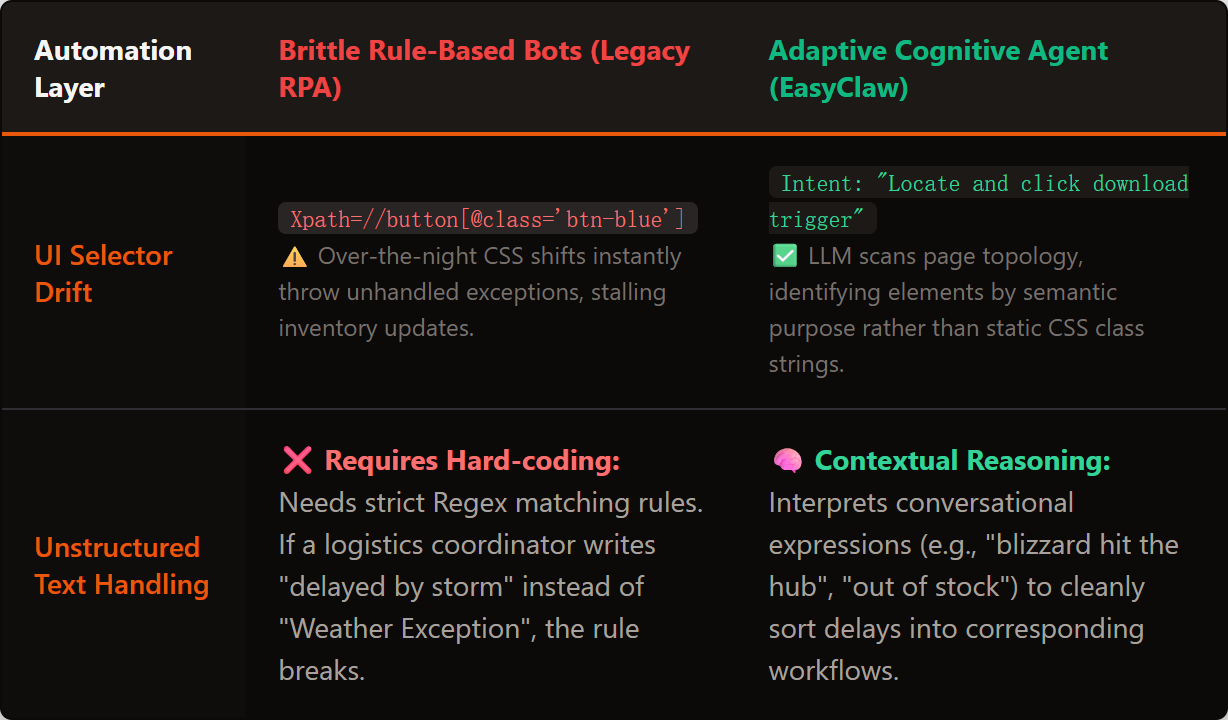
La RPA basada en reglas se rompe en cada caso límite no controlado; El agente cognitivo de EasyClaw utiliza la comprensión semántica para adaptarse dinámicamente a la variabilidad del mundo real.
Phase 1: Instruir al arquitecto: la interfaz Auto Task
Vamos a automatizar un proceso de monitoreo de la cadena de suministro. Tradicionalmente, esto requiere integraciones API complejas y código lógico condicional. Con EasyClaw, simplemente le indicaremos al agente que controle su navegador web con toma de decisiones cognitivas integrada.
Navega hasta el Auto Task interfaz en EasyClaw. No se le presenta un lienzo en blanco de nodos de codificación. Se le presenta un cuadro de texto simple. Aquí, escriba su mensaje exactamente como le daría instrucciones a un nuevo coordinador de logística:
"Abra el navegador e inicie sesión en nuestro portal web de proveedores en proveedor.internal-network.com. Vaya a la pestaña 'Envíos activos'. Revise el panel y busque cualquier envío con un estado de 'Retrasado' o 'Excepción'. Para esos envíos específicos, lea las notas de entrega no estructuradas. Determine si el retraso se debe a 'Condiciones climáticas' o 'Escasez de inventario'. Si está relacionado con el clima, abra una nueva pestaña, inicie sesión en nuestro ERP interno en erp.local, busque el ID del envío y retrase la fecha de entrega prevista 3 días. Si se trata de una escasez de inventario, no actualice el ERP. En su lugar, redacte un correo electrónico en Outlook Web para el Gerente de Adquisiciones indicando los artículos faltantes específicos y el nombre del proveedor.
Esta es la verdadera definición de automatización inteligente de procesos. No estás escribiendo selectores CSS ni declaraciones If/Else. Le está pidiendo al agente que lea texto no estructurado (albaranes de entrega), tome una decisión cognitiva basada en el contexto (clima versus inventario) y ejecute dos rutas operativas completamente diferentes en diferentes portales web. Cuando hace clic en enviar, la IA compila esta intención en un script de navegador local altamente eficiente.
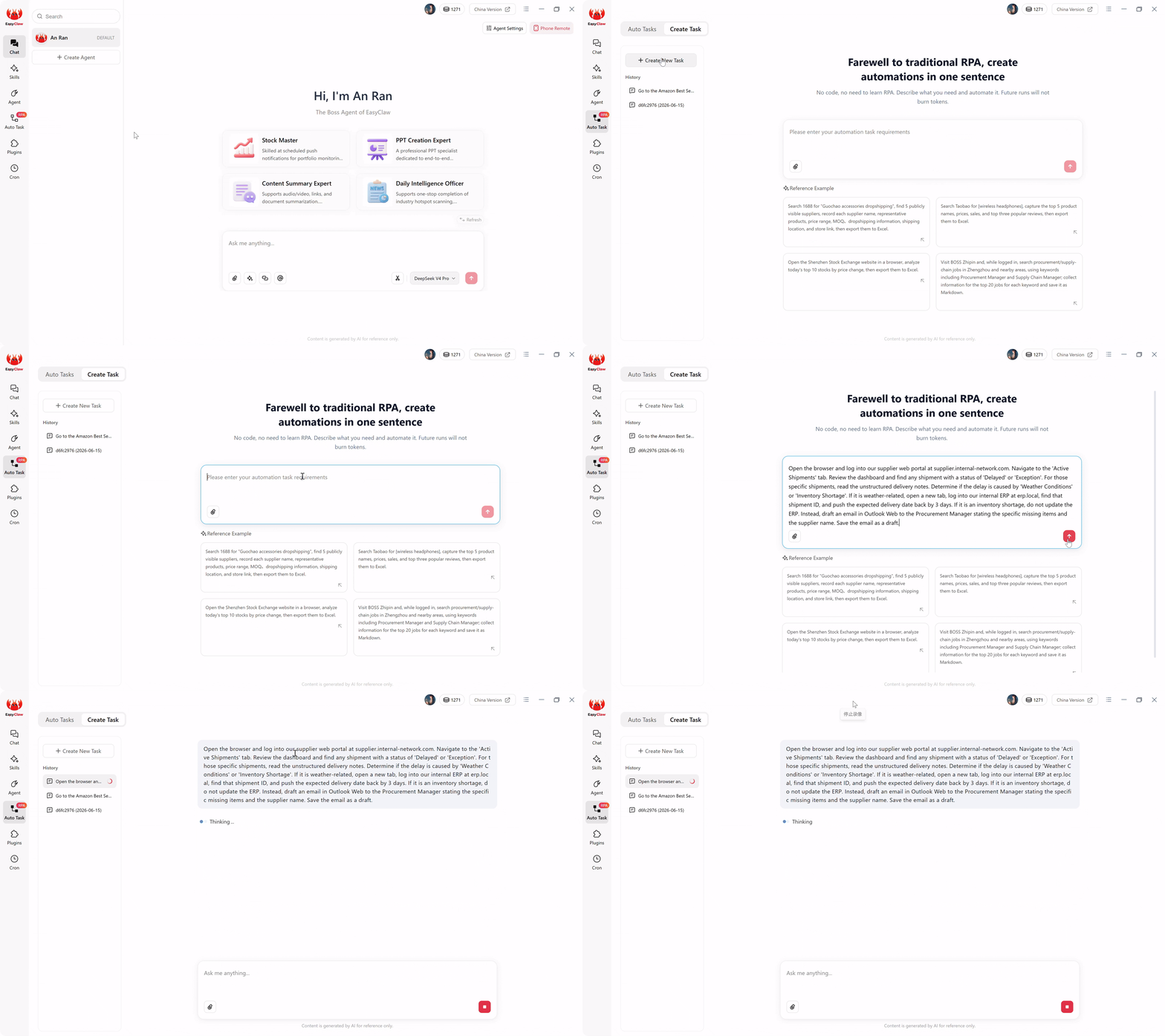
La interfaz Auto Task: describe flujos de trabajo cognitivos complejos en un lenguaje sencillo: la IA maneja la lógica de decisión, no las ramas if/else codificadas.
Phase 2: Establecer los límites — Skills para la gobernanza
Incluso con la automatización cognitiva, un agente de nivel empresarial necesita límites operativos estrictos. No desea que un agente inteligente improvise acciones más allá de su mandato. En EasyClaw, usted hace cumplir estos límites garantizando la correcta Skills están activos para su agente.
Para este flujo de trabajo, equipe la habilidad "Navegación y automatización web". Esto le brinda al agente el vocabulario técnico para manipular de forma segura las pestañas del navegador, manejar formularios web y extraer texto en pantalla. Garantiza que el agente solo interactuará con las interfaces web que usted mencionó explícitamente en su mensaje. No puede eliminar accidentalmente archivos locales ni acceder a directorios de red no autorizados. Mantienes un control absoluto sobre el radio de explosión de la automatización.
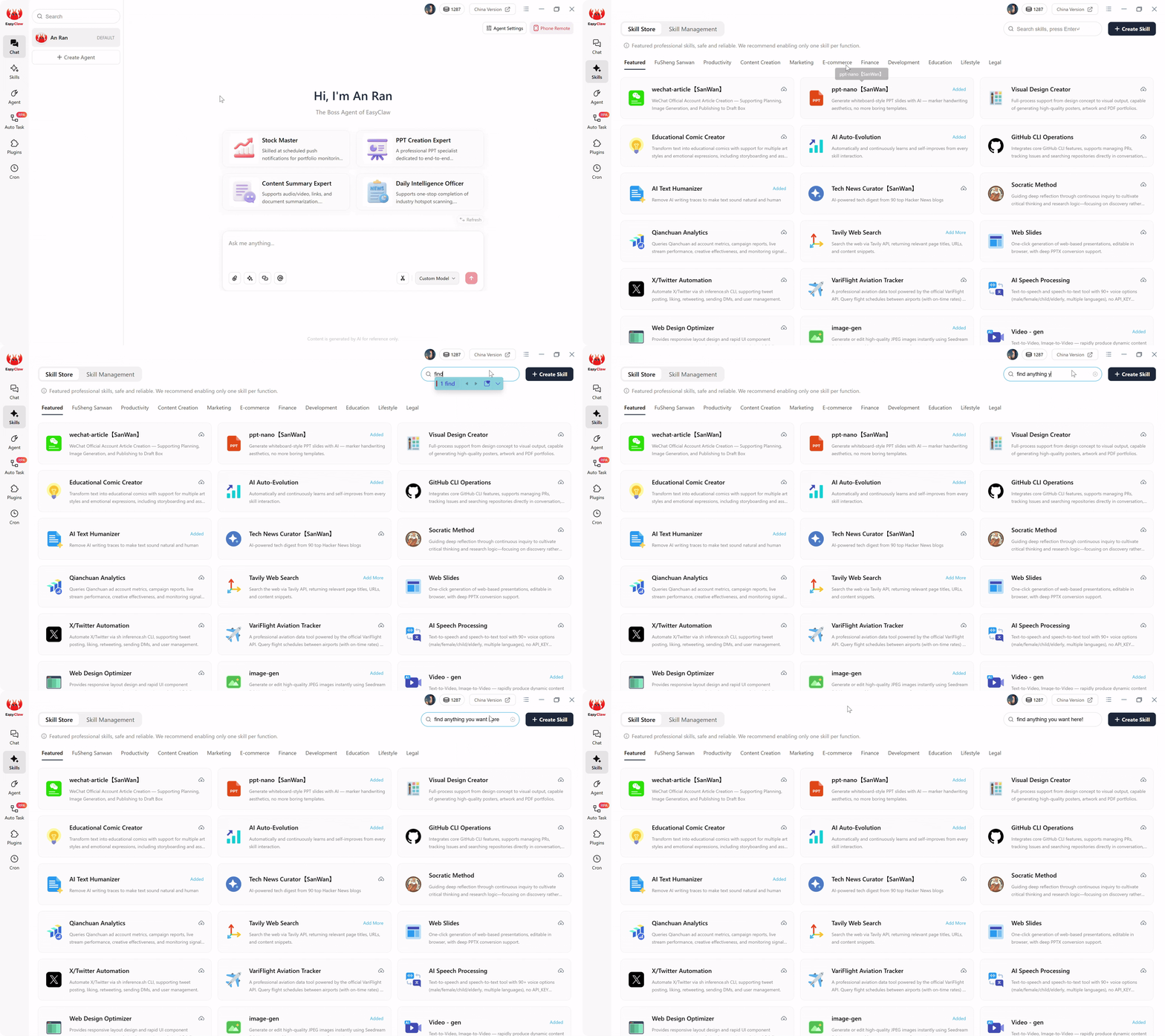
Adjunte habilidades para definir exactamente lo que puede hacer su agente cognitivo, creando límites de gobernanza estrictos que los equipos de TI empresariales requieren.
Phase 3: El activador de manos libres: Cron e integración de chat
Los flujos de trabajo cognitivos son más valiosos cuando se ejecutan de forma autónoma y evalúan los datos mientras duerme. Navega hasta el Cron sección en el menú de la izquierda. Cree una nueva tarea programada denominada "Auditoría matutina de la cadena de suministro". Seleccione el Agente que acaba de configurar. Establecer ejecución en Todos los días a las 07:10 a.m..
En el cuadro Mensaje de IA, vincule el cronograma con su flujo de trabajo compilado: "Ejecute la tarea automática 'Resolución de retraso del proveedor'. Cuando termine, resuma cuántos envíos se actualizaron debido al clima y cuántos borradores de correos electrónicos se crearon para la escasez de inventario".
Palanca Push Results to Chat App. Cuando te despiertas a las 7:15 a. m. y revisas tu teléfono, tu WhatsApp simplemente suena: "Auditoría completa. 3 envíos retrasados por el clima (ERP actualizado). Se encontró 1 escasez de inventario (borrador de correo electrónico guardado en Outlook). Pendiente de revisión humana". No es necesario iniciar sesión en el panel empresarial.
Phase 4: Ejecución local sin tokens: la economía de la automatización inteligente
Es fundamental comprender la mecánica financiera de lo que sucede a las 7:00 a.m. Si estuviera usando un sistema basado en la nube AI process automation herramienta, todas las mañanas, el sistema capturaría los datos web del proveedor, enviaría toda la carga útil a través de Internet a un LLM en la nube, pediría a la IA que tomara una decisión y luego canalizaría los comandos de regreso a su ERP. Quemaría costosos tokens de IA conversacionales todos los días solo para leer actualizaciones de envío de rutina, mientras expone sus datos operativos a servidores de nube pública.
EasyClaw eliminates this recurring tax. El pesado y costoso razonamiento de la IA solo ocurrió una vez: en Phase 1, cuando su párrafo en lenguaje natural se compiló en un guión. Cuando el programador Cron se active mañana a las 7:00 a. m., el script RPA local subyacente se hará cargo de forma nativa. Abre su navegador local, navega por las URL y extrae los datos utilizando modelos livianos integrados directamente en la memoria. Toma las decisiones de ruta localmente.
Debido a que no necesita hacer ping constantemente a las API de la nube externa para ejecutar los pasos, sus ejecuciones diarias consumen absolutely zero AI tokens. La inteligencia pesada se escala localmente, de manera predecible y segura, lo que hace que la automatización inteligente sea accesible para Organizaciones de cualquier tamaño, desde equipos de PYMES hasta empresas globales..
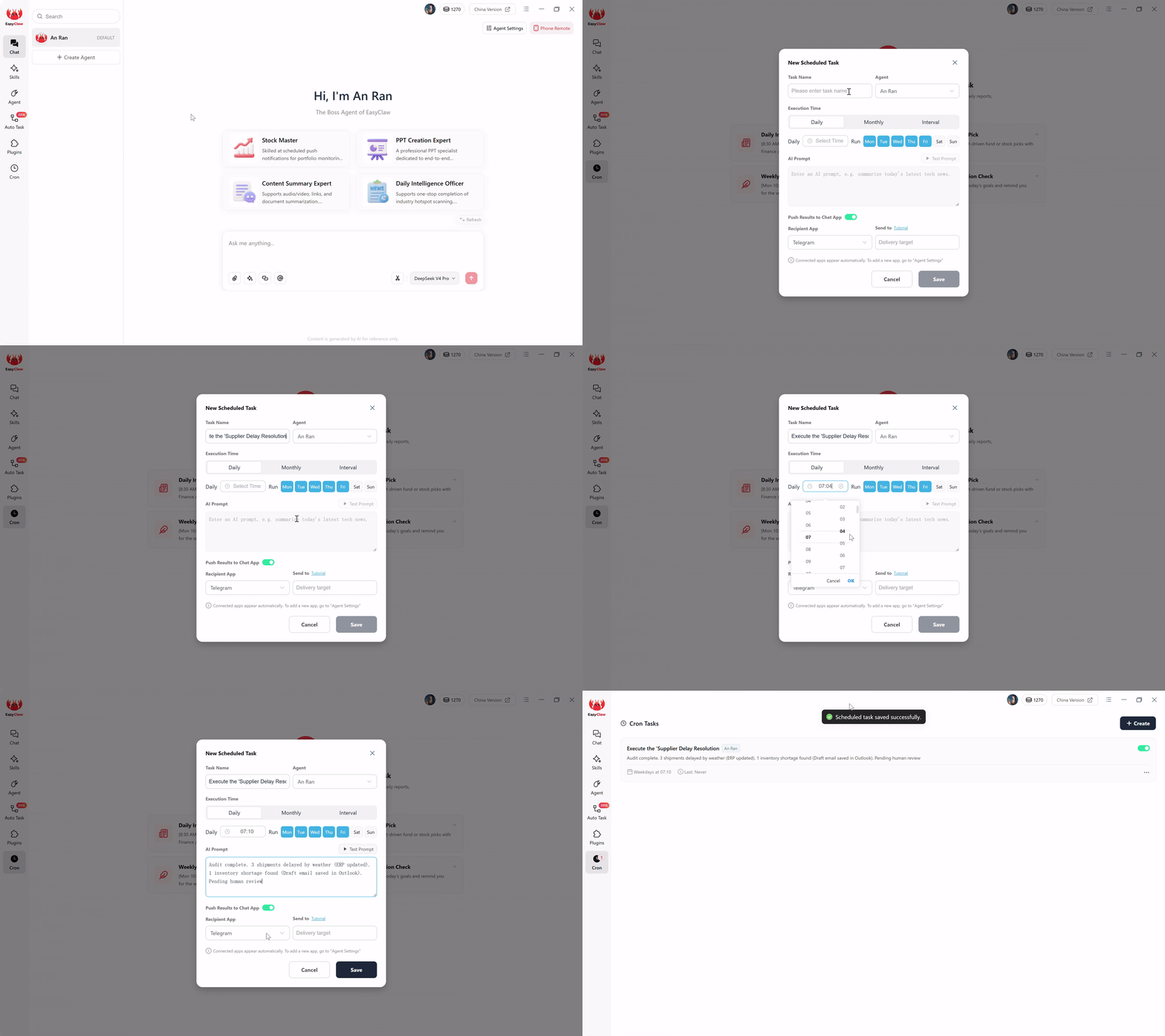
Configure activadores cron manos libres y reciba resúmenes de ejecución a través de aplicaciones de chat: automatización inteligente que se ejecuta mientras duerme.
Pro Tips para flujos de trabajo inteligentes y resilientes
1. El mecanismo de seguridad "Si-Entonces" para ventanas emergentes web
Los portales web son conocidos por mostrar ventanas emergentes promocionales inesperadas o pancartas que dicen "Actualice su contraseña". Simplemente agregue una oración a prueba de fallas: "Si aparece una encuesta inesperada o una ventana emergente de notificación en el portal del proveedor, ubique el botón 'Cerrar' o 'No, gracias' y haga clic en él antes de continuar con la extracción de datos".
2. Start with "Read-Only" Cognition
No automatice un proceso de lectura y escritura entre departamentos de 50 pasos desde el primer día. Empiece por generar confianza. Haga que el agente realice el análisis cognitivo (leer albaranes no estructurados y categorizarlos) y simplemente registre los resultados en una hoja de cálculo. Revisar sus decisiones durante tres días. Una vez que esté seguro de que distingue correctamente entre retrasos climáticos y escasez de inventario, otorgue acceso de escritura.
3. Utilize Chat Apps as Escalation Protocols
Su integración WhatsApp o Slack no es solo para resúmenes de éxito: es su herramienta de escalamiento definitiva. Agregue a su mensaje: "Si la nota de entrega contiene un motivo de retraso que no está relacionado con el clima ni con el inventario, no procese el envío. En su lugar, envíe inmediatamente un mensaje a mi Telegram indicando: 'Motivo de retraso desconocido encontrado para el envío #XYZ. Se requiere intervención manual'". Esto le brinda la velocidad de la IA con la red de seguridad de la supervisión humana instantánea.
Por qué EasyClaw ofrece una verdadera automatización inteligente sin los gastos generales de la empresa
Para gerentes de operaciones, directores de cadena de suministro y arquitectos de automatización, la promesa de la automatización inteligente ha sido rehén de proveedores empresariales que convirtieron un concepto simple en un contrato de consultoría de un año de duración. EasyClaw devuelve a IPA su promesa original: describe lo que necesitas y el sistema descubre cómo hacerlo.
EasyClaw no es una plataforma RPA tradicional. es un motor de automatización cognitiva que interpreta su intención comercial y toma decisiones contextuales, sin que usted escriba una sola regla, condición o modelo de ML. Describe tu flujo de trabajo en un lenguaje sencillo. La IA se encarga de todo lo demás.
Describe objetivos, no pasos. La IA interpreta lo que necesita y crea una automatización adaptativa, no guiones rígidos.
El agente lee texto no estructurado, toma decisiones contextuales y selecciona diferentes rutas de ejecución según el significado.
Límites operativos precisos a través de habilidades. El agente no puede actuar más allá de su alcance autorizado, lo cual es fundamental para el cumplimiento empresarial.
Cuando el agente encuentra ambigüedad, recurre a su aplicación de chat para tomar una decisión humana: velocidad con seguridad.
Ventajas
- No se requieren reglas, scripts ni modelos de aprendizaje automático
- Intención del lenguaje natural → automatización compilada
- Toma de decisiones cognitivas a partir de datos no estructurados
- Adaptable a los cambios de la interfaz de usuario: sin mantenimiento del selector
- Ejecución recurrente sin token
- Nivel gratuito disponible: no se requiere tarjeta de crédito
Limitaciones
- Requiere instalación de la aplicación de escritorio
- La orquestación multisistema compleja puede necesitar una implementación gradual
EasyClaw frente a plataformas de automatización inteligente tradicionales
| Capacidad | EasyClaw | IPA empresarial (Pega/AA) | Canalización de aprendizaje automático personalizada |
|---|---|---|---|
| Enfoque de configuración | ✓ One paragraph of English | ✗ Months of development | ✗ Model training + deployment |
| Decision logic | ✓ Semantic intent — contextual | ~ Rule-based + some AI | ✓ ML-driven |
| UI change resilience | ✓ Adaptive: sin mantenimiento | ~ Partial: necesita actualizaciones | ✗ Requires retraining |
| Deployment time | ✓ 5 minutos | ✗ 6+ meses | ✗ 3 a 12 meses |
| Recurring cost | ✓ Zero tokens per run | ✗ Per-process licensing | ✗ Inference + infra costs |
Preguntas frecuentes sobre la automatización inteligente de procesos
Reclaiming the Intelligence Advantage
Durante años, la industria del software ha tratado de convencer a los líderes empresariales de que la automatización inteligente es un lujo reservado para las empresas Fortune 500 con enormes presupuestos de TI, equipos dedicados de aprendizaje automático y cronogramas de implementación interminables. That ya no es la realidad.
Verdadero automatización inteligente de procesos no debería exigirle que aprenda Python, mapee las coordenadas exactas de la pantalla o negocie contratos empresariales en la nube. No debería requerir nada más que una comprensión clara de su propia lógica empresarial y la capacidad de articularla en un lenguaje sencillo.
Al adoptar una arquitectura de lenguaje natural que prioriza lo local con EasyClaw, evita la fragilidad de la RPA tradicional y los costos exorbitantes de la IPA empresarial. Implementa un agente que piensa contextualmente, ejecuta localmente y respeta la privacidad de sus datos. Para equipos de operaciones en centros de fabricación en Asia, centros logísticos en Europa y redes de cadenas de suministro en América del Norte., la capacidad de implementar la automatización cognitiva en minutos, no meses, representa una ventaja competitiva genuina.
Abra la interfaz Auto Task, escriba su intención operativa en un solo párrafo y observe cómo sus flujos de trabajo más complejos y con muchas decisiones se automatizan sin problemas, sin escribir una sola línea de código.