


En 2026, la dura realidad es simple: muchas herramientas de automatización de LinkedIn de “configurar y olvidar” están logrando que se prohíban cuentas más rápido de lo que los usuarios pueden generar una canalización de clientes potenciales significativa. La razón no es sólo el volumen de uso. Es el patrón de comportamiento. Cuando su cuenta comienza a actuar a diferencia de un verdadero profesional (clics en el momento exacto, patrones de visualización repetidos, ritmos de mensajes uniformes), los sistemas anti-bot de LinkedIn marcan la actividad y eliminan el acceso. Si confías en la automatización pura para obtener clientes potenciales de LinkedIn, no estás escalando; estás apostando.
Esta guía le brinda una estrategia híbrida: prospección manual de los "momentos humanos" que reducen el riesgo de prohibición, luego EasyClaw para registrar y extraer datos de clientes potenciales de forma segura y, finalmente, seguimiento automatizado que aún respeta la cadencia humana. El resultado es eficiencia sin activar los mismos factores antiautomatización que provocan la suspensión de cuentas.
La trampa antiautomatización en LinkedIn
LinkedIn no depende de una sola señal. Crea una puntuación de riesgo a partir de múltiples patrones de comportamiento. Piense en ello como un detector de discrepancias. Es posible que su cuenta esté funcionando técnicamente, pero si los clics, las rutas de navegación y el ritmo de los mensajes se parecen más a un guión que a una persona, el riesgo aumenta. Los límites de tarifas importan, pero son sólo una capa. El problema más importante es la uniformidad: acciones repetidas que ocurren con demasiada frecuencia, de manera demasiado uniforme o en demasiados perfiles de una manera que no parece un flujo de trabajo de usuario real.
Para la generación intensa de leads en LinkedIn, esto se vuelve doloroso cuando finalmente acumulas una cuenta antigua y valiosa. Una vez suspendida, el "historial de aprendizaje" detrás de su cuenta se restablece definitivamente y toda la credibilidad que haya creado desaparece. Por eso el enfoque híbrido no es sólo una conveniencia. Es una estrategia de preservación de cuenta que aún hace avanzar su canal.
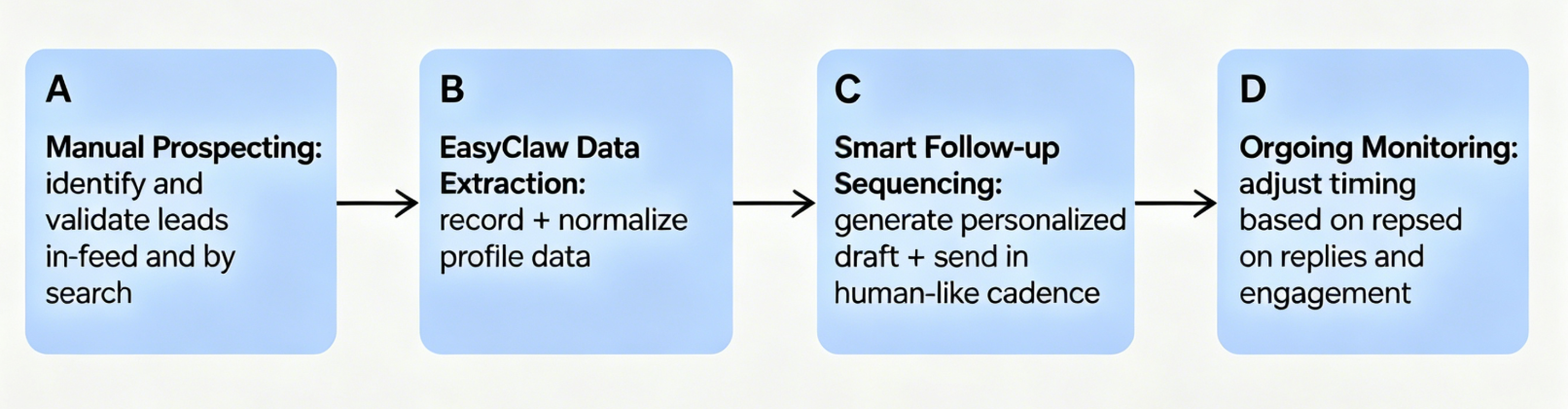
El marco central: un diagrama de flujo de trabajo basado en texto
El objetivo es dividir el trabajo en dos modos: descubrimiento controlado por humanos y ejecución asistida por IA. El descubrimiento humano evita las firmas de automatización más obvias, mientras que EasyClaw convierte el "manejo de datos" repetitivo en una capa operativa segura y consistente.
Guía de implementación paso a paso (híbrido, resistente a prohibiciones)
Step 1: Filtrado manual de alta intención (dirigido a los clientes potenciales de LinkedIn adecuados mediante la curación humana)
Comience por tratar la selección de prospectos como una decisión humana, no como un volcado de búsqueda automatizado. Primero desea la calidad de los clientes potenciales, porque la calidad reduce la necesidad de un alcance agresivo. Cuando filtra manualmente, controla las señales de intención, como la relevancia del rol, la adecuación a la empresa y la actividad reciente que sugiere que vale la pena contactar a la persona. El punto es crear una “lista razonable” que parezca alguien que realmente esté haciendo prospección.
Una vez que abra los resultados de la búsqueda, su comportamiento debe parecerse a una revisión activa: escanea, hace una pausa, hace clic en algunos perfiles para confirmar que encajan y solo acepta clientes potenciales que pasan sus criterios internos. La transición aquí es importante. No estás recopilando miles de perfiles. Estás validando un conjunto más pequeño con el que realmente considerarías contactar.
Al final de esta fase, su flujo de trabajo produce una lista corta en la que cada persona tiene una razón clara por la que se comunicaría con usted. Ese motivo se convierte en la semilla de la personalización posterior. Si se salta este paso, la automatización "acelerará" el alcance incorrecto, y eso aumentará tanto la deserción como la visibilidad conductual de la actividad masiva.

Step 2: Automatización de la grabación y extracción de datos con EasyClaw
Una vez que los clientes potenciales se seleccionan manualmente, la siguiente fase pasa sin problemas al trabajo operativo de EasyClaw: registrar y extraer datos de clientes potenciales de una manera que admita el seguimiento sin obligar a su cuenta a adoptar un comportamiento sospechoso.
En lugar de permitir que una herramienta de automatización "navegue" o "visite perfiles" repetidamente a escala, usted mantiene la cadencia de navegación humana y deja que EasyClaw se encargue de la extracción estructurada detrás de escena. En la práctica, esto significa que abre los perfiles seleccionados como parte de su flujo de trabajo normal, luego EasyClaw captura los campos clave que necesitará más adelante: contexto de identidad, señales de rol, detalles de la empresa y cualquier texto de perfil relevante que pueda informar un mensaje natural.
La lógica de seguridad aquí es sencilla. No estás intentando que la cuenta realice acciones rápidas y uniformes. Está reduciendo el trabajo de copia manual y está centralizando los datos para que el seguimiento pueda ser consistente sin ser repetitivo.
Una vez que EasyClaw extrae los datos, también querrá normalizarlos. El paso de extracción no debería crear "notas desordenadas". Debería producir campos limpios a los que pueda hacer referencia al generar un borrador de mensaje y programar seguimientos. Si los datos son inconsistentes, su seguimiento se basa en plantillas, lo que aumenta la posibilidad de una baja participación. Luego, un bajo compromiso lo empuja hacia un volumen más agresivo, lo que nuevamente aumenta el riesgo.
Utilice el resultado de la transición como punto de control. Al final de esta etapa, debería tener un registro interno utilizable de cada cliente potencial que pueda auditar rápidamente. Cuando puede verificar "estos fueron los campos extraídos de estos perfiles exactos", controla tanto la calidad como el cumplimiento.

Step 3: Configuración de la secuenciación de seguimiento automatizada y similar a la humana
Ahora viene la parte en la que la mayoría de las cuentas se equivocan: la automatización del seguimiento que es demasiado rápida, demasiado idéntica o con un volumen demasiado alto. En lugar de enviar mensajes explosivos, se configura un patrón de secuencia que refleja cómo los profesionales realizan un seguimiento después de iniciar genuinamente una conversación.
Primero, el momento. Quiere suficiente retraso para el comportamiento humano normal y suficiente espacio para evitar un "patrón de explosión". Una buena mentalidad de secuenciación es esperar a que el destinatario tenga tiempo de ver el alcance en su feed y luego enviar seguimientos solo cuando el mensaje anterior no haya producido una respuesta o una interacción significativa. Si envía varios empujones en una ventana corta, el patrón de mensajería se vuelve similar al spam y LinkedIn también es vulnerable a ese comportamiento.
En segundo lugar, la personalización. Sus borradores deben utilizar el contexto del cliente potencial, no solo su puesto de trabajo. Las entradas de personalización más confiables son las que ya extrajo en el Paso 2. Por ejemplo, mencione un detalle relevante para el rol, una iniciativa de la empresa visible en su perfil o un tema con el que probablemente estén asociados según el contenido de su perfil. El objetivo es mantener el mensaje basado en una lectura real de su perfil, no en un texto de marketing genérico.
En tercer lugar, la variabilidad de los mensajes. Incluso con la personalización, si la estructura es idéntica en muchos clientes potenciales, el patrón se vuelve predecible. Varíe la primera oración y la redacción del llamado a la acción manteniendo coherente la intención principal. Así es como se mantiene el rendimiento sin crear uniformidad.
Finalmente, seguimiento. La automatización nunca debe ser "disparar y olvidar". Su circuito operativo debe revisar los resultados de las respuestas y ajustar el comportamiento de seguimiento futuro en consecuencia. Si el destinatario responde, su secuencia automatizada debería detenerse o pasar a una transferencia manual. Si lo ignoran, se reduce la presión futura. Así es como preserva la reputación del remitente y mantiene su comportamiento alineado con el flujo de una conversación real.

Pure Automation frente a estrategia híbrida (tabla comparativa)
| Dimensión | Estrategia de herramienta Pure Automation | Estrategia Híbrida (Manual + EasyClaw) |
|---|---|---|
| Account Risk Profile | Alto riesgo de restricción debido a firmas de ejecución continuas y uniformes. | Riesgo bajo porque la navegación por la plataforma y la selección de clientes potenciales se realizan a un ritmo humano. |
| Lead Qualification Depth | Se basa en consultas de palabras clave básicas, lo que genera datos de divulgación no calificados. | Determinado por filtrado humano activo antes de que comience cualquier manejo de datos. |
| Data Logging Process | Requiere extensiones de navegador masivas o llamadas de análisis de API en segundo plano. | Capturado directamente desde la capa de UI local mientras el usuario revisa el registro. |
| Follow-Up Cadence | Intervalos rígidos (por ejemplo, exactamente 24 horas después) en todo el oleoducto. | Retrasos de tiempo variados y variables estructuradas para reducir las firmas de patrones. |
| Workflow Handoff | Es difícil hacer una pausa limpia una vez que responde una conexión activa. | Lógica de secuenciación controlada que se adapta en función de los resultados de respuesta reales. |
Integración perfecta de EasyClaw (posicionamiento suave, valor operativo real)
EasyClaw se convierte en su capa operativa entre dos zonas controladas por humanos. En la fase manual, tú decides a quién vale la pena contactar. En la fase automatizada, EasyClaw maneja el trabajo repetitivo que de otro modo lo tentaría a adoptar patrones de navegación riesgosos de “automatización total”. Eso significa menos copiar y pegar, menos errores en los registros de clientes potenciales y un seguimiento que se mantiene coherente con el contexto que recopiló.
La filosofía de integración es simple. Utiliza EasyClaw para hacer que el flujo de trabajo sea más seguro y rápido al mismo tiempo: más seguro porque la extracción y la secuenciación se gestionan de forma estructurada, más rápido porque su tiempo pasa del manejo de datos a la estrategia real del cliente potencial. Cuando su canalización está organizada en torno a registros de clientes potenciales, puede realizar un seguimiento sin prisas, sin errores de copia y sin caer en hábitos de gran volumen.
EasyClaw funciona en la capa de interfaz de usuario de su software de escritorio para manejar la recopilación de datos y los patrones de mensajería sin incrustar código sospechoso en su navegador ni activar alertas de discrepancia en plataformas empresariales.
Conclusión y CTA procesable
Si ha estado tratando de obtener clientes potenciales de LinkedIn con herramientas altamente automatizadas, la realidad de 2026 es que la velocidad sin realismo conductual es un imán de prohibición. La estrategia híbrida soluciona el problema de raíz dividiendo el trabajo en descubrimiento controlado por humanos y ejecución asistida por IA. El filtrado manual mantiene el comportamiento de su cuenta creíble. La extracción de datos EasyClaw preserva el contexto y crea registros de clientes potenciales estructurados. La secuenciación de seguimiento controlada mantiene el impulso sin desencadenar patrones similares al spam.
Si desea que este flujo de trabajo se adapte a su nicho, sus funciones objetivo y su volumen de alcance actual, el siguiente paso es probar EasyClaw y solicitar una demostración de flujo de trabajo personalizado. Podemos ayudarle a mapear sus criterios de descubrimiento de clientes potenciales en un canal híbrido seguro para que pueda generar clientes potenciales en LinkedIn de manera consistente sin convertir su cuenta en una responsabilidad.