


El costo oculto de mantener los scripts Python RPA
Hay una pesadilla muy específica y recurrente que cada ingeniero de automatizacion lo sabe demasiado bien. Suele ocurrir un viernes por la tarde. Está empacando su computadora portátil cuando se activa una alerta Slack de emergencia: la canalización de datos de su cadena de suministro ha fallado.
Abres tu terminal, ingresas SSH a tu servidor y verificas los registros. Un seguimiento de pila masivo termina en NoSuchElementException. El proveedor actualizó ligeramente el marco frontal de su portal web. Cambiaron una clase de botón de submit-btn a btn-primary, o envolvieron una tabla en un nuevo div. porque tu tradicional Python RPA script se basa en selectores CSS rígidos y XPaths exactos, esa pequeña actualización cosmética destrozó todo su flujo de trabajo.
Este es el sucio secreto de la automatización tradicional basada en código. Escribe guiones para ahorrar tiempo, pero eventualmente, la deuda técnica se agrava. Mantener guiones frágiles se convierte en un trabajo de tiempo completo. Si actualmente mantiene una biblioteca frágil de scripts de Selenium, Playwright o BeautifulSoup en teams in the US, Europe, and Asia, estás atrapado en un ciclo de parches interminables.
Pero ¿qué pasaría si pudieras abandonar por completo el mantenimiento del código? ¿Qué pasaría si pudieras reemplazar doscientas líneas de Python frágil con un solo párrafo de inglés sencillo y dejar que un agente de IA local navegue dinámicamente por el navegador por ti?
Este es el cambio de paradigma de la automatización de la web semántica. Migrando tu legado Pitón RPA base de código a EasyClaw, pasa de la codificación explícita a la intención operativa. Ya no le dices a la maquina cómo hacer clic en un píxel específico; tu lo dices qué para lograr.
La ilusión del control del código: por qué fallan los scripts tradicionales
Cuando escribes un script de Python para automatizar un navegador, estás construyendo una pista rígida. Le dice al controlador web que espere exactamente cinco segundos, busque el tercer cuadro de entrada en la página, escriba una contraseña y haga clic en el botón azul. Si Internet es lento y la página tarda seis segundos en cargarse, el script falla. Si el sitio web agrega un banner emergente promocional temporal sobre la pantalla de inicio de sesión, el script hace clic en el banner en lugar del botón y falla.
Pasas horas construyendo try/except bloques y funciones de espera dinámicas solo para manejar la volatilidad básica de Internet. Ha dedicado sus horas de ingeniería al mantenimiento de la cinta adhesiva digital. Arquitectos de automatización y administradores de TI en América del Norte informan que hasta el 40% de su presupuesto de mantenimiento de RPA se destina únicamente a solucionar fallas relacionadas con el selector.
| Acercarse | Python RPA tradicional | EasyClaw RPA semántica |
|---|---|---|
| Element Location | ✗ Fixed CSS/XPath selectors | ✓ AI understands page structure |
| Async Waiting | ✗ WebDriverWait / time.sleep() | ✓ Semantic condition triggers |
| Data Cleaning | ✗ Pandas / regex operations | ✓ In-memory AI parsing logic |
| UI Change Resilience | ✗ Breaks on any layout change | ✓ Adapts to visual context |
| Maintenance Overhead | ✗ Continuous patching required | ✓ Near-zero maintenance |
EasyClaw cambia fundamentalmente esta arquitectura a través de un motor de "compilación por pasos". Opera un navegador web local tal como lo hace Selenium, pero la navegación funciona con un modelo de lenguaje grande (LLM) que comprende el contexto. No busca un XPath; busca el concepto semántico de un botón "Descargar informe". Si el sitio web rediseña todo su diseño, EasyClaw aún comprende cómo se ve visualmente un formulario de inicio de sesión.
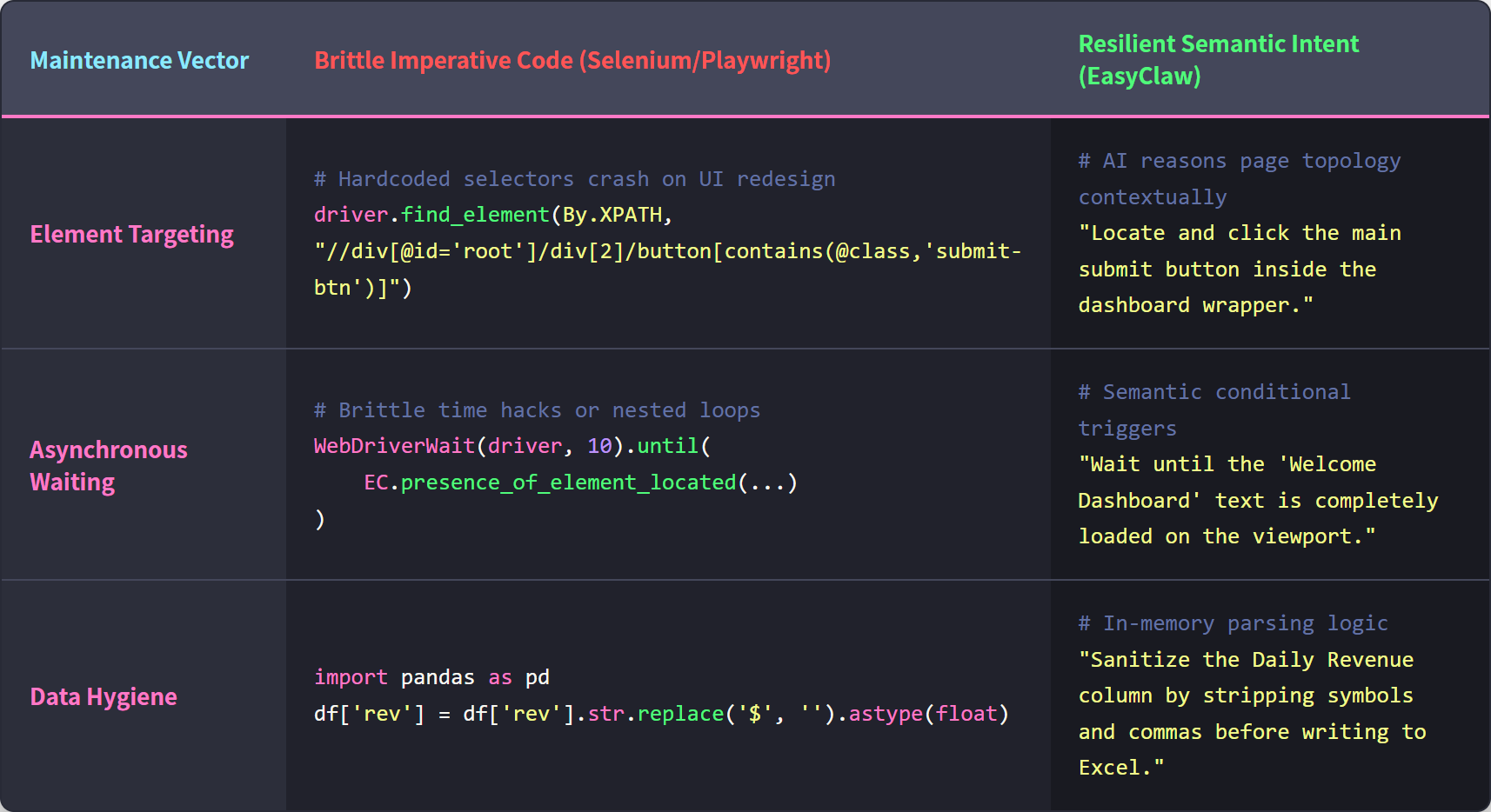
El código Python RPA tradicional se basa en selectores frágiles y esperas explícitas; EasyClaw utiliza la comprensión semántica de la IA para adaptarse dinámicamente a la estructura de la página.
Step 1: Audite y mapee la intención de su script existente
El mayor error que cometen los ingenieros al migrar es intentar traducir su código Python línea por línea. No mires tu código. Mire el objetivo operativo.
Abra su archivo Python existente e ignore webdriver.Chrome(), las esperas explícitas y la lógica de análisis de BeautifulSoup. Trace la intención humana del guión. Un guión típico de informes diarios normalmente se puede auditar en cuatro acciones humanas:
- Navegue hasta el panel de informes internos y autentíquese.
- Filtre el rango de fechas de las últimas 24 horas.
- Extraiga los nombres, estados y montos de ingresos de las diez filas superiores.
- Escriba estos datos en un archivo Excel local.
Ahora ha eliminado el código frágil y ha aislado la lógica empresarial. Estás listo para construir el agente.
Step 2: Compilación semántica vía Auto Task
Ahora, abra la aplicación de escritorio EasyClaw y navegue hasta el Auto Task interfaz. No encontrará un IDE ni un editor de código. Encontrará un cuadro de texto simple. Aquí es donde hablará con el arquitecto de IA que construirá su automatización resiliente.
Traduces las cuatro acciones que acabas de auditar en un solo párrafo muy específico. Un mensaje listo para producción para reemplazar su script de Python se ve así:
"Abra el navegador y navegue hasta panel.internal-ops.local. Inicie sesión con las credenciales guardadas del navegador. Una vez que se carga el panel, ubique el filtro de fecha y configúrelo en las últimas 24 horas. Espere a que se actualice la tabla de datos. Lea las 10 filas superiores de la tabla. Extraiga el 'Nombre del cliente', el 'Estado de la cuenta' y los 'Ingresos diarios' para cada fila. No extraiga las columnas de ID internas. Finalmente, cree un nuevo archivo de Excel en el escritorio local llamado 'Daily_Revenue_Report', escriba los datos extraídos en él con encabezados claros y guarde el archivo".
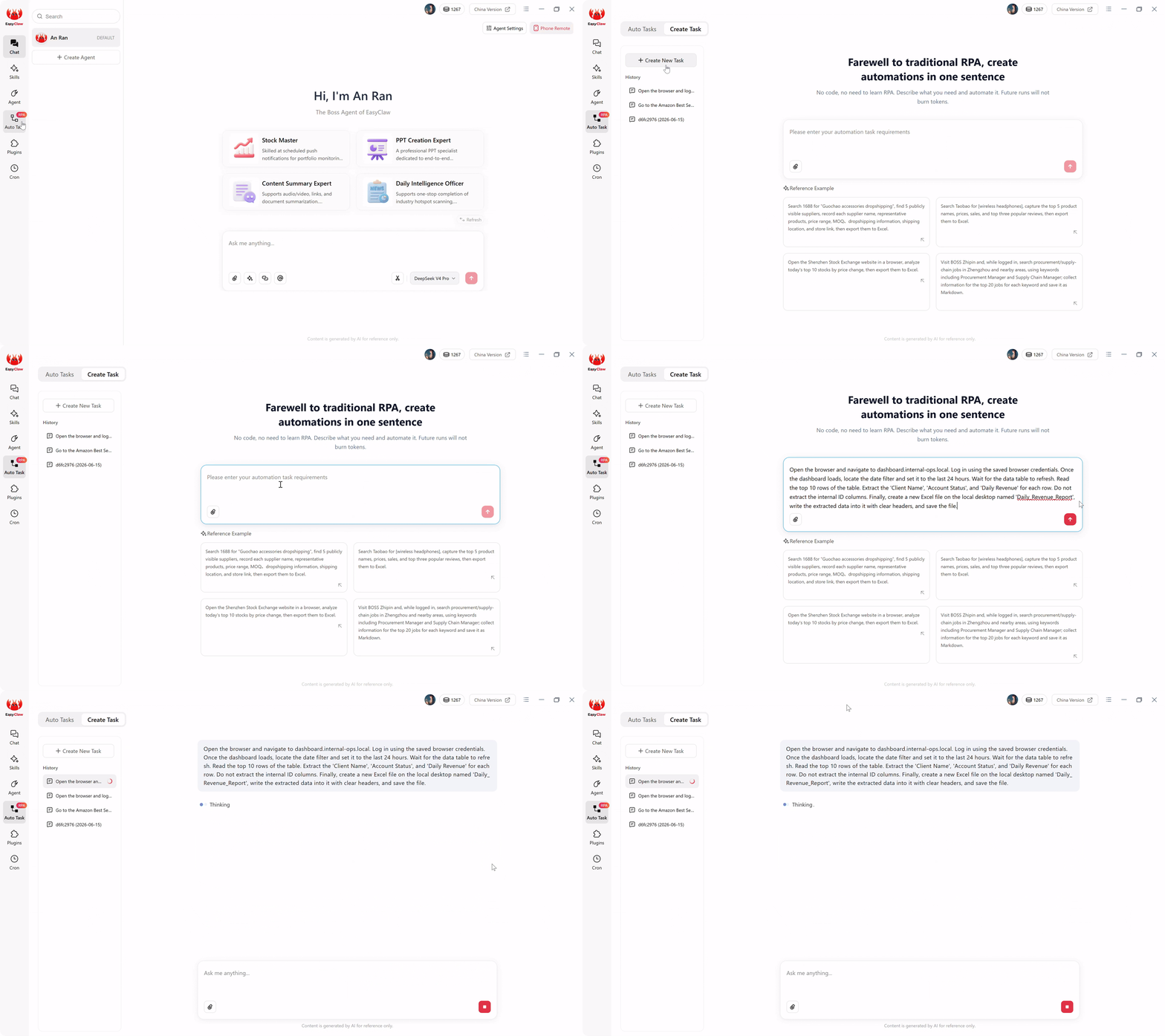
La interfaz EasyClaw Auto Task: describe lo que deseas automatizar en inglés sencillo y la IA lo compila en un script RPA local sólido.
Cuando haces clic en el botón enviar, el agente de IA local se hace cargo. El LLM lee su párrafo en lenguaje natural, comprende la intención semántica de la extracción de datos y los compila instantáneamente en un script RPA de navegador local estructurado, paso a paso. Acaba de reemplazar un repositorio GitHub completo de código frágil con un párrafo.
Step 3: Comparación de resultados y ejecución sin tokens
Antes de implementar, debe verificar la arquitectura.
En una herramienta tradicional de automatización de IA basada en la nube, ejecutar un script como este significaría enviar el código fuente HTML completo del panel de su empresa a un servidor LLM remoto cada vez que se ejecuta, solo para averiguar dónde están los datos. Esto quema cantidades masivas de tokens conversacionales diariamente y expone sus datos internos a una nube pública.
EasyClaw prevents this. El costoso razonamiento impulsado por la IA solo ocurrió una vez: durante Step 2, cuando se compiló su mensaje en inglés.
Cuando activa el flujo de trabajo ahora, el script RPA local subyacente asume el control de forma nativa. Abre Chrome o Edge en tu escritorio. Navega visualmente por la URL y analiza los datos utilizando modelos de extracción ligeros e integrados directamente en la memoria. Escribe el archivo de Excel en su disco duro local.
Compare el archivo de Excel resultante con el generado por su antiguo script de Python. Los datos están perfectamente formateados, pero la ejecución fue perfecta. Más importante aún, debido a que estos pasos de ejecución recurrentes no llaman a API de IA conversacionales externas para tomar decisiones de enrutamiento, sus ejecuciones diarias posteriores se queman. absolutely zero LLM tokens. Obtiene la resiliencia de la IA con el costo fijo y predecible de la ejecución local tradicional.
Step 4: Establecer el disparador de manos libres (Cron y Chat)
Su antiguo script de Python probablemente dependía de un crontab de Linux o de una configuración torpe del Programador de tareas de Windows. Si el servidor se reiniciaba, la tarea cron a menudo fallaba silenciosamente. EasyClaw maneja la programación a través de una brillante interfaz integrada que se conecta directamente a sus aplicaciones de comunicación.
Navega hasta el Cron (Scheduled Tasks) sección en el menú de la izquierda. Cree una nueva tarea y asígnele el nombre "Exportación de ingresos diarios". Establezca el tiempo de ejecución en A diario a las 08:00 a.m.
En el cuadro Mensaje AI, vincula el cronograma a su flujo de trabajo compilado escribiendo: "Ejecute la tarea automática 'Informe de ingresos diarios'. Cuando termine, resuma los ingresos totales calculados a partir del archivo de Excel e indique si algún estado de cuenta se marcó como 'Suspendido'".
Finalmente, cambie el Push Results to Chat App cambiar. Si ha conectado EasyClaw a un complemento de comunicación como Telegram, WhatsApp, Slack, or LINE, esto crea un circuito de retroalimentación inquebrantable.
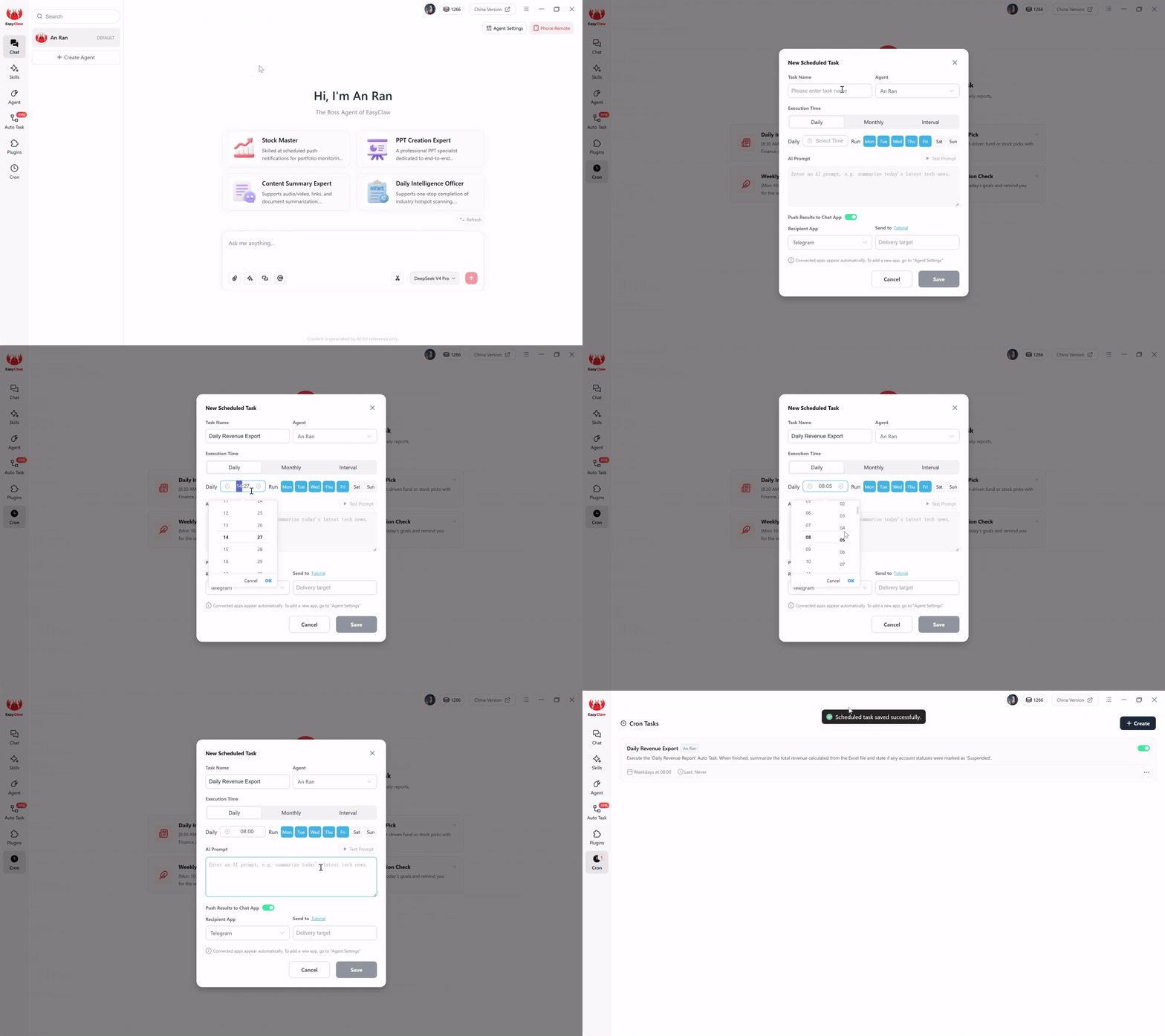
Configure programas de ejecución recurrentes y habilite notificaciones automáticas a Telegram, WhatsApp, Slack, or LINE para operación con manos libres.
Mañana por la mañana a las 8:05 a. m., su teléfono sonará con un mensaje seguro: "Ejecución completa. Archivo de Excel guardado en el escritorio. Ingresos totales extraídos: $45,200. No hay cuentas marcadas como suspendidas". Ha desacoplado completamente la ejecución de su terminal, reemplazando las fallas silenciosas con informes móviles proactivos.
Pro Tips para reemplazar la lógica compleja de Python
Cuando se migra la lógica de ingeniería avanzada al lenguaje natural, hay que pensar como un arquitecto. Aquí hay tres estrategias avanzadas para garantizar que sus scripts semánticos manejen los casos extremos mejor que su código anterior.
1. Reemplazo de time.sleep() con espera semántica
En Python, los ingenieros suelen utilizar time.sleep(10) para esperar a que se cargue una página web pesada, lo que ralentiza el script innecesariamente o provoca un tiempo de espera si la red es lenta. En EasyClaw, esto se reemplaza con condicionales semánticos. Agregue a su mensaje: "Después de hacer clic en el botón de inicio de sesión, espere hasta que el texto 'Panel de bienvenida' esté visible en la pantalla antes de continuar". El agente esperará dinámicamente la señal visual exacta y procederá instantáneamente cuando esté listo.
2. Reemplazo de bloques If/Else para ventanas emergentes web
Los portales web son conocidos por mostrar ventanas emergentes promocionales inesperadas o pancartas de "Actualice su contraseña" que bloquean instantáneamente Selenium. Maneje esto sin bloques try/except. Agregue una oración a prueba de fallas: "Si aparece una encuesta inesperada o una ventana emergente de notificación que cubre la tabla de datos, ubique el botón 'Cerrar', 'X' o 'Recordarme más tarde' y haga clic en él antes de continuar".
3. Reemplazo de Pandas para transformación de datos
No es necesario importar bibliotecas de manipulación de datos masivas sólo para limpiar el texto extraído. Indique al agente que desinfecte los datos en la memoria: "Al extraer los 'Ingresos diarios', elimine los símbolos de moneda o las comas y asegúrese de que el valor se guarde como un número sin formato. Escriba en mayúscula todos los 'Nombres de clientes' antes de escribirlos en el archivo de Excel".
Por qué EasyClaw es el destino de migración adecuado para los scripts Python RPA
Las plataformas RPA tradicionales lo obligan a adoptar un flujo de trabajo centrado en el desarrollador que perpetúa los mismos problemas de fragilidad. EasyClaw adopta un enfoque fundamentalmente diferente, uno que coincide con la forma en que equipos de operaciones, gerentes de TI y arquitectos de automatización pensar realmente en sus flujos de trabajo.
EasyClaw no es una herramienta de automatización de IA exclusiva de la nube. es un desktop-native AI agent que interactúa con su sistema operativo como lo haría un humano: hacer clic, escribir, leer la pantalla y ejecutar flujos de trabajo de varios pasos en cualquier aplicación que tienes instalada.
Mientras que los scripts tradicionales de Python RPA fallan con cada actualización de la interfaz de usuario, la comprensión semántica de EasyClaw se adapta dinámicamente. Mientras que las herramientas basadas en la nube exponen sus datos internos a servidores externos, EasyClaw procesa todo localmente.
Reemplace más de 200 líneas de Python con un solo párrafo en inglés. Describe la intención: la IA se encarga de la ejecución.
Toda la automatización se ejecuta localmente. Los paneles de control, los datos financieros y los portales internos de su empresa nunca abandonan su máquina.
El razonamiento de IA compila su mensaje una vez. Las ejecuciones diarias no utilizan tokens LLM: costo operativo fijo y predecible.
Reciba resúmenes de ejecución a través de WhatsApp, Telegram, Slack o LINE: sepa de inmediato si algo sale mal.
Ventajas
- Reemplace los scripts de Python con lenguaje natural: no se requiere codificación
- Configuración cero: en vivo en menos de 60 segundos
- Ejecución local: sin exposición de datos en la nube
- Se adapta automáticamente a los cambios de la interfaz de usuario, sin mantenimiento del selector
- Programación integrada con notificaciones de chat.
- Nivel gratuito disponible: no se requiere tarjeta de crédito
Limitaciones
- Requiere instalación de la aplicación de escritorio
- Plataforma más nueva: el ecosistema sigue en expansión
EasyClaw frente a los enfoques tradicionales de Python RPA
| Capacidad | EasyClaw | Selenio / Playwright | RPA en la nube (UiPath / AA) |
|---|---|---|---|
| Script creation method | ✓ Natural language prompt | ✗ Python code + selectors | ✗ Visual designer + coding |
| UI change resilience | ✓ Semantic: se adapta automáticamente | ✗ Brittle: se interrumpe ante cualquier cambio | ~ Partial: requiere mantenimiento |
| Data privacy | ✓ Fully local execution | ✓ Local (but fragile) | ✗ Cloud-processed |
| Recurring run cost | ✓ Zero tokens per run | ✓ Zero (but high maintenance) | ✗ Per-bot licensing fees |
| tiempo de configuración | ✓ Under 60 seconds | ✗ Hours to days | ✗ Weeks to months |
| Scheduling + mobile alerts | ✓ Built-in | ✗ Separate setup required | ~ Orchestrator required |
Preguntas frecuentes sobre la migración Python RPA
Reclaiming Your Engineering Hours
Escribir código es profundamente satisfactorio, pero mantener web scrapers frágiles es un despliegue miserable de talento de ingeniería. La industria del software nos ha condicionado a creer que una automatización sólida requiere marcos complejos y codificados. Pero la realidad es que la web es demasiado dinámica y los marcos de la interfaz de usuario cambian con demasiada frecuencia como para que el código estático sobreviva a largo plazo sin un mantenimiento intensivo.
Cada hora que dedica a actualizar un XPath o parchear un selector de CSS es una hora robada del desarrollo real del producto y de la arquitectura de alto nivel. Para organizaciones de Norteamérica, Europa y Asia-Pacífico, el cambio de la RPA basada en código a la automatización semántica basada en la intención no es solo una conveniencia: es una necesidad competitiva.
EasyClaw elimina por completo la carga de mantenimiento. Al migrar sus scripts Python heredados a una arquitectura de lenguaje natural que prioriza lo local, evita la fragilidad de la RPA tradicional. Implementa un agente que piensa contextualmente, ejecuta localmente y se adapta visualmente.
Audite hoy su raspador de Python más antiguo y frustrante. Abra la interfaz Auto Task, escriba su intención operativa en un solo párrafo y observe cómo sus tuberías más frágiles se transforman en flujos de trabajo irrompibles y libres de mantenimiento.