


La crisi delle 16:30 in ogni banca regionale
C'è un'ansia silenziosa e altamente specifica che pervade il piano operativo di una banca regionale ogni pomeriggio alle 16:30. Gli sportelli dei cassieri si chiudono, le porte pubbliche si chiudono, ma il vero lavoro è appena iniziato.
Nel back office, altamente qualificato analisti finanziari e addetti alle operazioni di tesoreria sedersi per effettuare la riconciliazione quotidiana. Accedono al portale web della banca centrale. Scaricano file CSV contenenti migliaia di record di regolamento delle transazioni. Aprono una nuova scheda, accedono al sistema contabile interno della banca basato sul web e iniziano l'estenuante processo di riferimento incrociato dei numeri di conto, dei codici di compensazione e degli importi di liquidazione. Cercano discrepanze. Digitano appunti. Copiano e incollano dati tra due browser per tre ore estenuanti.
È noioso. È estremamente incline all’errore umano. Ed è proprio questo il motivo automazione dei processi robotici nel settore bancario divenne un’industria multimiliardaria. Ma la soluzione è diventata dolorosa quanto il problema.
Quando il CIO decide finalmente di risolvere questo collo di bottiglia, chiama un grande fornitore di software aziendale. Arriva una società di consulenza. Propongono una suite RPA monolitica: tempistica di distribuzione di sei mesi, risorse dedicate per gli sviluppatori, configurazione del server di orchestrazione. Poi rivelano la fattura: decine di migliaia di dollari per singola licenza bot, più spese di manutenzione ricorrenti.
La banca è costretta a fare una scelta terribile: pagare un esorbitante riscatto aziendale per automatizzare alcuni portali web, o abbandonare completamente il progetto perché le alternative basate sul cloud come Zapier vengono immediatamente bloccate dalla conformità. Non è possibile trasmettere i numeri di conto cliente non elaborati tramite un intermediario API del cloud pubblico.
Questa guida illustra esattamente come creare una pipeline di automazione bancaria sicura per la conformità e senza licenza aziendale con EasyClaw: descrivendo il tuo compito, selezionando le competenze web, impostando trigger giornalieri ed eseguendo flussi di lavoro con la completa privacy dei dati.
La trappola delle licenze aziendali: perché la RPA tradizionale fallisce nel settore bancario
Per capire perché l’automazione del browser locale rappresenta un cambiamento di paradigma obbligatorio per il settore finanziario, dobbiamo esaminarne il motivo RPA nel settore bancario è fondamentalmente ostile all’agilità.
Storicamente, le banche hanno tentato di risolvere l’immissione ripetitiva di dati implementando strumenti pesanti come UiPath o Automation Anywhere. Queste piattaforme sono potenti, ma i loro modelli di business sono radicati nell’era aziendale legacy. Fanno pagare tariffe astronomiche solo per il privilegio di creare e gestire un bot. Inoltre, la creazione di un flusso di lavoro richiede uno sviluppatore specializzato per mappare selettori complessi, gestire variabili e scrivere codice personalizzato.
Se la banca centrale aggiorna il layout del proprio sito web di reporting, il bot aziendale si rompe. La banca quindi apre un ticket di supporto, paga la società di consulenza per un'ora di manutenzione e attende due settimane affinché lo script venga aggiornato.
| Dimensione | RPA aziendale preesistente | Automazione API cloud | EasyClaw RPA locale |
|---|---|---|---|
| Data Sovereignty | ~ On-prem (complex setup) | ✗ Cloud-exposed — rischio elevato | ✓ Absolute: completamente locale |
| Compliance Audit | ~ Extensive vendor BAAs needed | ✗ Complex multi-vendor chain | ✓ Zero external BAAs required |
| Cost Structure | ✗ Per-bot + consulting fees | ~ API usage + per-call costs | ✓ Flat, no per-bot fees |
| Maintenance | ✗ Dedicated developer required | ✗ API breakage risk | ✓ Adaptive: linguaggio naturale |
| Scalability | ~ License-locked per bot | ~ Per-transaction cost scaling | ✓ Free to scale (zero tokens) |
È qui che EasyClaw cambia le regole operative. La sua competenza principale è l'automazione del browser Web locale e in linguaggio naturale. Il principio di funzionamento è semplice: apre una pagina Web nel browser locale, simula azioni umane come fare clic, digitare e leggere dati sullo schermo e solidifica tali azioni in uno script ripetibile. Intercettazione intermediaria zero cloud. Nessuna estorsione di licenze aziendali. Controllo operativo completo.
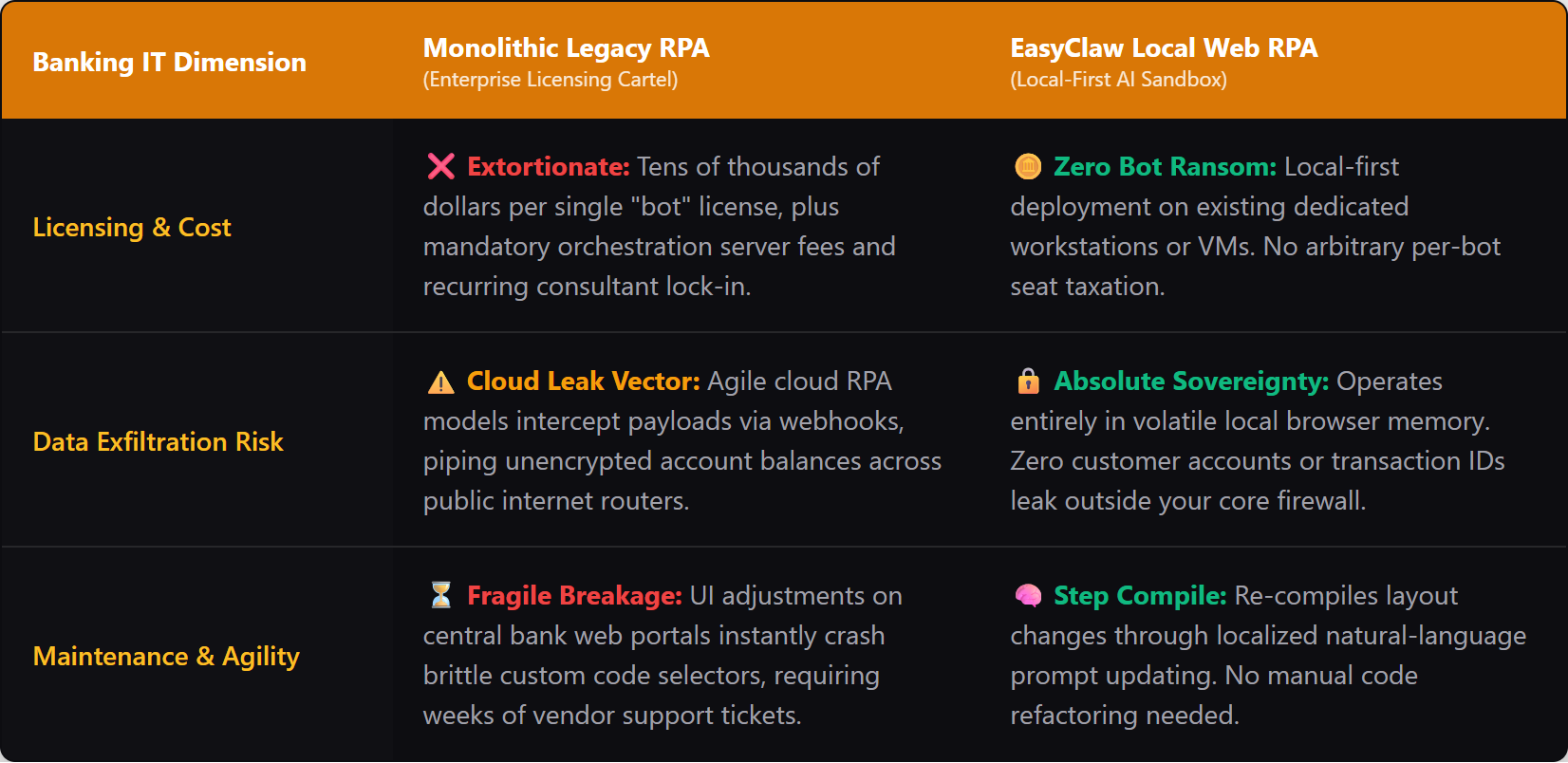
L'architettura local-first di EasyClaw elimina completamente l'intercettazione degli intermediari cloud e i costi di licenza aziendale, elementi fondamentali per la conformità bancaria.
Phase 1: descrivere il compito: l'architettura Auto Task
Quando si crea l'automazione in un ambiente bancario, non si desidera trascinare e rilasciare nodi di codifica astratti. Vuoi dichiarare esattamente qual è la procedura operativa. EasyClaw sostituisce la tradizionale interfaccia pesante per gli sviluppatori con un'architettura "Step Compile".
Apri il Auto Task interfaccia. Verrai accolto con una casella di testo. Non è necessario scrivere codice. Stai parlando con l'architetto AI che costruirà il tuo script.
Una richiesta pronta per la produzione per un flusso di lavoro di riconciliazione giornaliero è simile alla seguente:
"Apri il browser e vai al nostro portale di compensazione della tesoreria su clearing.federal-bank.local. Accedi utilizzando le credenziali sicure salvate. Vai alla scheda "Regolamenti giornalieri" e scarica il report CSV delle transazioni di oggi. Leggi i dati scaricati direttamente nella memoria del browser. Successivamente, apri una nuova scheda del browser e accedi al nostro dashboard interno di core banking su core.bank-internal.com. Per ogni transazione nel CSV, cerca il corrispondente "ID transazione" nel sistema principale. Confronta l'"Importo di liquidazione" dal CSV con l'"Importo registrato" nel sistema principale. Se gli importi corrispondono, fare clic sulla casella di controllo "Riconciliato" e salvare. Se è presente una discrepanza, non fare clic sulla casella di controllo, invece, aggiungere un commento nel campo "Note" indicando: "Discrepanza rilevata: previsto [Importo CSV], Trovato [Importo principale]".
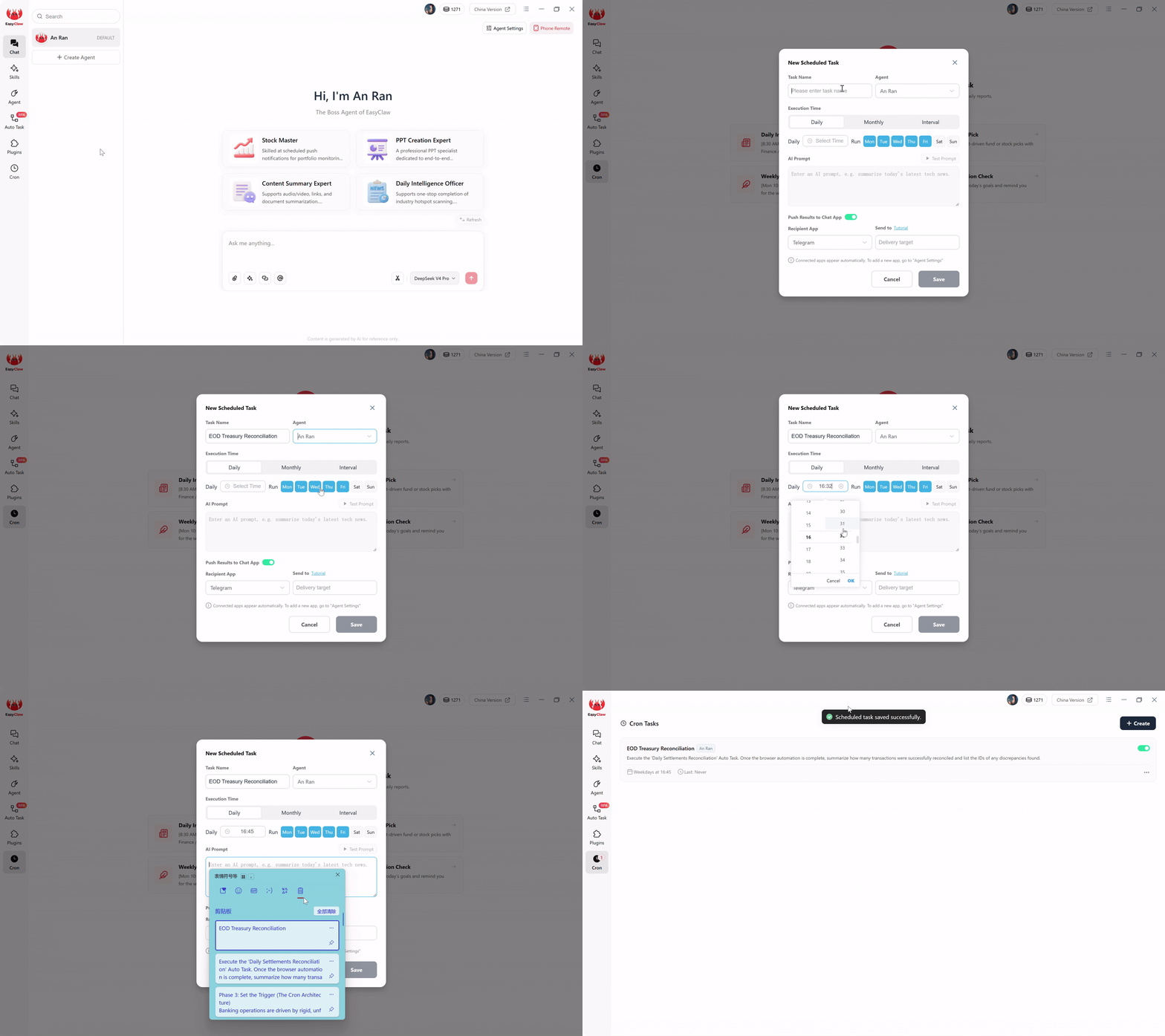
L'interfaccia Auto Task: descrivi il tuo flusso di lavoro bancario in linguaggio naturale e l'intelligenza artificiale lo compila in un robusto script di automazione locale.
Quando fai clic su Invia, il LLM locale legge il tuo prompt in linguaggio naturale e lo compila in uno script del browser locale hardcoded e altamente efficiente. La fase di compilazione AI è ora completa.
Phase 2: seleziona l'abilità: fornisci il vocabolario dell'agente
Affinché lo script compilato venga eseguito in modo impeccabile, l'agente ha bisogno del giusto vocabolario tecnico. In EasyClaw, questo viene gestito Skills. Una competenza è un insieme di funzionalità preconfezionate che indica all'agente esattamente come interagire con gli elementi Web, gestire i download di file e gestire le schede del browser in modo sicuro.
Prima di finalizzare il flusso di lavoro, assicurati che la competenza "Automazione Web e analisi dei dati" sia collegata al tuo agente. Utilizzando questa abilità, stabilisci i confini precisi di ciò che l'agente può fare. Gli concedi l'autorità per navigare negli URL, leggere il testo sullo schermo e interagire con i moduli web. Non può inviare e-mail esterne, accedere a directory di file locali non autorizzate o raggiungere domini pubblici non specificati nel messaggio.
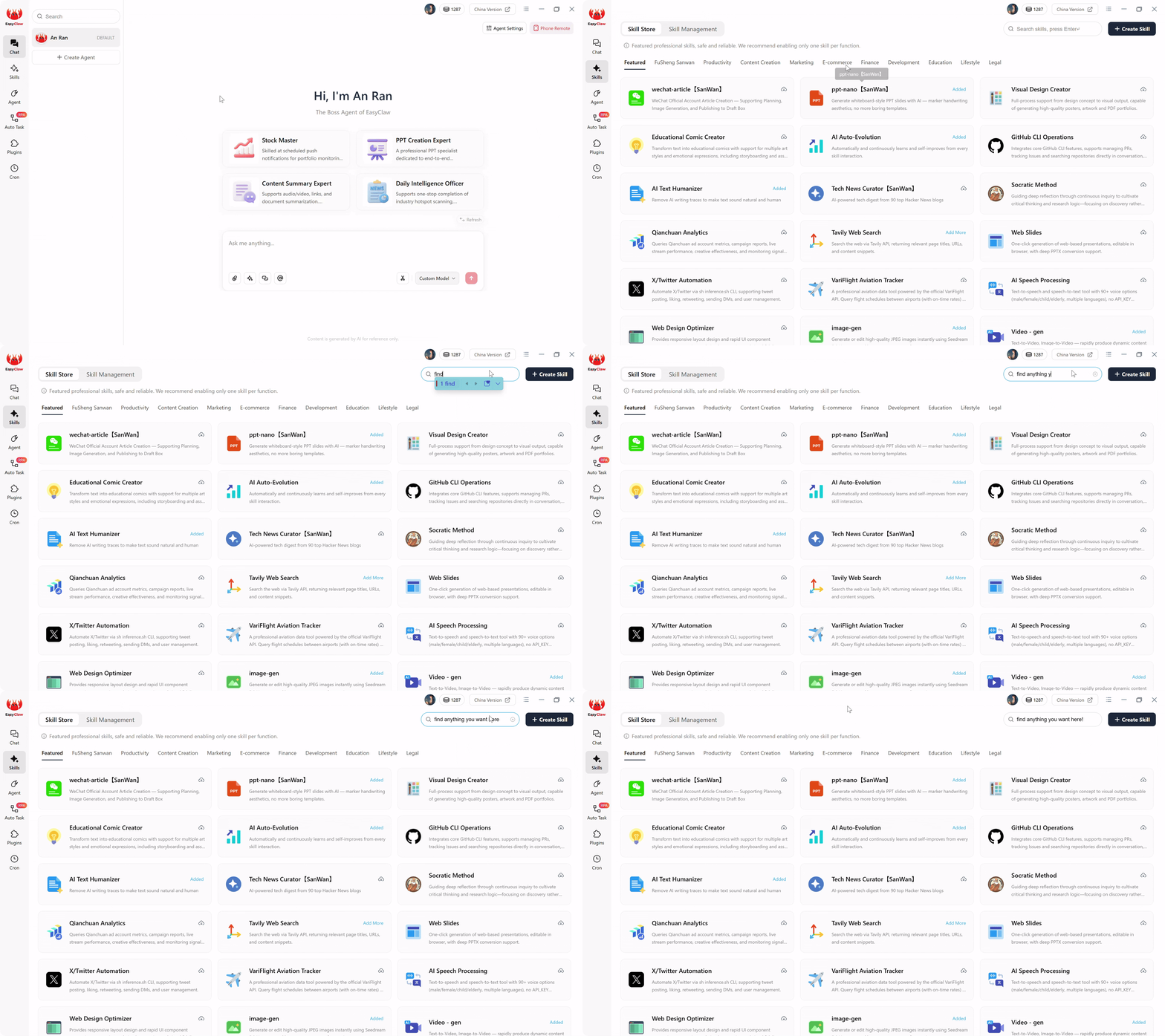
Collega la competenza "Automazione Web e analisi dei dati" per definire con precisione a cosa può accedere l'agente, creando un ambito bloccato che soddisfi i revisori bancari.
Questo rigido limite è esattamente ciò che i revisori bancari vogliono vedere: un processo automatizzato con un campo d’azione limitato e innegabile.
Phase 3: imposta il trigger: l'architettura Cron
Le operazioni bancarie sono guidate da tempistiche rigide e spietate. I file di transazione vengono rilasciati in orari specifici. Gli orari limite per gli aggiornamenti della contabilità generale non sono negoziabili. La tua automazione non può fare affidamento sul fatto che un analista umano si ricordi di fare clic su un pulsante "Avvia" ogni pomeriggio.
Nell'RPA aziendale legacy, la pianificazione di un bot richiede la messa in funzione di un costoso server Orchestrator e l'assunzione di un tecnico DevOps. EasyClaw gestisce tutto ciò tramite un'interfaccia di pianificazione in linguaggio naturale integrata direttamente nel client desktop.
Passare a Cron sezione. Creare una nuova attività denominata "Riconciliazione tesoreria EOD". Seleziona il tuo agente finanziario dedicato, dotato delle giuste competenze e memoria. Imposta l'esecuzione su Tutti i giorni, dal lunedì al venerdì, alle 16:45.
Nella casella Prompt AI, pianificazione ed esecuzione del bridge:
"Esegui l'attività automatica 'Riconciliazione liquidazioni giornaliere'. Una volta completata l'automazione del browser, riepiloga quante transazioni sono state riconciliate con successo ed elenca gli ID di eventuali discrepanze trovate."
Infine, attiva/disattiva Push Results to Chat App. Se hai collegato EasyClaw a Telegram, WhatsApp, LINE o Slack, l'agente instraderà in modo proattivo il riepilogo della riconciliazione al tuo dispositivo mobile. Alle 16:50, il tuo telefono vibra con il rapporto giornaliero sui pagamenti: non è richiesto l'accesso alla dashboard.
Phase 4: esecuzione automatica: esecuzione locale senza token
È fondamentale capire cosa succede quando arrivano le 16:45. Questo è il segreto per scalare l’automazione bancaria senza aumentare i costi operativi.
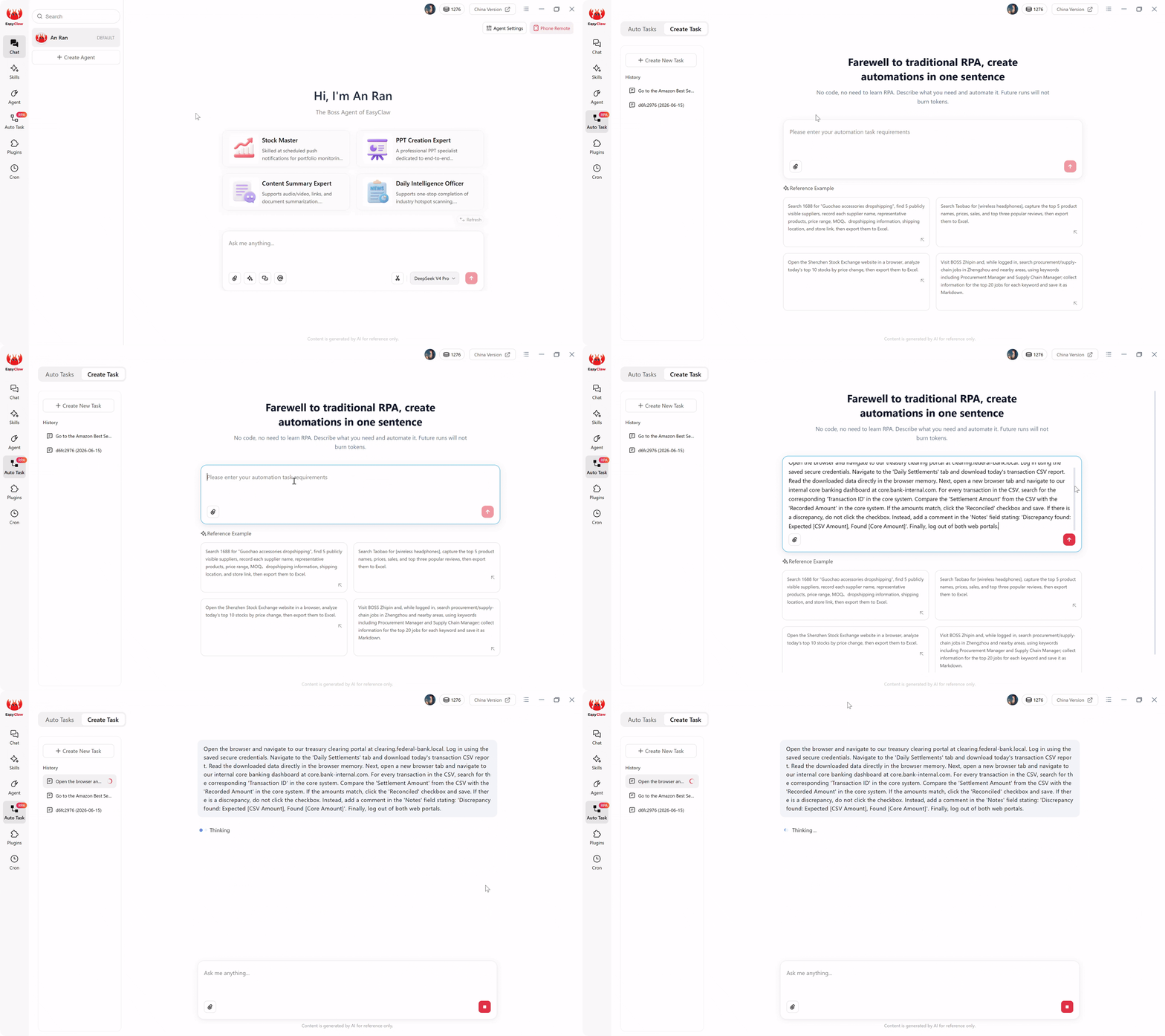
Quando il cron si attiva alle 16:45, lo script compilato viene eseguito interamente localmente: zero esposizione ai dati cloud, zero AI tokens masterizzato.
Se si utilizzasse uno strumento di intelligenza artificiale basato su cloud, ogni singolo pomeriggio, il sistema impacchetterebbe i dati delle transazioni scaricate e li rispedirebbe a un server LLM esterno per capire quali importi corrispondevano. Quella trasmissione continua di dati è a massiccia violazione della conformitàe brucia ogni giorno costosi token di conversazione.
EasyClaw prevents this entirely. Il costoso ragionamento basato sull'intelligenza artificiale è avvenuto solo una volta: in Phase 1, quando l'attività è stata compilata. Quando il flusso di lavoro si attiva, prende il sopravvento lo script RPA locale sottostante. Apre il browser locale, accede al portale della tesoreria, scarica il file e analizza gli importi delle transazioni utilizzando modelli di estrazione leggeri e incorporati, interamente in memoria.
Poiché questi passaggi ricorrenti non chiamano API AI conversazionali esterne, la tua attività quotidiana viene eseguita elaborare i dati in modo completamente locale. I dati finanziari non lasciano mai la tua macchina sicura e bruci assolutamente zero AI tokens durante l'esecuzione. Questa architettura consente di elaborare 500 o 50.000 transazioni al giorno con assoluta riservatezza dei dati e costi operativi fissi e prevedibili.
Pro Tips per una configurazione bancaria a prova di proiettile
Quando passi dall'immissione manuale dei dati ai flussi di lavoro finanziari automatizzati, incontrerai rigidi protocolli di sicurezza IT e interfacce web imprevedibili. Ecco tre strategie avanzate:
1. Gestisci l'autenticazione a più fattori (MFA) con garbo
I portali bancari raramente ti consentono di accedere solo con un nome utente e una password. Aggiungi al tuo messaggio: "Se viene visualizzata una schermata di input MFA, metti in pausa l'automazione e invia una notifica sul desktop locale dicendo: 'In attesa del token MFA.' Attendi che un operatore umano digiti il token e premi Invio, quindi riprendi il flusso di lavoro."
2. L'esecuzione del controllo "Sola lettura".
Non concedere mai all'agente l'accesso in scrittura il primo giorno. Durante la prima settimana, esegui in modalità Shadow: "Non fare clic sulla casella di controllo 'Riconciliato'. Genera invece un rapporto CSV locale che elenca ogni transazione corrispondente e ogni discrepanza." Lascia che il team della tesoreria riveda i calcoli dell'agente per una settimana prima di concedere l'accesso in scrittura.
3. Centralized Local Audit Logging
Nel settore bancario, se non viene registrato, non è successo. Aggiungi al tuo messaggio: "Dopo che ogni transazione è stata elaborata, aggiungi una riga a 'Reconciliation_Log.txt' indicando l'ora, l'ID transazione e se è stata abbinata o contrassegnata." Quando arrivano i revisori esterni, avrai a disposizione una traccia cartacea locale con timestamp che dimostra l'esatta conformità.
Perché EasyClaw è la giusta scelta di automazione per il settore bancario
Per istituti finanziari, cooperative di credito e team operativi fintech, la scelta tra RPA aziendale, automazione del cloud e agenti IA local-first non è solo una questione di costi, ma anche di sopravvivenza normativa. EasyClaw è creato appositamente per ambienti in cui la sovranità dei dati non è opzionale.
EasyClaw non è una piattaforma di automazione basata su cloud. È un desktop-native AI agent che esegue flussi di lavoro finanziari direttamente sul tuo computer locale: nessun intermediario nel cloud, nessuna licenza aziendale, nessuna esposizione dei dati API.
Laddove l’RPA aziendale richiede tariffe di licenza per bot e gli strumenti cloud violano la conformità bancaria, EasyClaw fornisce un terzo percorso: la resilienza dell’automazione basata sull’intelligenza artificiale con la sovranità dei dati dell’esecuzione locale.
Tutti i dati finanziari (registri delle transazioni, file di liquidazione, numeri di conto) rimangono sul tuo computer locale. Zero esposizione alle nuvole.
Nessuna tariffa per bot. Nessun costo di orchestrazione. Nessun contratto aziendale annuale. Solo prezzi piatti e prevedibili.
Log di esecuzione locale con timestamp per ogni transazione. Soddisfa i più severi controlli normativi senza richieste di terze parti.
Ricevi riepiloghi di riconciliazione di fine giornata tramite WhatsApp, Telegram, Slack o LINE: scopri immediatamente le discrepanze.
Pro
- Esecuzione completamente locale: nessuna esposizione dei dati nel cloud per la conformità bancaria
- Nessun costo di licenza RPA aziendale: costi fissi e prevedibili
- Creazione di flussi di lavoro in linguaggio naturale: non sono necessari sviluppatori specializzati
- Registrazione di audit integrata per revisioni normative
- Compatibile con MFA con la sicurezza human-in-the-loop
- Livello gratuito disponibile: non è richiesta la carta di credito
Limitazioni
- Richiede l'installazione dell'app desktop su un computer dedicato
- Non sostituisce le API del sistema bancario principale (strumento complementare)
EasyClaw e alternative all'automazione bancaria
| Capacità | EasyClaw | UiPath / Automation Anywhere | Zapier / Strumenti cloud |
|---|---|---|---|
| Data stays on local machine | ✓ S?: completamente locale | ~ On-prem possible (complex) | ✗ No: elaborato nel cloud |
| No per-bot licensing | Prezzi ✓ Flat | ✗ Per-bot + orchestrator | ~ Per-task/per-transaction |
| Compliance audit trail | ✓ Local timestamped logs | ~ Available with setup | ✗ Vendor-dependent |
| Deployment time | ✓ Minutes | ✗ Months | ~ Days to weeks |
| Handles MFA workflows | ✓ Built-in pauses | ~ Custom coding needed | ✗ Typically cannot |
Domande frequenti sull'automazione RPA bancaria
Reclaiming Your Financial Sovereignty
Imparare ad automatizzare le operazioni bancarie ripetitive a livello locale significa in realtà imparare a progettare un ambiente operativo sicuro, trasparente e finanziariamente sostenibile.
Il mercato del software aziendale cercherà di convincerti che l’unico modo per ottenere un’automazione affidabile è pagare decine di migliaia di dollari per una licenza RPA monolitica. Il mercato SaaS nel cloud cercherà di convincerti che la privacy dei dati è un concetto obsoleto. Both metrics are dangerous per le moderne istituzioni finanziarie.
Una buona pipeline di automazione bancaria non è quella che richiede un’implementazione di consulenza di sei mesi, né è quella che sposta i dati dei clienti su Internet più velocemente. È quello in cui ogni capacità ha una ragione, ogni estrazione di dati è delimitata in modo sicuro e ogni singola voce del registro rimane completamente privata.
La prossima ondata di automazione finanziaria non sarà giudicata dal logo sul contratto del software aziendale. Sarà giudicato se sarà possibile in modo sicuro, privato e conveniente operare dove si svolge effettivamente il vero lavoro. Per banche in tutto il Nord America, centri finanziari europei e mercati dell’Asia-Pacifico, l'approccio local-first non è solo conveniente: è l'unico approccio che soddisfa contemporaneamente sia i requisiti operativi che quelli di conformità.
Utilizzando un'architettura local-first con il web RPA in linguaggio naturale di EasyClaw, eviti completamente i cartelli delle licenze aziendali. Mantieni i registri delle transazioni, i dati di liquidazione e i registri generali esattamente al posto in cui appartengono: visualizzati ed elaborati in modo sicuro dietro il tuo firewall.