


Lo sporco segreto degli strumenti di "personalizzazione dell'intelligenza artificiale".
La maggior parte degli strumenti di posta elettronica freddi condividono uno sporco segreto che le loro pagine di marketing faticano a nascondere. Quando promettono "personalizzazione AI", ciò che in realtà intendono è che il software inserirà il nome del tuo potenziale cliente nel messaggio di saluto e magari inserirà il nome della sua azienda nel secondo paragrafo, se ti sei ricordato di caricare un CSV adeguatamente popolato. L'intera operazione è una stampa unione rivestita in un'interfaccia SaaS e i tuoi potenziali clienti possono dirlo. Cancellano quelle email entro due secondi perché il messaggio si legge esattamente come è: un modello servito a diecimila persone con uno scambio di variabile di tre parole.
Se il tuo obiettivo è davvero ottenere contatti di vendita che rispondono e convertono, questo approccio è peggiore che non inviare nulla: brucia la reputazione del tuo dominio mentre insegna ai potenziali clienti a ignorare il tuo nome. Real personalization significa che l'e-mail fa riferimento a qualcosa di specifico sull'attività del destinatario che uno scraper generico non potrebbe conoscere: un round di finanziamento chiuso il mese scorso, un problema discusso dal team di ingegneri in un recente post sul blog o una dimostrazione di comprensione di chi sono nelle prime due frasi.
Questo livello di personalizzazione è stato storicamente impossibile da scalare perché richiede una ricerca per lead che nessun team SDR può sostenere oltre 50 e-mail al giorno. EasyClaw cambia la situazione riunendo ricerca, scrittura e invio in un'unica pipeline automatizzata eseguita localmente. L'agente non scambia i token in un modello: apre il sito Web di ciascun lead, legge la pagina Informazioni, esegue la scansione degli annunci recenti, cerca su LinkedIn e scrive un'e-mail che può essere indirizzata solo a quella specifica azienda.
Scaling Outbound Through Deep Personalization
Le tradizionali piattaforme di posta elettronica fredda operano su un modello modello più variabili: un corpo di posta elettronica, campi dinamici, scambio di dati CSV. Il risultato sono cinquanta varianti di "Ciao {{first_name}}, ho notato che {{company_name}} sta facendo grandi cose in {{industry}}". Questa non è personalizzazione: è una sostituzione di stringhe.
L'approccio EasyClaw inverte il flusso di lavoro. Invece di iniziare con un modello e variabili di riempimento, l'agente inizia con l'iniziativa e conduce una ricerca autentica: apre il sito Web dell'azienda, legge la pagina Informazioni e gli annunci, cerca su LinkedIn il ruolo e la carica del contatto e sintetizza tutto il contesto in un'e-mail breve e specifica che fa riferimento a qualcosa di reale e recente. Solo dopo aver scritto l'e-mail l'agente passa al lead successivo.
L'output non è una stampa unione. Si tratta di cinquanta email uniche, ciascuna delle quali dimostra che il mittente ha fatto i compiti. Inviati tramite il tuo Gmail o Outlook (browser reale, IP reale, reputazione di invio reale) arrivano nelle caselle di posta primarie perché il modello assomiglia esattamente al contatto manuale di una persona reale.
Progetto per ottenere lead di vendita in modo nativo utilizzando EasyClaw
Passaggio 1: abilita le competenze Browser Strumento e XLSX
Abilitare Browser Strumento per la ricerca di siti Web, blog e LinkedIn di lead, utilizzando il tuo vero Chrome con sessioni di accesso esistenti per Gmail, LinkedIn e qualsiasi piattaforma autenticata. Abilitare XLSX per leggere l'elenco dei lead da Excel e riscrivere le e-mail generate per la revisione. Se desideri che l'agente invii direttamente tramite Gmail o Outlook, Browser Strumento gestisce la composizione e l'invio tramite il tuo account e-mail effettivo, senza configurazione SMTP, senza servizio di invio di terze parti.
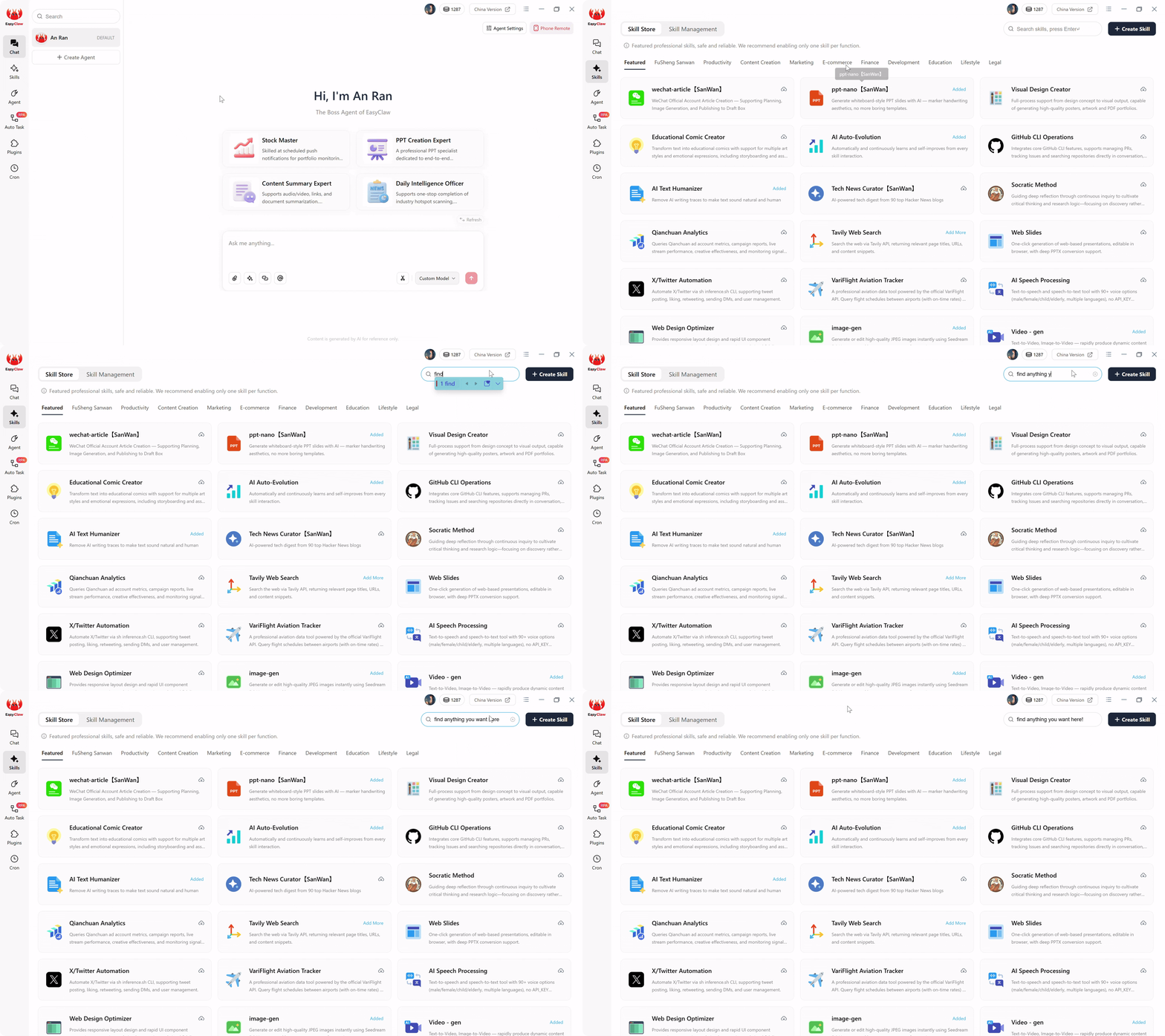
Abilita Browser Strumento per inviare e-mail tramite il tuo attuale account Gmail o Outlook: nessuna configurazione SMTP, nessun servizio di invio di terze parti, nessun rischio per la reputazione del dominio derivante da IP condivisi.
Passaggio 2: lascia che l'intelligenza artificiale generi il tuo script per la pipeline di sensibilizzazione
Apri la chat e descrivi la posizione dell'elenco dei lead, i passaggi di ricerca per lead, la struttura e il tono dell'email e le preferenze di invio (solo bozza o invio diretto). L'intelligenza artificiale genera uno script della pipeline che copre: lettura dell'elenco dei lead da Excel, ricerca di ciascuna azienda (sito Web, blog/notizie, LinkedIn), mappatura dei punti critici della soluzione e generazione di e-mail con argomenti specifici che fanno riferimento ai risultati della ricerca, il tutto in meno di 90 parole, scritto come un collega che offre un'osservazione piuttosto che un venditore che propone un prodotto.
Passaggio 3: pianifica il lavoro Cron
Crea un'attività Cron "Cold Outreach Pipeline" all'orario che preferisci: le prime mattine dei giorni feriali funzionano meglio. Richiesta: "Leggi ed esegui cold-outreach-pipeline.md nel mio spazio di lavoro." L'agente legge l'elenco dei contatti, ricerca ciascuna azienda, scrive e-mail personalizzate e salva come bozze per la revisione o invia direttamente con ritardi casuali di 2-4 minuti tra ciascun invio.
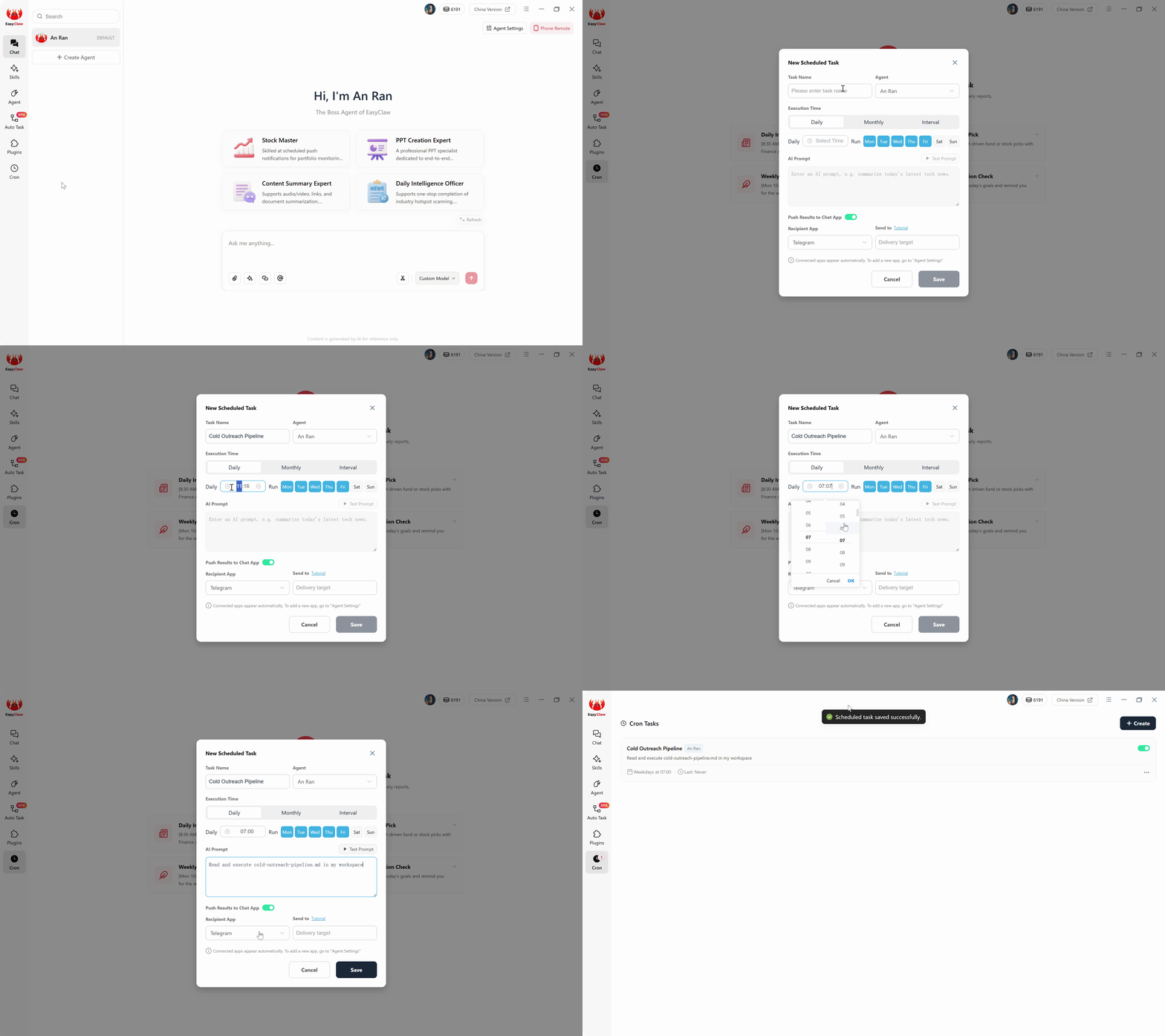
La pipeline di sensibilizzazione esegue: lettura di dati di lead da Excel, ricerca del sito Web e del blog di ciascuna azienda e composizione di e-mail fredde realmente personalizzate, non di modelli di stampa unione.
Protezione della deliverability per convertire in modo coerente i lead di vendita
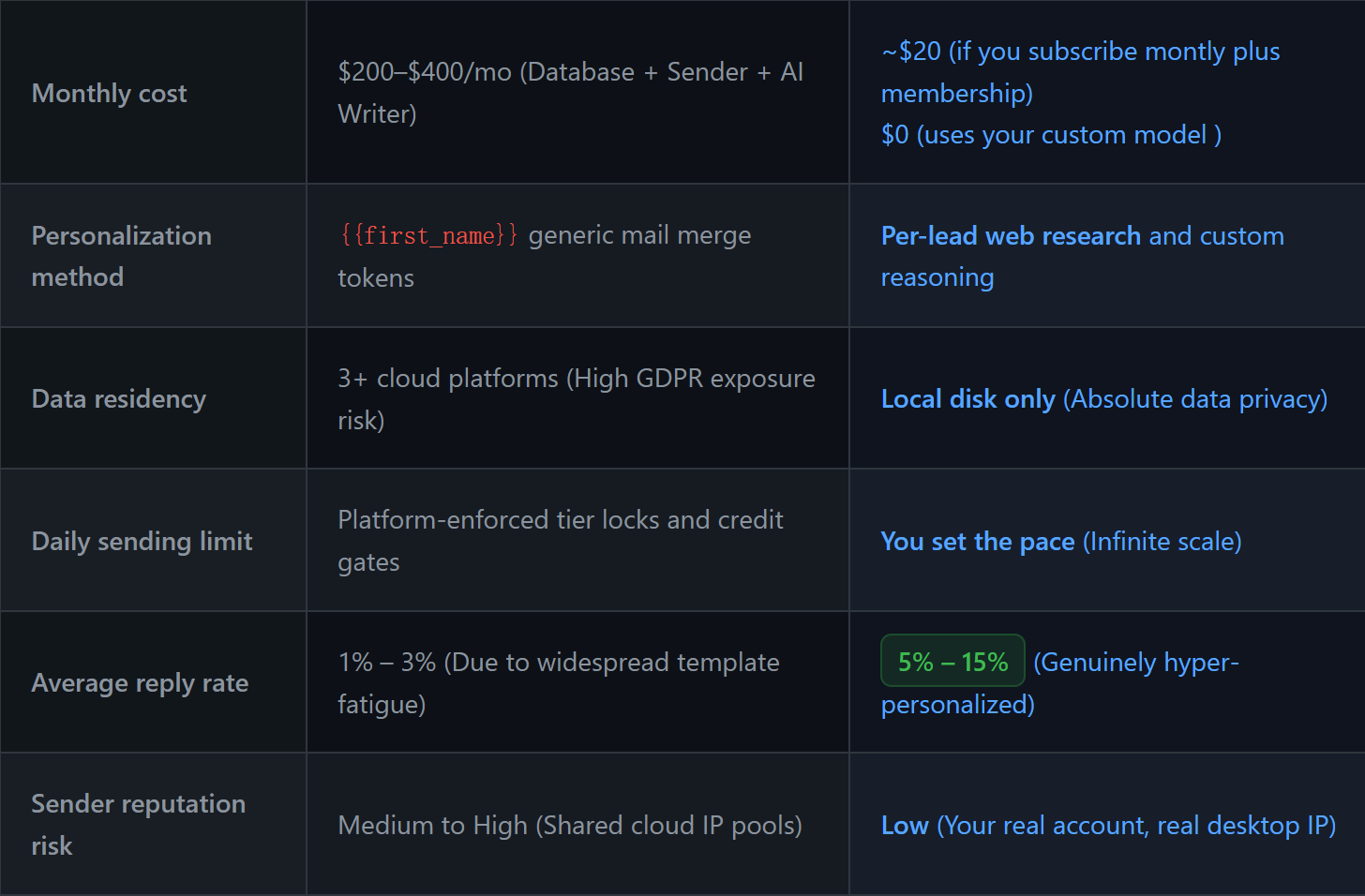
Gli strumenti di posta elettronica cloud utilizzano IP condivisi e variabili di modello che attivano i filtri antispam; EasyClaw compone e invia tramite il tuo vero account e-mail con una personalizzazione autentica e supportata dalla ricerca.
L'automazione della posta elettronica fredda vive o muore sulla deliverability e la deliverability vive o muore comportamento di invio simile a quello umano. Se 50 email lasciano il tuo Gmail entro 60 secondi, gli algoritmi di Google contrassegnano immediatamente lo schema. Lo script della pipeline specifica 2-4 minuti tra gli invii: l'elaborazione di 40 e-mail in 2 ore sembra un professionista impegnato che lavora attraverso il proprio elenco di contatti. L'elaborazione di 40 email in 2 minuti sembra un bot spam.
La qualità della ricerca influisce direttamente sui tassi di risposta e i tassi di risposta influiscono direttamente sulla consegna. I provider di posta elettronica tengono traccia del coinvolgimento: i messaggi aperti, letti e a cui hai risposto migliorano la reputazione del mittente. Vengono aperte e-mail autenticamente personali che fanno riferimento a qualcosa di specifico. I modelli evidenti vengono eliminati. L'investimento nella ricerca si ripaga nel posizionamento nella casella di posta. Quando sei costantemente ottenere contatti di vendita che rispondono e interagiscono, i provider di posta elettronica diventano tuoi alleati: il tuo dominio si guadagna la reputazione di inviare posta ricercata.
Perché EasyClaw sostituisce l'intero stack di e-mail fredde
Uno stack in uscita tradizionale costa dai 200 ai 400 dollari al mese tra database di lead, piattaforme di invio e strumenti di scrittura AI, con dati sui potenziali clienti su almeno tre piattaforme cloud. EasyClaw comprime ricerca, scrittura e invio in un'unica pipeline locale.
Apre siti Web aziendali, legge blog, esegue la scansione di LinkedIn, scrivendo e-mail che fanno riferimento a risultati reali e specifici.
Nessun modello {{first_name}}. Ogni email è unica, meno di 90 parole, e fa riferimento a qualcosa che solo la ricerca potrebbe trovare.
Invia tramite la tua vera e-mail con ritardi di 2-4 minuti a ritmo umano. Nessuna configurazione SMTP. La tua reputazione, il tuo controllo.
Gli elenchi dei lead e le e-mail generate rimangono sul desktop. Nessuna piattaforma di posta elettronica di terze parti memorizza i dati dei tuoi potenziali clienti.
Pro
- Tassi di risposta 3-5 volte più alti rispetto alle campagne modello
- L'invio a ritmo umano protegge la consegna
- Nessun costo per la piattaforma di invio: utilizza la tua casella di posta effettiva
- Modalità solo bozza per la revisione prima dell'invio
- Livello gratuito disponibile
Limitazioni
- Volume giornaliero limitato inviando una rampa di reputazione
- Richiede un desktop con una sessione di posta elettronica attiva
Domande frequenti sulle email fredde personalizzate tramite intelligenza artificiale
Quello che hai appena sostituito
Uno stack tradizionale di lead generation in uscita – Apollo/ZoomInfo ($ 100/mese), Instantly/Smartlead ($ 80-100/mese) e uno strumento di scrittura AI – costa $ 200-$ 400 al mese prima che venga inviata una singola email, con i dati dei potenziali clienti su almeno tre piattaforme cloud che non controlli.
La tua pipeline EasyClaw lo sostituisce tutto. L'agente legge l'elenco dei lead da un file Excel locale, senza abbonamento al database. Esamina ogni potenziale cliente e scrive e-mail realmente personalizzate, senza uno strumento di scrittura AI separato. Elabora o invia la tua email effettiva con un ritmo simile a quello umano, senza piattaforma di invio. Tutto funziona localmente, i dati dei tuoi potenziali clienti non toccano mai un server di terze parti.
Sales leads generato attraverso una sensibilizzazione realmente personalizzata converte a 3-5 volte il tasso delle campagne modello. Quando ogni email fa riferimento a qualcosa di reale sul destinatario, il tasso di risposta smette di essere una funzione del volume e inizia ad essere una funzione della pertinenza. Per i team SDR, i fondatori e i professionisti del marketing in crescita in tutto il mondo, l'intelligenza artificiale non ti aiuta a inviare più e-mail, ma ti aiuta a inviarne di migliori.