


Month-End Close è un caos silenzioso e gli strumenti cloud lo rendono più rischioso
La chiusura di fine mese in qualsiasi dipartimento finanziario è una sorta di caos silenzioso. La casella di posta si inonda di allegati PDF. I venditori richiedono il pagamento. Il tuo team di contabilità altamente istruito trascorre ore a fare qualcosa di completamente poco affascinante: aprire la webmail, strizzare gli occhi ai PDF per trovare un numero di fattura e digitare manualmente le stesse identiche informazioni nel loro software di contabilità.
Sai già che ne hai bisogno automatizzare l'elaborazione delle fatture. Il mercato del software è invaso da strumenti che promettono di leggere i tuoi documenti e organizzare magicamente i tuoi libri. Ma quando porti una proposta per un nuovo splendore sistema di automazione delle fatture per il tuo CFO, la conversazione si scontra con un muro di mattoni impenetrabile.
Il problema non è il costo del software. Il problema è la pipeline dei dati. Le fatture contengono alcuni dei dati operativi più sensibili di cui dispone un'azienda: margini di profitto, dettagli bancari dei fornitori, volume degli acquisti, termini di pagamento interni. Gli strumenti tradizionali basati su cloud come Zapier o Make richiedono l'invio di questi PDF altamente sensibili a server remoti per l'elaborazione OCR.
Quando utilizzi un aggregatore API cloud-first, stai rinunciando alla sovranità dei dati per comodità. Per team SaaS finanziari che gestiscono la rigorosa conformità SOC 2 o imprese di medie dimensioni in Nord America ed Europa avere a che fare con accordi di riservatezza con i fornitori, pompare documenti finanziari grezzi attraverso servizi cloud di terze parti è semplicemente inaccettabile.
E se non dovessi scendere a compromessi? E se potessi costruire un impeccabile flusso di lavoro della contabilità fornitori che sfrutta l'intelligenza artificiale avanzata per leggere i tuoi documenti, senza che un singolo byte dei tuoi dati venga mai intercettato da un intermediario del cloud?
L'illusione dell'automazione API: perché l'elaborazione delle fatture basata sul cloud fallisce
Per capire perché l’automazione del browser locale rappresenta un cambiamento di paradigma così massiccio, dobbiamo prima capire perché l’attuale panorama dell’automazione delle API finanziarie è così profondamente imperfetto.
Storicamente, le aziende hanno cercato di risolvere il problema delle fatture collegando i sistemi tramite API backend. Una email arriva nella tua casella di posta. Un servizio cloud lo intercetta, inviando il carico utile al server di un fornitore. Quel fornitore utilizza l'API OCR cloud di un importante gigante della tecnologia per leggere il testo. I dati estratti vengono archiviati, elaborati ed eventualmente inviati al tuo account QuickBooks Online o Xero tramite un altro token API cloud.
Ogni volta che i tuoi dati passano da un server all'altro, esponi la tua azienda a rischi per la sicurezza. Inoltre, le integrazioni API sono notoriamente fragili. Se il tuo software di contabilità aggiorna la sua struttura API, il tuo flusso di lavoro si interrompe. Se un fornitore modifica il layout della fattura, il cloud OCR non riesce.
| Dimensione | Automazione API cloud-first | EasyClaw RPA Web locale |
|---|---|---|
| Data Sovereignty | ✗ Multiple third-party servers | ✓ Absolute: completamente locale |
| Compliance Audit | ✗ Complex multi-vendor BAAs | ✓ Zero external BAAs required |
| Cost Structure | ✗ Per-API-call + per-document fees | ✓ Flat: nessun costo per documento |
| Workflow Fragility | ✗ Breaks on API version changes | ✓ Adaptive to UI changes |
| Scalability | ✗ Costs scale per invoice | ✓ Free to scale (zero tokens per run) |
EasyClaw cambia completamente il gioco. La sua capacità principale è l'automazione web basata su browser. Invece di fare affidamento su connessioni API invisibili e fragili in esecuzione su server remoti, apre una pagina Web nel browser locale, simula azioni umane come fare clic, digitare e leggere dati e solidifica queste azioni in uno script ripetibile. Intercettazione intermediaria zero cloud. Zero costi API OCR di terze parti. Controllo osservativo completo.
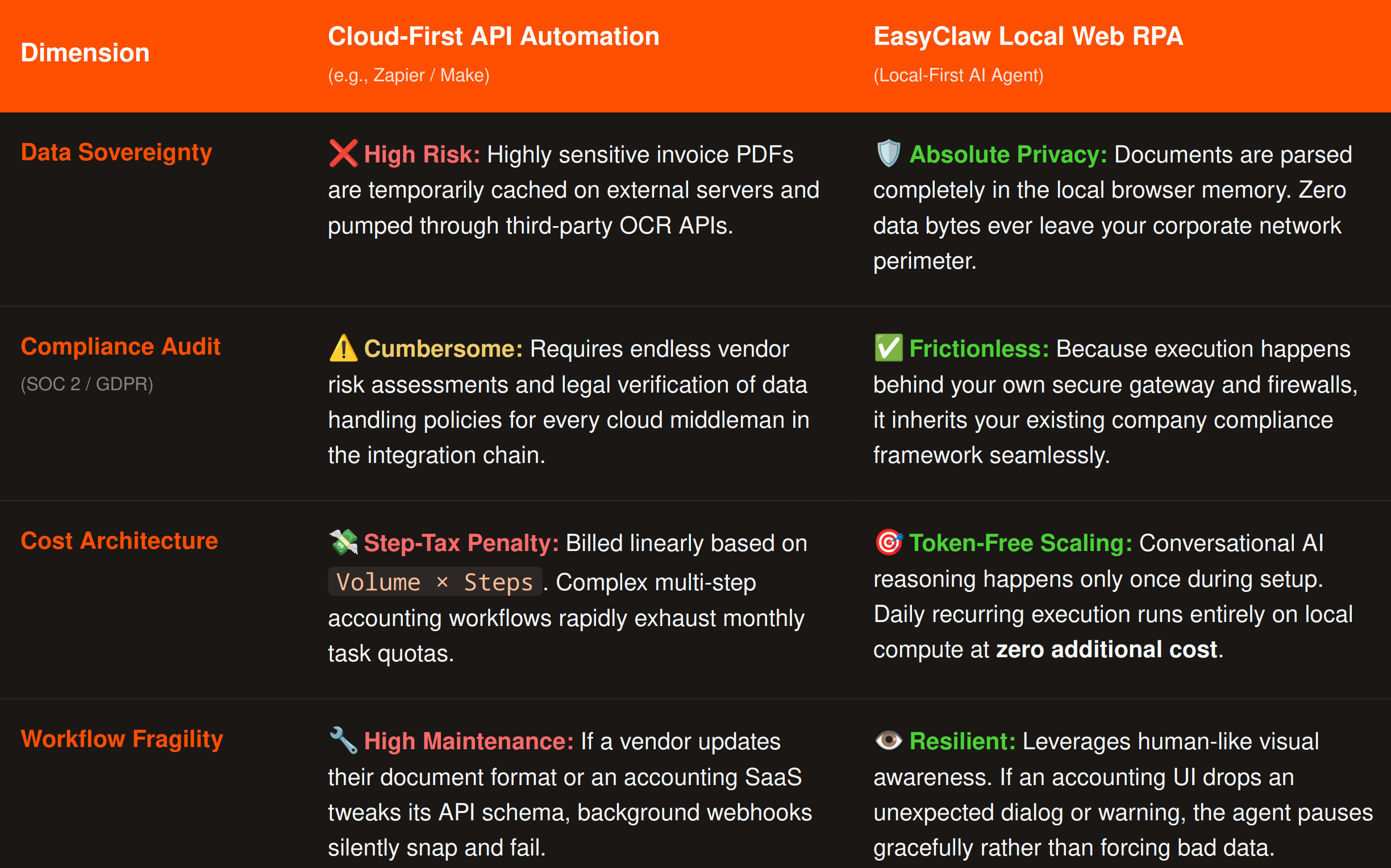
L'automazione API cloud-first espone i dati sensibili delle fatture su più server di terze parti; EasyClaw elabora tutto localmente sul tuo computer.
Passaggio 1: Configurazione dell'ambiente di automazione Web
Poiché EasyClaw è progettato per padroneggiare l'automazione del browser web, strutturiamo il nostro flusso di lavoro attorno alle interfacce web basate su cloud che il tuo team già utilizza quotidianamente. Per l'inserimento della posta elettronica, chiediamo all'agente di monitorare Outlook Web Access (OWA) tramite outlook.office.com. Per il registro contabile, chiediamo all'agente di registrare i dati in un moderno ERP web come QuickBooks Online tramite qbo.intuit.com.
Standardizzando l'ambiente esclusivamente nel browser web, diamo all'intelligenza artificiale una tela pulita e prevedibile. Il trasferimento dei dati avviene direttamente tra la pagina web di posta elettronica che stai visualizzando e la pagina web di contabilità di destinazione — in esecuzione interamente sul tuo computer locale.
Passaggio 2: la compilazione "Auto Task": dal linguaggio naturale allo script RPA
È qui che gli strumenti RPA tradizionali alienano i propri utenti. Per creare un web scraper multiapplicazione è stato necessario trascinare centinaia di nodi complessi, mappare selettori CSS e scrivere espressioni regolari. EasyClaw lo sostituisce con un'architettura "Step Compile".
Apri il Auto Task interfaccia. Vieni accolto con una semplice promessa: crea automazioni in una frase. Non è necessario scrivere codice: basta scrivere un messaggio chiaro e operativo.
"Apri il browser e vai su outlook.office.com. Accedi (se non hai già effettuato l'accesso) e cerca le e-mail non lette contenenti la parola 'Fattura' nella riga dell'oggetto. Quando ne trovi una, apri l'e-mail e leggi la fattura PDF allegata direttamente nel browser. Estrai il nome del fornitore, la data della fattura, l'importo totale dovuto e il numero dell'ordine di acquisto. Successivamente, apri una nuova scheda del browser e vai a qbo.intuit.com. Fai clic su "Nuova fattura". Incolla il fornitore estratto Nome nel campo "Fornitore", data nel campo "Data" e importo totale nel campo "Importo dovuto". Salva la voce come bozza. Infine, torna alla scheda Outlook e rispondi all'e-mail originale affermando: "Salve, la tua fattura è stata ricevuta ed è in attesa di revisione interna.'"
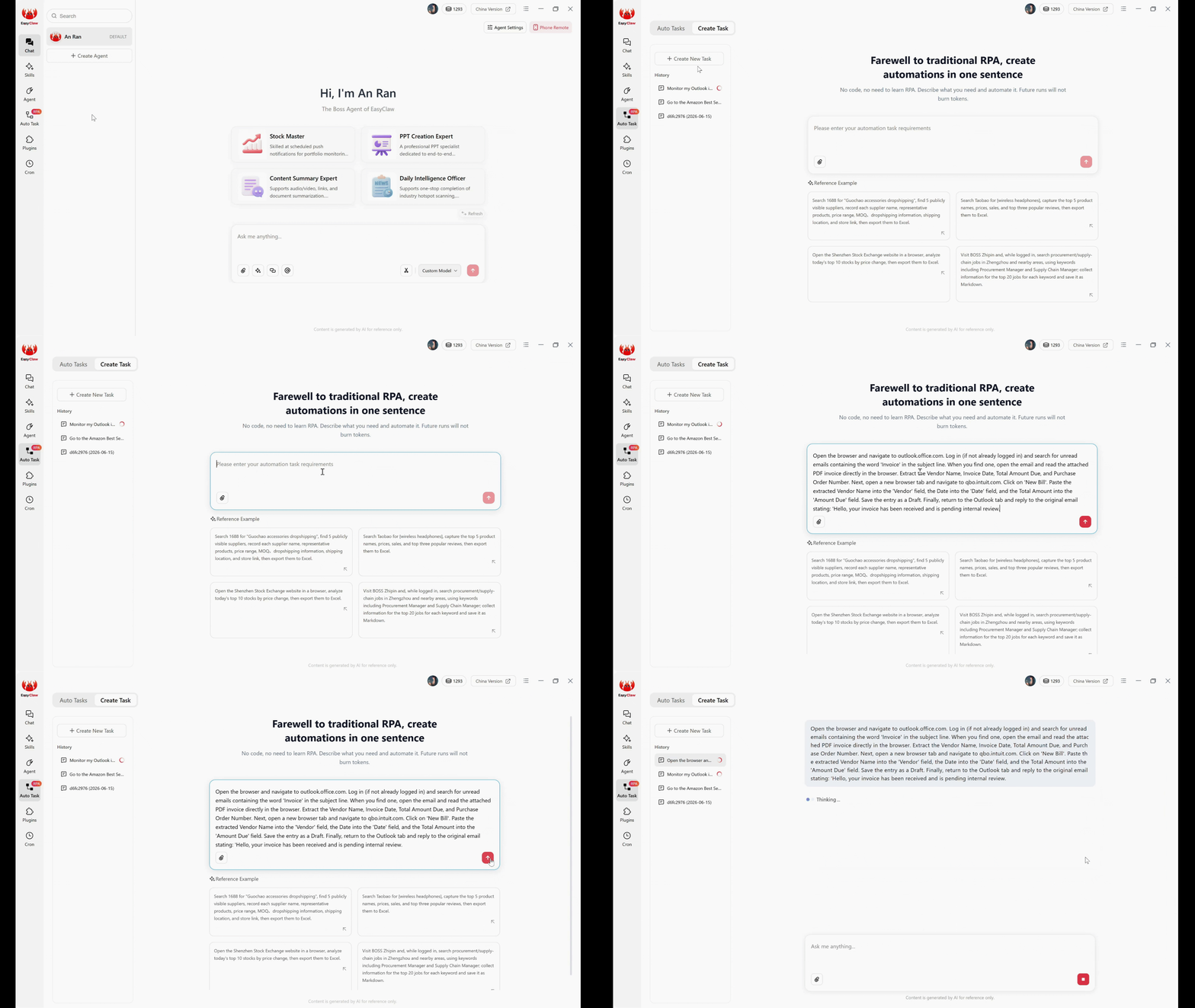
L'interfaccia Auto Task: inserisci il flusso di lavoro di elaborazione delle fatture in linguaggio naturale: EasyClaw lo compila in uno script RPA completamente locale.
Dopo aver fatto clic su Invia, l'agente AI locale prende il sopravvento. LLM legge il tuo paragrafo in linguaggio naturale, comprende il tuo intento operativo e lo compila immediatamente in uno script RPA del browser strutturato e passo passo. La fase di compilazione AI è ora completa.
Passaggio 3: esecuzione senza token: il segreto per un'elaborazione scalabile delle fatture
È fondamentale capire cosa succede Dopo premi Invia. Questo è il segreto per scalare la tua automazione senza aumentare i costi.
Se si trattasse di uno strumento AI puramente basato su cloud, ogni volta che arriva una nuova fattura, il sistema invierebbe l'intera e-mail e il PDF a un server LLM. Brucerebbe costosi token di conversazione solo per capire quali dati estrarre. EasyClaw does not do this. Il costoso ragionamento basato sull’intelligenza artificiale avviene solo una volta: durante la creazione dell’attività.
Quando domani arriva una nuova fattura, lo script RPA sottostante prende il sopravvento. Apre il browser, accede agli URL e analizza il PDF utilizzando modelli di estrazione leggeri e incorporati. Poiché questi passaggi di esecuzione ricorrenti non chiamano API AI conversazionali esterne per prendere decisioni di routing, le successive esecuzioni giornaliere vengono bruciate absolutely zero LLM tokens.
Questa architettura consente di elaborare 50 fatture o 5.000 fatture al mese con un costo operativo fisso e prevedibile. Team finanziari negli Stati Uniti, in Europa e nella regione Asia-Pacifico possono scalare l'automazione degli AP senza ridimensionare la bolletta relativa all'AI.
Passaggio 4: osserva l'esecuzione del browser: la trasparenza come risorsa di sicurezza
Il collo di bottiglia più significativo nell’automazione della contabilità fornitori è la fiducia. I leader finanziari esitano perché le API sono invisibili: quando i dati vengono danneggiati attraverso un webhook in background, nessuno lo sa fino alla riconciliazione.
EasyClaw aggira completamente il problema dell'invisibilità. Poiché l'agente esegue le attività tramite l'automazione del browser locale, l'intero processo è trasparente. Puoi guardare fisicamente lo schermo del tuo computer mentre l'agente prende vita: Chrome o Edge si aprono, il cursore si sposta su outlook.office.com, controlla l'e-mail, passa alle schede QuickBooks Online, fa clic su "Nuova fattura" e digita i dati estratti nei campi corretti con assoluta precisione.
Questa visibilità è un'enorme risorsa per la sicurezza. Sposta l'immissione dei dati lontano dai fragili endpoint API e nel regno prevedibile e osservabile delle interfacce utente. Se il software di contabilità aggiorna la sua interfaccia utente o apre una finestra di dialogo di avviso inaspettata, l'automazione dell'interfaccia utente si fermerà, proprio come un essere umano confuso, impedendo che i dati non verificati vengano forzati ciecamente nei tuoi registri.
Pro Tips per un'impostazione di elaborazione delle fatture a prova di bomba
1. Enforce the "Draft Only" Rule
Non dare mai a un agente automatizzato l'autorità di fare clic su "Paga" o "Invia finale" il primo giorno. Includere sempre le istruzioni per "Salva la voce come bozza" nel tuo prompt Auto Task. Una pipeline AP leggermente più lenta che richiede che un CFO umano faccia clic su "Approva" è di gran lunga superiore a una pipeline veloce e distruttiva che paga accidentalmente il fornitore sbagliato.
2. Handle Missing Data Gracefully
I fornitori spesso dimenticano di includere i numeri degli ordini di acquisto. Aggiungi un'istruzione condizionale: "Se non è possibile trovare il numero dell'ordine di acquisto sulla fattura, non inserire la fattura in QuickBooks. Rispondi invece all'e-mail di Outlook dicendo: "Abbiamo ricevuto la fattura, ma manca un numero di ordine di acquisto. Forniscilo in modo che possiamo elaborare il pagamento.'" L'agente gestisce automaticamente il noioso follow-up del fornitore.
3. Keep the Execution Environment Clean
Non lasciare che il tuo agente si scateni sulla tua workstation principale. Distribuiscilo su un computer locale dedicato, una VM locale sicura o un laptop dedicato funzionante 24 ore su 24, 7 giorni su 7. Ciò crea una postazione di lavoro dedicata al "dipendente digitale" che elabora i conti da pagare nell'angolo dell'ufficio senza interrompere il lavoro umano.
Perché EasyClaw è la scelta giusta per l'automazione delle fatture
Per dipartimenti finanziari, team contabili e CFO aziendali, la scelta tra l'elaborazione delle fatture basata sul cloud e l'automazione local-first definisce il tuo livello di sicurezza dei dati. EasyClaw è creato appositamente per ambienti in cui la sovranità dei dati non è negoziabile.
EasyClaw non è una piattaforma di elaborazione dei documenti basata su cloud. È un desktop-native AI agent che legge le fatture, estrae i dati e li inserisce nel tuo software di contabilità, tutto a livello locale, senza che gli intermediari del cloud tocchino i tuoi documenti finanziari.
Le fatture del fornitore, i termini di pagamento e i dettagli bancari non lasciano mai il tuo computer locale. Nessun servizio OCR cloud coinvolto.
Leggi i PDF delle fatture direttamente nel browser: estrai nomi dei fornitori, date, importi e numeri di ordine di acquisto senza API esterne.
Elabora 50 o 5.000 fatture al mese. Nessuna tariffa OCR per documento, nessun costo di chiamata API. Prezzi fissi e prevedibili.
Guarda il browser elaborare ogni fattura in tempo reale. Nessun webhook API invisibile: completa trasparenza dell'audit.
Pro
- Completamente locale: i dati del fornitore non lasciano mai la tua macchina
- Nessun costo per fattura o per chiamata API
- Configurazione del linguaggio naturale: descrivi il tuo processo AP una volta
- Modalità solo bozza per voci sicure e riviste
- Follow-up automatico del fornitore sui dati mancanti
- Livello gratuito disponibile: non è richiesta la carta di credito
Limitazioni
- Richiede l'installazione dell'app desktop
- È richiesto un software di contabilità basato sul Web (non ERP solo desktop)
EasyClaw rispetto alle alternative per l'elaborazione delle fatture
| Capacità | EasyClaw | Cloud OCR (Rossum/Nanonets) | Zapier/Crea + OCR |
|---|---|---|---|
| Vendor data privacy | ✓ Fully local | ✗ Cloud-processed | ✗ Multi-vendor data path |
| Per-document cost | ✓ Zero | ✗ $ 0,05–$ 0,30 per pagina | ✗ Per-task + OCR fees |
| Handles missing fields | ✓ Auto follow-up email | Coda di revisione ~ Requires manual | ✗ Typically errors out |
| Deployment time | ✓ Minutes | ~ Days to train models | ~ Days to configure |
Domande frequenti sull'automazione dell'elaborazione delle fatture
Reclaiming Your Financial Sovereignty
Imparare a farlo automatizzare l'elaborazione delle fatture localmente significa davvero imparare a progettare un ambiente operativo sicuro e trasparente per la tua azienda.
Il mercato del software cercherà di convincerti che il miglior strumento di automazione è quello con il maggior numero di integrazioni cloud e gli hook API più profondi. Questa è una metrica pericolosa per i team finanziari. Una buona pipeline di contabilità fornitori non è quella che sposta i dati su Internet più velocemente, effettuando il ping di una dozzina di server diversi lungo il percorso. È quello in cui ogni capacità ha una ragione, ogni estrazione di dati è delimitata in modo sicuro e ogni record finanziario rimane completamente privato.
La prossima ondata di automazione aziendale non sarà giudicata dall’intelligenza dell’intelligenza artificiale in una finestra di chat. Sarà giudicato se sarà possibile operare in modo sicuro e privato dove si svolge effettivamente il vero lavoro. Per team finanziari e imprese in Nord America, Europa e mercati globali, l'approccio local-first offre efficienza e sicurezza dei dati senza compromessi.
Utilizzando un'architettura local-first con il web RPA in linguaggio naturale di EasyClaw, eviti completamente gli intermediari API. Mantieni i dettagli del tuo fornitore, i termini di pagamento e i dati della catena di fornitura esattamente al loro posto: visualizzati in modo sicuro sul tuo schermo.