


La più grande bugia: database statici "verificati".
Paghi a un fornitore di dati aziendale decine di migliaia di dollari per un foglio di calcolo contenente cinquantamila contatti. Il rappresentante di vendita ti assicura che i dati sono stati ripuliti la settimana scorsa. Ma la realtà dell’economia moderna è che i dati iniziano a marcire nel momento esatto in cui li acquisti. Nel giro di tre mesi, un terzo di questi obiettivi ha cambiato lavoro, le imprese locali hanno cambiato marchio, i siti web aziendali sono stati migrati e le vostre e-mail fredde, accuratamente realizzate, rimbalzano a una velocità allarmante. Stai pagando un prezzo premium per un bene in decomposizione.
Per combattere questo problema, i team di crescita più aggressivi abbandonano gli elenchi statici e costruiscono i propri canali di ricerca dinamici. Ma il flusso di lavoro manuale è angosciante: cerca un'azienda locale su Google Maps, copia il dominio, apri il sito web dell'azienda per recuperare un'e-mail di contatto, apri LinkedIn per scovare il CEO e incolla tutto in un foglio di monitoraggio principale. Prende 10-15 minuti per profilo arricchito – matematicamente impossibile da scalare utilizzando il lavoro umano.
Quando i team di ingegneri tentano di automatizzarlo, creano un incubo frammentato: Google Places API (esorbitantemente costosa), un'API di scraper LinkedIn (inevitabilmente vietata) e scraper Python personalizzati (crash su layout non standard). Il risultato è un Frankenstein fragile e dipendente dal cloud che richiede uno sviluppatore a tempo pieno per continuare a funzionare. Ma cosa accadrebbe se potessi abbandonare completamente le fragili API e implementare un unico agente AI locale che guida visivamente il tuo browser su tutte e tre le piattaforme?
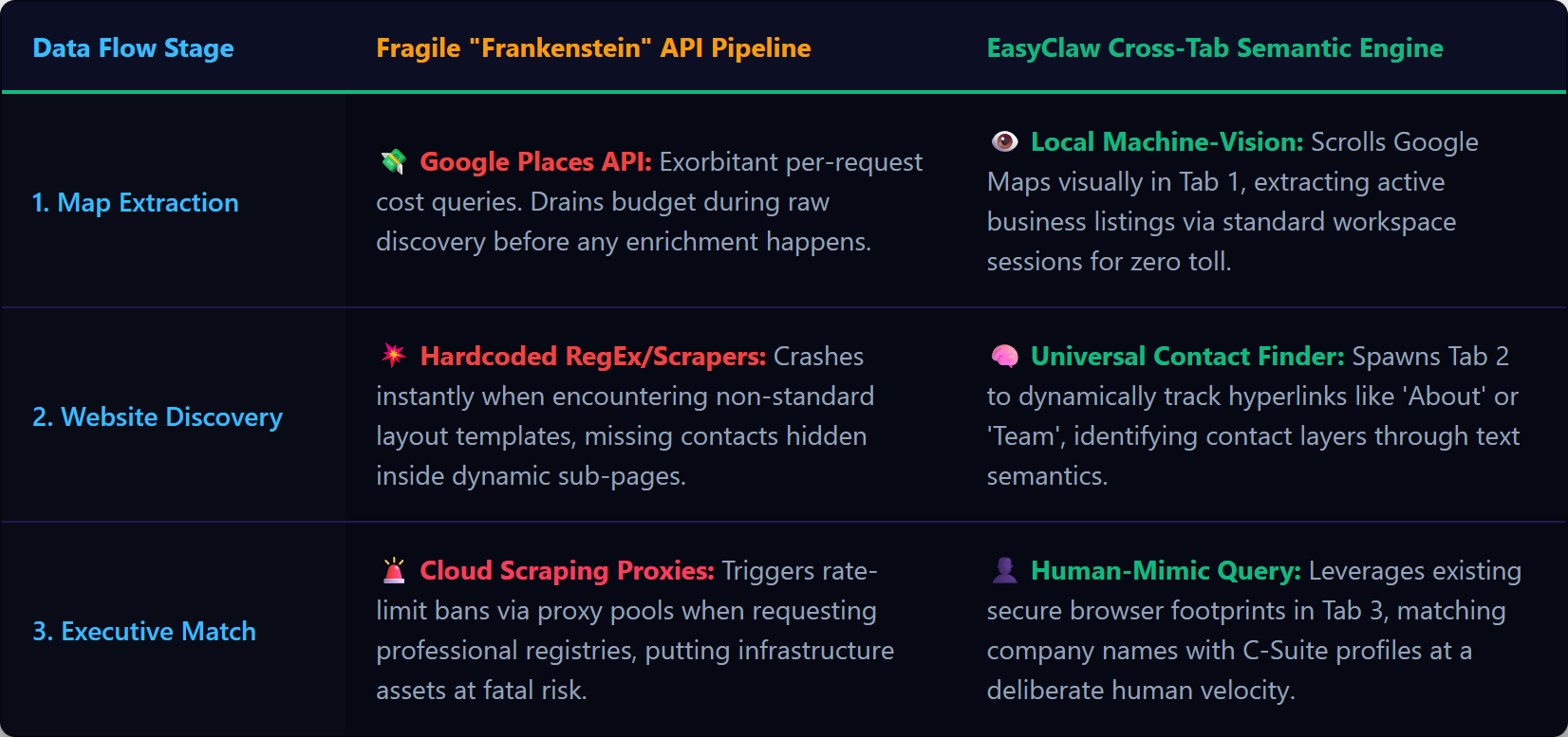
I database statici si deteriorano nel giro di pochi mesi; EasyClaw crea elenchi di lead B2B in tempo reale e multi-fonte facendo riferimenti incrociati a Google Maps, ai siti Web aziendali e a LinkedIn in tempo reale.
Perché i cloud scraper falliscono nell'arricchimento multi-fonte
I tradizionali cloud scraper sono progettati per ambienti altamente strutturati e a dominio singolo. Una pipeline di arricchimento B2B è intrinsecamente caotica. Inizi su Google Maps con la sua complessa tela dinamica che altera costantemente il DOM per contrastare gli scraper. Quindi passi al sito web dell'azienda target: ogni azienda utilizza un builder diverso (WordPress, Webflow, React personalizzato). Un cloud scraper che si basa su selettori CSS si blocca perché non è in grado di prevedere dove si trova l'e-mail "Contattaci" su un sito Web locale casuale. Infine, esegui una query su LinkedIn tramite un endpoint cloud e gli algoritmi di sicurezza contrassegnano immediatamente l'IP del data center.
Se provi a risolvere questo problema instradando tramite Zapier o Make, pagherai una tassa per passaggio su ogni azione. Un'attività da Maps, recupero dei dati del sito Web, query LinkedIn: decine di attività cloud. Il raggiungimento di migliaia di lead manda in bancarotta il budget del software in pochi giorni.
EasyClaw aggira questo errore automazione del web semantico. Non analizza il codice sottostante invisibile tramite server remoti. Prende il controllo fisico del tuo browser Chrome o Edge, apre schede, guarda lo schermo utilizzando modelli di visione artificiale locali e comprende il concetto semantico di una "e-mail di contatto" sia che sia nascosta in un piè di pagina, nascosta in un pop-up o incollata su un banner.
Four-Phase Multi-Source Pipeline Configurazione
Phase 1: dotare il tuo strumento di ricerca lead B2B locale
Abilita il Web Automation & Navigation abilità in EasyClaw. Insegna all'agente come aprire e chiudere in modo sicuro nuove schede senza arrestare in modo anomalo la sessione del browser principale, gestisce lo scorrimento infinito su Google Maps e impedisce all'agente di scaricare file non verificati da siti Web di società sconosciute. L'agente è autorizzato a leggere testo ed estrarre stringhe; non è autorizzato a interagire con i file di sistema oltre al salvataggio del report Excel finale.
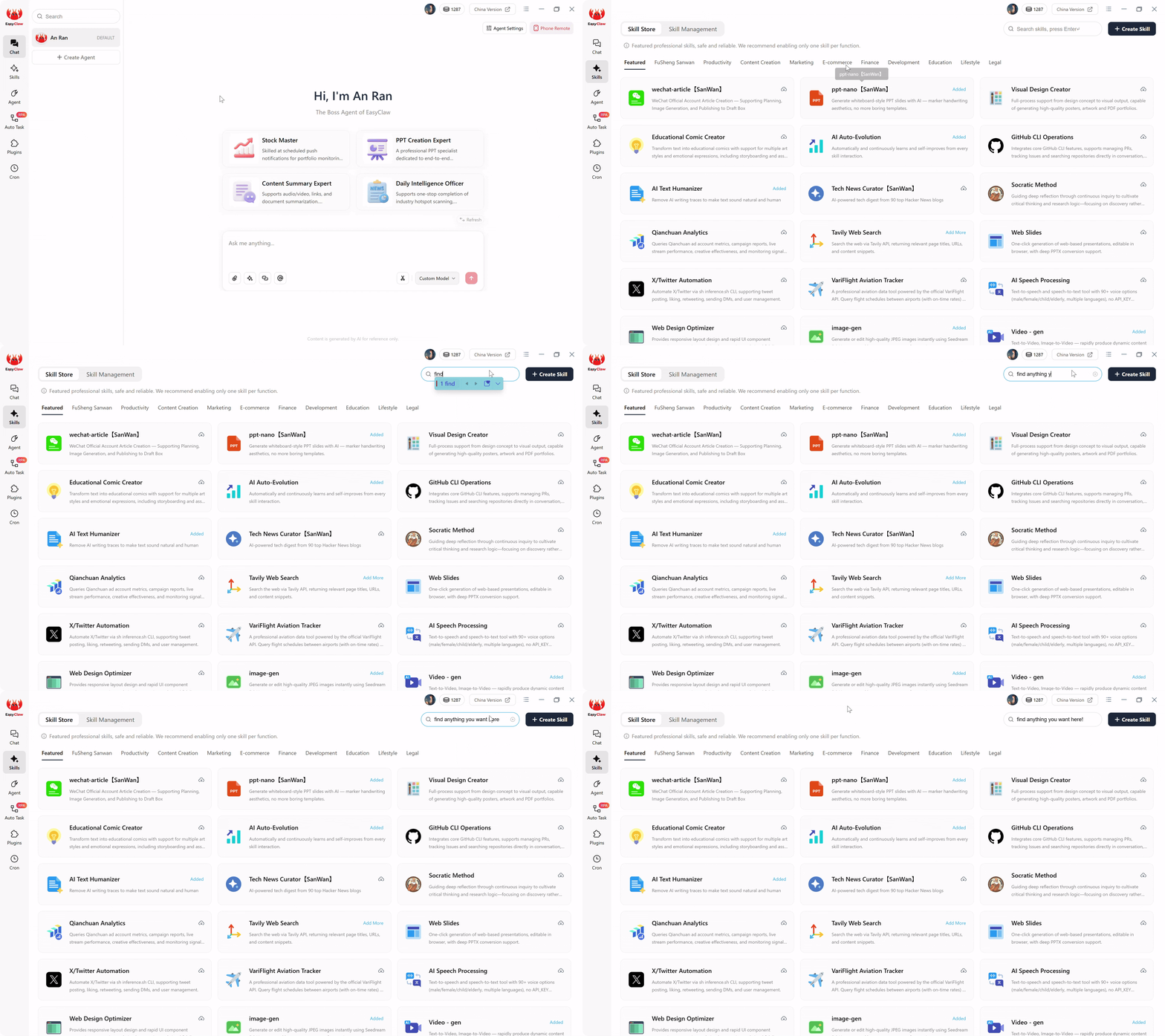
Abilita la competenza Web Automation & Navigation per fornire al tuo agente il vocabolario per la ricerca di lead B2B multipiattaforma, da Google Maps a LinkedIn.
Phase 2: scrittura del prompt dell'attività automatica multipiattaforma
Quando si realizza l'automazione su più piattaforme, si articola la logica operativa in un inglese semplice. Un prompt pronto per la produzione per l'arricchimento da più fonti:
"Apri il browser e vai a Google Maps. Cerca "Produttori HVAC commerciali in Ohio". Estrai il nome dell'azienda, il numero di telefono e l'URL del sito web per i primi 20 elenchi. Conserva questi dati in memoria.
Successivamente, per ogni URL del sito web, vai a quel sito web. Scansiona visivamente la home page e la pagina dei contatti per qualsiasi indirizzo email pubblico. Allega le email trovate; contrassegnare quelli mancanti come 'NULL'.
Successivamente, vai su LinkedIn. Per ogni nome aziendale, cerca il nome più "CEO" o "Direttore". Filtra per Persone. Estrai il nome completo e l'URL del profilo LinkedIn del risultato principale.
Infine, chiudi le schede aggiuntive. Crea un file Excel locale "Ohio_HVAC_Enriched_Leads" con i dati consolidati: nome dell'azienda, telefono, sito Web, e-mail, nome del CEO, URL del CEO LinkedIn. Assicurati che non vi siano duplicati e salva."
LLM compila questo paragrafo multicondizionale in uno script RPA rafforzato che mantiene i dati in memoria su architetture web completamente diverse. Hai appena creato una sofisticata pipeline di ingegneria dei dati multidominio in un solo paragrafo.
Phase 3: esecuzione invisibile (economia zero-token)
Se utilizzassi uno strumento di automazione AI cloud per questo flusso di lavoro, ogni navigazione verso un nuovo sito Web di un'azienda HVAC richiederebbe l'acquisizione dell'intero codice HTML, l'invio a un server LLM esterno e la masterizzazione di token costosi solo per chiedere "dov'è l'e-mail?" Farlo per migliaia di contatti costa una fortuna. EasyClaw elimina questo: il ragionamento dell'IA è avvenuto una volta in fase di compilazione. Lo script RPA locale analizza vari layout utilizzando modelli di estrazione leggeri in memoria. L'estrazione giornaliera viene eseguita zero LLM tokens.
Phase 4: impostazione del motore non presidiato
Crea un'attività Cron denominata "Esecuzione di arricchimento HVAC notturno" ogni giorno alle 2:00. Collegalo con: "Esegui l'attività automatica 'Ohio HVAC Enrichment'. Deduplica rispetto al file di ieri. Conteggio dei profili completamente arricchiti." Attiva/disattiva i risultati push su Slack/WhatsApp/Telegram. Alle 8 del mattino, i tuoi DSP visualizzano: "Arricchimento notturno completato. 45 lead HVAC nuovi e completamente arricchiti estratti da Maps e LinkedIn. File Excel salvato sul desktop". I dati risalgono a ore, non a mesi.
Pro Tips from the Data Trenches
Semantic Contact Hunting
Non chiedere all'agente semplicemente di "cercare il simbolo @". Molti siti Web moderni nascondono le e-mail in immagini o richiedono la navigazione in un modulo di contatto. Sfruttare la comprensione semantica: "Se un'e-mail non è immediatamente visibile, cerca i collegamenti ipertestuali etichettati 'Contatto', 'Chi siamo' o 'Team'. Fai clic su questi collegamenti ed esegui la scansione delle pagine successive prima di arrenderti." Questa persistenza simile a quella umana aumenta drasticamente i tassi di successo dell'estrazione.
In-Memory Deduplication
Le aziende Google Maps spesso compaiono più volte in diverse categorie. Istruire l'agente: "Mantieni un elenco interno di nomi aziendali in memoria. Prima di aprire una nuova scheda per il sito Web di un'azienda o LinkedIn, verifica che il nome aziendale non esista già nell'array di memoria. Salta immediatamente i duplicati."
Perché EasyClaw sostituisce l'intero stack del fornitore di dati
Il settore delle vendite B2B è rimasto intrappolato in un circolo vizioso: acquista elenchi costosi e in rapido decadimento da broker di dati, sperimenta tassi di conversione terribili e costringe il personale di vendita ben pagato a ricercare manualmente obiettivi migliori. Quel fallimento architettonico finisce qui.
EasyClaw impiega un implacabile ricercatore digitale che utilizza il tuo browser per passare da Google Maps, siti Web aziendali ed LinkedIn, compilando database strutturati in tempo reale direttamente sul tuo disco rigido con zero costi API e zero dati obsoleti.
Cerca ed estrai schede di attività commerciali con telefono, indirizzo e sito web, senza costi per l'API Places.
Scansione semantica di home page, pagine Informazioni e pagine Contatti per e-mail e nomi di dirigenti.
Verifica l'occupazione, estrai i titoli attuali e acquisisci gli URL dei profili, il tutto durante la sessione autenticata.
Tutte e tre le origini dati sono state unite in un'unica cartella di lavoro strutturata, deduplicata e pronta per essere divulgata.
Pro
- Zero costi API: nessun Google Places, nessuna tariffa API LinkedIn
- Dati in tempo reale: estratti oggi, non 90 giorni fa
- La verifica incrociata da più fonti migliora la precisione
- Completamente locale: i dati non toccano mai un server di terze parti
- Livello gratuito disponibile: non è richiesta la carta di credito
Limitazioni
- Richiede un desktop con Chrome/Edge installato
- Non adatto per build di database con milioni di record
| Origine dati | EasyClaw Pipeline locale | Stack di cloud tradizionale |
|---|---|---|
| Google Maps | ✓ Visual extraction via real browser | ✗ Google Places API: costoso per richiesta |
| Company Websites | ✓ Semantic scanning adapts to any layout | ~ CSS-selector scrapers break on custom sites |
| ✓ Authenticated session, residential IP | ✗ Datacenter IPs — bannato in pochi giorni |
Domande frequenti
La fine dei dati statici
Per anni, il settore delle vendite B2B è rimasto intrappolato in un circolo vizioso: acquisto di elenchi costosi e in rapido decadimento da data broker, sperimentando terribili tassi di conversione a freddo e costringendo il personale di vendita ben pagato a ricercare manualmente obiettivi migliori. Questo è un fallimento architettonico.
La creazione di una pipeline altamente mirata e multi-verificata non dovrebbe richiedere decine di migliaia di dollari ai fornitori di dati o API cloud fragili e costose che si interrompono nel momento in cui un sito Web ridisegna la propria home page. Adottando un'architettura dell'interfaccia utente Web locale con EasyClaw, elimini le limitazioni dei cloud scraper e i costi dei database statici.
Distribuisci un implacabile ricercatore digitale che utilizza il tuo browser, salta senza interruzioni tra piattaforme web disparate e compila database strutturati in tempo reale direttamente sul tuo disco rigido. Apri l'interfaccia Auto Task, definisci il tuo profilo cliente ideale e la sequenza di arricchimento in un unico paragrafo e osserva come le tue operazioni di prospezione più estenuanti si trasformano in una pipeline quotidiana automatizzata, a manutenzione zero e perfettamente fresca, dando potere ai team SDR, ai responsabili delle vendite e ai leader della crescita a livello globale.