


La scelta impossibile che ogni reparto IT ospedaliero deve affrontare
Esiste un ciclo familiare e doloroso che si verifica all’interno di quasi tutti i reparti IT ospedalieri e i team di software sanitario. Un responsabile operativo si rende conto che il personale clinico trascorre tre ore al giorno copiando manualmente i dati demografici dei pazienti da un portale di immissione basato sul Web nel sistema di cartelle cliniche elettroniche (EHR) primario dell'ospedale. Il manager propone un'iniziativa di automazione. Mappano il processo. Calcolano le migliaia di ore risparmiate.
E poi portano la proposta al Chief Compliance. Nel momento in cui il responsabile della conformità se ne rende conto Protected Health Information (PHI) - nomi, date di nascita, storia medica - verranno instradati attraverso una piattaforma di automazione cloud di terze parti, il progetto è morto all'arrivo.
Questa è la dura realtà di automazione dei processi robotici in ambito sanitario. L'automazione tradizionale si basa su un middleware cloud-first che acquisisce i tuoi dati, li elabora su server remoti e li reimmette nei tuoi sistemi. In un ambiente altamente regolamentato, ogni server che tocca i tuoi dati richiede un certificato firmato Business Associate Agreement (BAA), controlli di sicurezza approfonditi e valutazioni continue del rischio. L'invio dei dati grezzi dei pazienti a un'API cloud esterna solo per spostarli tra due portali Web è un incubo di conformità che la maggior parte delle organizzazioni sanitarie semplicemente rifiuta di affrontare.
Ma l’alternativa – costringere infermieri e amministratori altamente qualificati ad agire come macchine umane copia-incolla – è altrettanto inaccettabile. Per ospedali, cliniche e team IT sanitari in Nord America ed Europa, la domanda non è se automatizzare. La questione è se l'automazione può essere realizzata senza violare il quadro normativo che protegge la privacy dei pazienti.
L’illusione dell’interoperabilità basata sul cloud nel settore sanitario
Per capire perché l’automazione del browser locale rappresenta un cambiamento di paradigma obbligatorio per il settore sanitario, dobbiamo capire perché il cloud RPA per la sanità è fondamentalmente rotto. Storicamente, gli ospedali tentavano di connettere i sistemi utilizzando API backend come HL7 o FHIR. Ma la realtà del software medico è incredibilmente frammentata: le cliniche regionali, i portali di laboratori specializzati e i sistemi di fatturazione di terze parti spesso mancano di API robuste.
Quando le API non esistono, i team si rivolgono a strumenti RPA basati su cloud. Un nuovo paziente si registra su un sito web di pianificazione. Uno strumento RPA cloud attiva un webhook, inserisce il payload contenente la storia medica in un server remoto, utilizza un'intelligenza artificiale cloud di terze parti per analizzare note non strutturate e inserisce tali dati tramite un'altra API nella tua cartella clinica elettronica.
Ogni volta che le PHI lasciano la tua rete controllata per spostarsi su server esterni, esponi l'organizzazione a una responsabilità catastrofica. Mantenere i BAA con ogni microservizio in quella catena è amministrativamente estenuante. Hai ceduto la custodia fisica dei dati dei tuoi pazienti a società che non puoi controllare.
| Compliance Dimensione | Middleware cloud-first (RPA legacy) | EasyClaw RPA Web locale |
|---|---|---|
| PHI Sovereignty | ✗ External servers: alta responsabilità | ✓ Absolute: completamente locale |
| BAA Requirements | ✗ Multi-vendor BAAs required | ✓ Zero external BAAs needed |
| Audit Trail Access | ✗ Vendor-dependent: solo su richiesta | ✓ Local, immediate, timestamped |
| Execution Observability | ✗ Invisible API webhooks | ✓ Screen-visible browser actions |
| Data Storage | ✗ Cloud-stored: custodia del fornitore | ✓ Zero cloud storage |
EasyClaw modifica le regole operative. La sua competenza principale è l'automazione del browser Web locale: apre una pagina Web nel browser locale, simula azioni umane come fare clic, digitare e leggere dati sullo schermo e consolida tali azioni in uno script ripetibile. Intercettazione intermediaria zero cloud. Zero archiviazione dati esterna. Controllo osservativo completo.
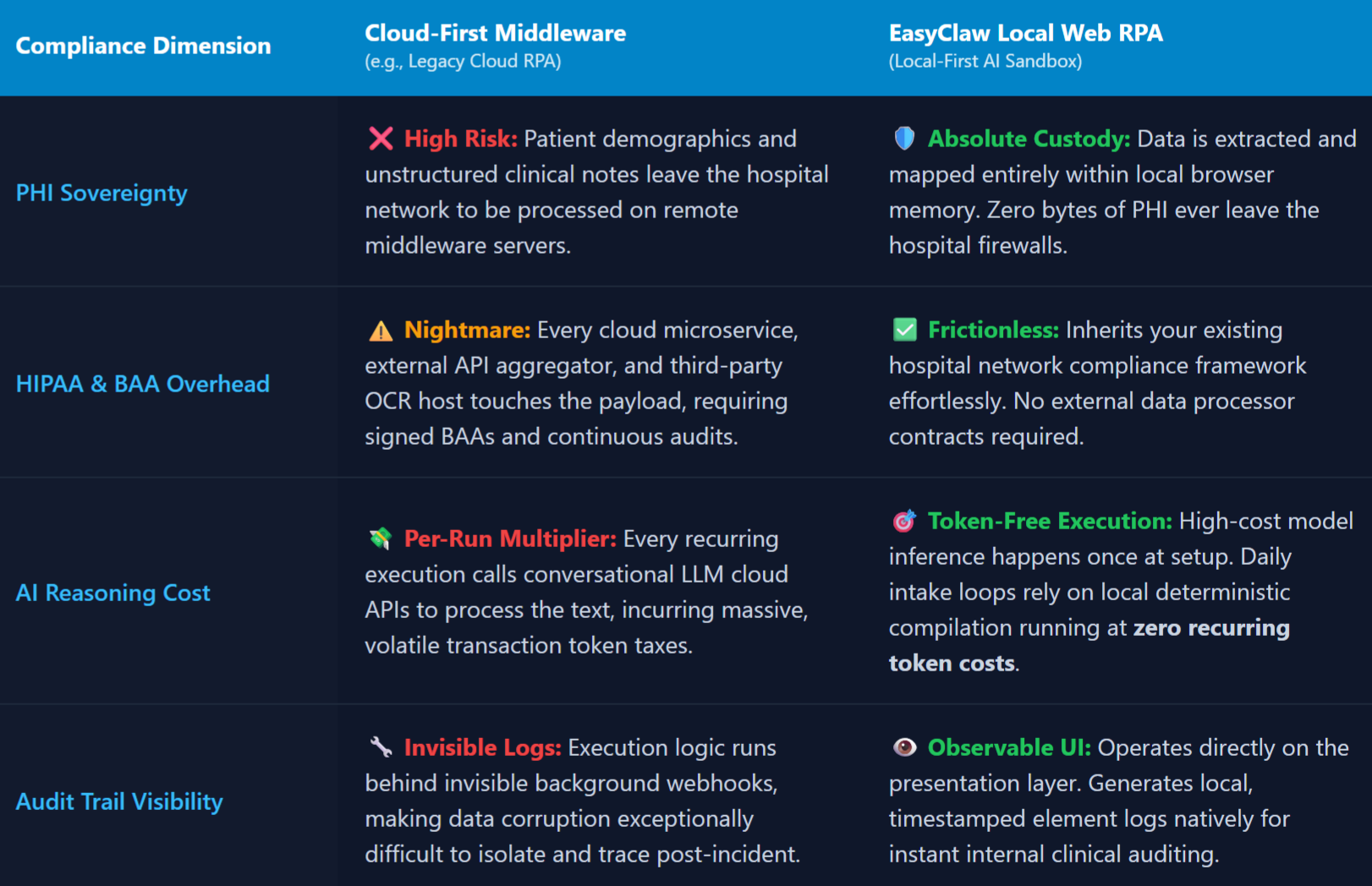
L’automazione sanitaria cloud-first richiede BAA multi-vendor complessi; EasyClaw elabora tutti i dati dei pazienti localmente, eliminando le catene di conformità esterne.
Passaggio 1: installa l'automazione Skill — The Regulatory Foundation
Quando si ha a che fare con dati sanitari, non si vuole che un agente AI improvvisi le sue azioni al volo. Desideri un processo deterministico, ripetibile e bloccato. Invece di scrivere uno script complesso da zero, EasyClaw ti consente di utilizzarlo Skill architettura: un insieme di funzionalità preconfezionate che indica all'agente esattamente come interagire con gli elementi web, gestire gli errori ed eseguire cicli.
Apri l'interfaccia EasyClaw e vai al file Skills directory. Per un flusso di lavoro di immissione dati nel settore sanitario, installa una competenza di base per l'automazione web. Installando questo Skill, fornirai al tuo agente locale il vocabolario tecnico per comprendere le schede del browser, i campi dei moduli e i pulsanti di invio - e fissandone i confini precisi di ciò che l'agente è autorizzato a fare.
Non può inviare e-mail, accedere al file system locale o raggiungere domini non autorizzati. Può solo manipolare le interfacce web specifiche che gli assegni. Questo è esattamente ciò responsabili della conformità ospedaliera e team di sicurezza IT bisogno di vedere.
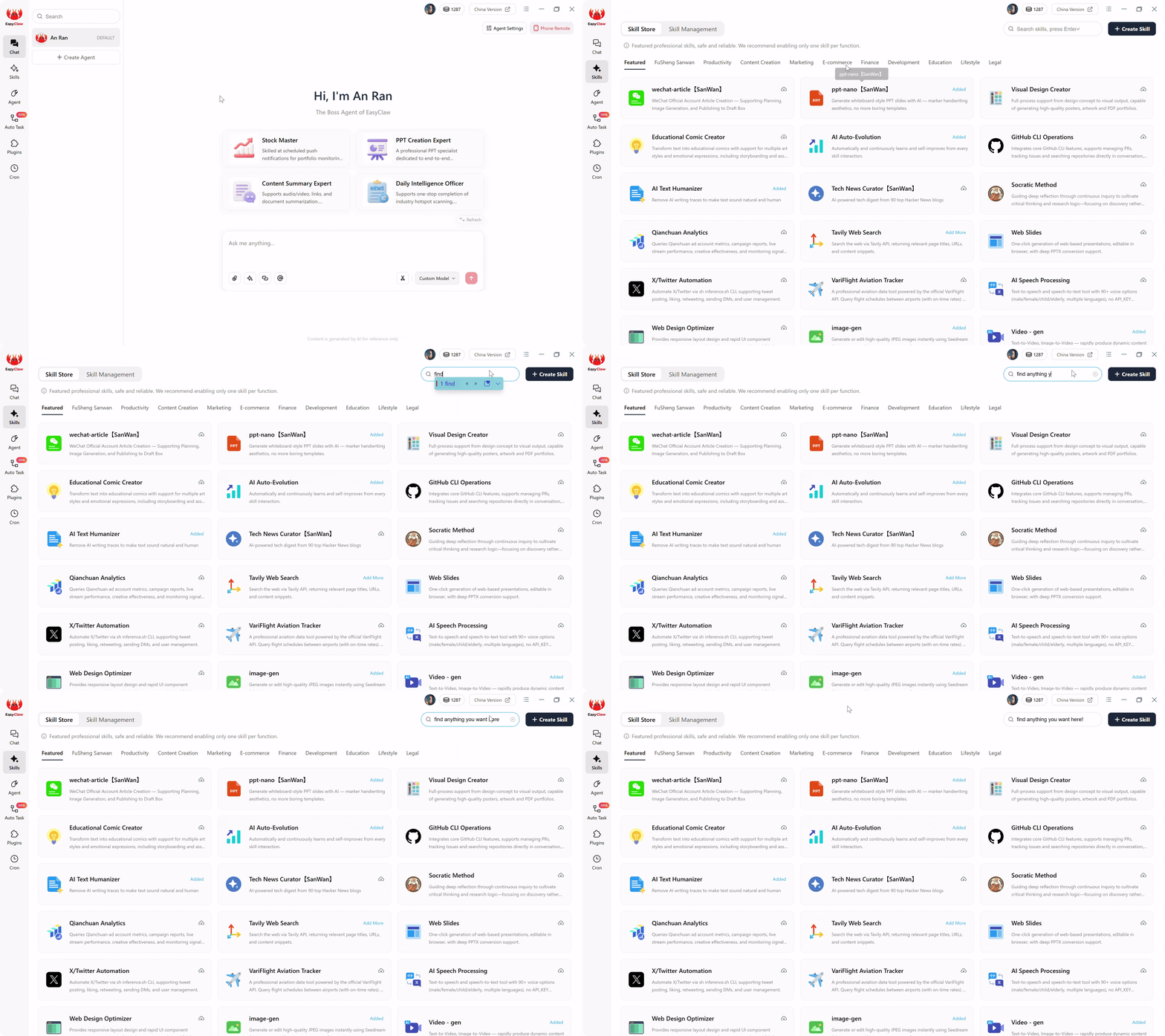
Installa la funzionalità di automazione web per fornire al tuo agente il vocabolario per l'interazione con il browser, applicando al contempo limiti rigorosi su ciò a cui può accedere.
Passaggio 2: Configura l'origine e la destinazione dei dati: i confini
Una volta installato Skill, è necessario configurare gli esatti ambienti Web che l'agente può toccare. Passare a Auto Task interfaccia per definire il flusso di lavoro specifico. È qui che parli con l'architetto dell'intelligenza artificiale: non scrivi codice, scrivi una chiara richiesta operativa.
Un prompt pronto per la produzione e sicuro per la conformità per l'automazione dell'assunzione dei pazienti si presenta così:
"Utilizza la funzionalità di automazione web installata. Apri il browser e accedi al nostro portale di pianificazione interno all'indirizzo schedule.hospital.local. Accedi utilizzando le credenziali locali salvate. Cerca nella dashboard gli appuntamenti dei pazienti contrassegnati come "Nuova assunzione". Quando ne trovi uno, fai clic sul profilo del paziente ed estrai il nome del paziente, il cognome, la data di nascita e le note non strutturate "Motivo della visita".
Successivamente, apri una nuova scheda del browser e accedi alla nostra cartella clinica elettronica basata sul web all'indirizzo ehr.hospital.com. Fare clic su "Registra nuovo paziente". Incolla il nome estratto nel campo "Nome", il cognome nel campo "Cognome" e la data di nascita nel campo "Data di nascita". Incolla il testo "Motivo della visita" nella casella di testo "Note cliniche". Salvare il record del paziente come "Revisione in sospeso". Infine, torna al portale di pianificazione e contrassegna lo stato dell'appuntamento come "Trasferito"."
Quando fai clic su Invia, LLM legge il tuo messaggio in linguaggio naturale e lo compila in uno script del browser locale codificato e altamente efficiente. La fase di compilazione AI è ora completa. Per i team operativi sanitari che gestiscono l'assunzione di pazienti in più strutture, questa singola richiesta sostituisce le ore di trasferimento manuale dei dati giornalieri.
Passaggio 3: esegui il flusso di lavoro: esecuzione senza token e sicura HIPAA
È fondamentale capire cosa succede durante la fase di esecuzione vera e propria. Questo è il segreto per mantenere la conformità HIPAA ridimensionando le operazioni.
Se si trattasse di uno strumento di intelligenza artificiale puramente basato su cloud, ogni volta che un nuovo paziente si registra, il sistema impacchetterebbe il PHI del paziente e lo rispedirebbe a un server LLM esterno per capire quali dati estrarre e dove fare clic successivamente. That continuous data transmission costituisce una massiccia violazione della conformità.
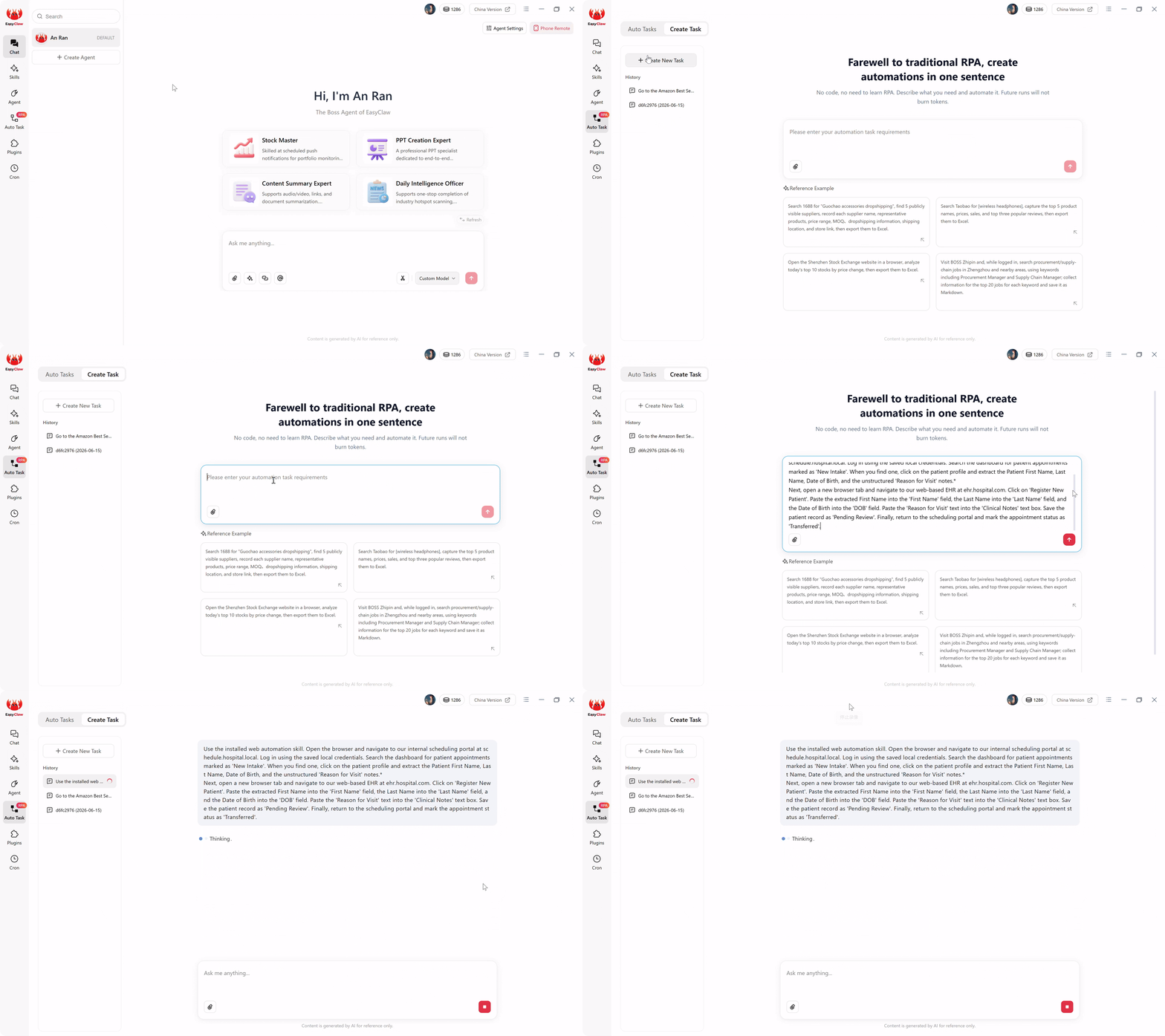
Esecuzione locale senza token: PHI non lascia mai la tua macchina: lo script compilato elabora i dati del paziente interamente nella memoria del browser locale.
EasyClaw lo impedisce completamente. Il costoso ragionamento basato sull’intelligenza artificiale è avvenuto solo una volta: durante Passaggio 2, quando è stata creata l’attività. L'intelligenza artificiale ha compilato la tua frase in uno script del browser locale e deterministico. Quando il flusso di lavoro viene eseguito domani mattina, lo script RPA sottostante prende il sopravvento. Apre il browser locale, accede agli URL interni e analizza i dati dei pazienti utilizzando modelli di estrazione leggeri e incorporati, interamente in memoria.
Poiché questi passaggi di esecuzione ricorrenti non chiamano API AI conversazionali esterne per prendere decisioni di routing, le esecuzioni giornaliere successive elaborano i dati in modo completamente locale. Il PHI non lascia mai la tua macchina. Questa architettura consente di elaborare 50 assunzioni di pazienti o 5.000 risultati di laboratorio al mese con assoluta riservatezza dei dati e costi operativi fissi e prevedibili.
Passaggio 4: verifica dell'output: l'audit trail HIPAA
Nell’IT sanitario, l’automazione è inutile se non può essere controllata. Quando i dati vengono danneggiati tramite un webhook API cloud in background, nessuno sa cosa è andato storto finché un medico non segnala la mancanza della cartella clinica di un paziente.
EasyClaw aggira completamente il problema dell'invisibilità. Poiché l'agente esegue le attività tramite l'automazione del browser locale, l'intero processo è completamente trasparente e verificabile. Puoi guardare fisicamente lo schermo del tuo computer mentre l'agente prende vita: il browser si apre, il cursore si sposta verso il portale di pianificazione interno, passa alle schede EHR, fa clic su "Registra nuovo paziente" e digita i dati demografici estratti nei campi corretti con assoluta precisione.
Se il software EHR aggiorna la sua interfaccia utente o un timeout della sessione attiva una richiesta di accesso inaspettata, l'automazione dell'interfaccia utente si fermerà, proprio come un essere umano confuso, impedendo che i dati non verificati vengano ciecamente inseriti nel registro medico. Inoltre, tutti i registri di esecuzione rimangono sul disco rigido locale. Se un responsabile della conformità ha bisogno di rivedere la cronologia dell'automazione, puoi fornire log locali con timestamp che mostrano esattamente quali elementi web sono stati cliccati e quando, soddisfacendo i requisiti di controllo più severi senza richiedere registri a un fornitore cloud di terze parti.
Pro Tips per una configurazione sanitaria a prova di proiettile
1. Enforce the "Draft Only" Clinical Rule
Quando si ha a che fare con le cartelle cliniche, la comodità è il luogo in cui si accumula il rischio. Non autorizzare mai un agente automatizzato a fare clic su "Invia finale" o "Impegna in cartella clinica" il primo giorno. Includere sempre le istruzioni per "Salva il record come in attesa di revisione". Un flusso di lavoro che richiede l'approvazione umana dei dati redatti è di gran lunga superiore a una pipeline veloce che unisce accidentalmente i file dei pazienti errati.
2. Deploy on Dedicated, Secured Virtual Machines
Non lasciare che il tuo agente si scateni su una workstation primaria. Distribuisci EasyClaw su una macchina virtuale dedicata e conforme a HIPAA all'interno dell'ambiente server sicuro del tuo ospedale. Blocca la VM con una whitelist IP specifica in modo che l'agente possa accedere solo ai portali Web EHR autorizzati, isolando completamente il processo dalle minacce Internet esterne.
3. Build Robust Timeout Recovery
I portali web sanitari sono noti per i timeout di sicurezza aggressivi. Se una sessione rimane inattiva per 15 minuti, l'EHR si disconnetterà forzatamente. Aggiungi un'istruzione condizionale: "Se accedi al portale EHR e vedi la schermata 'Sessione scaduta' o 'Accesso', metti in pausa l'estrazione dei dati. Reinserisci le credenziali locali per autenticarti, attendi il caricamento della dashboard, quindi riprendi il processo di immissione dei dati."
Perché EasyClaw è la scelta giusta per l'automazione sanitaria
Per dipartimenti IT ospedalieri, team operativi clinici e responsabili della conformità sanitaria, la scelta della piattaforma di automazione ha conseguenze normative che vanno ben oltre le caratteristiche e i prezzi. EasyClaw è progettato per ambienti in cui la privacy dei dati dei pazienti non è una funzionalità: è un requisito legale.
EasyClaw non è una piattaforma di automazione sanitaria basata su cloud. È un desktop-native AI agent che elabora i dati dei pazienti interamente sul tuo computer locale: nessun intermediario nel cloud, nessuna elaborazione PHI esterna, nessuna catena BAA multi-vendor da gestire.
PHI non lascia mai il tuo computer locale. Nessun OCR cloud, nessuna elaborazione IA esterna: tutto viene eseguito all'interno del tuo ambiente controllato.
Log di esecuzione locali con timestamp per ogni azione. Presenta record pronti per l'audit senza richiedere dati ai fornitori cloud.
Tutte le voci salvate come "In attesa di revisione" per impostazione predefinita. È richiesta l'approvazione clinica umana prima che qualsiasi dato venga inserito nelle cartelle cliniche.
Esegui su VM dedicate e autorizzate da IP all'interno della rete ospedaliera. Zero requisiti Internet esterni per l'esecuzione.
Pro
- Le PHI rimangono locali: zero esposizione ai dati cloud
- Zero BAA richiesti con fornitori di automazione di terze parti
- Registri di controllo locali per le revisioni della conformità HIPAA
- Tutele del flusso di lavoro clinico solo in bozza
- Distribuibile su VM dedicate e protette
- Configurazione del linguaggio naturale: nessuno sviluppatore RPA specializzato
Limitazioni
- Richiede l'app desktop su macchina/VM dedicata
- Preferibili sistemi CSE basati sul web (si qualificano i sistemi CCE più moderni)
EasyClaw e alternative all'automazione sanitaria
| Capacità | EasyClaw | RPA nel cloud (UiPath/AA Cloud) | Integrazione API HL7/FHIR |
|---|---|---|---|
| PHI never leaves local machine | ✓ S?: completamente locale | ✗ No: elaborato nel cloud | ~ Depends on architecture |
| External BAAs required | ✓ Zero | ✗ Multiple vendors | ~ Varies by endpoint |
| Funziona con portali Web non API | ✓ Any web-based system | ~ Requires connectors | ✗ API-only |
| Deployment time | ✓ Minutes | ✗ Months | ✗ Weeks to months |
Domande frequenti sull'automazione conforme a HIPAA
Reclaiming Healthcare Operations
Imparare come implementare RPA per la sanità a livello locale significa davvero imparare a progettare un ambiente operativo sicuro, trasparente e incentrato sul paziente. Il mercato del software cercherà di convincerti che il miglior strumento di automazione è quello con il maggior numero di integrazioni cloud e hook API. Si tratta di un parametro pericoloso e giuridicamente precario per i team IT ospedalieri.
Una buona pipeline di automazione sanitaria non è quella che sposta i dati su Internet più velocemente, effettuando il ping di una dozzina di server di terze parti diversi lungo il percorso. È quello in cui ogni capacità ha una ragione, ogni estrazione di dati è delimitata in modo sicuro e ogni singola informazione sanitaria protetta rimane completamente privata.
La prossima ondata di automazione sanitaria non sarà giudicata dall’intelligenza dell’intelligenza artificiale in una finestra di chat. Sarà giudicato se sarà possibile operare in modo sicuro e privato dove si svolge effettivamente il vero lavoro clinico. Per ospedali, cliniche e organizzazioni sanitarie in Nord America ed Europa, l’approccio local-first garantisce efficienza operativa senza compromettere il quadro normativo che protegge i pazienti.
Utilizzando un'architettura local-first con il web RPA in linguaggio naturale di EasyClaw, elimini completamente gli intermediari dell'API cloud. Mantieni i dati demografici dei pazienti, le note cliniche e i dati di fatturazione esattamente al loro posto: visualizzati ed elaborati in modo sicuro dietro il tuo firewall.