


Questa guida illustra un approccio di verifica multi-thread locale utilizzando EasyClaw in modo da poter verificare e pulire in blocco interamente sul tuo computer. Eviti il rischio di caricamento su terze parti, salti i prezzi con pagamento per lead e mantieni il controllo sul comportamento della verifica.
Il focus qui è strettamente la fase post-acquisizione. Hai già la tua lista. Ora verifichi la qualità dell'elenco e-mail B2B e risolvi i problemi dell'elenco e-mail in un modo che sia operativamente sicuro e stabile in termini di budget.
La logica tecnica: flusso di lavoro di convalida locale
Prima di avviare la sequenza di validazione, trattate la verifica come un processo deterministico piuttosto che come un “verdetto basato sul credito”. L'obiettivo è trasformare CSV o TXT non elaborati in un'esportazione pulita con decisioni tracciabili: validità della sintassi, risolvibilità del dominio e reattività a livello di protocollo, senza effettivamente inviare messaggi.
Ecco lo stack del flusso di lavoro locale che desideri rispecchiare nel tuo progetto di automazione.
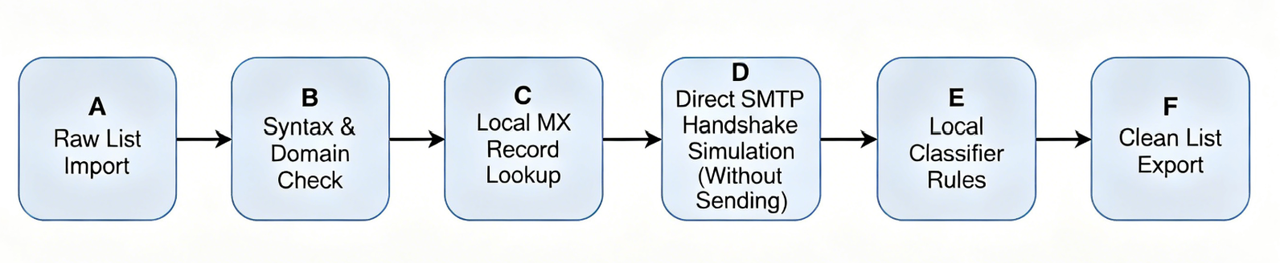
Una volta che la macchina locale ha stabilito i tentativi di connessione, il sistema dovrebbe simulare solo il comportamento di handshake necessario per il punteggio di idoneità. Non dovrebbe mai richiedere l'invio di posta per convalidare la consegna. In questo modo mantieni la verifica allineata agli obiettivi di "verifica e-mail in blocco" senza problemi di "limiti di invio".
Step-by-Step Implementation Guide with EasyClaw
Passaggio 1: preparazione e formattazione del set di dati non elaborati
Inizia assicurandoti che il tuo input sia esplicito e leggibile dalla macchina. Se utilizzi CSV, normalizza le intestazioni delle colonne in modo che EasyClaw possa mappare i campi e-mail in modo affidabile Nero. Se il tuo set di dati ha formati misti, convertilo in un unico CSV o TXT canonico contenente solo gli indirizzi email che intendi verificare.
Prima di eseguire la verifica, cerca le anomalie di sintassi che comunemente aumentano i tassi di errore. Spazi finali, sosia Unicode, simboli “@” mancanti e commenti incorporati spesso si insinuano nei fogli di calcolo e creano risultati incoerenti. La normalizzazione degli spazi bianchi e l'eliminazione dei caratteri non validi riducono i cicli di verifica sprecati.
Dovresti anche standardizzare la codifica. Carica i file come UTF-8 ove possibile ed evita codifiche legacy che possono corrompere i nomi di dominio. Quando i domini diventano parzialmente illeggibili, le ricerche MX falliscono per i motivi sbagliati e si finisce per pulire in base agli artefatti di formattazione anziché all'effettiva salute dell'indirizzo.
Una volta normalizzato il file, crea una copia separata di "archivio grezzo" e non sovrascriverla mai. La verifica è iterativa e il mantenimento degli input grezzi consente di eseguire nuovamente con regole modificate senza perdere prove.
Passaggio 2: configurazione di EasyClaw per la verifica multithread locale
Con il set di dati pronto, configura EasyClaw per eseguire la verifica multi-thread locale con un comportamento di connessione conservativo. L'idea operativa è semplice: la concorrenza deve essere sufficientemente elevata per il throughput, ma limitata per evitare di sovraccaricare la propria rete o di attivare difese basate sulla velocità dalla ricezione di MTA.
Imposta un limite di connessione per lavoratore e un limite di concorrenza totale. Per lotti di grandi dimensioni, iniziare con moderazione, quindi aumentare quando si nota un comportamento stabile dell'handshake. Questo approccio è essenziale per "No Send Limits" perché la verifica crea comunque attività di rete, anche se non viene trasmesso alcun messaggio.
Successivamente, abilita la modalità di simulazione dell'handshake anziché la modalità di invio. In pratica, si desidera una logica locale che esegua la ricerca MX e i controlli a livello di protocollo necessari per classificare gli indirizzi, rifiutandosi di eseguire qualsiasi trasferimento di DATI SMTP. Il flusso di lavoro di EasyClaw dovrebbe mantenerti nel territorio di “sola verifica”.
Ecco un modello di configurazione realistico in stile JSON che puoi adattare al tuo ambiente. Le chiavi esatte possono variare in base alla versione, ma ciò che conta è la struttura: limiti di concorrenza, timeout e modalità di sola verifica.
{
  "mode": "verify_only",
  "input": {
    "type": "csv",
    "path": "./b2b_raw_list.csv",
    "emailColumn": "email"
  },
  "network": {
    "localMxResolver": "system_dns",
    "mxLookupsCacheSeconds": 7200,
    "connectTimeoutMs": 8000,
    "readTimeoutMs": 8000,
    "maxConnectionsTotal": 24,
    "maxConnectionsPerDomain": 3,
    "rateLimitPerSecond": 15
  },
  "verification": {
    "syntaxCheck": true,
    "domainCheck": true,
    "smtpHandshakeSimulation": true,
    "skipCatchAllProbingOnUncertain": true,
    "classifyRoleBased": true
  },
  "dedupe": {
    "normalizeCase": true,
    "stripAliases": false,
    "keepFirstOccurrence": true
  },
  "output": {
    "cleanCsvPath": "./b2b_clean_validated.csv",
    "invalidCsvPath": "./b2b_clean_invalid.csv",
    "reportPath": "./verification_report.json"
  }
}
Se il tuo ambiente preferisce un flusso di lavoro basato su browser, puoi rispecchiare la stessa logica nelle impostazioni dell'agente. Scegli solo verifica, imposta limiti di concorrenza e conferma i timeout. La chiave è limitare il numero di sessioni SMTP simultanee eseguite e garantire che la fase di handshake si interrompa prima di qualsiasi trasferimento del payload.
Passaggio 3: deduplicazione automatizzata e filtraggio multistrato
La verifica diventa veramente utile quando produce output puliti e stabili al reinserimento. Ciò significa che la deduplicazione deve avvenire dopo la normalizzazione, non prima, e il filtraggio deve essere stratificato anziché binario.
In EasyClaw, la normalizzazione dovrebbe trattare i domini senza distinzione tra maiuscole e minuscole e preservare esattamente la parte locale a meno che tu non abbia configurato la gestione degli alias. Una volta normalizzati, i duplicati si riducono a un singolo record canonico, impedendo ripetuti tentativi di verifica ed evitando righe duplicate nell'importazione della piattaforma di sensibilizzazione a freddo.
Successivamente, le e-mail basate sui ruoli richiedono una gestione attenta. Indirizzi come info@, vendite@, supporto@ e admin@ spesso rappresentano caselle di posta condivise che si comportano in modo diverso rispetto ai singoli utenti. EasyClaw può classificare modelli basati sui ruoli in modo da poterli escludere da determinate sequenze o instradarli verso una logica di campagna separata. Anche se li mantieni, dovresti comunque filtrare i domini che non riescono a essere risolvibili o che mostrano una classificazione dell'handshake incoerente.
Il comportamento catch-all è un altro motivo per cui il filtraggio multistrato è importante. Un server può accettare tutti i destinatari nella fase SMTP pur continuando a instradare molti indirizzi nella posta indesiderata. Una pipeline di verifica dovrebbe quindi utilizzare regole di incertezza ed evitare di considerare il “destinatario accettato” come consegna definitiva. Nella modalità di sola verifica, desideri un elenco e-mail pulito per una sensibilizzazione a freddo basata su segnali di idoneità e coerenza del protocollo, non su una singola risposta permissiva.
Infine, filtra per dominio e per classe di protocollo osservata. Se la sintassi fallisce, eliminala immediatamente. Se la risoluzione MX fallisce, eliminala o mettila in quarantena. Se la simulazione della stretta di mano produce classi ad alto rischio o comportamenti incoerenti, mettere in quarantena invece di passare alla cieca. Ciò si traduce in un'esportazione più pulita con meno sorprese al momento dell'invio.
Passaggio 4: esportazione dell'elenco ripulito e preparazione per la divulgazione a freddo
Al termine della pipeline, dovresti considerare l'output come un artefatto ingegnerizzato, non come un'ipotesi del foglio di calcolo. Esporta il tuo elenco convalidato in un CSV pulito ed esporta anche set non validi e in quarantena in modo da poter controllare le decisioni.
Prima di importare in Lemlist, Instantly o in un flusso di lavoro CRM, controlla i parametri di salute finali riportati da EasyClaw. Verifica che i duplicati siano scomparsi, che la classificazione di sola verifica sia in linea con la tua tolleranza al rischio prevista e che le selezioni basate sui ruoli corrispondano alla tua strategia di sensibilizzazione.
Quindi normalizza la formattazione per la piattaforma di destinazione. Rimuovi le righe vuote, assicurati che la colonna email sia un campo singolo e mantieni coerenti i metadati facoltativi. Se la tua piattaforma di invio supporta colonne aggiuntive, puoi riportare i tag di stato dal rapporto di verifica, che abilita la logica di sensibilizzazione segmentata senza nuova verifica.
Un dettaglio operativo cruciale è la ripetibilità. Se esegui nuovamente la verifica, desideri che lo stesso input non elaborato produca categorie stabili, tranne quando cambia il DNS esterno e il comportamento della casella di posta. Ecco perché il mantenimento degli archivi non elaborati e l'utilizzo della memorizzazione nella cache MX locale offrono un comportamento prevedibile nelle iterazioni della campagna.
Comparison Table: Desktop Engine locale e verifica Cloud SaaS
Questa tabella dovrebbe aiutarti a inquadrare la decisione come un compromesso tecnico, non come una proposta di marketing. Se desideri verificare ripetutamente la qualità dell'elenco e-mail B2B, il controllo locale in genere vince sia in termini di costi che di privacy.
| Dimensione | Motore desktop locale (EasyClaw) | Verifica SaaS sul cloud |
|---|---|---|
| Prezzi Model | Licenza software una tantum/Limitato alle risorse locali (commissioni di credito incrementali pari a zero) | Abbonamento pay-per-lead/livello (si adatta linearmente alla dimensione del database) |
| Data Privacy | Esecuzione locale. La derivazione dei dati rimane sul disco locale. Nessuna esposizione di terze parti | Richiede il caricamento su server esterni. Soggetto alle politiche di fidelizzazione del fornitore |
| Send Limits constraints | Nessun tetto al credito esterno. Vincolato solo dalla larghezza di banda della rete hardware | Strict monthly caps or transaction credit limits |
| Inspection Depth | Limiti di handshake configurabili, accesso diretto al risolutore MX locale | Algoritmi di punteggio opachi, metriche di classificazione a scatola nera |
| Automation Integration | Hook di file configurabili, integrazione di script di pipeline personalizzati | Limitato ai Webhook forniti o alle costose connessioni Zapier |
L'architettura dell'automazione EasyClaw senza soluzione di continuità
EasyClaw è progettato esattamente per questo modello operativo: verifica di posta elettronica in blocco e creazione di elenchi di posta elettronica puliti senza costringerti a modificare manualmente fogli di calcolo o a gestire crediti di terze parti. Invece di trattare ogni set di dati come una transazione una tantum, costruisci una pipeline locale ripetibile che puoi eseguire nuovamente man mano che la tua portata migliora.
L'angolo "Nessun limite di invio" è importante perché la verifica e l'invio sono preoccupazioni diverse. La verifica dovrebbe determinare solo l'idoneità, mentre l'invio rimane soggetto alla politica ESP o alla piattaforma di sensibilizzazione. EasyClaw mantiene il ciclo di verifica locale, così puoi iterare rapidamente senza chiederti se hai bruciato crediti di verifica o superato un limite esterno che ritarda la sequenza temporale della tua campagna.
L’automazione è anche il luogo in cui gli ingegneri della crescita guadagnano terreno. Quando il processo di pulizia è deterministico, puoi implementare misure di salvaguardia come la "quarantena solo in caso di incertezza", la memorizzazione nella cache del dominio e la normalizzazione coerente della deduplica in ogni campagna. Ciò riduce la varianza e migliora i risultati di consegna nel tempo, perché il tuo sistema produce le stesse categorie dagli stessi input.
Se desideri il percorso più veloce da "abbiamo un elenco" a "abbiamo un'esportazione pulita", scarica EasyClaw ed esegui prima un test locale su un campione rappresentativo. Se preferisci una configurazione più personalizzata, puoi pianificare un controllo personalizzato di ottimizzazione del flusso di lavoro locale in modo che le regole di concorrenza, timeout e classificazione corrispondano alla tua rete e ai modelli di destinazione.
Conclusione e passaggi successivi attuabili
Il cambiamento strategico è semplice. Smetti di pagare per credito per la convalida in blocco che non controlli completamente e gestisci invece il flusso di lavoro di pulizia della tua lista e-mail con verifica locale. Quando verifichi la qualità dell'elenco e-mail B2B sul tuo computer, riduci l'esposizione alla privacy, elimini la dipendenza dal caricamento e produci risultati più puliti che puoi controllare e riutilizzare.
Come passaggi successivi, prepara un CSV o TXT canonico con campi e-mail normalizzati, esegui EasyClaw in modalità di sola verifica con concorrenza limitata ed esporta categorie valide e in quarantena per la segmentazione di sensibilizzazione a valle. Quindi importa solo l'elenco pulito per la comunicazione a freddo nei tuoi strumenti di invio, mantenendo i set non validi e incerti per il perfezionamento futuro anziché scartarli alla cieca.
Se sei pronto per industrializzare questo processo, scarica EasyClaw e utilizza la configurazione della pipeline locale come base. Per i team che desiderano una messa a punto più rigorosa, pianifica un controllo personalizzato di ottimizzazione del flusso di lavoro locale e ti aiuteremo a impostare regole di concorrenza, memorizzazione nella cache e classificazione in modo che corrispondano esattamente alle dimensioni dell'elenco e alla tolleranza al rischio.