


Il costo nascosto del mantenimento degli script Python RPA
C'è un incubo ricorrente e altamente specifico che ogni ingegnere dell'automazione lo sa troppo bene. Di solito accade di venerdì pomeriggio. Stai preparando il tuo laptop quando viene attivato un avviso di emergenza Slack: la pipeline dei dati della catena di fornitura non è riuscita.
Apri il tuo terminale, accedi tramite SSH al tuo server e controlla i log. Un'enorme analisi dello stack termina con NoSuchElementException. Il venditore ha leggermente aggiornato il framework frontend del proprio portale web. Hanno cambiato una classe di pulsanti da submit-btn a btn-primary o hanno racchiuso una tabella in un nuovo div. Perché sei tradizionale Python RPA si basa su selettori CSS rigidi e XPath esatti, quel piccolo aggiornamento cosmetico ha distrutto l'intero flusso di lavoro.
Questo è lo sporco segreto della tradizionale automazione basata su codice. Scrivi script per risparmiare tempo, ma alla fine il debito tecnico aumenta. Mantenere script fragili diventa un lavoro a tempo pieno. Se al momento stai mantenendo una fragile libreria di script Selenium, Playwright o BeautifulSoup su teams in the US, Europe, and Asia, sei intrappolato in un ciclo di patch senza fine.
E se potessi abbandonare completamente la manutenzione del codice? E se potessi sostituire duecento righe di fragile Python con un singolo paragrafo di inglese semplice e lasciare che un agente AI locale navighi dinamicamente nel browser per te?
Questo è il cambio di paradigma dell’automazione del web semantico. Migrando la tua eredità RPAPitone codebase a EasyClaw, si passa dalla codifica esplicita all'intento operativo. Non lo dici più alla macchina Come fare clic su un pixel specifico; lo dici tu Che cosa raggiungere.
L'illusione del controllo del codice: perché gli script tradizionali falliscono
Quando scrivi uno script Python per automatizzare un browser, stai costruendo una traccia rigida. Dici al webdriver di attendere esattamente cinque secondi, trova la terza casella di input nella pagina, digita una password e fai clic sul pulsante blu. Se Internet è lento e la pagina impiega sei secondi per caricarsi, lo script si blocca. Se il sito web aggiunge un banner pop-up promozionale temporaneo sulla schermata di accesso, lo script fa clic sul banner invece che sul pulsante e si blocca.
Trascorri ore a costruire blocchi try/except e funzioni di attesa dinamiche solo per gestire la volatilità di base di Internet. Hai dedicato le tue ore di ingegneria alla manutenzione del nastro adesivo digitale. Architetti di automazione e responsabili IT in tutto il Nord America riferiscono che fino al 40% del budget per la manutenzione dell'RPA è destinato esclusivamente alla risoluzione dei guasti relativi al selettore.
| Approccio | Python RPA tradizionale | EasyClaw RPA semantica |
|---|---|---|
| Element Location | ✗ Fixed CSS/XPath selectors | ✓ AI understands page structure |
| Async Waiting | ✗ WebDriverWait / time.sleep() | ✓ Semantic condition triggers |
| Data Cleaning | ✗ Pandas / regex operations | ✓ In-memory AI parsing logic |
| UI Change Resilience | ✗ Breaks on any layout change | ✓ Adapts to visual context |
| Maintenance Overhead | ✗ Continuous patching required | ✓ Near-zero maintenance |
EasyClaw cambia radicalmente questa architettura attraverso un motore "Step Compile". Funziona con un browser Web locale proprio come fa Selenium, ma la navigazione è alimentata da un Large Language Model (LLM) che comprende il contesto. Non cerca un XPath; cerca il concetto semantico di un pulsante "Scarica rapporto". Se il sito web ridisegna l'intero layout, EasyClaw riesce comunque a capire come appare visivamente un modulo di accesso.
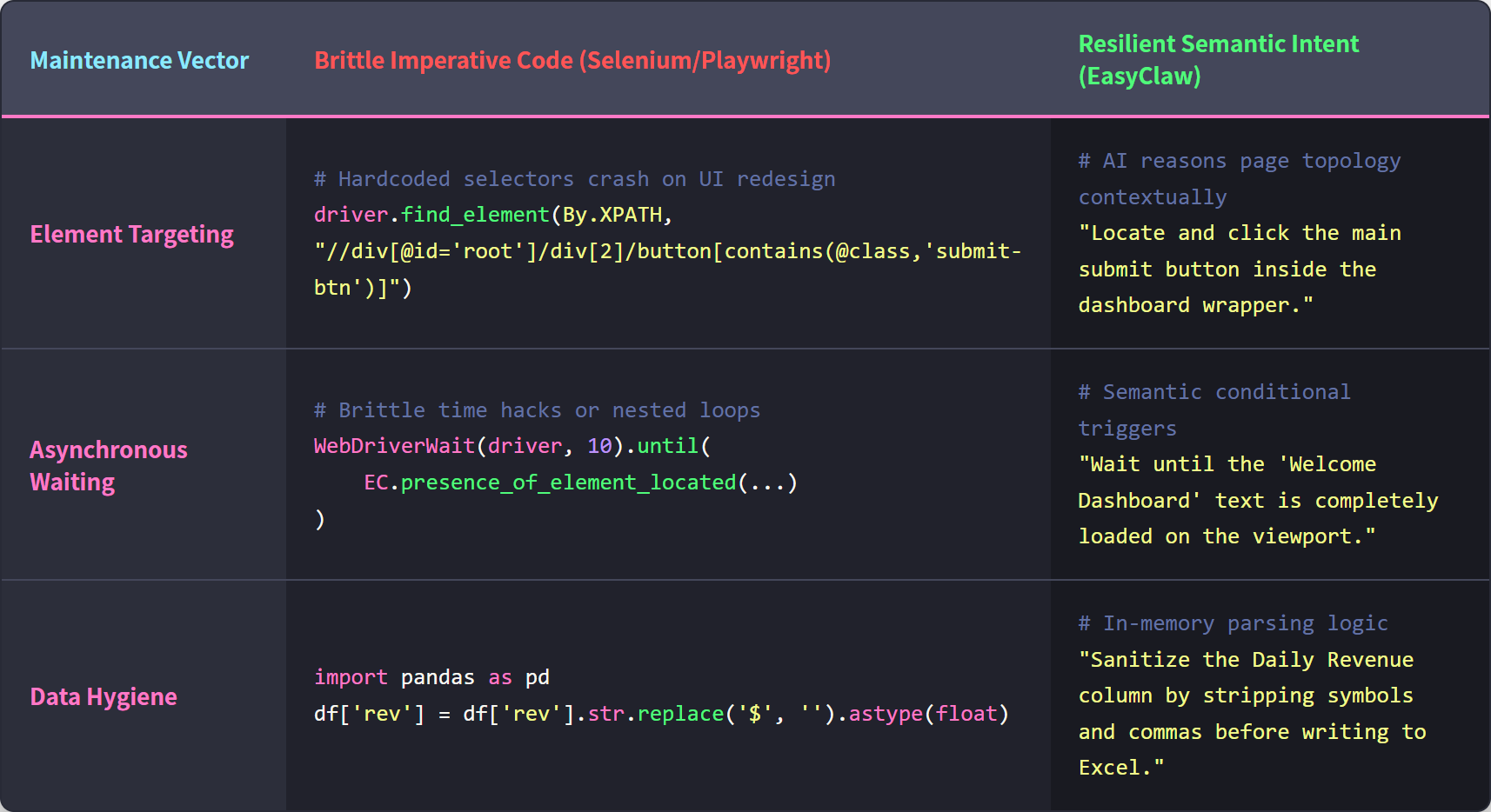
Il codice Python RPA tradizionale si basa su selettori fragili e attese esplicite; EasyClaw utilizza la comprensione semantica dell'intelligenza artificiale per adattarsi dinamicamente alla struttura della pagina.
Passaggio 1: controlla e mappa l'intento dello script esistente
L'errore più grande che gli ingegneri commettono durante la migrazione è provare a tradurre il codice Python riga per riga. Non guardare il tuo codice. Guarda l'obiettivo operativo.
Apri il tuo file Python esistente e ignora webdriver.Chrome(), le attese esplicite e la logica di analisi BeautifulSoup. Delinea l'intento umano della sceneggiatura. Un tipico script di reporting giornaliero può solitamente essere controllato in quattro azioni umane:
- Passare al dashboard di reporting interno ed autenticarsi.
- Filtra l'intervallo di date per le ultime 24 ore.
- Estrai i nomi, gli stati e gli importi delle entrate dalle prime dieci righe.
- Scrivi questi dati in un file Excel locale.
Ora hai eliminato il fragile codice e isolato la logica aziendale. Sei pronto per creare l'agente.
Passaggio 2: compilazione semantica tramite Auto Task
Ora apri l'applicazione desktop EasyClaw e vai al file Auto Task interfaccia. Non troverai un IDE o un editor di codice. Troverai una semplice casella di testo. Qui è dove parli con l'architetto AI che costruirà la tua automazione resiliente.
Traduci le quattro azioni che hai appena auditato in un unico paragrafo altamente specifico. Una richiesta pronta per la produzione per sostituire lo script Python è simile alla seguente:
"Apri il browser e vai a dashboard.internal-ops.local. Accedi utilizzando le credenziali del browser salvate. Una volta caricata la dashboard, individua il filtro della data e impostalo sulle ultime 24 ore. Attendi l'aggiornamento della tabella dati. Leggi le prime 10 righe della tabella. Estrai il "Nome cliente", "Stato account" e "Entrate giornaliere" per ogni riga. Non estrarre le colonne ID interne. Infine, crea un nuovo file Excel sul desktop locale denominato 'Daily_Revenue_Report', scrivi i dati estratti con intestazioni chiare e salva il file."
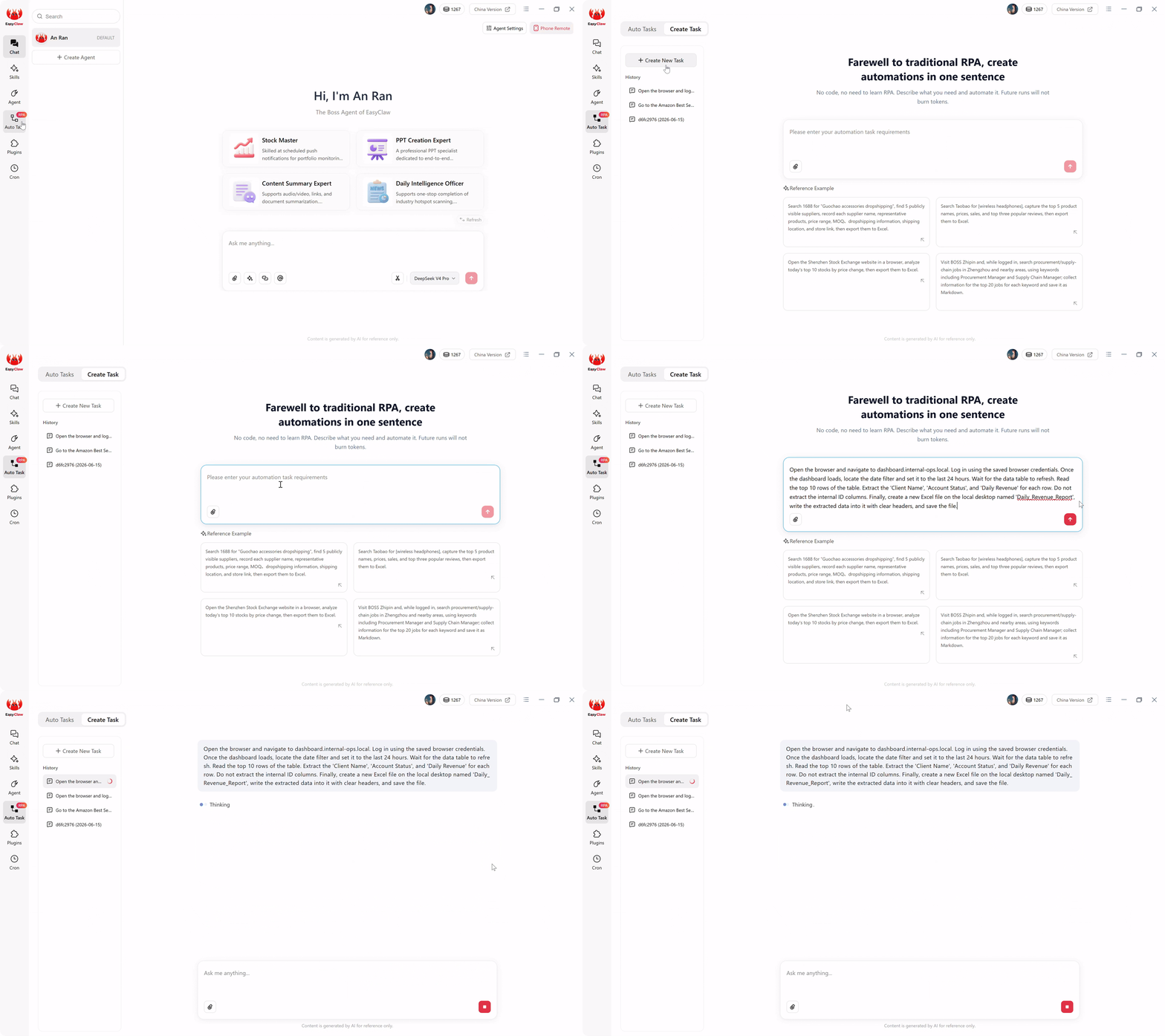
L'interfaccia EasyClaw Auto Task: descrivi ciò che desideri automatizzare in un inglese semplice e l'intelligenza artificiale lo compila in un robusto script RPA locale.
Quando fai clic sul pulsante di invio, l'agente AI locale prende il sopravvento. LLM legge il tuo paragrafo in linguaggio naturale, comprende l'intento semantico dell'estrazione dei dati e lo compila immediatamente in uno script RPA del browser locale strutturato e passo passo. Hai appena sostituito un intero repository GitHub di codice fragile con un paragrafo.
Passaggio 3: confronta output ed esecuzione senza token
Prima della distribuzione, è necessario verificare l'architettura.
In uno strumento di automazione AI tradizionale basato su cloud, eseguire uno script come questo significherebbe inviare il file intero codice sorgente HTML della dashboard della tua azienda a un server LLM remoto ogni volta che viene eseguito, solo per capire dove si trovano i dati. Ciò brucia quotidianamente enormi quantità di token conversazionali ed espone i tuoi dati interni su un cloud pubblico.
EasyClaw prevents this. Il costoso ragionamento basato sull'intelligenza artificiale è avvenuto solo una volta: durante Passaggio 2, quando è stato compilato il prompt in inglese.
Quando attivi il flusso di lavoro adesso, lo script RPA locale sottostante subentra in modo nativo. Apre Chrome o Edge sul desktop. Naviga visivamente nell'URL e analizza i dati utilizzando modelli di estrazione leggeri e incorporati direttamente in memoria. Scrive il file Excel sul tuo disco rigido locale.
Confronta il file Excel risultante con quello generato dal tuo vecchio script Python. I dati sono formattati perfettamente, ma l'esecuzione è stata fluida. Ancora più importante, poiché questi passaggi di esecuzione ricorrenti non chiamano API AI conversazionali esterne per prendere decisioni di routing, le successive esecuzioni giornaliere bruciano absolutely zero LLM tokens. Ottieni la resilienza dell'intelligenza artificiale con il costo fisso e prevedibile dell'esecuzione locale tradizionale.
Passaggio 4: Stabilisci il trigger a mani libere (Cron e Chat)
Il tuo vecchio script Python probabilmente si basava su Linux crontab o su una goffa configurazione dell'Utilità di pianificazione di Windows. Se il server si riavviava, il processo cron spesso falliva in modo silenzioso. EasyClaw gestisce la pianificazione attraverso un'interfaccia brillante e integrata che si collega direttamente alle tue app di comunicazione.
Passare a Cron (Scheduled Tasks) sezione nel menu di sinistra. Crea una nuova attività e chiamala "Esportazione entrate giornaliere". Imposta il tempo di esecuzione su Quotidiano alle 08:00.
Nella casella Richiesta AI, colleghi la pianificazione al flusso di lavoro compilato digitando: "Esegui l'attività automatica 'Report entrate giornaliere'. Al termine, riepiloga le entrate totali calcolate dal file Excel e indica se eventuali stati dell'account sono stati contrassegnati come 'Sospeso'."
Infine, attiva/disattiva Push Results to Chat App interruttore. Se hai collegato EasyClaw a un plugin di comunicazione come Telegram, WhatsApp, Slack, or LINE, questo crea un ciclo di feedback indistruttibile.
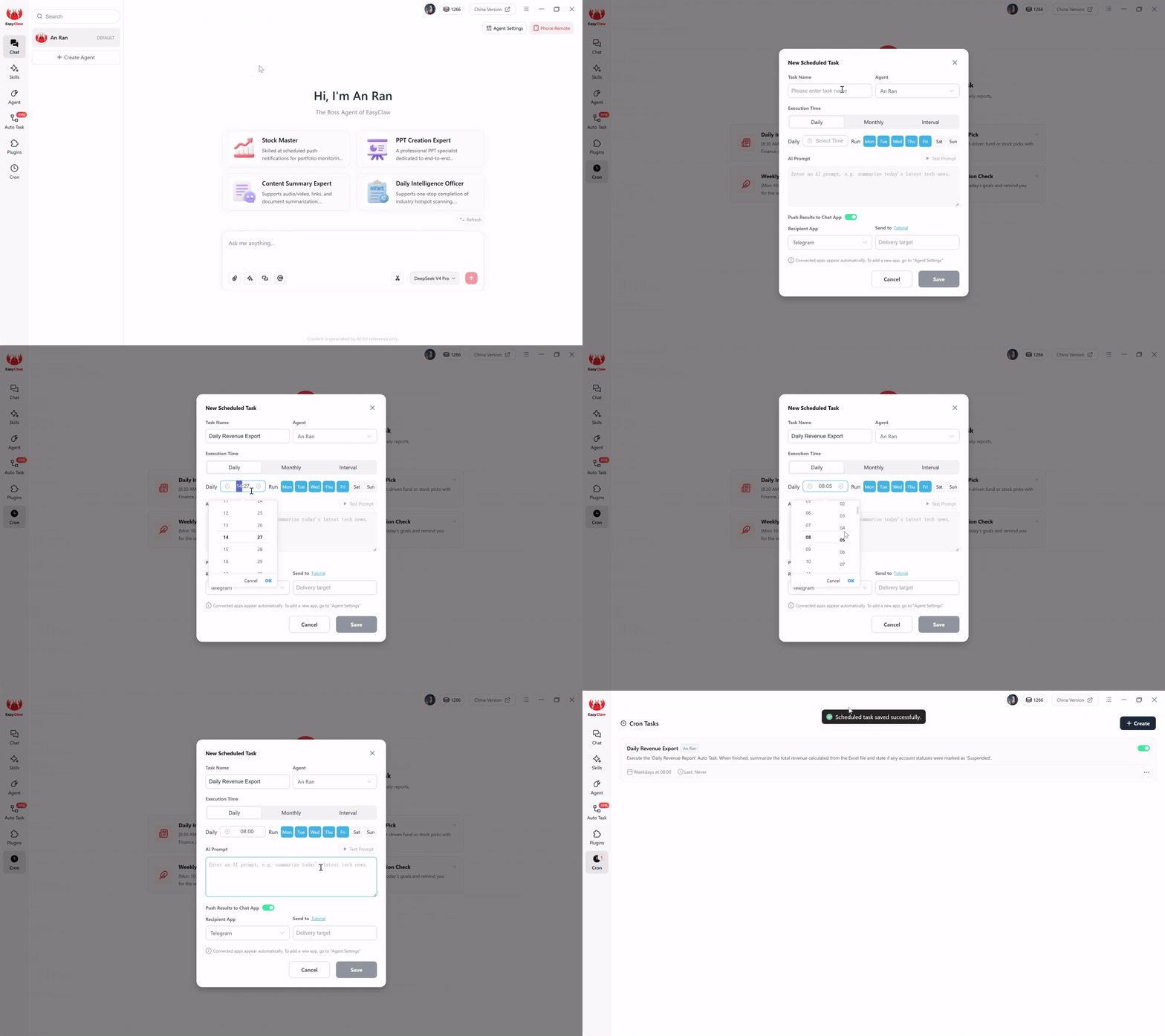
Configura pianificazioni di esecuzione ricorrenti e abilita le notifiche push su Telegram, WhatsApp, Slack, or LINE per operazioni a mani libere.
Domani mattina alle 8:05 il tuo telefono emetterà un messaggio sicuro: "Esecuzione completata. File Excel salvato sul desktop. Entrate totali estratte: $ 45.200. Nessun account contrassegnato come sospeso." Hai completamente disaccoppiato l'esecuzione dal tuo terminale, sostituendo i guasti silenziosi con un reporting mobile proattivo.
Pro Tips per sostituire la complessa logica Python
Quando si esegue la migrazione della logica ingegneristica avanzata al linguaggio naturale, è necessario pensare come un architetto. Ecco tre strategie avanzate per garantire che i tuoi script semantici gestiscano i casi limite meglio di quanto facesse mai il tuo vecchio codice.
1. Sostituzione di time.sleep() con l'attesa semantica
In Python, gli ingegneri utilizzano spesso time.sleep(10) per attendere il caricamento di una pagina Web pesante, il che rallenta inutilmente lo script o causa un timeout se la rete è lenta. In EasyClaw, lo sostituisci con condizionali semantici. Aggiungi al tuo messaggio: "Dopo aver fatto clic sul pulsante di accesso, attendere che il testo 'Dashboard di benvenuto' sia visibile sullo schermo prima di procedere." L'agente attenderà dinamicamente l'esatto segnale visivo, procedendo immediatamente quando sarà pronto.
2. Sostituzione dei blocchi If/Else per i popup Web
I portali Web sono noti per lanciare popup promozionali inaspettati o banner "Aggiorna la tua password" che mandano in crash Selenium all'istante. Gestiscilo senza try/except blocchi. Aggiungi una frase di sicurezza: "Se viene visualizzato un sondaggio o una notifica popup inaspettata che copre la tabella dati, individuare il pulsante 'Chiudi', 'X' o 'Ricordamelo più tardi' e fare clic su di esso prima di procedere."
3. Sostituzione di Pandas per la trasformazione dei dati
Non è necessario importare enormi librerie di manipolazione dei dati solo per ripulire il testo estratto. Indicare all'agente di disinfettare i dati in memoria: "Quando estrai le 'Entrate giornaliere', rimuovi eventuali simboli di valuta o virgole e assicurati che il valore venga salvato come numero non elaborato. Scrivi in maiuscolo tutti i 'Nomi dei clienti' prima di scriverli nel file Excel."
Perché EasyClaw è il giusto target di migrazione per gli script Python RPA
Le piattaforme RPA tradizionali ti costringono a un flusso di lavoro incentrato sullo sviluppatore che perpetua gli stessi problemi di fragilità. EasyClaw adotta un approccio fondamentalmente diverso, che corrisponde al modo team operativi, responsabili IT e architetti di automazione pensare davvero ai loro flussi di lavoro.
EasyClaw non è uno strumento di automazione AI esclusivamente cloud. È un desktop-native AI agent che interagisce con il tuo sistema operativo come farebbe un essere umano: facendo clic, digitando, leggendo lo schermo ed eseguendo flussi di lavoro in più fasi attraverso Qualunque app che hai installato.
Laddove gli script tradizionali di Python RPA si interrompono a ogni aggiornamento dell'interfaccia utente, la comprensione semantica di EasyClaw si adatta dinamicamente. Laddove gli strumenti basati su cloud espongono i tuoi dati interni a server esterni, EasyClaw elabora tutto localmente.
Sostituisci più di 200 righe di Python con un singolo paragrafo in inglese. Descrivi l'intento: l'intelligenza artificiale gestisce l'esecuzione.
Tutta l'automazione viene eseguita localmente. I dashboard della tua azienda, i dati finanziari e i portali interni non lasciano mai la tua macchina.
Il ragionamento AI compila il tuo prompt una volta. Le esecuzioni giornaliere utilizzano zero token LLM: costi operativi fissi e prevedibili.
Ricevi riepiloghi di esecuzione tramite WhatsApp, Telegram, Slack o LINE: scopri immediatamente se qualcosa va storto.
Pro
- Sostituisci gli script Python con il linguaggio naturale: non è richiesta alcuna codifica
- Configurazione zero: operativa in meno di 60 secondi
- Esecuzione locale: nessuna esposizione dei dati nel cloud
- Si adatta automaticamente alle modifiche dell'interfaccia utente, senza manutenzione del selettore
- Pianificazione integrata con notifiche chat
- Livello gratuito disponibile: non è richiesta la carta di credito
Limitazioni
- Richiede l'installazione dell'app desktop
- Piattaforma più recente: ecosistema ancora in espansione
EasyClaw rispetto agli approcci tradizionali Python RPA
| Capacità | EasyClaw | Selenio / Playwright | RPA nel cloud (UiPath/AA) |
|---|---|---|---|
| Script creation method | ✓ Natural language prompt | ✗ Python code + selectors | ✗ Visual designer + coding |
| UI change resilience | ✓ Semantic: si adatta automaticamente | ✗ Brittle: si interrompe con qualsiasi modifica | ~ Partial: richiede manutenzione |
| Data privacy | ✓ Fully local execution | ✓ Local (but fragile) | ✗ Cloud-processed |
| Recurring run cost | ✓ Zero tokens per run | ✓ Zero (but high maintenance) | ✗ Per-bot licensing fees |
| Tempo di installazione | ✓ Under 60 seconds | ✗ Hours to days | ✗ Weeks to months |
| Scheduling + mobile alerts | ✓ Built-in | ✗ Separate setup required | ~ Orchestrator required |
Domande frequenti sulla migrazione Python RPA
Reclaiming Your Engineering Hours
Scrivere codice è profondamente soddisfacente, ma mantenere fragili web scraper è un miserabile impiego di talento ingegneristico. L’industria del software ci ha condizionato a credere che un’automazione solida richieda strutture complesse e codificate. Ma la realtà è che il Web è troppo dinamico e i framework dell’interfaccia utente cambiano troppo frequentemente perché il codice statico possa sopravvivere a lungo termine senza una pesante manutenzione.
Ogni ora trascorsa ad aggiornare un XPath o ad applicare patch a un selettore CSS è un'ora rubata allo sviluppo del prodotto reale e all'architettura di alto livello. Per organizzazioni in Nord America, Europa e Asia-Pacifico, il passaggio dall'RPA basata su codice all'automazione semantica e orientata agli intenti non è solo una comodità: è una necessità competitiva.
EasyClaw elimina completamente il carico di manutenzione. Migrando i tuoi script Python legacy a un'architettura in linguaggio naturale e local-first, elimini la fragilità dell'RPA tradizionale. Distribuisci un agente che pensa contestualmente, viene eseguito localmente e si adatta visivamente.
Controlla oggi stesso il tuo raschietto Python più vecchio e frustrante. Apri l'interfaccia Auto Task, scrivi il tuo intento operativo in un unico paragrafo e osserva come le tue condutture più fragili si trasformano in flussi di lavoro indistruttibili e esenti da manutenzione.