


すべての B2B チームが直面する LinkedIn オートメーションのジレンマ
B2B 運営に携わっている方は、LinkedIn が世界で最も正確で最新の専門レジストリを維持していることを一応覚悟しておきます。 ただし、LinkedIn のエンジニアリング チームも、データが確実に価値があるのか正確に知っています。
成長チームが規模を拡大しようとすると、 LinkedIn での安心顧客の発掘 従来のSaaS スクレイパーや積極的な Chrome 拡張機能を使うと、サイレント アラームのカスケードがトリガーされます。 クラウドベースのスクレイピング ツールは、リモート データ センターの IP アドレスから動作します。アルゴリズムは、これが犯罪の人間ではないことを即座に認識します。 AWSのサーバーラックです。 永久アカウント禁止、何千もの接続を一掃し、販売パイプラインを麻痺させます。
現代の収益チームのジレンマは悩ましいものです。 SDR が名前やタイトルを手動でコピーしてスプレッドシートに貼り付ける作業に 1 日 4 時間かかるわけではないのですが、クラウド スクレーパーによる判断的なリスクを失う余裕もありません。 ローカルAIエージェント 実際の認証された Web ブラウザを物理的に制御して、人間のペースでデータをスクロールしたり抽出したりするには?
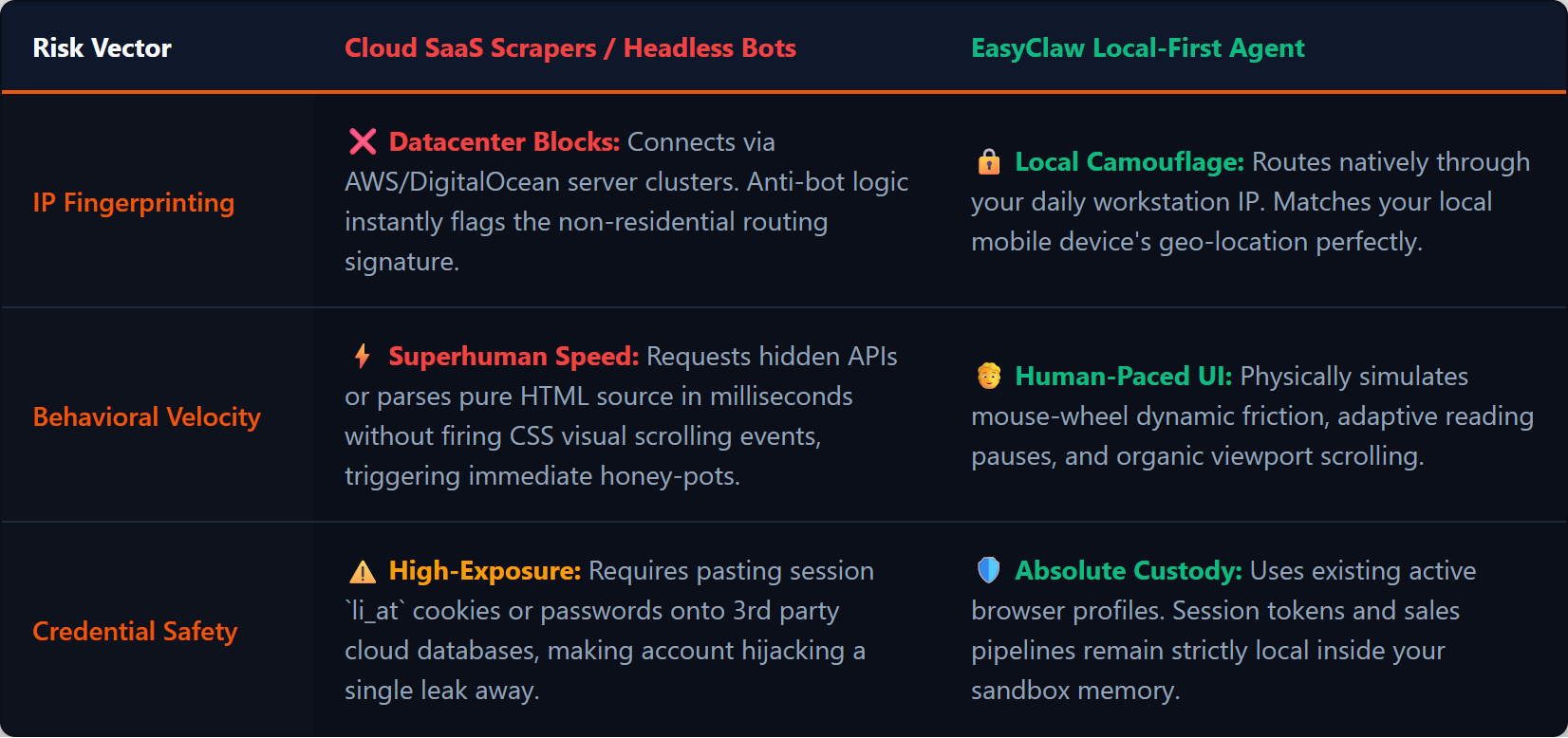
クラウド スクレイパーは、検出可能なデータセンター IP とヘッドレス ブラウザを使用します。 EasyClaw はローカル IP と本物の Chrome を使用します。これは人間のブラウジングと区別できません。
LinkedIn のリード生成でクラウドツールが失敗する理由
従来の B2B 企業は、自動化されたアウトリーチとデータ抽出を約束するサードパーティの SaaS ツールを購入します。アカウントの Cookie または認証ログイン情報をリモートボードに提供します。ベンダーのサーバーは、「ヘッドレス」ブラウザ セッション (グラフィカル ユーザー インターフェイスのないブラウザ) を開始して、バックグラウンドでデータを収集します。
LinkedIn のセキュリティ システムは、この行為を検出するように特別に訓練されています。 マウスの移動パターン、スクロール速度、ページ読み込み中のタイミングを監視します。 クラウド スクレイパーが検索結果ページをリクエストし、HTML を解析し、0.2 秒後に次のページをリクエストすると、プラットフォームはアカウントに設定を立てます。 モバイルアプリがロンドンの携帯電話基地局から ping を送信しているときに、アカウントが突然オレゴン州の AWS IPからログインすると、地理的な不一致により瞬時にセキュリティロックダウンがトリガーされます。
| リスクベクトル | クラウドSaaSスクレーパー/ヘッドレスボット | EasyClaw ローカルファーストエージェント |
|---|---|---|
| IPフィンガープリンティング | データセンターサーバークラスター — ボット対策ロジックによってフラグが設定されています | ローカル住宅用 IP — 毎日の閲覧パターンに一致します |
| 行動速度 | 超人的なスピードがハニーポットを引き起こす | ランダム化された 3 ~ 8 秒の遅延による人間の模倣 |
| 資格情報のセキュリティ | サードパーティのクラウド DB に貼り付けられたセッション トークン | 既存のブラウザ プロファイルを使用します — VPNはローカルに留まります |
| ブラウザの指紋 | 検出可能なシグネチャを持つヘッドレス ブラウザ | 本物の拡張機能、Cookie、TLSを備えた本物のChrome |
LinkedIn のリード獲得自動化を安全に行うための 4 つのフェーズ
フェーズ 1: ローカルエージェントのセットアップ (スキルファウンデーション)
高度に監視された Web 環境を扱う場合は、決定的で予測可能な実行が必要です。 EasyClaw では、スキルをインストールすることでこの規律を確立します。を確認してください。 Web オートメーションとナビゲーション スキルはアクティブです。エージェントに、無限スクロールの処理方法、ダイナミック要素の一時の待機方法、および危険のあるスクリプト警告をトリガーせずに DOM からテキストを安全に抽出する方法を教えます。エージェントはビジュアルインターフェイスとの対話のみに制限されており、API を悪用しようとすることはありません。
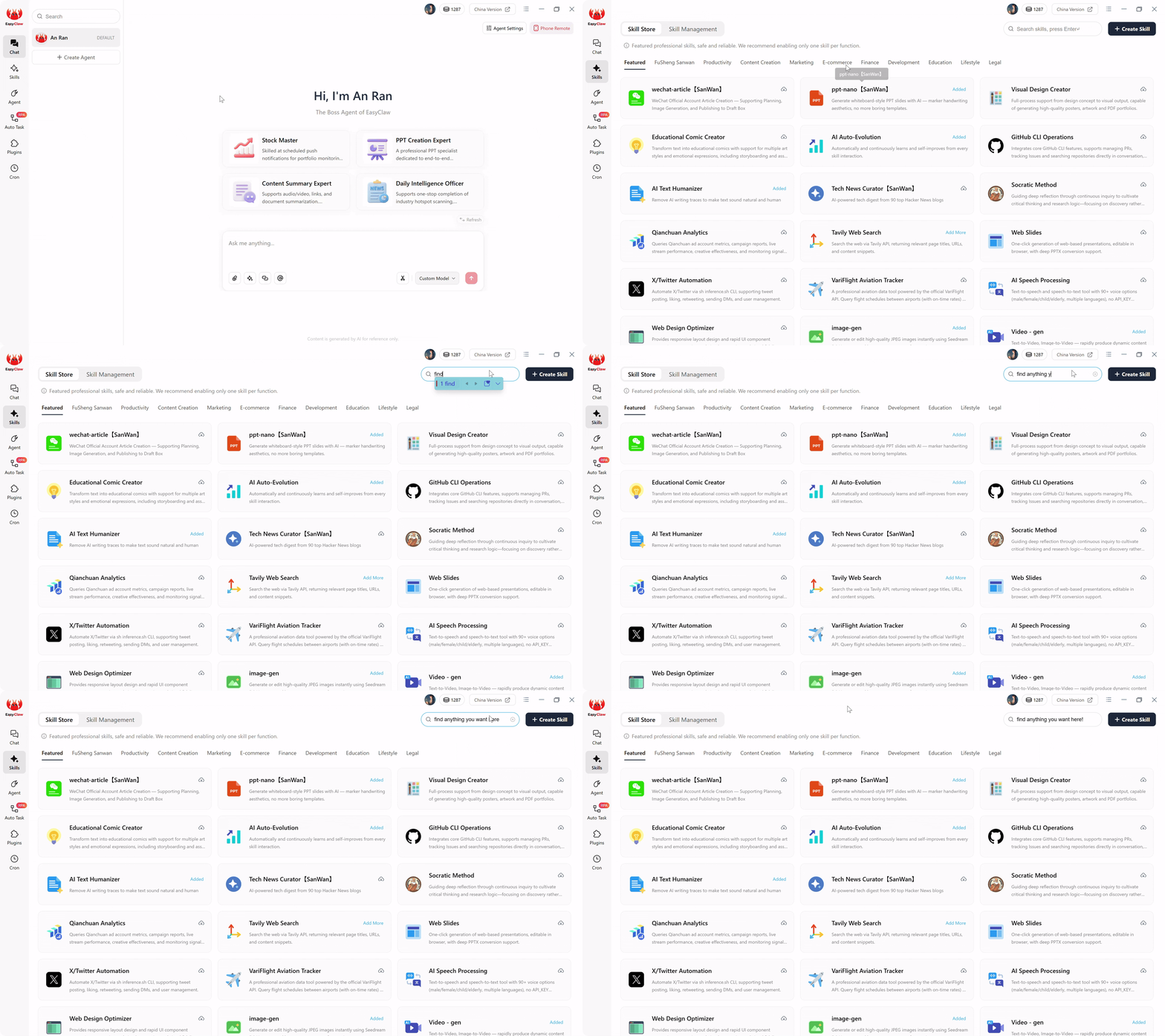
Web Automation & Navigation スキルをインストールすると、隠れた API を悪用したり JavaScript を挿入したりする近く、安全に LinkedIn を閲覧するための視覚エージェントに提供できます。
フェーズ 2: 自動タスク プロンプトの作成
従来のデータ抽出では、Seleniumを使用して脆弱なPythonスクリプトを作成し、正確なCSSセレクターを設定する必要があります。 LinkedInがボタンの色を変更したり、装備名を新しいdivタグで囲んだりすると、ハードコードされたスクリプトが壊れてしまいます。 EasyClawは、この脆弱性を意味の理解に置き換えます。
「ブラウザを開いて LinkedIn 検索に移動します。検索バーに「最高情報セキュリティ責任者」と入力します。結果を「米国」と「第 2 学位」の「人物」にフィルターします。ゆっくりと下にスクロールして、すべてのプロフィールカードを読み込みます。フルネーム、現在の役職、会社名、プロフィール URL を抽出します。[次へ] クリックして 5 ページ繰り返します。ヘッダーが明確な「CISO_Outreach_List」という名前のローカル CSVを作成し、保存します。
[コンパイル] クリックすると、LLM は自然言語を強化されたステップバイステップのローカル RPA スクリプトに翻訳します。世界中のマーケティング代理店、SaaS 先行者、B2B 営業チーム向け、エンタープライズ グレードの LinkedIn スクレーパーを 1 つの段落で構築しました。
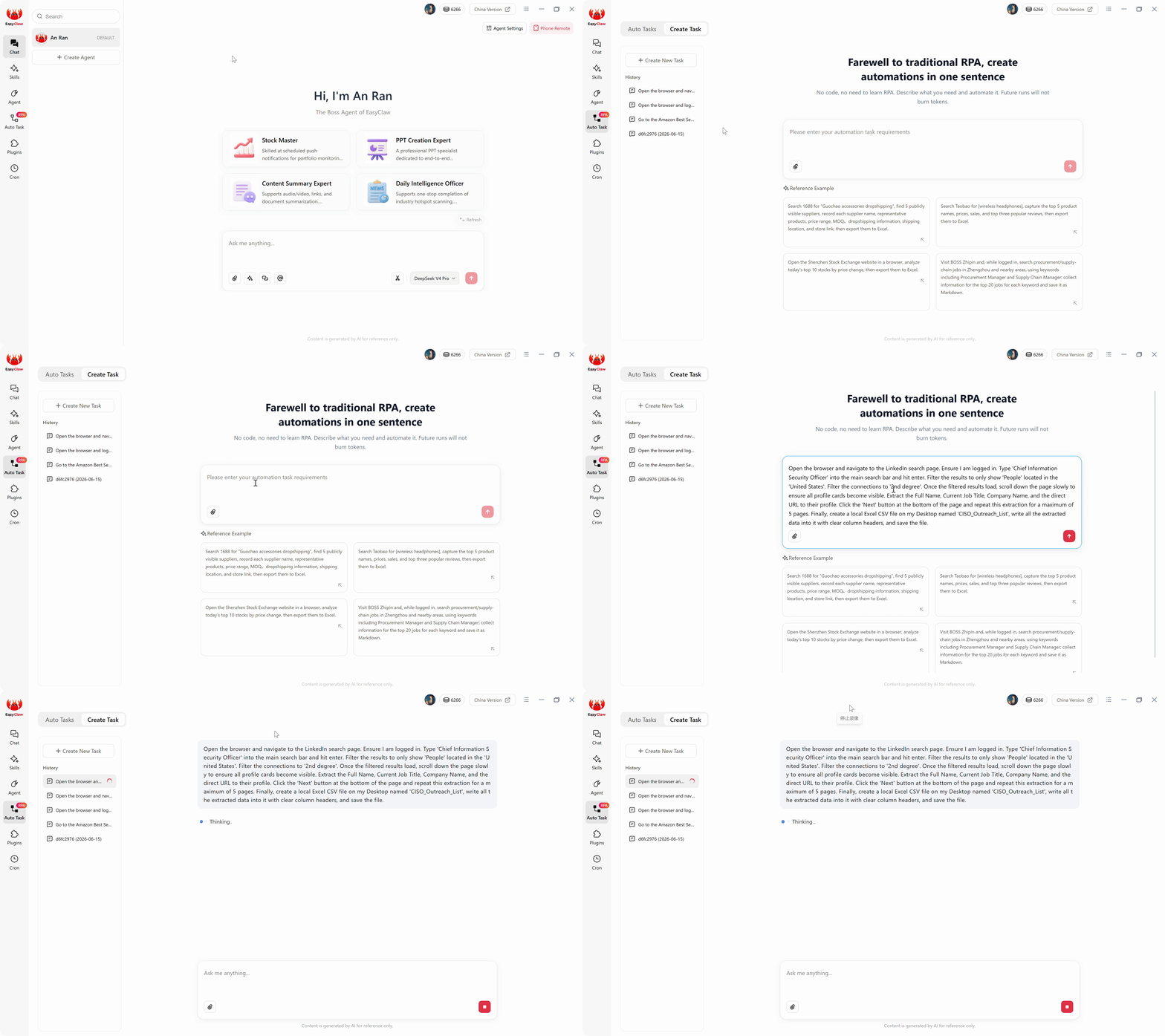
LinkedIn のリード抽出ロジックを平易な英語で記述します。AI はセマンティックな意図を、無限スクロールと動的に処理する強化されたローカル RPA スクリプトにコンパイルします。
フェーズ 3: ステルス実行 (ゼロウイルス運用)
クラウドベースの AI 自動化ツールを使用した場合、検索結果の新しいページごとに HTML をキャプチャし、そのペイロードを外部 LLM サーバーに送信し、名前と企業を識別するためだけに高価な権利を書き込む必要があります。 EasyClaw では、この税金が完全に排除されます。コンパイル中に、高価な AI 推論が 1 回発生しました。ローカル RPA解析スクリプトはネイティブに引き継ぎ、コンピューターのメモリに埋め込まれた軽量モデルを使用してデータを使います。毎日の抽出作業が無駄になります ゼロLLMトークン.
フェーズ4:安全な毎日のリズムの確立
安全な抽出の鍵はペースです。 1時間に1,000個の規定チームを抽出しないでください。 最も成功しているB2Bの成長は、小規模で高さに目標を絞ったバッチを毎日抽出し、通常の人間の制限内で活動を十分に維持しています。 Cronに移動し、午前9時15分に「Daily Executive Lead」 「プル」を作成し、コンパイル済みのワークフローにリンクします。チャットアプリへの結果の意見を切り替えます。明日の午前9時20分に、次のメッセージが届きます。 「実行が完了しました。50 個の新しい CISO 権限が抽出されました。CSV がデスクトップに保存されました。」
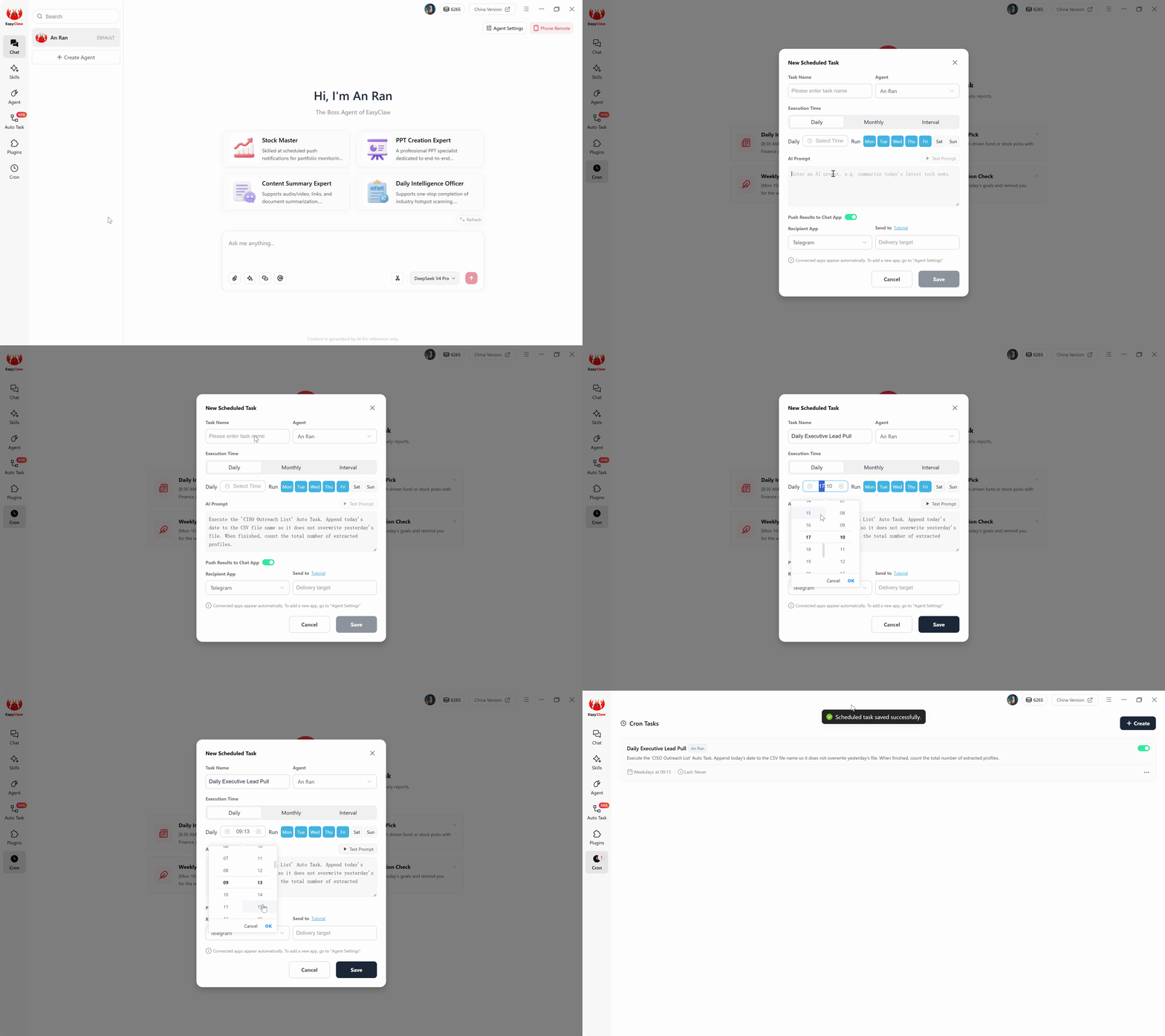
cron スケジュールを使用して毎日の安全な抽出頻度を設定します。小規模で対象を絞ったバッチにより、アクティビティが人々の通常の制限内に維持され、セキュリティ断片のトリガーが回避されます。
完全な B2B 抽出のためのプロのヒント
セマンティック遅延とランダム化されたペーシング
フラグを立てる最も簡単な方法は、毎回ちょうど 1.00 秒でページ間を移動することです。ペーシング命令を追加します。 「検索結果が読み込まれた後、抽出するまでランダム化された 4 ~ 8 秒待機します。[次へ] をクリックした後、人間の読み取りをシミュレートするために 5 秒間一時停止します。」 エージェントはこれらの自然な一時停止を動的に挿入し、自動化されたセッションを本物のブラウジングと視覚的に区別できないようにします。
マスターブール検索制約
抽出後の高度なフィルタリングをすべてエージェントに依存しないでください。検索命令で高度なブール ロジックを使用します。 「検索バーに正確な文字列 (CMO OR "Chief Marketing Officer") AND ("B2B" OR "SaaS") NOT "Consultant" を入力してください。」 LinkedIn 独自の検索エンジンに重労働を強制するため、エージェントは高さに適格で意図の高い目標を引き出すことにのみ時間を費やします。
EasyClawがLinkedInのリードジェネレーションで勝利を収めた理由
ソフトウェア業界は、LinkedIn パイプラインの構築には高価なクラウド データ アグリゲータや、積極的なブラウザ拡張機能を備えた危険なアカウントが必要であると営業リーダーを信じています。 EasyClaw は、その偽のバイナリを完全に破壊します。
EasyClaw は、次のエージェントをデプロイします。 あなた自身の認証されたブラウザセッション、人間のペースでスクロールし、構造化データベースをハードドライブに直接コンパイルします。 クラウド API 呼び出しやヘッドレスブラウザー、LinkedIn のセキュリティ基盤ストラクチャをトリガーするデータセンターの IP アドレスは必要ありません。
本物のCookieと住宅用IPを備えた実際のChrome – 手動ブラウジングからセキュリティアルゴリズムまで区別できません。
ランダムな 3 ~ 8 秒の遅延、自然なスクロール速度、コンテキスト切り替えの一時停止は人間の行動を反映しています。
LinkedIn が UI を更新するときに破損する脆弱な CSS セレクターはありません。
抽出されたデータはローカルの Excel/CSV ファイルに直接保存されます。クラウドダッシュボードやベンダーデータの保持は必要ありません。
長所
- アカウント禁止のリスクゼロ - 実際のブラウザセッションを使用します
- サードパーティのサーバーと認証情報を共有しない
- 自然言語プロンプト — Python や Selenium は必要ありません
- 人間の安全な範囲内での毎日のバッチ抽出
- 結果は WhatsApp、Telegram、または Slack経由で配信されます
制限事項
- 1 日あたりのボリュームは人間規模に制限されます (50 ~ 100 プロファイル)
- LinkedInログインがアクティブなデスクトップが必要です
LinkedIn のリードジェネレーションに関するよくある質問
いたちごっこの終わり
ソフトウェア業界は何年もの間、LinkedIn パイプラインを構築するために高価なクラウド データ アグリゲータや危険なブラウザ拡張機能を使用するしかない方法が必ず信じられるようにセールスリーダーやマーケティングリーダーを条件付けしてきました。
EasyClaw を使用してローカルファーストの Web UI アーキテクチャを採用することで、従来のスクレイパーの脆弱性とクラウド仲介者 API の大胆なリスクを回避できます。
独自の認証されたセッションを使用し、人間のペースでスクロールし、データベースの構造化をハードドライブに直接コンパイルするエージェントを展開します。自動タスク インターフェイスを開き、理想的な顧客オプションを 1 つのセグメント落で定義します。