🏗️ Lead Generation · 2026

Enrich & Verify Sales Leads: From Raw Data to Sales-Ready Contacts

The most expensive hidden liability in sales isn't a bloated software stack — it's the grinding friction of incomplete data. Learn how to deploy a local AI polling agent that automatically enriches and verifies leads without uploading your proprietary prospect lists to cloud data brokers.

📅 Updated: June 2026⏱ 13-min read✍️ EasyClaw Editorial
  • X(Twitter) icon
  • Facebook icon
  • LinkedIn icon
  • Copy link icon

The Silent Killer of Sales Productivity: Incomplete Data

Every week, a marketing team proudly hands over a massive spreadsheet of two thousand raw contacts from a trade show, whitepaper download, or webinar. The Director of Sales looks at the file with dread. The spreadsheet is a structural disaster: first names, last names, company names. Job titles are entirely missing. Phone numbers are blank. The email column is a wasteland of personal Gmail addresses, typos, and fake placeholders.

Upload this raw, unverified list directly into your CRM, and you create a data graveyard. Email deliverability plummets from hard bounces. Worse, your highly paid SDRs spend 40% of their day manually hunting prospects on LinkedIn to verify their current roles — instead of actually dialing the phone. The software industry's traditional answer is lead enrichment: subscribe to an expensive cloud data aggregator, upload your messy spreadsheet, pay a premium per-row fee, and wait for them to return missing job titles and corporate emails.

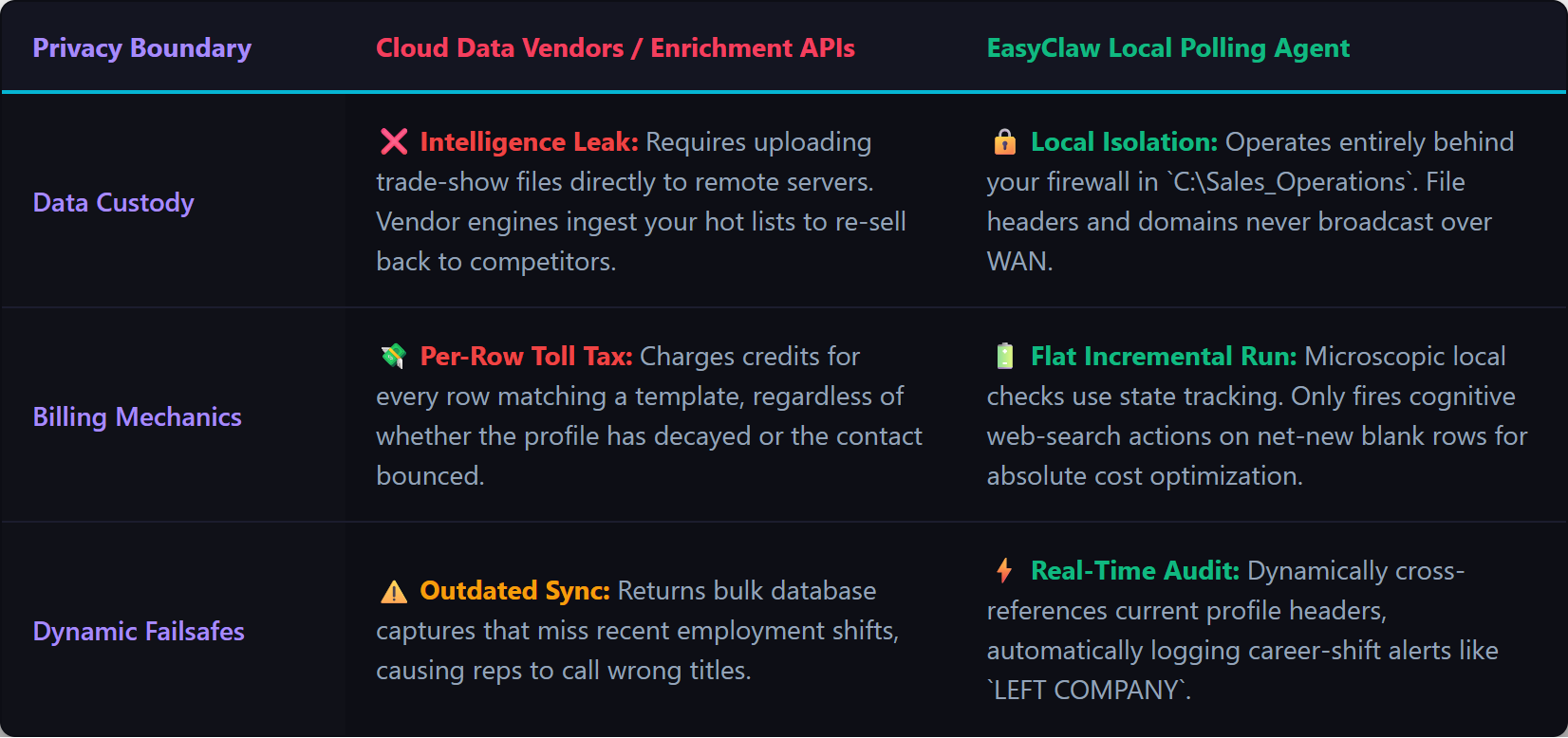
But here's the dark, rarely discussed compromise: when you use a cloud enrichment API, you upload your hard-earned, proprietary lead data directly to a third-party server. You just spent $50,000 sponsoring a trade show booth to capture high-intent buyers. By uploading that specific list to a cloud vendor, you are handing over proprietary competitive intelligence. Many data vendors quietly absorb uploaded lists to update their own global databases. You are paying a premium per-row fee to leak your own pipeline.

Lead Enrichment Verification Pipeline Script

Cloud enrichment APIs absorb your proprietary lead lists into their databases; EasyClaw enriches and verifies locally — your pipeline data never leaves your machine.

💡 Key Insight What if enrichment didn't require a cloud middleman at all? EasyClaw keeps your raw Excel file securely on your local hard drive and deploys an intelligent polling agent that monitors your folders, enriches new data on the fly, and keeps proprietary lists behind your own firewall. For revenue operations teams, sales managers, and growth marketers across global organizations, this eliminates the per-row tax and the data privacy liability simultaneously.

Why Rigid RPA Fails at Lead Enrichment

When operations managers try to automate lead enrichment locally, their first instinct is building a traditional RPA script: Open Excel, copy row 2, open Chrome, paste into LinkedIn, copy job title, switch back to Excel, paste into column D. This is terrible architecture. True enrichment isn't a predictable UI sequence — it's a dynamic, highly variable research task. Some prospects have common names requiring deeper search queries. Some companies use .com while others use .io. A rigid RPA script crashes the moment a LinkedIn search result looks slightly different.

Instead of a rigid UI script, you need a cognitive polling engine. In EasyClaw, a scheduled Cron task wakes up a fully capable, independent AI session. This agent already possesses skills to read spreadsheets (xlsx skill), search the internet (web_search), and manipulate the browser (browser-tool). You set up a Cron job that acts as an autonomous data steward — quietly polling your files in the background and springing into action only when new work appears.

Four-Phase Intelligent Enrichment Pipeline

Phase 1: The Secure Local Staging Ground

Create a dedicated folder on your local machine — e.g., C:\Sales_Operations\Raw_Event_Leads. Whenever your marketing team returns from a trade show, they drop the master Excel file into this folder. Standardize column headers: First Name, Last Name, Company, Job Title, LinkedIn URL, Corporate Email, and a critical operational column named Processing Status. This folder becomes the ingestion point — a predictable, secure environment for your agent to monitor.

Phase 2: Equipping Your Agent

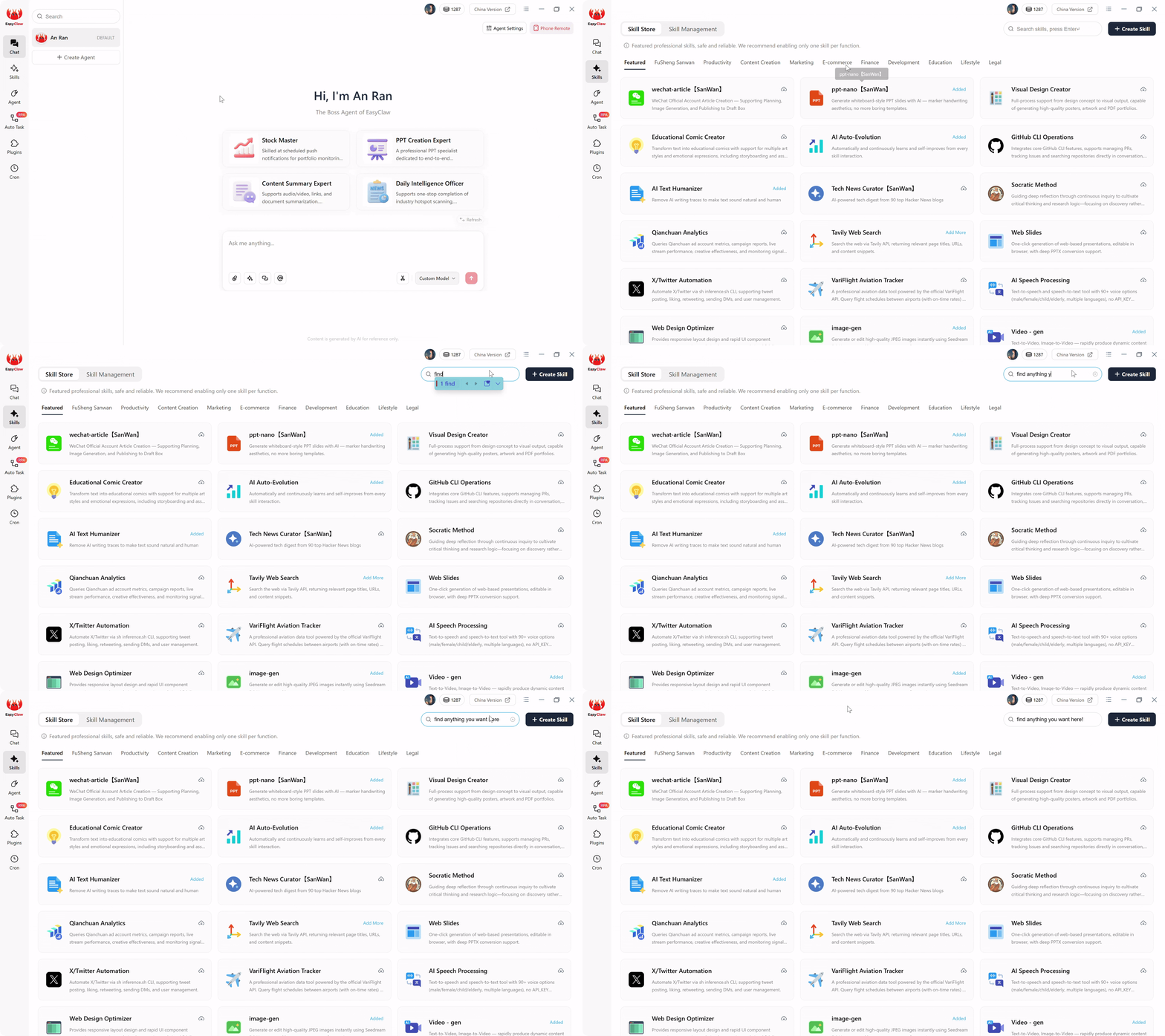
Enable the Excel/CSV Processing skill and Web Search & Browser Automation skill. This combination provides the mechanical vocabulary to safely bridge the gap between your hard drive and the internet — parsing spreadsheet columns, searching the web, and writing data back without corrupting file encoding. The agent is authorized to read that specific Excel file; it's strictly prohibited from wandering into unauthorized directories.

Lead Enrichment Verification Skills Store

Enable Excel/CSV Processing and Web Search skills to bridge your spreadsheet data with live web research — all processed locally without cloud APIs.

Phase 3: The Intelligent Polling Engine (Cron Configuration)

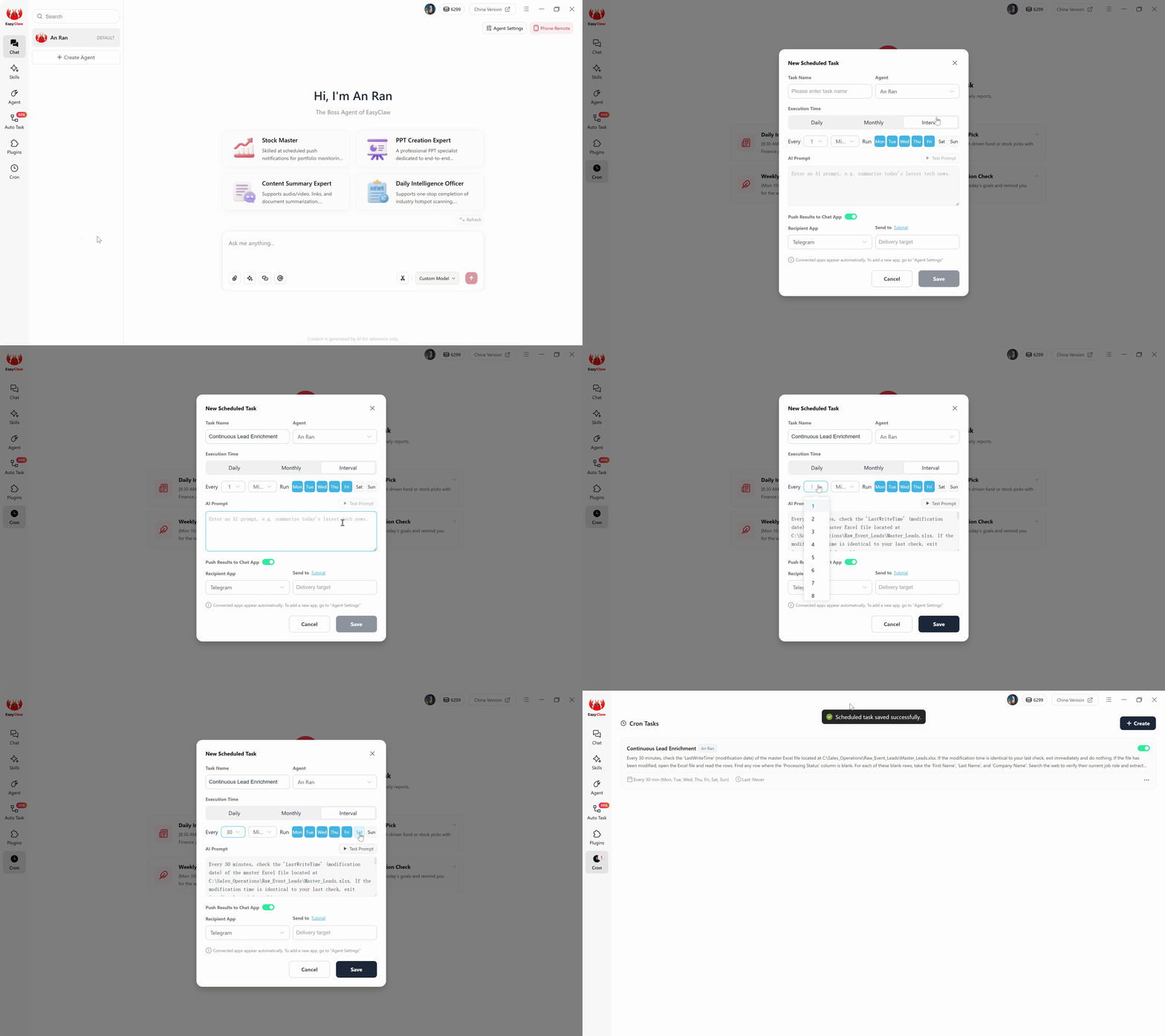
Create a Cron task named "Continuous Lead Enrichment" running Every 30 Minutes. The AI prompt tells the agent: "Check the LastWriteTime of Master_Leads.xlsx. If unchanged since your last check, exit immediately. If changed, open the file and find rows with blank Processing Status. For each, search the web to verify current job role, extract LinkedIn URL, and deduce corporate email from domain patterns. Write back to Excel and mark status as Complete. Save after every 10 rows. Push a summary notification — how many rows processed, how many had incomplete information."

You just deployed a relentlessly efficient, stateful polling engine that only consumes AI resources when new work actually exists. The 30-minute checks that find no changes cost zero tokens — they're microscopic local file operations.

Lead Enrichment Verification Cron Job

The enrichment engine in action: cross-referencing job titles, extracting LinkedIn URLs, and deducing corporate emails from domain patterns — all locally.

Phase 4: The Economics of Local Execution

If you used a cloud AI automation tool, every 30-minute poll would require ingesting the entire Excel file, sending it to an external LLM server, and burning tokens just to check for new rows. EasyClaw eliminates this: agent runs locally, file modification checks cost zero tokens, and only net-new blank rows trigger AI reasoning. Daily enrichment runs are unbelievably cost-effective — cognitive AI with flat, predictable local execution costs.

Pro Tips from Revenue Operations

Deductive Email Generation

You don't need an expensive API to find email addresses. Most corporate emails follow strict patterns. Instruct your agent: "Search for the company domain alongside 'email format' or 'contact'. If you deduce 'first.last@company.com', apply that formula to the prospect's name. Write the generated email with a confidence note." This local logic replaces thousands of dollars in SaaS enrichment fees.

The Job Title Validation Failsafe

The most dangerous thing in sales: sending automated outreach praising a prospect's work at a company they left three months ago. Instruct: "When viewing the prospect's LinkedIn profile, explicitly compare their currently listed employer against the 'Company Name' in our raw Excel file. If names don't match, write 'LEFT COMPANY - UPDATE REQUIRED' in the Processing Status column and move on."

💡 Local Memory Caching: If your marketing team captured 50 leads from the same enterprise at a trade show, don't waste time deducing email formats 50 separate times. Instruct the agent: "Maintain an internal dictionary of company email formats in memory. Once you deduce the format for a domain, store it. When processing the next lead from that same company, apply the stored format immediately." This microscopic architecture tweak saves massive execution time.

Why EasyClaw Replaces Cloud Enrichment Services

🏆 Recommended Tool — Private Lead Enrichment & Verification
Enrich Leads Locally — Never Upload Prospect Data to a Cloud Broker Again

EasyClaw deploys a relentless digital SDR that monitors your local files, hops between search engines seamlessly, verifies employment in real-time, and compiles pristine, structured data directly back onto your hard drive. Zero per-row fees. Zero data leakage.

🔒 Proprietary Data Stays Local

Trade show lists, whitepaper downloads, event leads — all stay on your hard drive. No cloud broker absorbs your pipeline.

🧠 Intelligent Polling

Agent only activates when new data arrives. Zero wasted compute, zero unnecessary API calls, zero token burn on idle checks.

✅ Real-Time Verification

LinkedIn cross-referencing, job title validation, email format deduction — all done live, not from a stale database snapshot.

📊 Structured Excel Output

Enriched data written back to your original file with Processing Status tracking — ready for CRM import.

Pros
  • Zero per-row enrichment fees
  • Proprietary lists never leave your machine
  • Stateful polling — only processes net-new rows
  • Real-time LinkedIn verification, not stale database
  • Free tier available
Limitations
  • Best for batches under 500 leads per session
  • Requires active browser for LinkedIn verification

FAQ About Automated Lead Enrichment

How is this better than using Clearbit or Clay for enrichment?
Clearbit and Clay charge per lookup and store your prospect data on their servers. EasyClaw processes enrichment locally — no data leaves your machine. Over a year of enriching 1,000 leads/month, the cost difference is $1,200-$2,400 in SaaS fees versus zero. More importantly, your proprietary event leads never feed a competitor's database.
What if email format deduction gets it wrong?
The pipeline writes all inferred emails with a confidence flag so your team can spot-verify before sending outreach. The most common corporate formats (first.last, first, f.last) are correct 85%+ of the time. For mission-critical contacts, the agent also extracts LinkedIn URLs so SDRs can verify manually if needed.
Can this handle leads from multiple events simultaneously?
Yes. Create separate staging folders for different events or campaigns, and configure separate Cron jobs monitoring each. A team running events across North America, Europe, and APAC can maintain parallel enrichment pipelines — all running locally, all keeping data segregated by region.
Is this GDPR-compliant?
Running enrichment entirely on your local machine is the most GDPR-compatible architecture possible. No prospect data transits a third-party server. If a data subject requests deletion, you delete a local row — no vendor support ticket, no replicated cloud storage to purge. Your DPA exposure is zero because there are no external data processors.

Sunsetting the Cloud Data Broker

For years, revenue operations teams accepted a bitter compromise: force highly paid sales staff to do manual data entry, or pay extortionate fees to upload proprietary trade show lists to a cloud data broker. Both options cripple momentum — one destroys your team's time, the other destroys data privacy and drains your operational budget.

That architectural failure is no longer mandatory. Building a sales-ready contact list should not require surrendering competitive intelligence to a remote server, nor paying a per-row tax to verify a Director of Marketing still works at a specific company. By adopting a local-first, agent-driven architecture with EasyClaw, you deploy a relentless digital SDR that monitors your local files, verifies employment in real-time, and compiles pristine structured data directly back onto your hard drive.

Set up your Cron polling engine, define your enrichment sequence, and watch as your raw data graveyard transforms into an automated, zero-maintenance, flawlessly accurate revenue engine — for marketing agencies, SaaS sales teams, and enterprise revenue operations globally.