


すべての RPA チームを悩ませる火曜日の朝の恐怖
従来の自動化に依存する運用チームを悩ませる独特の恐怖があります。通常、それは火曜日の早朝に起こります。ダッシュボードにログインすると、赤いエラー ログの海が表示されます。
過去 6 か月間サプライヤーレポートを通常にダウンロードしていた従来の RPA スクリプトが突然クラッシュしました。なぜ? btn-blue から btn-primary に変更しました。従来の自動化は、厳密で明示的に定義されたルールと正確な座標マッピングに依存しているため、その小さな表面的な更新は、サプライ チェーン パイプライン全体を破壊するのに十分でした。ここで、チケットを開き、開発者がスクリプトを書き直すのを待ち、その間に手動でレポートを処理する必要があります。
この脆弱性こそが、テクノロジー業界が インテリジェントなプロセスオートメーション (IPA)。アイデアはシンプルでした。UIが少し変更されただけで機能がなくなる脆弱なスクリプトを構築する代わりに、人工知能をワークフローに注入することで、システムが適応し、コンテキストを読み取り、基本的な決定をその場で行うことができるようになります。
しかし、エンタープライズ ソフトウェア市場は、このエレガントなコンセプトを台無しにしました。企業が、 AIプロセスの自動化 現在、企業ベンダーは 6 か月の導入サイクルを要求しています。複雑な機械学習モデルをトレーニングし、複雑なデシジョン ツリーをマッピングし、専門の統合エンジニアを雇用する必要があります。彼らは時間を節約することを目的としたコンセプトを採用し、それを大規模な IT インフラストラクチャ プロジェクトに変えました。
しかし、真のコグニティブ オートメーションの実装に、単一のルールを作成したり、大規模な機械学習モデルを展開したりする必要がないとしたらどうなるでしょうか? 操作上の意図を平易な英語で入力するだけで、ローカルエージェントがその意図を瞬時に復元力のある適応性のある Web ブラウザ スクリプトにコンパイルしてくれるつもりか?
ルールベースの考え方の問題: 従来のRPAが根本的に脆弱である理由
EasyClawがなぜ大規模なパラダイムシフトを表しているのかを理解するには、従来のRPAがどのように機能するかを学ぶ必要があります。従来のシステムでは、シナリオを描いてボットを構築します。ボットに次のようにわかりやすく伝える必要があります。 X/Y 座標の要素をクリックします。テキスト文字列が「遅延」に完全に一致する場合は、ブランチ A に進みます。「保留中」に一致する場合は、ブランチ B に進みます。
考えられるあらゆる人のためのエラーやウェブのバリエーションを事前に予測しようとしています。現実の世界に予測しているなかった変化が必然的に現れると、ボットは例外をスローして動作を停止します。 ルールベースの自動化は、作成するルールの数に応じて直線的に拡張され、未処理のエッジ ケースごとに指数関数的に中断されます。
| オートメーション層 | 従来のルールベースのRPA | EasyClaw 認知エージェント |
|---|---|---|
| 要素のターゲティング | ✗ 正確な XPath / CSS セレクター | ✓ 意味関数認識 |
| UIセレクターのドリフト | ✗ 変更時の未処理例外 | ✓ 視覚的なコンテキストに適応します |
| 構造化テキスト | ✗ 厳密な正規表現一致 | ✓ 文脈に応じた推論 |
| 意思決定ロジック | ✗ ハードコードされた if/else 分岐 | ✓ 意味論的意図の解釈 |
| エッジケース | ✗ 不明な点でクラッシュする | ✓ 適切な例外処理 |
EasyClaw は、このルールベースのアーキテクチャを放棄します。すべての座標と条件分岐をマッピングすることを強制する代わりに、大規模言語モデルを利用した「ステップ コンパイル」エンジンを利用します。運用上の目標を会話形式で説明します。 AI は、ユーザーの言葉の意味的意図を解釈し、データの背後にあるコンテキストを理解して、それを動的なブラウザー自動化スクリプトに変換します。 btn-blue という名前のボタンのようなものはなく、構造的にダウンロードトリガーとして機能するボタンを探します。
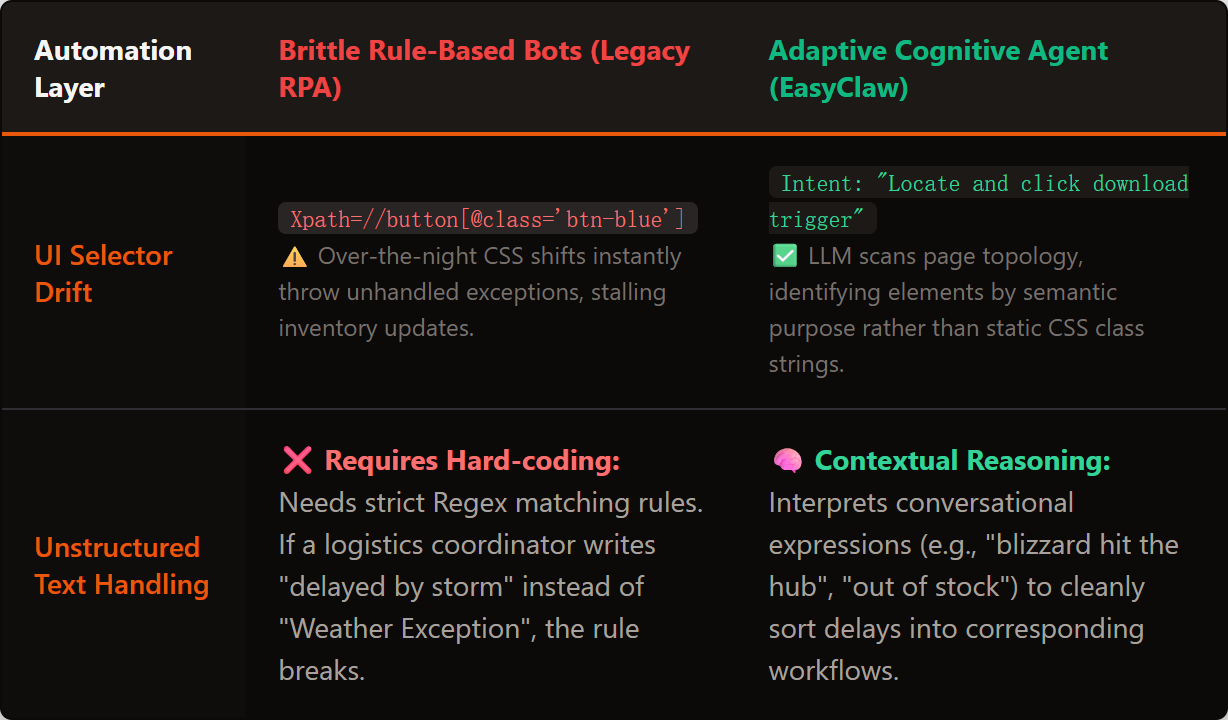
ルールベースの RPA は、未処理のあらゆるエッジケースで機能しません。 EasyClaw の認知エージェントは、意味論的な考え方を使用して、現実世界の変動に動的に適応します。
フェーズ 1: アーキテクトへの指示 — 自動タスクインターフェイス
サプライチェーンの監視プロセスを自動化する予定です。従来、これには複雑な API 統合と条件付きロジックコードが必要でした。
に移動します。 自動タスク EasyClaw のインターフェイス。コーディング ノードの空白のキャンバスは表示されません。シンプルなテキストボックスが表示されます。ここでは、新しい物流コーディネーターに指示するときとまったく同じようにプロンプトを作成します。
「ブラウザを開いて、サプライヤー Web ポータル (supplier.internal-network.com) にログインします。[アクティブな出荷] タブに移動します。ダッシュボードを確認し、ステータスが [遅延] または [例外] の出荷を見つけます。特定の出荷については、構造化されていないまずを読みます。遅延の原因が「気象条件」なのか「在庫不足」なのかを判断します。関連している場合は、新しいタブを開いて、当社のログインしてください。 erp.local で社内 ERP を検索し、その出荷 ID を見つけて、配送予定日を 3 日遅らせます。 在庫不足の場合は、代わりに、Outlook Web で、不足している特定の品目と供給ヤー名を記載した電子メールを下書きして保存してください。
これが本当の定義です インテリジェントなプロセスオートメーションCSSセレクターや If/Else ステートを作成しているわけではありません。
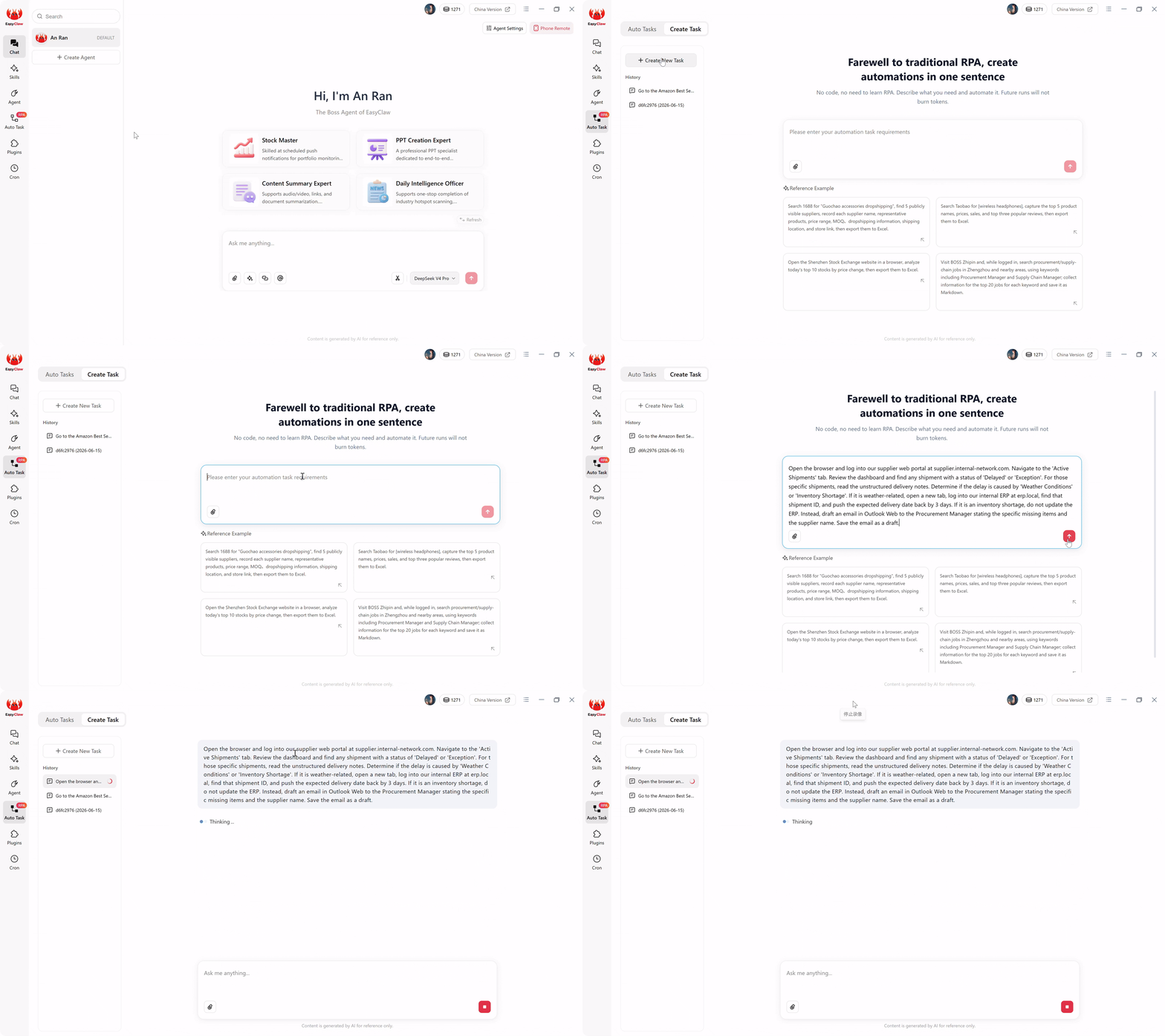
自動タスクインターフェイス: 複雑な認知ワークフローを平易な英語で説明します。AI は、ハードコードがあった if/else 分割ではなく、意思決定ロジックを処理します。
フェーズ 2: 境界を確立する — ガバナンスのためのスキル
コグニティブオートメーションを備えたとしても、エンタープライズグレードのエージェントには厳格な運用境界が必要です。賢いエージェントがその任務を超えて即興で行動することは望ましくありません。 EasyClaw では、正しい値を保証することでこれらの境界を強制します。 スキル エージェントのためにアクティブです。
このワークフローでは、「Web オートメーションとナビゲーション」スキルを備えます。 これにより、エージェントはブラウザのタブを安全に操作し、Web フォームを処理し、画面上のテキストを抽出するための技術的な認識を得ることができます。 これにより、エージェントはプロンプトでわかりやすく指定された Web インターフェイスのみと対話することが保証されます。 誤ってローカル ファイルを削除したり、許可されていないネットワーク ディレクトリに侵入したりすることはありません。 オートメーションの爆発範囲に対する絶対的なガバナンスを維持します。
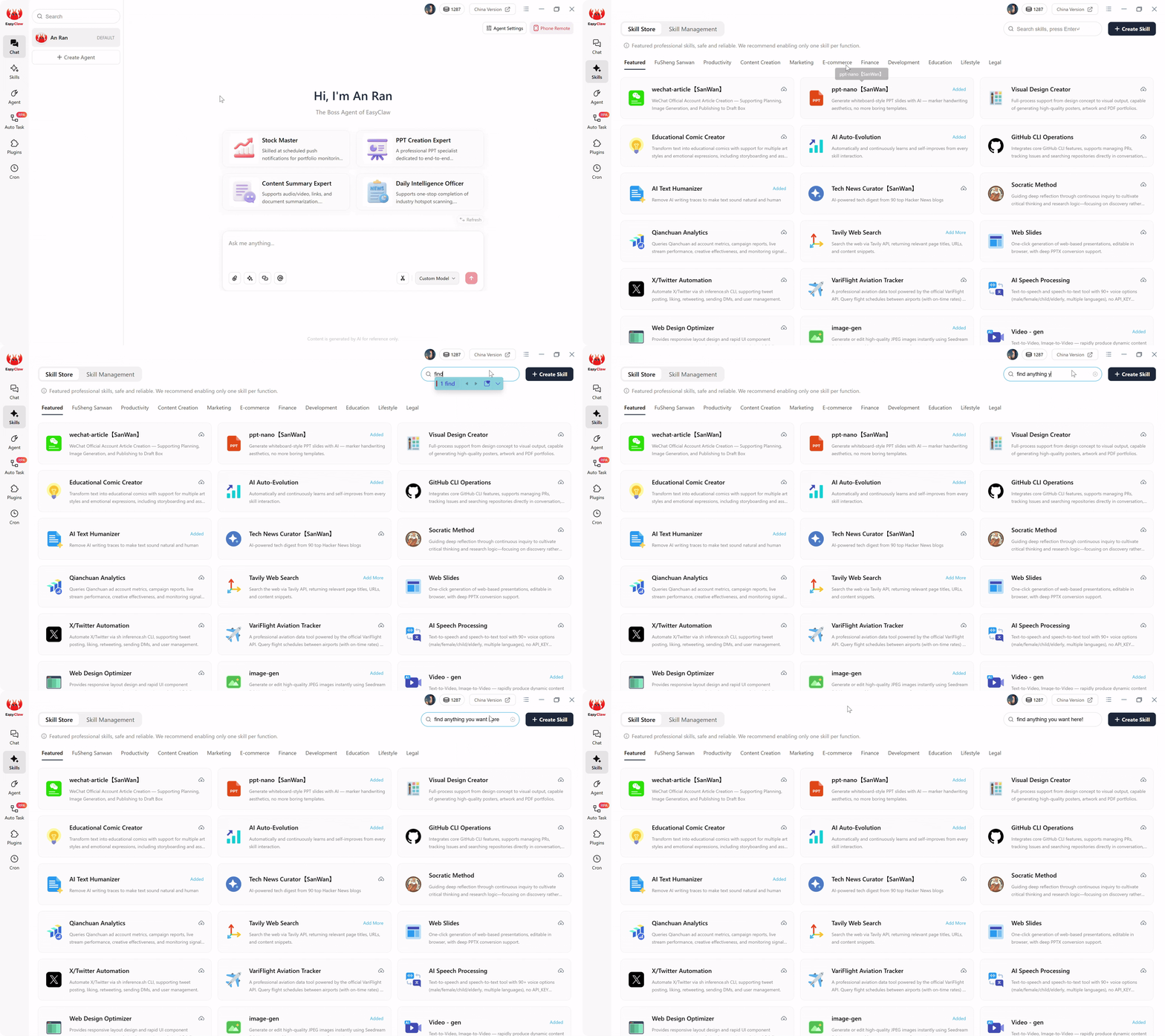
コグニティブ エージェントが実行できることを正確に定義するスキルを付加し、企業の IT チームが必要とする厳格なガバナンス境界を作成します。
フェーズ 3: ハンズフリートリガー — Cron とチャットの統合
コグニティブ ワークフローは、自律的に実行され、睡眠中にデータを評価するときに最も価値があります。に移動します。 クロン 左側のメニューのセクション。 「午前のサプライチェーン監査」という名前の新しいスケジュールされたタスクを作成します。構成したばかりのエージェントを選択します。実行を設定 毎日午前 7 時 10 分.
[AI プロンプト] ボックスで、スケジュールをコンパイル済みのワークフローにブリッジします。 「『サプライヤー遅延解決』自動タスクを実行します。完了したら、天候により更新された出荷の数と、在庫不足のために作成された下書きメールの数を要約します。」
トグル 結果をチャット アプリにプッシュする午前7時15分起きて携帯電話をチェックすると、WhatsAppがブザー音を鳴らすだけです。 「監査が完了しました。状況により出荷が 3 件遅延しました (ERP が更新されました)。在庫不足が 1 件見つかりました (Outlook に電子メールの下に書きましたが保存されました)。人によるレビューが保留中です。」 エンタープライズ ダッシュボードへのログインは必要ありません。
フェーズ 4: フリーのローカル実行 — インテリジェント オートメーションの経済学
午前 7 時に何が起こるかという財務メカニズムを理解することが重要です。クラウドベースのサービスを使用していた場合 AIプロセスの自動化 このツールを使用すると、システムは事前監視者の Web データをキャプチャし、ペイロード全体をインターネット経由でクラウド LLM に送信し、AI に判断を求め、コマンドをパイプで ERP に返します。
EasyClaw では、この繰り返し発生する税金が不要になります。 重くて高価な AI 推論は、フェーズ 1 のやがて自然言語のセグメント落がスクリプトにコンパイルされた一度だけ発生しました。 明日の午前 7 時に Cron スケジューラが起動されると、基盤となるローカル RPA スクリプトがネイティブに引き継ぎます。 ローカルブラウザを開き、URL に移動し、メモリ内に直接食い込まれた軽量モデルを使用してデータを抽出します。 ルーティングの決定はローカルで行われます。
ステップを実行するために外部クラウド API に継続的に ping を実行する必要がないため、毎日の実行で消費されるのは AIトークンは絶対にゼロ。高度なインテリジェンスは、ローカルで予測可能かつ安全に拡張できるため、インテリジェントな自動化にアクセスできるようになります。 無駄のない中小企業チームからグローバル企業まで、あらゆる規模の組織.
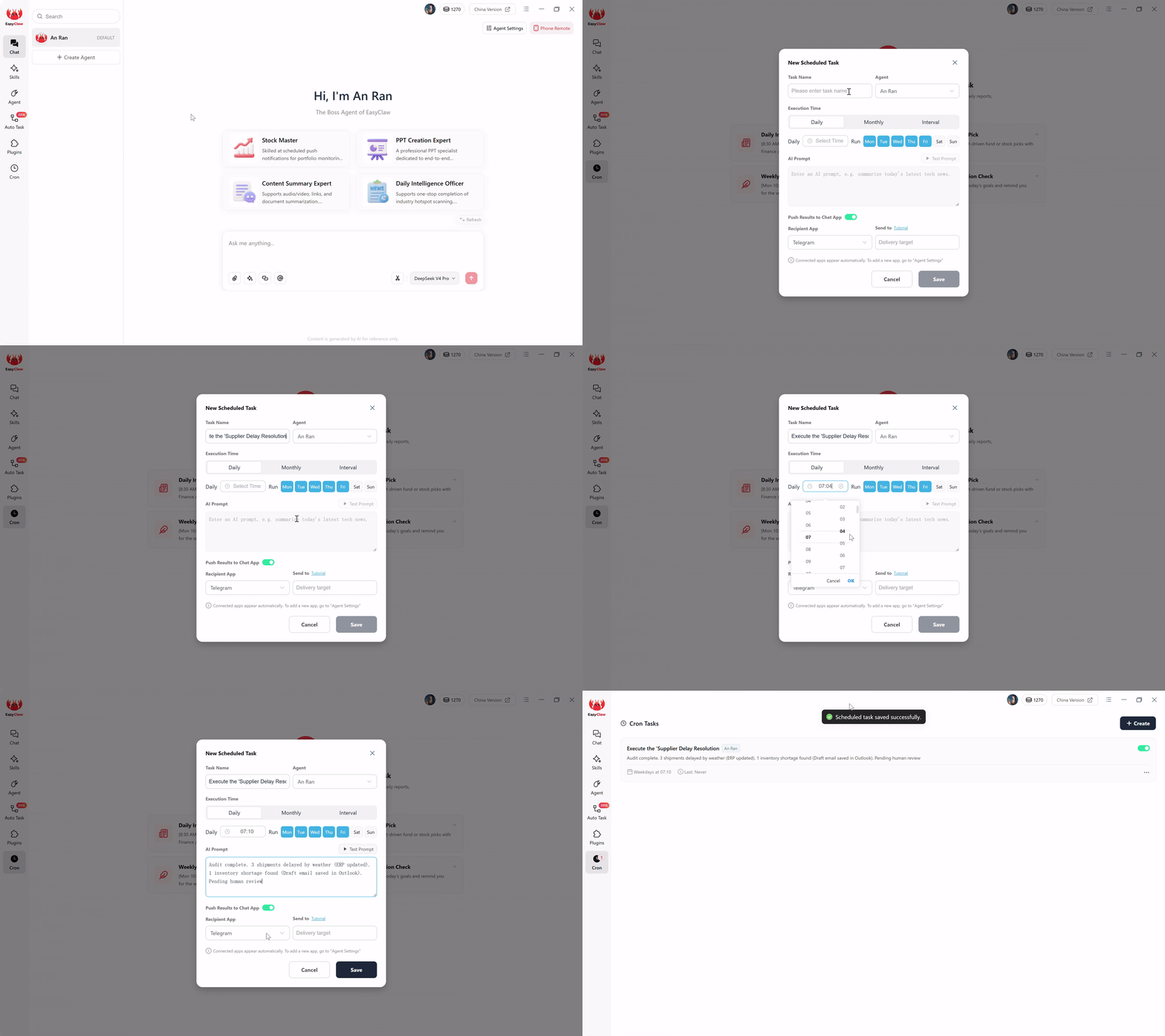
ハンズフリーの cron トリガーを設定し、チャット アプリで途中実行概要を受信します。これは、寝ている間に実行されるインテリジェントな自動化です。
回復力のあるインテリジェントなワークフローのためのプロのヒント
1. Web ポップアップの「If-Then」フェイルセーフ
Web ポータルは、予期しないプロモーション ポップアップや「パスワードの更新」バナーを表示することで有名です。フェイルセーフの文を追加するだけです。 「サプライヤー ポータルに予期しないアンケートや通知のポップアップが表示された場合は、データ抽出を続行する前に、[閉じる] または [いいえ] ボタンを見つけてクリックしてください。」
2.「読み取り専用」認知から始める
部門をまたがる 50 ステップの読み書きプロセスを初日から自動化しないでください。まずは信頼関係を築くことから始めましょう。エージェントに認知分析 (構造化されていない納品書を読んで分類) を実行してもらい、その結果をスプレッドシートに記録するだけです。決定を 3 日間検討します。天候による遅延と在庫不足が正しく区別されていることが確認できたら、書き込みアクセスを許可します。
3.エスカレーションプロトコルとしてチャットアプリを利用する
WhatsApp または Slack の統合は、成功の概要だけを目的とするものではなく、究極のエスカレーション ツールです。プロンプトに次のように追加します。 「とりあえずや在庫に関連しない遅延理由が含まれている場合は、出荷を処理しないでください。代わりに、すぐに私のTelegramに次のメッセージを送信してください。『出荷 #XYZに不明な遅延理由が発生しました。手動介入が必要です。』 これにより、人間による瞬時の監視によるセーフティ ネットを備えた AI のスピードが実現します。
EasyClaw が企業のオーバーヘッドなしで真のインテリジェント オートメーションを実現する理由
のために 運用マネージャー、サプライチェーンディレクター、自動化アーキテクト、インテリジェントな自動化の約束は、単純なコンセプトを 1 年間じっくりコンサルティング契約に変えたエンタープライズ ベンダーによって人質に取られてきました。 EasyClaw は、IPA を本来の約束に戻ります。
EasyClaw は、従来の RPA プラットフォームではありません。 コグニティブオートメーションエンジン これにより、単一のルール、条件、または ML モデルを作成しなくても、ビジネスの意図が解釈され、状況に応じた意思決定が行われます。ワークフローをわかりやすい英語で説明してください。それ以外はすべて AI が処理します。
手順ではなく目標を説明します。 AI は、厳格なスクリプトではなく、必要なものを解釈し、適応的な自動化を構築します。
エージェントは非構造化テキストを読み取り、状況に応じた決定を行い、意味に基づいてさまざまな実行パスを選択します。
スキルによる正確な運用境界。エージェントは、企業のコンプライアンスにとって重要な、その許可された範囲を超えて行動することはできません。
エージェントがあいまいな点に遭遇すると、チャット アプリにエスカレーションされ、人間による判断が求められます。つまり、安全かつ迅速です。
長所
- ルール、スクリプト、ML モデルは不要
- 自然言語の意図 → コンパイルされた自動化
- 非構造化データからの認知的意思決定
- UI の変更に適応 - セレクターのメンテナンスが不要
- トークンフリーの定期実行
- 無料利用枠をご利用いただけます – クレジット カードは必要ありません
制限事項
- デスクトップアプリのインストールが必要です
- 複雑なマルチシステム オーケストレーションには段階的な展開が必要な場合があります
EasyClaw と従来のインテリジェント オートメーション プラットフォームの比較
| 能力 | EasyClaw | エンタープライズ IPA (Pega/AA) | カスタム ML パイプライン |
|---|---|---|---|
| セットアップのアプローチ | ✓ 1 パラグラフの英語 | ✗ 数か月にわたる開発 | ✗ モデルのトレーニング + デプロイメント |
| 意思決定ロジック | ✓ セマンティックな意図 — コンテキストに応じた | ~ ルールベース + 一部の AI | ✓ ML 主導 |
| UIの変更に対する回復力 | ✓ アダプティブ — メンテナンスなし | ~ 部分的 — 更新が必要 | ✗ 再トレーニングが必要 |
| 導入時間 | ✓ 5分 | ✗ 6か月以上 | ✗ 3 ~ 12 か月 |
| 経常費用 | ✓ 実行ごとのトークンはゼロ | ✗ プロセスごとのライセンス | ✗ 推論 + インフラコスト |
インテリジェント・プロセス・オートメーションに関するよくある質問
インテリジェンスの優位性を取り戻す
ソフトウェア業界は長年にわたり、インテリジェントな自動化は、膨大な IT 予算、専用の機械学習チーム、無限の導入スケジュールを備えたフォーチュン 500 企業だけの贅沢品であるとビジネス リーダーに説得しようとしてきました。 それはもう現実ではありません。
真実 インテリジェントなプロセスオートメーション Pythonを学習したり、正確な画面認識を見直したり、エンタープライズ クラウド契約を交渉したりする必要はありません。
EasyClaw でローカルファーストの自然言語アーキテクチャを採用することで、従来の RPA の脆弱性やエンタープライズ IPA の法外なコストを回避できます。状況に応じて考え、ローカルで実行し、データのプライバシーを尊重する立場をデプロイします。 アジアの製造ハブ、ヨーロッパの物流センター、北米のサプライチェーンネットワークにわたる運用チーム向けコグニティブ オートメーションを数か月ではなく数分で導入できることは、真の競争上の優位性を表します。
自動タスクインターフェイスを開き、運用上の意図を 1 つの段落で記述します。コードを 1 行も近く、最も複雑で意思決定が必要なワークフローが完全に自動化されるのを確認してください。