


O dilema da automação do LinkedIn que toda equipe B2B enfrenta
Se você trabalha com vendas B2B, já sabe que o LinkedIn possui o registro profissional mais preciso e atualizado do mundo. Mas a equipe de engenharia do LinkedIn também sabe exatamente o valor dos seus dados. Nos últimos anos, eles implantaram algoritmos anti-bot de nível militar, limites de taxa agressivos e rastreamento de análise comportamental para proteger seu jardim murado.
Quando uma equipe de crescimento tenta dimensionar seus geração de leads no LinkedIn usando scrapers SaaS tradicionais ou extensões agressivas do Chrome, eles acionam uma cascata de alarmes silenciosos. Ferramentas de raspagem baseadas em nuvem operam a partir de endereços IP de datacenters remotos. Eles executam ações em velocidades sobre-humanas – navegando por cinquenta perfis em três segundos. Eles injetam JavaScript diretamente na página ou exploram APIs ocultas. Os algoritmos de segurança reconhecem instantaneamente que não se trata de um ser humano em Chicago; é um rack de servidor na AWS. O resultado: banimento permanente da conta, eliminando milhares de conexões e paralisando seu pipeline de vendas.
O dilema das equipes de receita modernas é angustiante. Você não pode permitir que SDRs gastem quatro horas por dia copiando e colando manualmente nomes e títulos em planilhas. No entanto, você também não pode arcar com o risco catastrófico dos raspadores de nuvem. Mas e se o software não dependesse de servidores remotos, navegadores headless ou chamadas agressivas de API? E se você pudesse instruir um local AI agent assumir fisicamente o controle de seu navegador real e autenticado, rolando e extraindo dados em um ritmo distintamente humano?
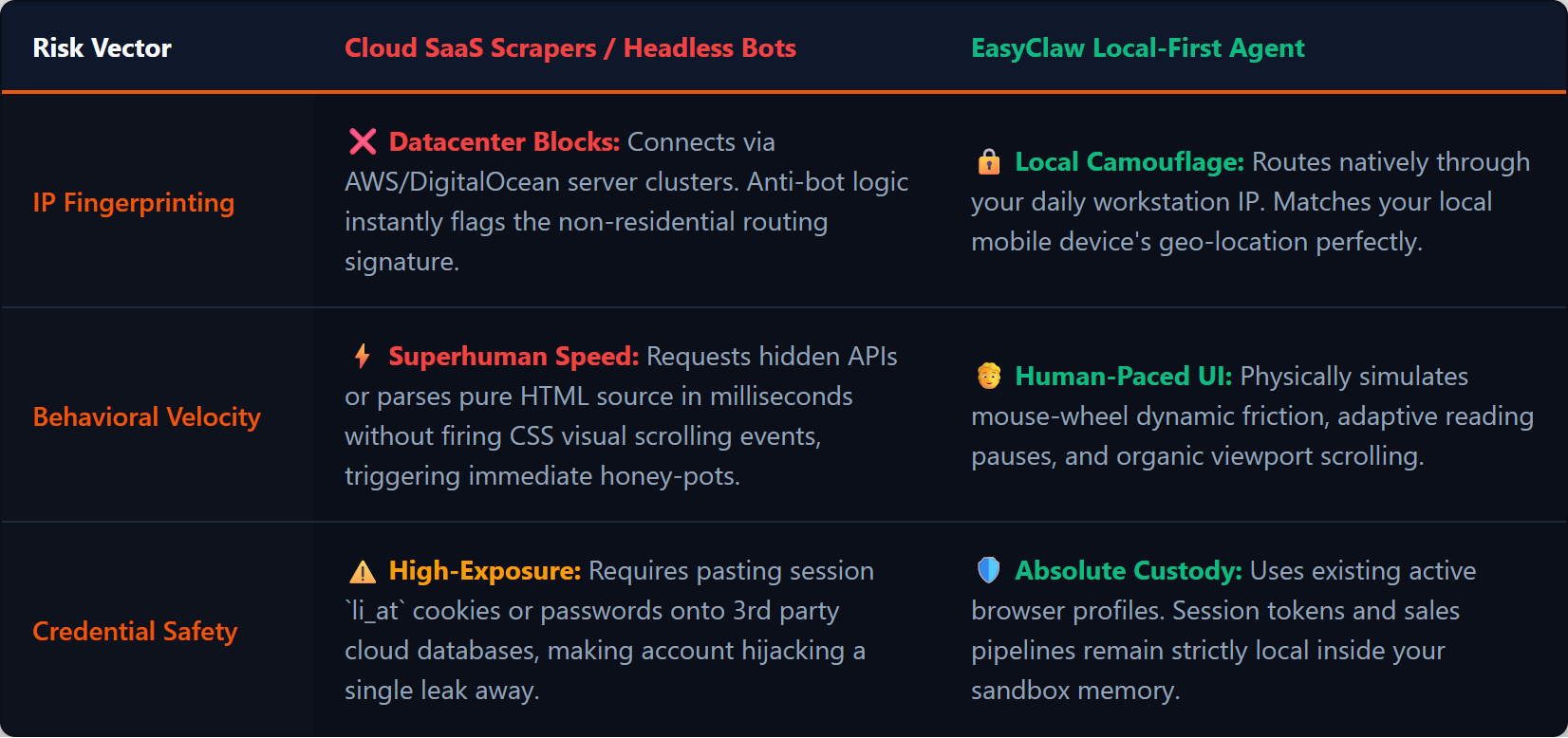
Os raspadores de nuvem usam IPs detectáveis de datacenter e navegadores headless; EasyClaw usa seu IP local e o Chrome real – indistinguível da navegação humana.
Por que as ferramentas em nuvem falham na geração de leads do LinkedIn
As empresas B2B tradicionais adquirem ferramentas SaaS de terceiros que prometem divulgação automatizada e extração de dados. Você fornece o cookie da sua conta ou credenciais de login para um painel remoto. O servidor do fornecedor inicia uma sessão de navegador “sem cabeça” – um navegador sem interface gráfica de usuário – para coletar dados em segundo plano.
Os sistemas de segurança do LinkedIn são treinados especificamente para detectar esse comportamento. Eles monitoram padrões de movimento do mouse, velocidades de rolagem e tempo entre carregamentos de páginas. Quando um raspador de nuvem solicita uma página de resultados de pesquisa, analisa o HTML e solicita a próxima página 0,2 segundos depois, a plataforma sinaliza a conta. Quando sua conta faz login repentinamente a partir de um IP da AWS em Oregon enquanto seu aplicativo móvel faz ping de uma torre de celular em Londres, a incompatibilidade geográfica aciona um bloqueio de segurança instantâneo.
| Vetor de risco | Raspadores de SaaS em nuvem/bots sem cabeça | EasyClaw Agente local primeiro |
|---|---|---|
| IP Fingerprinting | Datacenter server clusters — sinalizado pela lógica anti-bot | Local residential IP — corresponde aos seus padrões de navegação diários |
| Behavioral Speed | Superhuman speed triggers honeypots | Mimetismo humano com atrasos randomizados de 3 a 8 segundos |
| Segurança de credenciais | Session tokens pasted into third-party cloud DBs | Uses existing browser profile — os tokens permanecem locais |
| Browser Fingerprint | Navegadores sem cabeça com assinaturas detectáveis | Chrome real com extensões, cookies e TLS genuínos |
Quatro fases para automação segura de geração de leads no LinkedIn
Fase 1: Configurando seu agente local (Skill Foundation)
Ao lidar com ambientes web altamente monitorados, você deseja uma execução determinística e previsível. No EasyClaw, esta disciplina é estabelecida através da instalação de Skills. Certifique-se de que Web Automation & Navigation a habilidade está ativa - ensina o agente como lidar com a rolagem infinita, aguardar a renderização de elementos dinâmicos e extrair texto do DOM com segurança sem acionar avisos de script maliciosos. O agente está restrito apenas a interagir com a interface visual, nunca tentando explorar APIs.
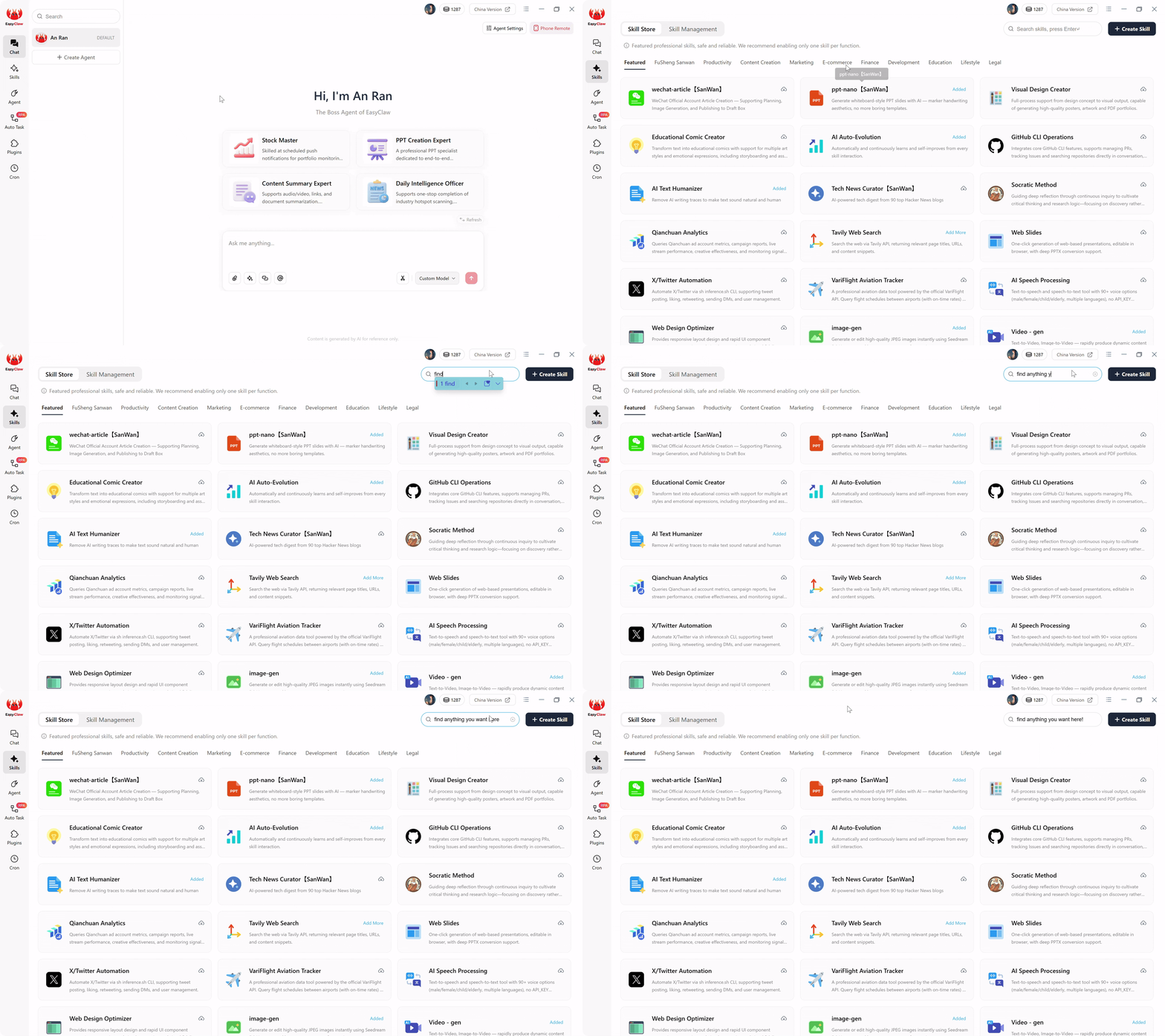
Instale a habilidade Web Automation & Navigation para dar ao seu agente o vocabulário para uma navegação segura no LinkedIn — sem explorar APIs ocultas ou injetar JavaScript.
Fase 2: Escrevendo o prompt de tarefa automática
A extração de dados tradicional exige que os engenheiros escrevam scripts Python frágeis com Selenium, mapeando seletores CSS exatos. Se o LinkedIn alterar a cor de um botão ou agrupar o nome de um perfil em uma nova tag div, o script codificado será quebrado. EasyClaw substitui essa fragilidade pela compreensão semântica. Na interface Auto Task, você dita a intenção operacional em inglês simples:
"Abra o navegador e navegue até a pesquisa do LinkedIn. Digite 'Chief Information Security Officer' na barra de pesquisa. Filtre os resultados para 'Pessoas' nos 'Estados Unidos' e '2º grau'. Role para baixo lentamente para carregar todos os cartões de perfil. Extraia o nome completo, cargo atual, nome da empresa e URL do perfil. Clique em Avançar e repita por 5 páginas. Crie um CSV local chamado 'CISO_Outreach_List' com cabeçalhos claros e salve. "
Quando você clica em compilar, o LLM traduz sua linguagem natural em um script RPA local passo a passo reforçado. Você acabou de criar um raspador de nível empresarial do LinkedIn em um único parágrafo - para agências de marketing, fundadores de SaaS e equipes de vendas B2B em todo o mundo.
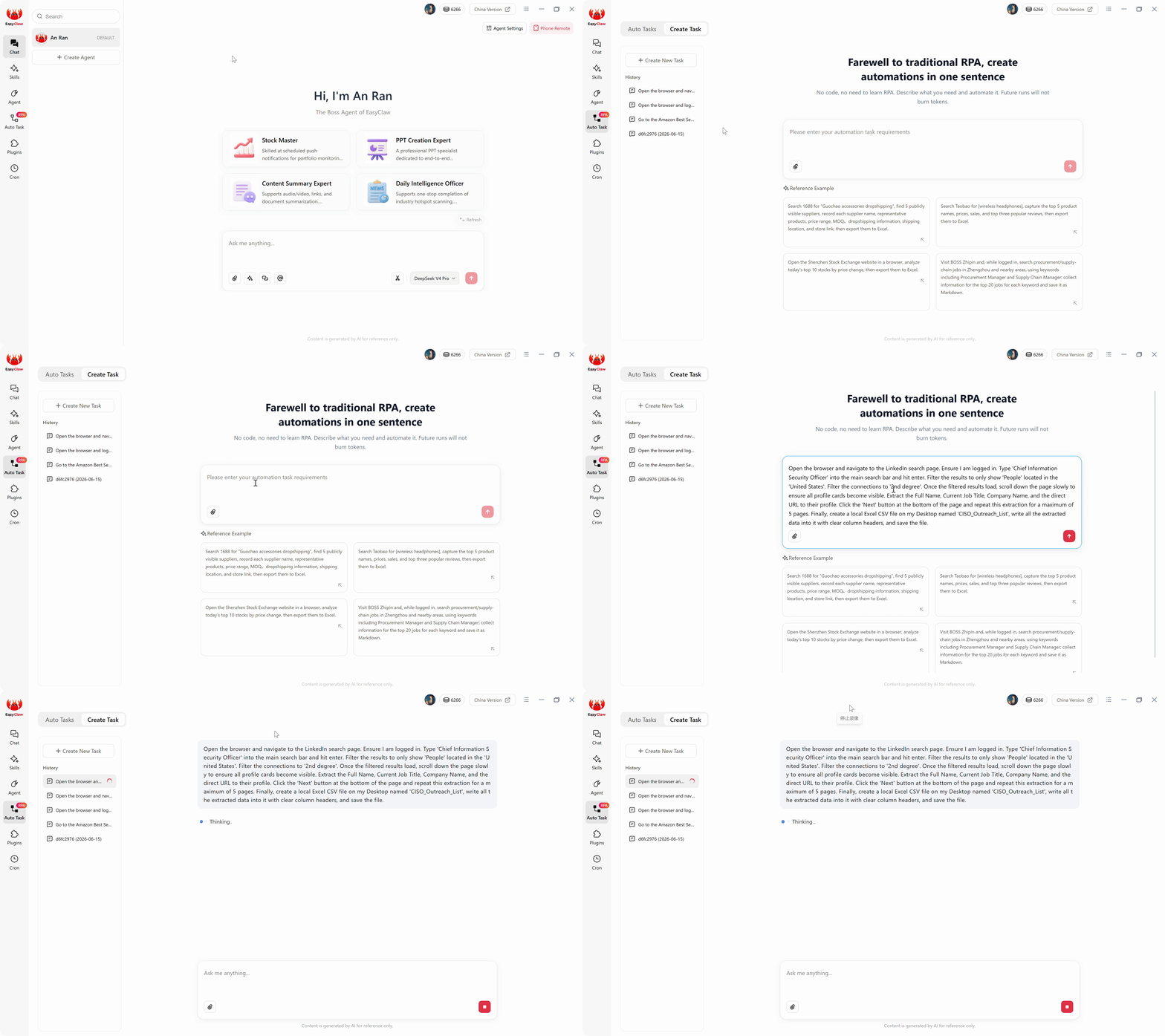
Escreva sua lógica de extração de leads do LinkedIn em inglês simples: a IA compila a intenção semântica em um script RPA local reforçado que lida com rolagem infinita e renderização dinâmica.
Fase 3: Execução Stealth (Operações zero token)
Se você usasse uma ferramenta de automação de IA baseada em nuvem, cada nova página de resultados de pesquisa exigiria a captura do HTML, o envio dessa carga útil para um servidor LLM externo e a queima de tokens caros apenas para identificar nomes e empresas. EasyClaw elimina totalmente esse imposto – o caro raciocínio de IA aconteceu uma vez durante a compilação. O script RPA local assume o controle nativamente, analisando os dados usando modelos leves incorporados na memória do seu computador. Sua extração diária queima zero LLM tokens.
Fase 4: Estabelecendo uma cadência diária segura
A chave para uma extração segura é o ritmo. Nunca extraia mil perfis em uma única hora. As equipes de crescimento B2B mais bem-sucedidas extraem diariamente um lote pequeno e altamente direcionado – mantendo a atividade dentro dos limites humanos normais. Navegue até Cron, crie "Daily Executive Lead Pull" às 9h15 e vincule-o ao seu fluxo de trabalho compilado. Alterne os resultados do push para o aplicativo de bate-papo. Amanhã, às 9h20, você receberá: "Execução concluída. 50 novos perfis CISO extraídos. CSV salvo no Desktop."
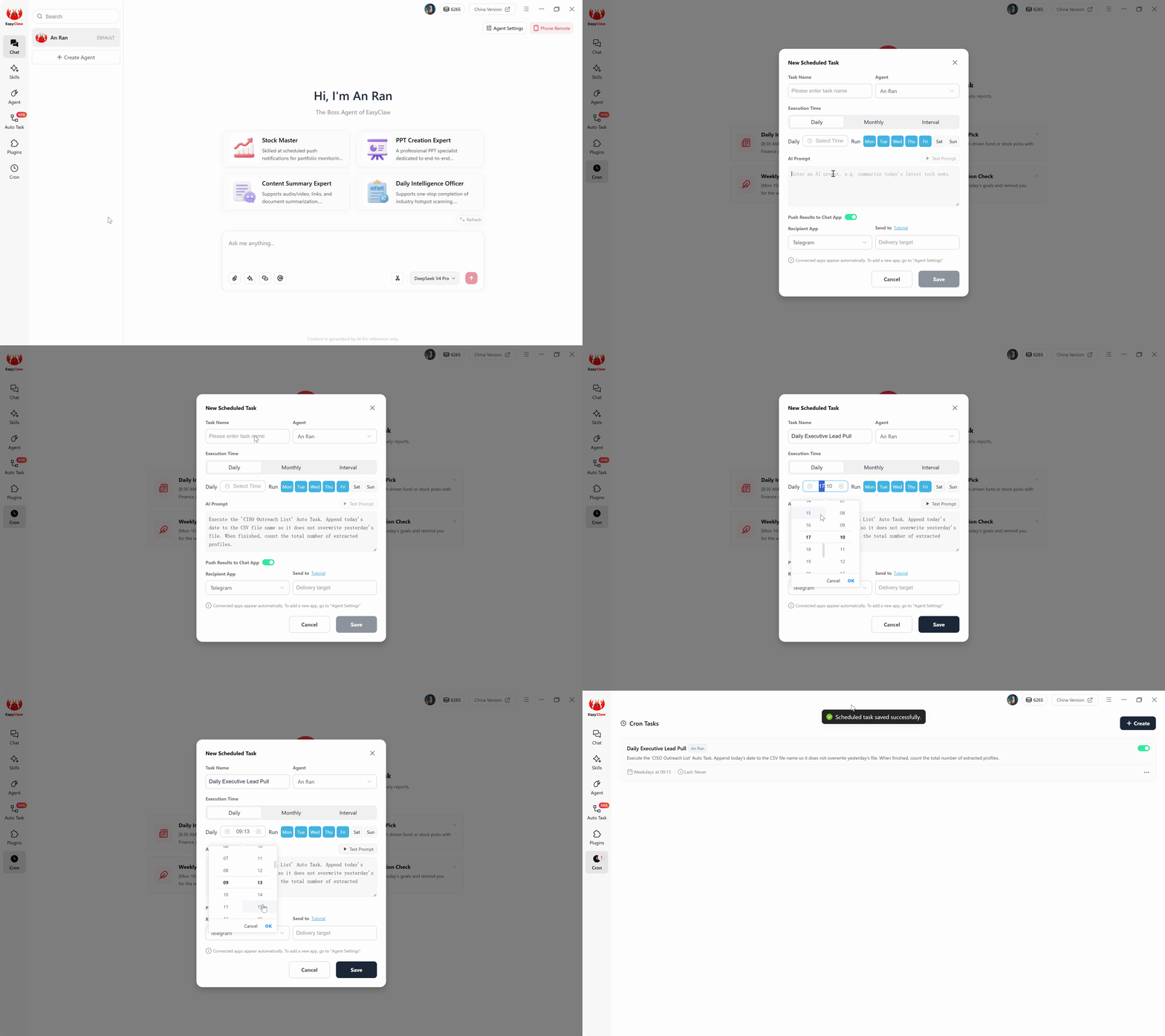
Defina uma cadência de extração diária segura com agendamento cron: lotes pequenos e direcionados mantêm a atividade dentro dos limites humanos normais e evitam o acionamento de sinalizadores de segurança.
Dicas profissionais para extração B2B à prova de balas
Atrasos semânticos e ritmo aleatório
A maneira mais rápida de ser sinalizado é navegar entre as páginas exatamente 1,00 segundo de cada vez. Adicione instruções de ritmo: "Após o carregamento dos resultados da pesquisa, aguarde de 4 a 8 segundos aleatórios antes da extração. Depois de clicar em Avançar, faça uma pausa de 5 segundos para simular a leitura humana." O agente injeta dinamicamente essas pausas naturais, tornando as sessões automatizadas visualmente indistinguíveis da navegação genuína.
Master Boolean Search Constraints
Não confie no agente para toda a pós-extração de filtragem pesada. Use lógica booleana avançada nas instruções de pesquisa: "Digite a string exata (CMO OR "Chief Marketing Officer") AND ("B2B" OR "SaaS") NOT "Consultant" na barra de pesquisa." Ao forçar o próprio mecanismo de busca do LinkedIn a fazer o trabalho pesado, o agente apenas gasta tempo extraindo alvos hiperqualificados e de alta intenção.
Por que EasyClaw vence na geração de leads no LinkedIn
A indústria de software condicionou os líderes de vendas a acreditar que a construção de um pipeline no LinkedIn requer agregadores de dados em nuvem caros ou contas arriscadas com extensões de navegador agressivas. EasyClaw quebra totalmente esse binário falso.
EasyClaw implanta um agente que usa sua própria sessão de navegador autenticada, rola em um ritmo humano e compila bancos de dados estruturados diretamente em seu disco rígido, sem uma única chamada de API na nuvem, sem navegadores headless e sem endereços IP de datacenter que acionam a infraestrutura de segurança do LinkedIn.
Seu Chrome real com cookies reais e IP residencial — indistinguíveis da navegação manual ou de qualquer algoritmo de segurança.
Atrasos aleatórios de 3 a 8 segundos, velocidade de rolagem natural e pausas de troca de contexto refletem o comportamento humano.
Compreende os perfis visualmente – sem seletores CSS frágeis que quebram quando o LinkedIn atualiza sua interface de usuário.
Os dados extraídos chegam diretamente em arquivos Excel/CSV locais — sem painéis na nuvem, sem retenção de dados do fornecedor.
Prós
- Risco zero de banimento de conta – usa sua sessão real do navegador
- Sem compartilhamento de credenciais com servidores de terceiros
- Prompt de linguagem natural - não é necessário Python ou Selenium
- Extração diária em lote dentro dos limites humanos seguros
- Resultados entregues via WhatsApp, Telegram ou Slack
Limitações
- Volume diário limitado à escala humana (50-100 perfis)
- Requer desktop com login ativo no LinkedIn
Perguntas frequentes sobre geração de leads no LinkedIn
O fim do jogo de raspagem de gato e rato
Durante anos, a indústria de software condicionou os líderes de vendas e marketing a acreditar que a única maneira de construir um pipeline no LinkedIn era através de caros agregadores de dados em nuvem ou extensões de navegador arriscadas. Eles forçaram você a participar de uma guerra implacável e geradora de ansiedade contra os algoritmos de segurança da plataforma.
Essa não é mais a realidade operacional. A construção de um pipeline previsível não deve exigir a entrega das credenciais da sua conta a um servidor remoto ou o pagamento de um prêmio mensal por dados públicos. Ao adotar uma arquitetura de UI da web local com EasyClaw, você contorna a fragilidade dos scrapers tradicionais e os riscos extremos das APIs intermediárias da nuvem.
Você implanta um agente que usa sua própria sessão autenticada, rola em ritmo humano e compila bancos de dados estruturados diretamente em seu disco rígido. Abra a interface Auto Task, defina seu perfil de cliente ideal em um único parágrafo e observe como suas tarefas de prospecção mais tediosas se transformam em uma rotina diária inquebrável, livre de manutenção e perfeitamente segura — para equipes de SDR, profissionais de marketing em crescimento e fundadores na América do Norte, Europa e além.