


O imposto SaaS: por que seu funil de leads custa mais à medida que cresce
Construindo um moderno funil de geração de leads geralmente começa com um erro caro. Um líder de receita decide escalar os esforços externos e imediatamente monta uma pilha de software baseada em nuvem – uma ferramenta de raspagem web por US$ 150/mês, uma API de verificação de e-mail por outros US$ 200, um terceiro fornecedor de enriquecimento e uma plataforma de middleware para colar tudo no CRM. Antes que um único e-mail não solicitado seja enviado, a equipe de vendas construiu uma infraestrutura frágil que drena US$ 500/mês do orçamento operacional.
Esta é a dura realidade da economia SaaS moderna. Você não é dono do seu funil de geração de leads. Você o aluga, peça por peça, de meia dúzia de fornecedores de nuvem diferentes. O modelo financeiro deles é intrinsecamente hostil ao seu crescimento: cada vez que seus servidores remotos raspam um perfil, verificam um domínio ou sincronizam uma linha, uma fração de centavo é deduzida. Se sua estratégia de marketing for bem-sucedida e de repente você precisar processar dez mil clientes potenciais em vez de cem, sua conta de software disparará instantaneamente. Você é punido financeiramente por ampliar seu alcance.
Mas o poder computacional necessário para construir um sistema automatizado processo de geração de leads já está sentado em sua mesa. Ao mudar a execução de servidores remotos em nuvem para hardware local, você reduz toda a pilha de SaaS em um único agente unificado executado em sua própria máquina.
Decoupling Your geração de leads Process
A RPA tradicional e a automação baseada em cron sofrem com acoplamento frágil. Lógica de gatilho, regras de extração, transformação de dados e formatação de saída são integradas em uma única configuração monolítica. Quando um site muda de layout, você reconstrói tudo. Quando os critérios de pontuação evoluem, você edita um fluxo de trabalho de GUI frágil. Ao trocar as fontes de destino, você corre o risco de quebrar todo o pipeline.
EasyClaw adota uma abordagem fundamentalmente diferente: projeto de lógica de controle desacoplado. O agendador cron é acionado em uma programação precisa e gera uma sessão de agente isolada. O script de pipeline — um arquivo Markdown simples armazenado localmente — define cada regra de extração, lógica de limpeza, critério de pontuação e formato de saída de forma independente. O prompt do cron job contém uma única frase: “Leia e execute pipeline-script.md”.
Esta dissociação não é uma preferência menor. É a diferença entre um funil que sobrevive anos e outro que quebra no momento em que a lógica de negócios muda. Quer ajustar seu limite de pontuação de “mais de 50 funcionários” para “mais de 100 funcionários”? Você abre um arquivo Markdown, altera um número e salva. O próximo ciclo cron seleciona as novas regras automaticamente.
O fluxo de dados completo executa quatro fases sequenciais a cada ciclo: Fase 1 — Extração Local usa a habilidade da ferramenta do navegador para abrir sites de destino por meio do navegador Chrome real com sessões de login reais. Fase 2 — Limpeza de dados locais normaliza nomes de empresas, desduplica registros e valida formatos de e-mail/telefone. Fase 3 – Pontuação de leads de IA avalia cada registro limpo em relação aos seus critérios de negócios. Fase 4 — Saída local grava os resultados pontuados em um arquivo Excel e envia notificações de leads de alta prioridade para seu canal de mensagens.
Configurando seu funil de geração de leads local passo a passo
Etapa 1: Equipe o agente com as habilidades certas
Antes que seu agente possa usar um navegador ou escrever planilhas, ele precisa do vocabulário operacional correto. Abra o painel EasyClaw Skills e habilite Browser Tool — dando ao agente a capacidade de abrir páginas da web, clicar em botões, preencher formulários e extrair texto por meio de seu navegador Chrome ou Edge real com sessões de login intactas. Em seguida, habilite XLSX — ensinar o agente a criar pastas de trabalho formatadas em Excel com realce de cores e organização em várias guias. Essas duas habilidades são a base mecânica de todo o funil.
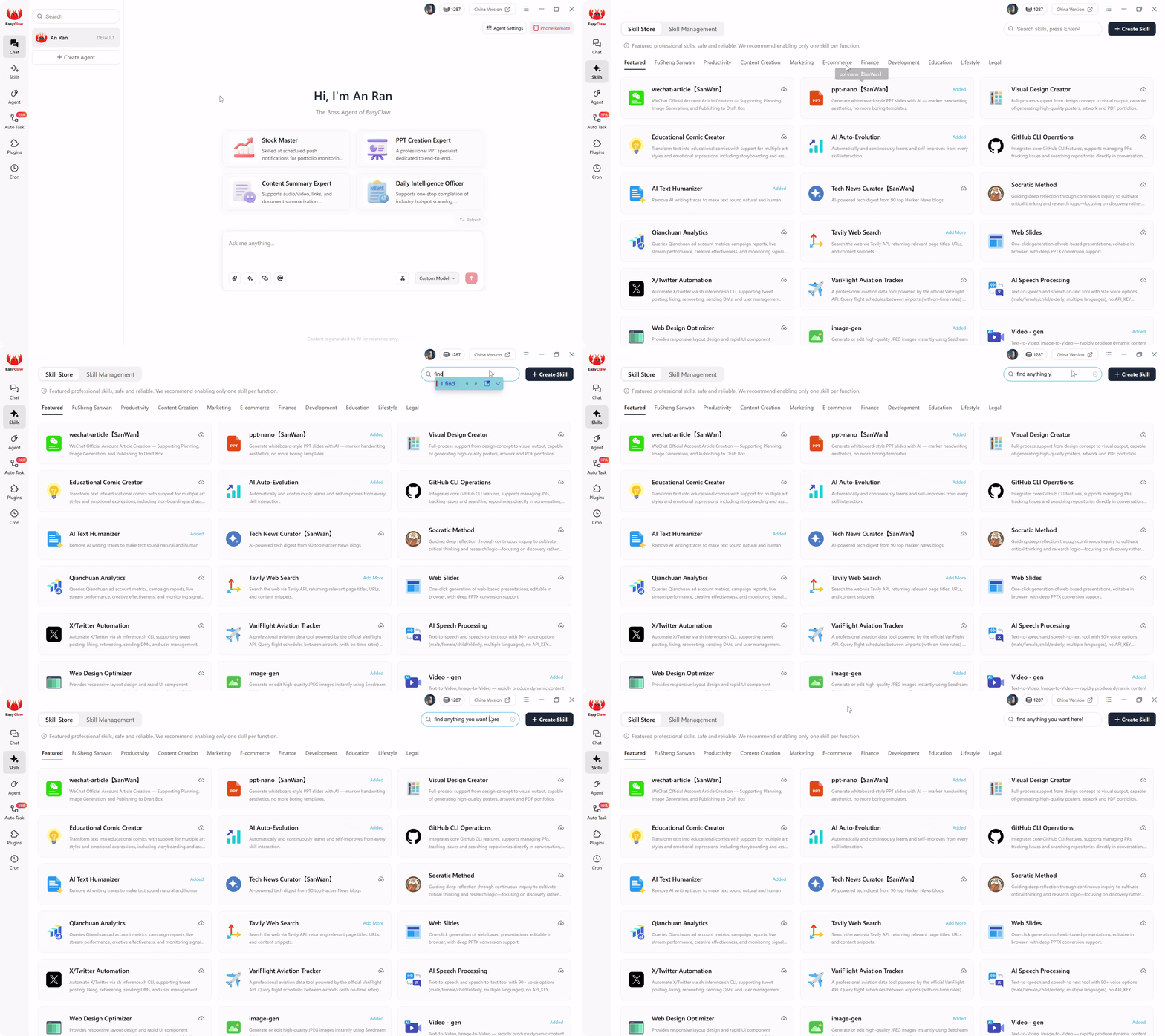
Habilite as habilidades Browser Tool e XLSX para fornecer ao seu agente o vocabulário operacional necessário para conduzir um navegador real e produzir resultados formatados em Excel.
Etapa 2: Deixe a IA escrever o script do pipeline para você
Você não se inscreveu para ser um desenvolvedor. Você se inscreveu para construir um funil de geração de leads. Em vez de escrever o script do pipeline sozinho, forneça ao EasyClaw um único prompt detalhado e deixe-o gerar tudo. O script de pipeline é um arquivo Markdown simples que define quatro fases sequenciais – extração, limpeza, pontuação de IA e sincronização de CRM – e o agente o lê sempre que o agendador cron é acionado.
Abra o chat EasyClaw e descreva seus URLs de destino, perfil de cliente ideal e preferências de pontuação em linguagem comercial simples. A IA produz um script pronto para produção que cobre todas as fases com listas explícitas de campos de extração, regras de validação, uma rubrica de pontuação totalmente articulada e instruções defensivas de tratamento de erros.
Etapa 3: Agende o tarefa Cron e vá embora
Abra a interface cron EasyClaw. Crie uma tarefa chamada “geração de leads Funnel Pipeline” com intervalo de 2 horas. Use o prompt: "Leia e execute pipeline-script.md em meu espaço de trabalho." Essa única frase é a instrução inteira. Toda a complexidade reside no roteiro. O cron job é apenas um relógio confiável. O roteiro é o cérebro.
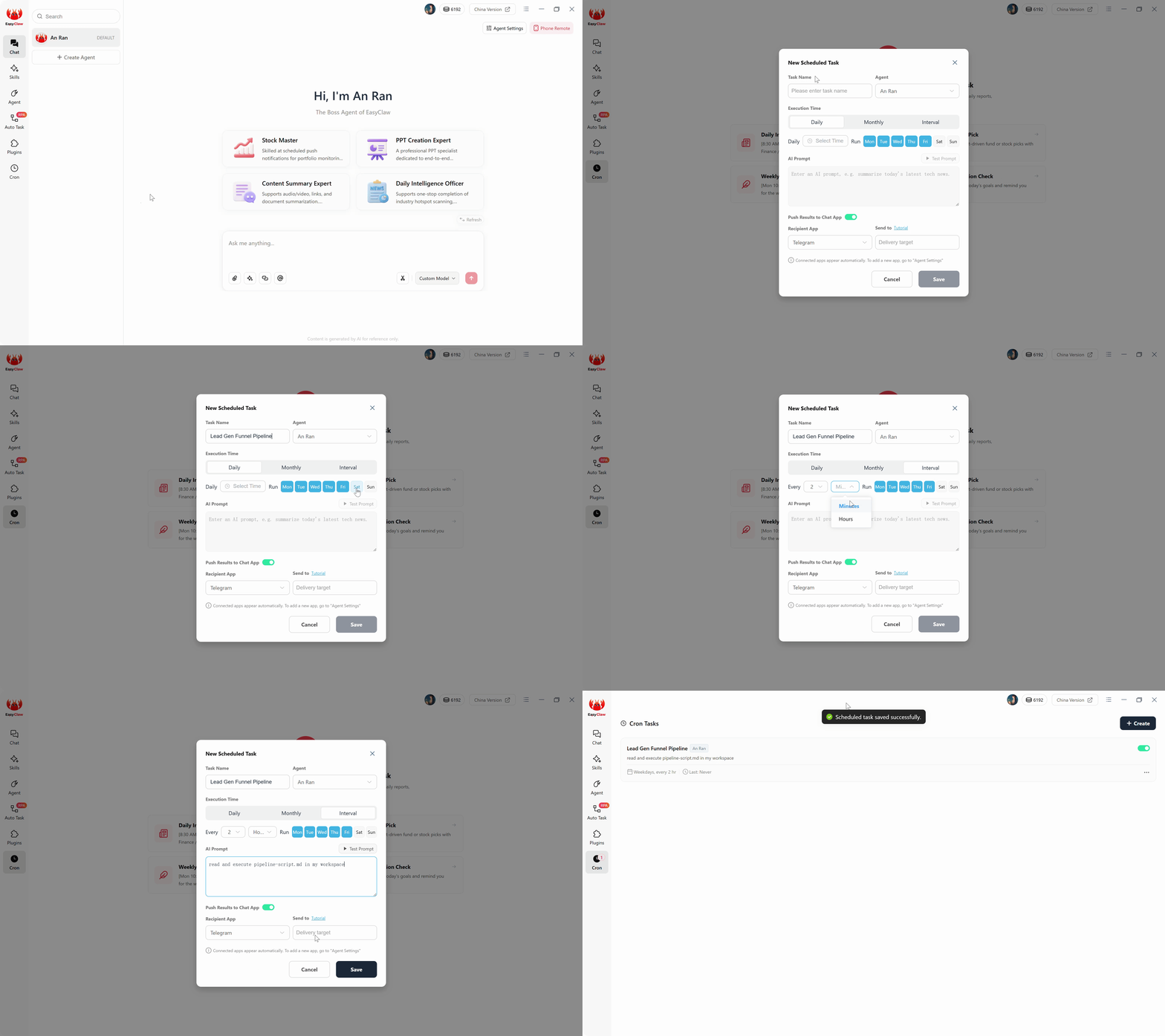
Configure um cronograma cron para executar seu pipeline automaticamente — o agente lê pipeline-script.md e executa o ciclo completo de extração até saída sem intervenção humana.
Antes de deixar o cron assumir o controle total, acione uma execução manual. Observe o agente abrir sites de destino em seu navegador real. Verifique a extração, limpeza, pontuação e saída do Excel. Quando a saída estiver correta e confiável, deixe o cron assumir o controle.
Defendendo seu pipeline contra o mundo real
A web é hostil à automação. Seu agente de desktop local tem três vantagens defensivas inerentes que faltam aos raspadores de nuvem. First, seu endereço IP residencial ou comercial contém um histórico de navegação real, fazendo com que a atividade automatizada se misture ao tráfego normal. Second, a ferramenta do navegador controla uma instância genuína do Chrome com extensões reais, cookies e impressão digital TLS – idêntica à sua navegação manual. Third, o ritmo aleatório de 3 a 6 segundos entre carregamentos de página imita a cadência natural de um pesquisador humano. Estas são propriedades estruturais de execução local, não otimizações opcionais. Eles são a razão pela qual os pipelines locais sobrevivem em plataformas onde os raspadores de nuvem são banidos em poucos dias.
A limitação de taxa merece consideração cuidadosa. Os servidores SMTP bloqueiam temporariamente os IPs que enviam mais de 10 solicitações de verificação por minuto. Verificação em lote separadamente das execuções de extração e manter as taxas abaixo dos limites conhecidos. Um pipeline que funciona um pouco mais devagar, mas nunca é bloqueado, processa muito mais leads ao longo de um mês do que aquele que funciona rápido e passa metade de seus ciclos bloqueados.
O ROI de possuir seu funil de geração de leads
Sejamos concretos em relação à economia. Um tradicional baseado em nuvem funil de geração de leads montado a partir de custos de ferramentas de scraping, enriquecimento, verificação e ferramentas de middleware de CRM $ 150- $ 500/mês apenas em assinaturas. Esse custo aumenta com o volume – cada lead adicional obtido, verificado e sincronizado representa outra fração de centavo deduzido de sua conta.
Seus custos de pipeline local zero dólares por mês para operar. A extração é executada em seu navegador e conexão à Internet com custo marginal zero por lead. A lógica de limpeza e desduplicação é executada na memória do agente, sem consumir créditos de API externos. A pontuação de IA aproveita o mesmo modelo de linguagem que você já usa. A saída grava em um arquivo Excel em seu disco rígido sem taxas de sincronização ou limites de armazenamento. Os dados do seu cliente potencial permanecem sob seu controle físico em todas as fases.
| Fator de custo | Pilha SaaS em nuvem | Pipeline local EasyClaw |
|---|---|---|
| Monthly Platform Fees | $150 – $500+ | $0 (flat AI subscription only) |
| Per-Lead Extraction Cost | Fractions of a cent each | $0 – roda em seu hardware |
| Privacidade de dados (exposição ao GDPR) | High — dados em servidores de terceiros | Zero — os dados nunca saem da sua unidade |
| Scoring Intelligence | Rule-based / static filters | AI-driven, context-aware judgment |
| Adaptability to New ICP | Reconstruir fluxos de trabalho | Edite um parágrafo, o próximo ciclo se adapta |
Por que EasyClaw é a escolha mais inteligente para automação de geração de leads
Cada plataforma de geração de leads baseada em nuvem — de Apollo a ZoomInfo e pilhas Zapier personalizadas — compartilha uma restrição fundamental: elas processam dados em servidores que você não controla, cobram por uso e exigem que sua inteligência proprietária de prospects transite pela infraestrutura de terceiros. EasyClaw inverte totalmente esse modelo.
EasyClaw não é uma ferramenta de automação apenas na nuvem. É um desktop-native AI agent que executa seu pipeline de geração de leads em seu próprio hardware – extraindo, limpando, pontuando e sincronizando leads sem que um único servidor de terceiros toque nos dados do cliente potencial.
Enquanto as plataformas tradicionais cobram por lead, por enriquecimento e por chamada de API, o EasyClaw processa tudo localmente com custo marginal zero. Seu funil é executado em uma programação cron – a cada duas horas, todos os dias – enquanto você se concentra em fechar negócios.
Aciona seu navegador Chrome real com cookies e sessões de login reais. Sem navegadores sem cabeça. Sem sinalizadores de IP do datacenter.
O LLM avalia leads em relação ao seu ICP – aplicando julgamentos comerciais diferenciados, e não correspondências de palavras-chave frágeis ou regras estáticas.
Todo o processamento é executado localmente. Os dados do cliente potencial nunca transitam por um servidor em nuvem. Exclusão do GDPR = excluir uma linha local.
Defina seu intervalo — a cada 2 horas, diariamente às 6h — e o pipeline será executado automaticamente. Custo marginal Zero por ciclo.
Prós
- Custo por lead Zero – executado em seu hardware
- Arquitetura desacoplada – edite o script sem tocar no agendador
- O comportamento de navegação semelhante ao humano evita a detecção
- Compatível com GDPR por design
- Nível gratuito disponível – não é necessário cartão de crédito
Limitações
- Requer instalação de aplicativo de desktop
- Não projetado para escala de banco de dados de milhões de registros
Perguntas frequentes sobre funis de geração de leads locais
Your Desktop agora é um servidor de geração de leads de produção
Seu funil de geração de leads agora é um mecanismo silencioso rodando em sua área de trabalho. Extrai, limpa, pontua e sincroniza a cada duas horas, todos os dias, sem intervenção humana. A camada de pontuação de IA faz o que nenhuma ferramenta de automação convencional pode fazer: avaliar a qualidade do lead da mesma forma que um diretor de vendas sênior faria, aplicando julgamentos de negócios diferenciados em vez de correspondências frágeis de palavras-chave.
A era do pagamento de aluguel mensal aos gatekeepers de SaaS pela infraestrutura básica de saída está chegando ao fim. As ferramentas são locais. A inteligência é local. Os dados permanecem seus. Para gerentes de vendas, líderes de equipes de SDR e growth hackers nos EUA, na Europa e na APAC, o caminho para a prospecção escalável não passa mais por uma dúzia de painéis de fornecedores de nuvem – ele passa por um único agente de desktop que não custa nada para operar e nunca para de funcionar.