


The Impossible Choice Facing Every Hospital IT Department
There is a familiar, painful cycle that occurs inside almost every hospital IT department and healthcare software team. An operations manager realizes that clinical staff are spending three hours a day manually copying patient demographics from a web-based intake portal into the hospital's primary Electronic Health Record (EHR) system. The manager proposes an automation initiative. They map out the process. They calculate the thousands of hours saved.
And then, they bring the proposal to the Chief Compliance Officer. The moment the compliance officer realizes that Protected Health Information (PHI) — names, dates of birth, medical history — will be routed through a third-party cloud automation platform, the project is dead on arrival.
This is the harsh reality of robotic process automation in healthcare. Traditional automation relies on cloud-first middleware that ingests your data, processes it on remote servers, and pushes it back to your systems. In a highly regulated environment, every server that touches your data requires a signed Business Associate Agreement (BAA), exhaustive security audits, and continuous risk assessments. Sending raw patient data to an external cloud API just to move it between two web portals is a compliance nightmare that most healthcare organizations simply refuse to navigate.
But the alternative — forcing highly trained nurses and administrators to act as human copy-paste machines — is equally unacceptable. For hospitals, clinics, and healthcare IT teams across North America and Europe, the question isn't whether to automate. It's whether automation can be done without violating the regulatory framework that protects patient privacy.
The Illusion of Cloud-Based Interoperability in Healthcare
To understand why local browser automation is a mandatory paradigm shift for healthcare, we must look at why cloud RPA for healthcare is fundamentally broken. Historically, hospitals attempted to connect systems using backend APIs like HL7 or FHIR. But the reality of medical software is incredibly fragmented — regional clinics, specialized lab portals, and third-party billing systems often lack robust APIs.
When APIs don't exist, teams turn to cloud-based RPA tools. A new patient registers on a scheduling website. A cloud RPA tool triggers a webhook, pulls the payload containing medical history into a remote server, uses a third-party cloud AI to parse unstructured notes, and pushes that data via another API into your EHR.
Every time PHI leaves your controlled network to hop across external servers, you expose the organization to catastrophic liability. Maintaining BAAs with every micro-service in that chain is administratively exhausting. You've surrendered physical custody of your patient data to companies you cannot control.
| Compliance Dimension | Cloud-First Middleware (Legacy RPA) | EasyClaw Local Web RPA |
|---|---|---|
| PHI Sovereignty | ✗ External servers — high liability | ✓ Absolute — fully local |
| BAA Requirements | ✗ Multi-vendor BAAs required | ✓ Zero external BAAs needed |
| Audit Trail Access | ✗ Vendor-dependent — request only | ✓ Local, immediate, timestamped |
| Execution Observability | ✗ Invisible API webhooks | ✓ Screen-visible browser actions |
| Data Storage | ✗ Cloud-stored — vendor custody | ✓ Zero cloud storage |
EasyClaw changes the operational rules. Its core competency is local web browser automation: it opens a webpage in your local browser, simulates human actions like clicking, typing, and reading data on the screen, and solidifies those actions into a repeatable script. Zero cloud middleman interception. Zero external data storage. Complete observational control.
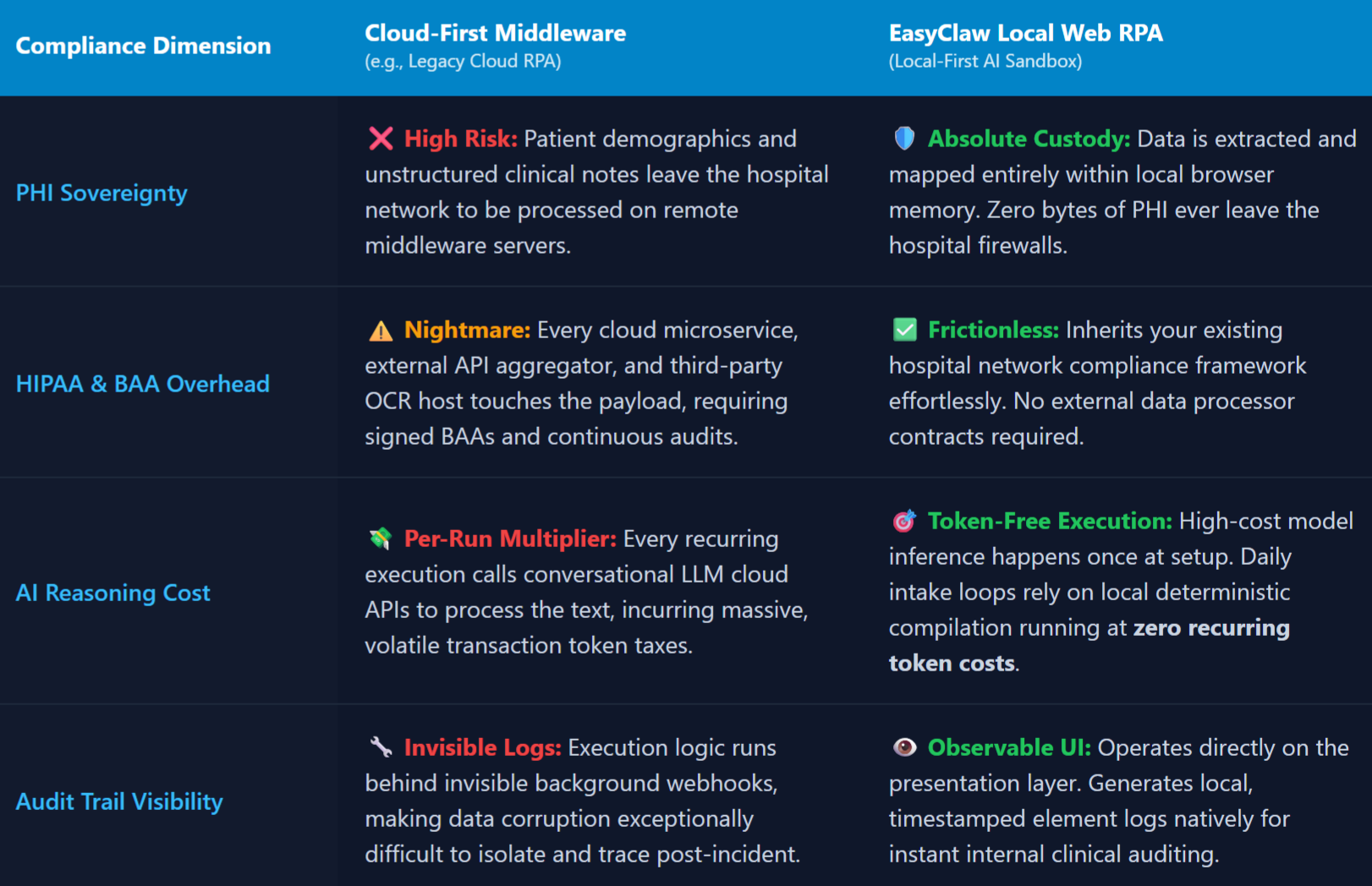
Cloud-first healthcare automation requires complex multi-vendor BAAs; EasyClaw processes all patient data locally, eliminating external compliance chains.
Step 1: Install the Automation Skill — The Regulatory Foundation
When dealing with healthcare data, you do not want an AI agent improvising its actions on the fly. You want a deterministic, repeatable, and locked-down process. Instead of writing a complex script from scratch, EasyClaw allows you to utilize its Skill architecture — a pre-packaged set of capabilities that tells the agent exactly how to interact with web elements, handle errors, and execute loops.
Open the EasyClaw interface and navigate to the Skills directory. For a healthcare data-entry workflow, install a web-automation foundation skill. By installing this Skill, you're giving your local agent the technical vocabulary to understand browser tabs, form fields, and submit buttons — and establishing the precise boundaries of what the agent is allowed to do.
It cannot send emails, access your local file system, or reach out to unauthorized domains. It can only manipulate the specific web interfaces you assign to it. This is exactly what hospital compliance officers and IT security teams need to see.
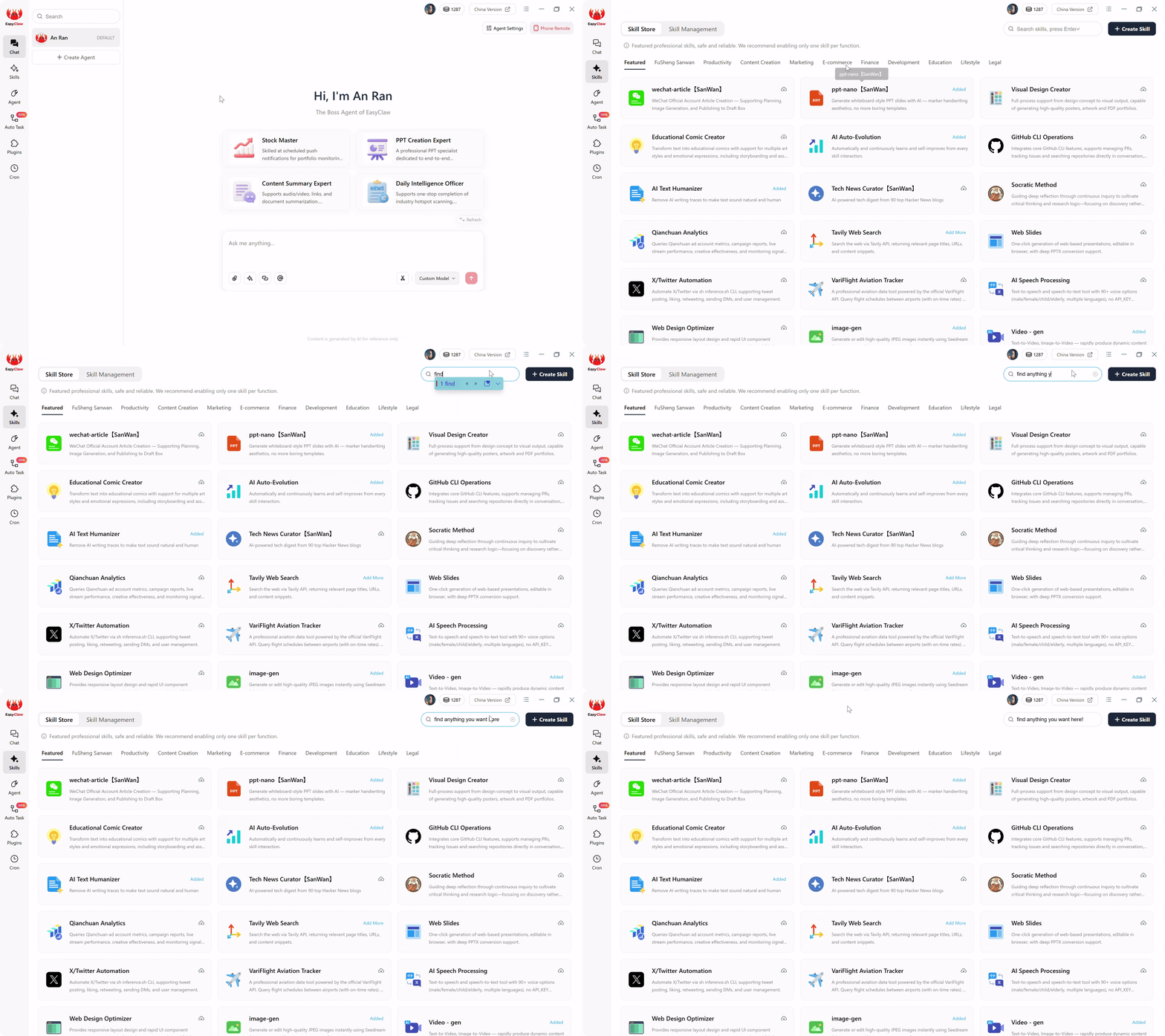
Install the web automation skill to give your agent the vocabulary for browser interaction while enforcing strict boundaries on what it can access.
Step 2: Configure the Data Source and Target — The Boundaries
Once the Skill is installed, you must configure the exact web environments the agent is permitted to touch. Navigate to the Auto Task interface to define your specific workflow. This is where you speak to the AI architect — you don't write code, you write a clear operational prompt.
A production-ready, compliance-safe prompt for patient intake automation looks like this:
"Use the installed web automation skill. Open the browser and navigate to our internal scheduling portal at schedule.hospital.local. Log in using the saved local credentials. Search the dashboard for patient appointments marked as 'New Intake'. When you find one, click on the patient profile and extract the Patient First Name, Last Name, Date of Birth, and the unstructured 'Reason for Visit' notes.
Next, open a new browser tab and navigate to our web-based EHR at ehr.hospital.com. Click on 'Register New Patient'. Paste the extracted First Name into the 'First Name' field, the Last Name into the 'Last Name' field, and the Date of Birth into the 'DOB' field. Paste the 'Reason for Visit' text into the 'Clinical Notes' text box. Save the patient record as 'Pending Review'. Finally, return to the scheduling portal and mark the appointment status as 'Transferred'."
When you click submit, the LLM reads your natural language prompt and compiles it into a hardcoded, highly efficient local browser script. The AI compilation phase is now complete. For healthcare operations teams managing patient intake across multiple facilities, this single prompt replaces hours of manual data transfer daily.
Step 3: Run the Workflow — Token-Free, HIPAA-Safe Execution
It is crucial to understand what happens during the actual execution phase. This is the secret to maintaining HIPAA compliance while scaling operations.
If this were a purely cloud-based AI tool, every single time a new patient registered, the system would package the patient's PHI and send it back to an external LLM server to figure out what data to extract and where to click next. That continuous data transmission is a massive compliance violation.
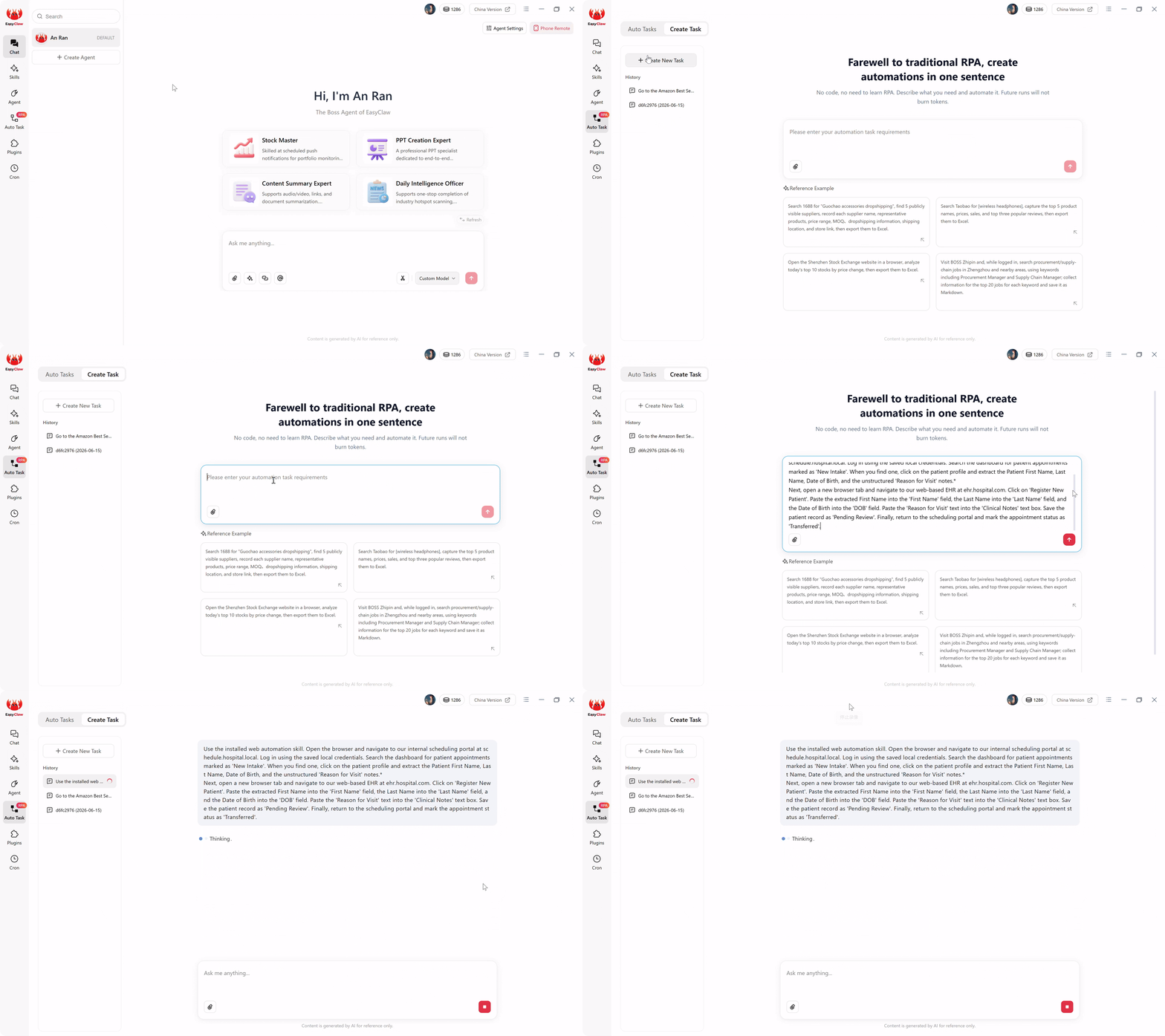
Token-free local execution: PHI never leaves your machine — the compiled script processes patient data entirely in local browser memory.
EasyClaw prevents this entirely. The expensive, AI-driven reasoning only happened once — during Step 2, when the task was created. The AI compiled your sentence into a local, deterministic browser script. When the workflow runs tomorrow morning, the underlying RPA script takes over. It opens your local browser, navigates to the internal URLs, and parses patient data using embedded, lightweight extraction models entirely in memory.
Because these recurring execution steps do not call external conversational AI APIs to make routing decisions, your subsequent daily runs process data completely locally. The PHI never leaves your machine. This architecture allows you to process 50 patient intakes or 5,000 lab results a month with absolute data privacy and a flat, predictable operational cost.
Step 4: Verify the Output — The HIPAA Audit Trail
In healthcare IT, automation is useless if it cannot be audited. When data gets corrupted through a background cloud API webhook, nobody knows what went wrong until a clinician flags a missing patient record.
EasyClaw bypasses the invisibility problem entirely. Because the agent executes tasks through local browser automation, the entire process is completely transparent and auditable. You can physically watch your computer screen as the agent springs to life: the browser opens, the cursor navigates to the internal scheduling portal, switches tabs to the EHR, clicks "Register New Patient", and types the extracted demographics into the correct fields with absolute precision.
If the EHR software updates its UI or a session timeout triggers an unexpected login prompt, the UI automation will pause — just like a confused human — preventing unverified data from being blindly forced into the medical ledger. Furthermore, all execution logs remain on your local hard drive. If a compliance officer needs to review the automation history, you can provide local, timestamped logs showing exactly which web elements were clicked and when, satisfying the strictest audit requirements without requesting logs from a third-party cloud vendor.
Pro Tips for a Bulletproof Healthcare Setup
1. Enforce the "Draft Only" Clinical Rule
When dealing with medical records, convenience is where risk accumulates. Never give an automated agent authority to click "Submit Final" or "Commit to Medical Record" on day one. Always include the instruction to "Save the record as Pending Review". A workflow requiring human approval of drafted data is vastly superior to a fast pipeline that accidentally merges wrong patient files.
2. Deploy on Dedicated, Secured Virtual Machines
Don't let your agent run wild across a primary workstation. Deploy EasyClaw on a dedicated, HIPAA-compliant Virtual Machine within your hospital's secure server environment. Lock the VM down with specific IP whitelisting so the agent can only access authorized EHR web portals, isolating the process entirely from external internet threats.
3. Build Robust Timeout Recovery
Healthcare web portals are notorious for aggressive security timeouts. If a session is idle for 15 minutes, the EHR will forcefully log out. Add a conditional instruction: "If you navigate to the EHR portal and see the 'Session Expired' or 'Login' screen, pause the data extraction. Re-enter the local credentials to authenticate, wait for the dashboard to load, and then resume the data entry process."
Why EasyClaw Is the Right Choice for Healthcare Automation
For hospital IT departments, clinical operations teams, and healthcare compliance officers, the choice of automation platform has regulatory consequences that go far beyond features and pricing. EasyClaw is built for environments where patient data privacy isn't a feature — it's a legal requirement.
EasyClaw is not a cloud-based healthcare automation platform. It's a desktop-native AI agent that processes patient data entirely on your local machine — no cloud middlemen, no external PHI processing, no multi-vendor BAA chain to manage.
PHI never leaves your local machine. No cloud OCR, no external AI processing — everything runs within your controlled environment.
Local, timestamped execution logs for every action. Present audit-ready records without requesting data from cloud vendors.
All entries saved as "Pending Review" by default. Human clinical approval required before any data commits to medical records.
Run on dedicated, IP-whitelisted VMs within your hospital network. Zero external internet requirements for execution.
Pros
- PHI stays local — zero cloud data exposure
- Zero BAAs required with third-party automation vendors
- Local audit logs for HIPAA compliance reviews
- Draft-only clinical workflow safeguards
- Deployable on dedicated, secured VMs
- Natural language setup — no specialized RPA developers
Limitations
- Requires desktop app on dedicated machine/VM
- Web-based EHR systems preferred (most modern EHRs qualify)
EasyClaw vs. Healthcare Automation Alternatives
| Capability | EasyClaw | Cloud RPA (UiPath/AA Cloud) | HL7/FHIR API Integration |
|---|---|---|---|
| PHI never leaves local machine | ✓ Yes — fully local | ✗ No — cloud-processed | ~ Depends on architecture |
| External BAAs required | ✓ Zero | ✗ Multiple vendors | ~ Varies by endpoint |
| Works with non-API web portals | ✓ Any web-based system | ~ Requires connectors | ✗ API-only |
| Deployment time | ✓ Minutes | ✗ Months | ✗ Weeks to months |
Frequently Asked Questions About HIPAA-Compliant Automation
Reclaiming Healthcare Operations
Learning how to implement RPA for healthcare locally is really about learning how to design a secure, transparent, and patient-first operating environment. The software market will try to convince you that the best automation tool is the one with the most cloud integrations and API hooks. That is a dangerous, legally precarious metric for hospital IT teams.
A good healthcare automation pipeline is not the one that moves data across the internet the fastest, pinging a dozen different third-party servers along the way. It is the one where every capability has a reason, every data extraction is securely bounded, and every single piece of Protected Health Information remains completely private.
The next wave of healthcare automation will not be judged by how clever an AI sounds in a chat window. It will be judged by whether it can safely and privately operate where the real clinical work actually happens. For hospitals, clinics, and healthcare organizations across North America and Europe, the local-first approach delivers operational efficiency without compromising the regulatory framework that protects patients.
By utilizing a local-first architecture with EasyClaw's natural language web RPA, you bypass the cloud API middlemen entirely. You keep your patient demographics, clinical notes, and billing data exactly where they belong: securely displayed and processed behind your own firewall.