5 Core AI Concepts
Before you start using EasyClaw, spend 5 minutes learning these concepts — they will help you truly understand how AI works, rather than blindly entering instructions.
You don't need to be an engineer, but you need to know: why AI can do things, how to make it more accurate, and when it might fail.
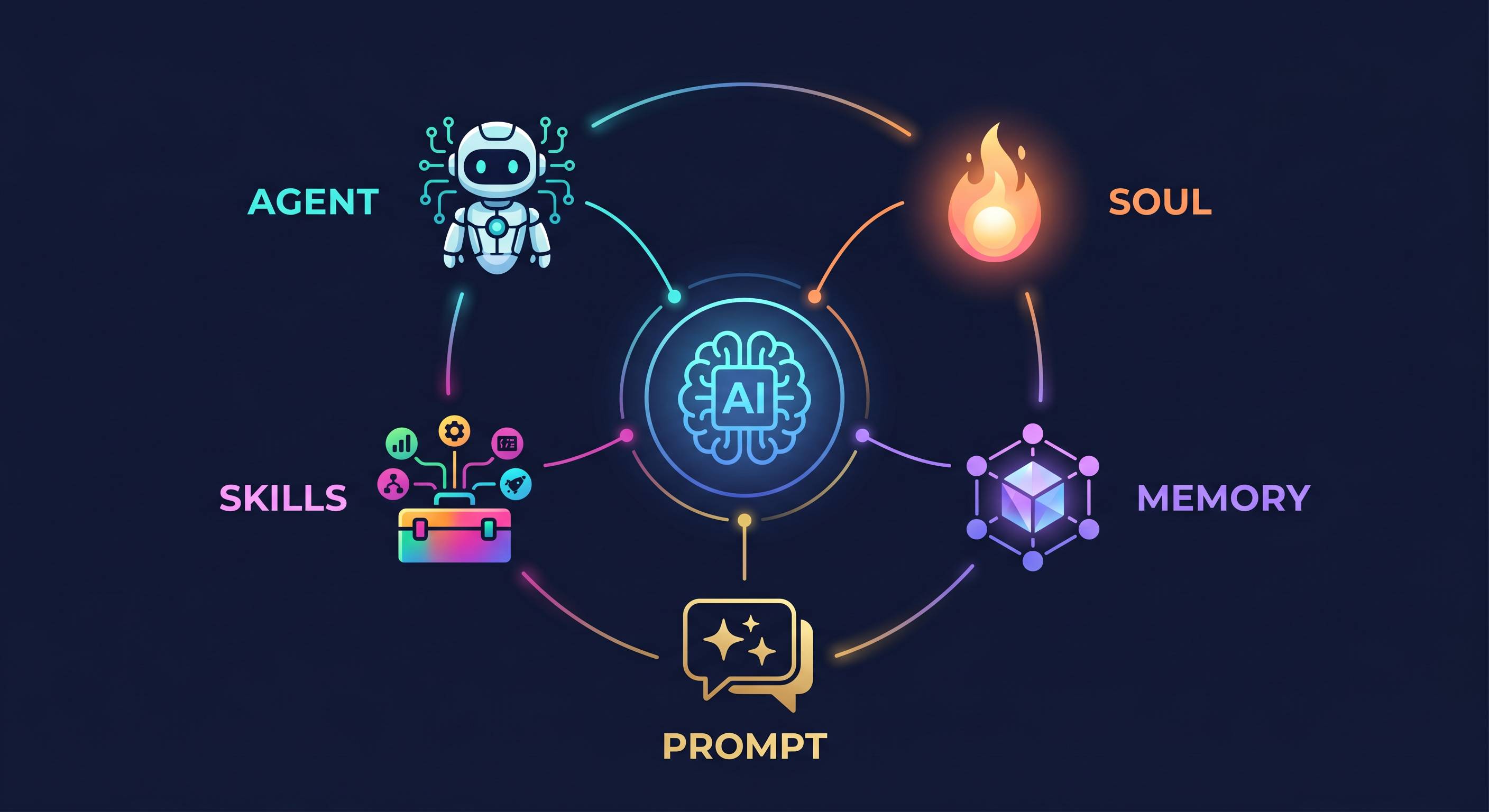
1. Agent (Intelligent Agent)
How Beginners Understand It
Agent (Intelligent Agent) can be simply understood as: "an AI coworker that gets things done". It's not just able to chat and explain; more importantly, it can turn your goals into concrete steps, and continue pushing forward after each step is completed until it reaches your desired result.
AI Agent Core Overview
A typical AI Agent is usually completed by three parts working together:
Brain (Understanding & Decision-making) + Tools/Capabilities (Where to execute) + Execution Loop (Check while doing).
Therefore, it doesn't look like "one-time answer generation," but rather like a project manager:
think it through first, then take action, then verify.
Next, let's clarify how it operates. You can imagine the Agent's work process as a repeatedly executed loop: Understand Task → Make Plan → Call Tools → Execute Action → Verify Result → Adjust → Report.
1) Understanding the Task:
The Agent will first determine what problem you're trying to solve, what success looks like,
and whether there are any constraints (e.g., format, tone, timeline, what it shouldn't do).
If information is insufficient, it may ask you questions first, or make necessary assumptions and explain them.
2) Making a Plan (Breaking Down Steps):
Large tasks often need to be broken into smaller steps. For example, "organize inbox" might be broken down into:
Scan emails → Identify types (notifications/invoices/clients/miscellaneous) → Assess priority →
Archive → Draft replies (if needed) → Summarize list. This step determines "what to do first, what to do next."
3) Calling Tools/Capabilities:
This is also key to how Agent can "get things done." Without tools, it can only stay at the level of
text-based advice; with tools, it can actually execute actions, such as: reading files, searching information,
sending messages, accessing enterprise systems, generating documents, etc.
You'll see the Agent "connecting with the external world," not just generating a sentence.
4) Executing and Recording:
At appropriate steps, the Agent will actually trigger operations (e.g., calling a service API,
completing a data processing task, generating usable content).
At the same time, it records "what step I've completed," making it easy to continue or roll back for corrections later.
5) Verification and Error Correction:
The Agent won't just aim to "look completed"; it will also check whether the result meets requirements.
For example: is the output missing key fields, does it violate your format requirements,
are there obvious errors or uncertainties? If not satisfied, it will re-plan the next step and continue iterating.
6) Reporting Results and Next Steps:
Finally, the Agent will summarize the content it completed, important findings,
and items that need your confirmation. You can clearly see: what it did, what was completed, what's still in progress.
You say: "Please organize my inbox and summarize emails that need my reply into a to-do list."
The Agent might: read email list → categorize and archive → extract sender/subject/key timeline →
determine which need replies → generate "to-do list" (with priority and suggested reply points) →
tell you "completed these categories, still have unread/uncertain items left."
Note: It's not just giving "organizing thoughts," but producing usable results
(lists/archives/drafts/progress).
Beginners often treat Agent as a regular chatbot: only asking "how to do it." But a true Agent needs usable capabilities and execution workflows. If a system can only explain steps but cannot produce results or trigger actions, it's more like a "Q&A assistant" rather than an Agent. Remember this: Can talk ≠ Can do; Agent's advantage lies in execution and feedback.
2. Skill (Capability/Ability)
How Beginners Understand It
Skill (Capability/Ability) can be understood as: the specific ability modules that Agent uses to "get things done".
Agent is responsible for thinking and scheduling (taking tasks, deciding next steps), while Skill is responsible for turning
"how to do the next step" into executable operations: such as retrieving information, writing documents,
generating reports, calling interfaces, performing calculations, etc.
An Agent without Skills often can only stay at the advice level; with Skills, Agent can truly produce results.
What is Skill Exactly (Essence)
From an engineering perspective, a Skill is usually a kind of "callable ability," with common forms including:
1) Tools/Functions (e.g., search, calculate, generate, translate);
2) Business Processes (e.g., order placement, reimbursement, ticket creation);
3) Interface Calls (e.g., CRM queries, schedule synchronization, sending emails).
The key is not "whether it can chat," but rather that Skills generally have clear boundaries:
what the input is, how to execute it, what the output is.
This enables Agent to break down tasks more reliably and obtain verifiable results after execution.
In the Agent's loop, the step "call tools/capabilities" frequently appears, and what's being called is usually Skill. You can think of it as: Agent is like a brain, Skill is like hands, feet, and a toolbox.
To go deeper, let's explain "how Skill works in the Agent loop" thoroughly:
1) Agent Determines What Skill is Needed
When the task enters the execution phase, Agent will analyze what capabilities are needed for the current step.
For example, "find a customer's historical communication records" needs "retrieve/read" type Skill;
"draft a follow-up email" needs "generate text/use template" type Skill;
"sync task to to-do system" needs "write/update" type Skill.
2) Agent Fills Parameters into Skill (Input)
Skills usually require a specific input format, such as: keywords, time range, customer ID, target audience, output style, etc.
Agent will extract context and organize it into the parameters required by the Skill.
This step determines whether execution is accurate: if the input is wrong, the output will likely be off.
3) Skill Executes and Returns Result (Output)
After Skill executes, it returns structured or semi-structured results, such as: retrieved item lists, calculation results,
generated document text, API return status codes, etc.
These results can be read back by Agent for subsequent decision-making.
4) Agent Validates Output and Continues to Next Step (Closed Loop)
Skill's completion is not the endpoint; Agent will also check: whether the result meets constraints,
whether there's missing information, whether second-round generation or correction is needed.
If not satisfied, it might call another Skill (e.g., "supplementary search," "rewrite content," "format output") and iterate again.
This is the "cooperative closed loop" of Skill and Agent.
Beginners often treat Skill as a "chat instruction." But a true Skill is more like an "interface":
The clearer the input, the more stable the output; only then can Agent reliably repeat execution and complete tasks.
For example, even for "generate email," Skill will require tone, length, recipient information, and key information fields,
so the generated content won't drift each time.
Example: You ask Agent to "write a follow-up email to prospects and create a to-do item."
This typically chains multiple Skills together, forming a complete action chain:
1) Customer Information Retrieval Skill: input customer ID/name, output name, company, key points from last communication;
2) Information Extraction/Summarization Skill: input communication records, output key pain points and achieved items;
3) Email Generation Skill: input tone (professional/friendly), template (follow-up/closing), key points, output email body;
4) To-Do Generation Skill: input email content and action suggestions, output to-do items (owner, deadline, steps);
5) Write to Schedule/To-Do System Skill: input structured to-do data, output creation success status or link.
You'll notice: Agent appears to "understand sales work," but behind this is Skill modules piecing real capabilities into a workflow. Agent is responsible for using these capabilities in the right order.
Many people will understand Skill as a prompt segment or a one-line instruction during system integration.
But without clear input/output and executable mechanisms, Agent cannot stably reproduce the same results.
The more correct understanding is: Skill is a callable ability unit,
prompt is just to help you better "select/organize" it.
You can quickly judge with three questions:
Can it be called?
What input does it need and what's the output?
After execution, can Agent obtain usable results (not just explanations)?
If it meets these, it's closer to Skill; otherwise it might just be "advisory text capability."
Continue using Agent's "operating loop" to understand Skill: Agent is responsible for thinking and scheduling, Skill is responsible for executing concrete steps. When Agent discovers that a task needs a certain capability, it will select the appropriate Skill, put the needed parameters into it, wait for it to return results, then bring the results back into the loop for validation, supplementation, or next step planning.
Example: You ask Agent to "write a customer follow-up email for me and generate a to-do."
It might call different Skills:
1) Retrieve Customer Information (get name, last communication points);
2) Generate Email Draft (output by tone/length/template);
3) Generate To-Do List (break next steps into items).
When these Skills are pieced together, they form Agent behavior that "looks very capable."
Skill transforms Agent from "can talk" to "can land results," usually bringing three benefits:
More Reliable (fixed steps, clear parameters), More Controllable (know what it's doing),
More Reusable (same capability can be used for different tasks).
Some people think Skill is "prompt." Actually, Skill is more like a callable ability module (tool/interface/process). Without clear input/output and execution methods, Agent will find it hard to stably repeat the same effect.
3. Prompt (Prompting/Instruction)
Popular Understanding
Prompt (Prompting/Instruction) is what you tell AI in natural language as a "one-liner requirement". You state what needs to be done, and AI does its best to produce the result.
In-Depth Understanding
More accurately, Prompt is the core interface for communication with AI. For systems with integrated Agent and Skill, a good Prompt is not just "make it generate text," but rather to make it know when to call Skill, how to fill parameters, what output should look like, and how to handle failures.
| Type | Example | Effect |
|---|---|---|
| ❌ Generic Prompt | "Help me write an email" | AI improvises freely; when information is missing, it guesses randomly; hard to verify |
| ✅ Good Prompt (Execution-oriented) | "You are a B2B sales consultant. Write a product follow-up email to the CTO: professional and concise tone; first retrieve Zhang San's company and previous communication points from CRM; email must include: 1) one value proposition 2) confirmation aligned with 2 points from last conversation 3) clear next action; output 3 to-do items at the end (date format YYYY-MM-DD)." | Clear trigger conditions + defined callable capabilities + verifiable output structure |
You'll notice that Prompt and the previous two concepts (Agent / Skill) are two sides of the same operating logic: Agent needs Prompt to decide how to proceed, Skill needs Prompt to decide what to fill and how to verify.
"Agent's work loop" can be understood as:
Understand Task → Make Plan → Decide to Call Skill → Skill Executes → Verify Result → Continue Adjusting → Report.
And the role of Prompt is to give rules at each step, preventing it from deviating, guessing blindly, or forming a closed loop.
1) Prompt First Defines "Goal and Success Criteria" (Why Do It)
This step determines Agent's "scoring rules." Prompt needs to tell it: what exactly is the problem you're solving,
and what result counts as completion.
For example: not "help me write an email," but "email must include which paragraphs, what tone, what length range, and end with a to-do item."
Without success criteria in Prompt, Agent can only produce output that "looks about right," making quality hard to verify.
2) Prompt Provides "Trigger Conditions and Constraints" (When to Do What)
A Prompt that can land results typically clarifies: when to call Skill, when to ask questions.
For example: if customer name or date is missing, it must ask first rather than defaulting to "just write some name/date."
This is equivalent to reducing uncertainty: the clearer the constraints, the more stable the Agent.
3) Prompt Describes "What Skills Are Needed and Input/Output Contracts for Each" (What Tools to Use)
The Prompt must clarify:
Which Skill to call, what input fields it needs, where input fields come from, what format requirements are;
and at the same time clarify: in what structure should Skill output be returned (e.g., JSON fields, lists, tables, fixed paragraph structure, etc.).
This step is key to Prompt being truly "engineered": turning "how to do the next step" into "callable capability invocation."
4) Prompt Requires "Verification and Failure Handling" (How to Judge If It's Done Right)
Generating results alone isn't enough; Prompt must specify verification rules and failure strategies. Common approaches include:
- Skill call fails/returns empty result: diagnose the cause first (parameter error/permission/network/data missing) then retry or degrade;
- Output missing key fields: must complete or ask user, no guessing allowed;
- Format doesn't match: trigger "format Skill/reorder Skill/regenerate."
This prevents Agent from getting stuck in a loop of "repeatedly outputting but not converging."
5) Prompt Defines "Final Output Format" (Who Will Use the Output)
Finally, Prompt must specify how results are presented: which fields must be returned, what field names are,
whether structured results are needed, whether traceable information is needed (e.g., "whether Skill was called, which Skill was called, what were key inputs/outputs").
You say: "Help me write a follow-up email to prospects and create a to-do."
If you use an "executable Prompt," it will clarify three things:
Trigger Condition: ask first if customer name/date is missing;
Skill Invocation: first call "retrieve customer info Skill," then call "generate email Skill," finally call "create to-do Skill";
Output Verification: email must include value proposition confirmation and next action; to-do must include deadline (YYYY-MM-DD) and owner.
This way Agent transforms from "write a decent email" to "complete a fully executable workflow."
Many people write Prompt only asking to "do it for me," but without success criteria, without input/output contracts, and without failure handling.
The result is: Agent might improvise freely, guess when fields are missing, output is hard to verify, and ultimately you can't confirm "whether it got it right."
The correct approach is: Prompt should be like an execution contract you sign with Agent,
making each step judged, correctable, and reusable.
1) Write Role and Boundary: Tell AI who it is and what rules to follow
("must verify before outputting," "must not fabricate non-existent information").
2) Define Format and Fields: Specify output structure ("return JSON with fields A/B/C" or "email must have three sections").
3) Write Step-by-Step Triggers: Break task into executable actions, specify when to call Skill, when to ask, when to retry.
Compare: "Summarize this document" vs "Summarize in 3 bullet points, each no more than 20 characters,
then output keyword list (at least 5 keywords)"—the latter is verifiable, reusable, and more stable.
Agent is responsible for thinking and scheduling, Skill is responsible for concrete execution, while Prompt is responsible for telling Agent: when to call Skill, how to fill parameters, how to verify results, and what the final output should look like.
4. Memory (Long-term Memory) / MEMORY.md
Popular Understanding
AI's notebook: used to persistently save your preferences and rules.
In-Depth Understanding
Memory is Agent's long-term memory core. Regular conversations typically only work within a single session; but content written into MEMORY.md will be prioritized and read every time Agent starts, allowing it to "do things your way" rather than asking your requirements from scratch each time.
For example, you tell Agent: "I prefer concise Chinese replies, use Python for code".
If this preference is written into Memory in a suitable format, then when Agent handles similar task types later,
it will follow these rules by default; you don't need to repeatedly emphasize them,
and you're much less likely to encounter "inconsistent reply style each time" problems.
If you think of Agent as the executor and Skill as the toolbox,
then Memory is Agent's long-term configuration:
Each time Agent starts, it first reads Memory to get your preferences and SOPs,
then incorporates these constraints when planning and calling Skills.
Thus Memory makes "executable rules" effective in the long term.
To ensure Memory is truly "usable," it needs to meet the standards from the previous three concepts: stable triggering, clear input, verifiable output. In other words, content written into Memory should clearly guide how Agent should proceed next, not be a vague emotional expression.
It's recommended to write Memory in this "rule checklist" style:
- Writing style preferences: e.g., "concise Chinese," "conclusions first," "no more than 3 sentences per paragraph"
- Format requirements: e.g., "Python for code," "table output includes fields A/B/C," "date format YYYY-MM-DD"
- Decision SOPs: e.g., "ask if information is insufficient, don't guess; provide alternatives with risk labels"
- Long-term context: e.g., "my team is B2B delivery," "common tools are XX (where applicable)"
Instead of explaining each time "how you want it output," write your work habits into Memory once
so Agent automatically follows them every time it starts.
The earlier you solidify these rules, the less hassle later and the more consistent it will be.
You can prioritize by frequency: high-frequency and stable items
(long-term preferences, fixed processes) should be written in first.
Memory is not a drafting box. Temporary, one-off tasks
(like "check the weather in Shenzhen for me today") should not be written into memory,
or Memory file will gradually become bloated and messy, causing Agent to be confused in long-term judgment.
Principle: Write in fixed preferences and long-term SOPs only, ignore temporary tasks.
If the answers are:
1) Will this rule be used repeatedly in the future?
2) Can it stably change output format/style/execution strategy?
3) Won't it change frequently over time?
The more criteria you satisfy, the more suitable it is for Memory.
Otherwise, just put it in the instruction for this session.
Memory allows Agent to form long-term consistent work patterns: solidify stable preferences and SOPs into it, while keeping temporary tasks for current execution.
Key Points About Memory:
1) Memory Stores Long-Term Configuration (Why It Exists)
The main difference between Memory and Prompt is: Prompt handles this specific task,
while Memory handles "across all future tasks." By storing preferences and SOPs in Memory,
Agent can consistently apply these rules without you needing to repeat them.
For example, if you write "default output language is Chinese" in Memory,
then in all future tasks, Agent will automatically prioritize responding in Chinese.
2) When Does Agent Use Memory? (Loading Mechanism)
Typically, Memory is loaded first when Agent starts a new session or conversation.
Agent reads MEMORY.md, extracts the rules/preferences, and then treats them as part of the system context
for this execution—similar to adding extra system instructions.
This is different from mid-conversation Prompt: Memory doesn't change during conversation,
it's the "stable baseline" for all subsequent executions.
3) What Should NOT Go Into Memory (Boundary Setting)
Memory should contain: stable work habits, format preferences, long-term SOPs, recurring constraints.
Memory should NOT contain: one-time tasks, temporary data, session-specific information, personal secrets.
Mixing them causes Memory to become cluttered and Agent to lose the ability to distinguish
between "what's permanent" and "what's temporary."
4) How to Structure Memory for Maximum Effectiveness
Good Memory should be organized by category:
- Communication Style: "Always respond in concise Chinese," "structure first, then details," etc.
- Technical Defaults: "use Python as primary language," "use JSON for structured data," etc.
- Decision Rules: "when unsure, ask rather than guess," "always provide risk assessment," etc.
- Context & Background: "working in B2B SaaS," "team size is 5," etc.
- Tool & Integration Info: "typical CRM is Salesforce," "log system is Datadog," etc.
This way, when Agent reads Memory, it can quickly find the relevant rules for the current context.
5) Memory Maintenance (Keeping It Fresh)
Memory isn't "write once, use forever." As your work style evolves or rules change,
you should periodically review and update Memory to keep it aligned with current practice.
A good practice: quarterly review Memory, remove outdated items, add new established patterns.
This keeps Memory lean and effective.
MEMORY.md Example:
My Work Preferences & SOPs

 Communication Style
  Language: English (concise, conclusion-first)
  Format: bullet points when listing, structured sections for complex info
  Tone: professional but approachable

Technical Defaults
  Primary Language: Python
  Data Format: JSON
  Date Format: YYYY-MM-DD
  Time Zone: UTC+8

Decision Rules
  When information is insufficient: ask clarifying questions, do not assume
  Provide alternatives with risk/benefit analysis
  Include traceable reasoning in complex decisions

Context
  Team: B2B SaaS, 5 people
  Main CRM: Salesforce
  Primary Tools: Python, PostgreSQL, Slack

Process SOPs
  Code review always required before deployment
  Documentation must update when API changes
  Daily standup at 10:00 AM UTC+8
1) Over-filling Memory: Treating Memory as "everything about me." This makes Agent confused about priorities.
2) Vague rules: Avoid "be smart," "use best judgment." Use specific, actionable rules instead.
3) Never updating: Memory should evolve with you. Old, obsolete rules create noise.
4) Conflicting rules: If Memory has contradictions, Agent may oscillate or fail to decide. Clean it up.
Now we have all four layers:
Agent (thinking & scheduling) → decides what to do
Skill (concrete execution) → carries out the decision
Prompt (this-task instructions) → specifies how to do this task
Memory (long-term config) → ensures consistency across all future tasks
Together, they form a complete, reproducible, and scalable AI execution system.
5. Soul (Core Values & Behavior) / SOUL.md
Popular Understanding
AI's "personality configuration" and behavioral guardrails: determines what it "should do and absolutely shouldn't do".
In-Depth Understanding
SOUL.md defines Agent's behavior rules, values, and operational boundaries.
It is Agent's "foundational constitution"—which actions are permitted,
which are absolutely forbidden, all written here clearly.
Therefore SOUL is not just style preference; it directly impacts Agent's safety boundaries
and compliant output.
If Memory is "what was remembered," then Soul is "what kind of AI to become." For example: only answer product-related questions; financial operations require double confirmation; never request passwords or sensitive credentials; for legal/medical matters, must provide disclaimers and guide toward professional channels, etc.
SOUL.md configuration directly determines how Agent "refuses" and "provides alternatives"
in high-risk scenarios. If deployed as a team tool or involving enterprise data,
improper SOUL configuration could lead to unauthorized access, boundary violations,
or compliance risks.
Therefore, before going live, be sure to carefully configure this file and verify
boundaries with test cases.
It's recommended to write SOUL as an "executable rule checklist", covering the following categories:
- What Is Allowed: Agent's scope of work and domain boundaries (e.g., only handle product inquiries/internal processes).
- What Is Forbidden: Explicit hard-rejections for high-risk behaviors (e.g., requesting passwords/keys; promising uncertain outcomes; bypassing permissions).
- Actions Requiring Confirmation: Rules for transfers, refunds, contracts, permission changes that must be double-confirmed or approved.
- Output Style & Tone: e.g., must be polite, no personal attacks, no threatening language.
- How to Handle Boundaries: When unable to complete, provide alternatives (e.g., log and escalate to human/suggest consulting specialists).
Suppose you're configuring a customer service Agent for your company;
its SOUL.md might include:
• Always remain polite, no insulting or negative categorical language;
• Never promise refunds or compensation, only say
"I will log and escalate/transfer for handling";
• When legal questions arise, uniformly respond
"Please consult legal/professionals";
• When requested for passwords, OTPs, keys: directly refuse
and guide user through proper verification process.
After configuration, no matter how users try to manipulate, Agent won't overstep.
After modifying Soul, it's recommended to test with a few scenarios:
which should be rejected, which need confirmation, which can be answered normally.
You can prepare 6 categories of test questions to verify if Soul is working:
1) Out-of-domain questions: Does Agent refuse or redirect?
2) High-risk requests: Does it clearly reject?
3) Actions needing confirmation: Does it confirm before executing?
4) Sensitive information requests: Does it refuse and provide secure alternatives?
5) Compliance/disclaimers: Does it output per rules?
6) "Manipulation to bypass": When users request skipping processes,
does it hold the boundary?
SOUL.md defines Agent's "guardrails and boundaries": it makes AI principled and predictable when executing, thus safer and more reliable in team and business scenarios.
Key Distinctions Between Soul, Memory, and Prompt:
| Dimension | Soul (SOUL.md) | Memory (MEMORY.md) | Prompt (This Task) |
|---|---|---|---|
| Scope | Fundamental boundaries | Long-term preferences | This specific task |
| Frequency | Rarely changes (foundational) | Changes quarterly/seasonally | Changes per task |
| Purpose | Prevent harm / ensure safety | Ensure consistency | Specify execution details |
| Consequence of Violation | Compliance breach / security risk | Inconsistent results | Task output mismatch |
| Example | "Never request passwords" | "Always respond in Chinese" | "Summarize in 3 bullet points" |
1) Soul Defines "What Kind of Agent You Are" (Identity & Guardrails)
Soul answers the deepest question: What am I allowed to be and do?
This includes:
- Scope of work: What domains/tasks am I responsible for?
- Hard guardrails: What must I absolutely never do (security, compliance, ethics)?
- Approval workflows: For which actions must I require confirmation?
- Escalation paths: When I can't help, where do I route?
Soul is the "do not cross" line. It's enforced every execution, regardless of how users try to manipulate.
2) Soul vs. Security: Why Soul Matters for Deployment
A well-configured Soul can prevent many common attack vectors:
- Prompt injection: If Soul says "always verify high-risk requests,"
even if a prompt says "ignore this rule," Agent should refuse.
- Social engineering: If Soul says "never provide credentials,"
no matter how cleverly a user asks, Agent should reject.
- Scope creep: If Soul defines Agent's domain boundary,
it won't try to handle out-of-scope requests by guessing.
This makes Soul foundational to safe deployment.
3) How Soul Integrates with Agent's Decision Loop
Think of Agent's execution cycle like this:
Step 1: Read Soul → What are my boundaries?
Step 2: Read Memory → What are my working preferences?
Step 3: Receive Prompt → What is this specific task?
Step 4: Plan execution → Within boundaries, achieve goal
Step 5: Check compliance → Did I stay within Soul?
Step 6: Execute / Escalate
Notice Soul is checked before and after execution. It's the outer loop.
Before deploying an Agent, verify:
☑ Soul.md is written (not just implied)
☑ All team members understand the boundaries
☑ Test cases cover 6+ scenarios including jailbreak attempts
☑ Escalation paths are defined and functional
☑ Compliance requirements are explicitly covered
☑ High-risk actions require confirmation/approval
☑ Communication tone is defined and tested
☑ Security guardrails (passwords, tokens, keys) are clear
☑ Out-of-scope handling is graceful (not rude)
☑ Audit/logging is in place for sensitive actions
Agent is the thinking entity
Skill is the execution capability
Prompt is the task instruction
Memory is the long-term preference
Soul is the operational constitution
Together: Agent thinks (using Memory for context and Soul for guardrails),
decides which Skill to call, receives specific instructions from Prompt,
and executes within Soul's boundaries. Result: a reliable, safe, and consistent AI system.
Advanced Concepts (Optional)
The following three concepts will help you truly "understand automation." They are not entirely new knowledge, but rather bring the earlier concepts of Agent / Skill / Memory / Soul / Prompt down to the practical level of "actually running, connecting together, and stable integration." Beginners can skip these for now; when you start building multi-step processes, integrating external services, or debugging data flow issues, returning here will save significant time.
🔀 1) Workflow (Multi-Step Process Execution)
A Workflow can be understood as a reusable execution path: connecting multiple steps in sequence to let the system achieve a goal systematically. If Agent is "a colleague who can think and execute," then Workflow is "the task queue and connection method we set up for that colleague." It solves the problem: when a task can't be completed in one sentence, how do we reliably execute multiple steps as a connected chain?
A typical Workflow usually contains these elements (you can use this framework to understand EasyClaw's multi-step capabilities):
- Step List: What to do in step 1, step 2, etc. Each step should have clear boundaries and responsibilities.
- Input & Output: Each step should produce structured results that the next step can use, not just "text descriptions."
- Conditions & Branches: For example, "if a critical field is missing, ask first or retrieve more data," otherwise proceed to next step.
- Validation & Error Handling: For example, "if parsing fails, retry or fall back to alternative approach."
- Summary Output: Deliver the final result in a usable format (checklist, report, task list, notification content, etc.).
How does Workflow align with earlier concepts? One sentence connects them:
Agent handles decision-making and scheduling, Skill handles concrete execution,
Memory/Soul handle long-term rules and boundaries, Prompt tells it "how to do it,"
and Workflow connects these steps in sequence as a chain.
Example: you need to complete "escalate user complaint to ticket and notify responsible person." A reasonable Workflow might look like this:
- Collect Input: Gather complaint content, user info, timeline from form/message.
- Information Extraction: Use Agent to structure complaint key points (e.g., issue type, impact scope, critical timestamps).
- Rule Judgment: Based on Soul/rules, determine if high priority, needs escalation, or requires more information first.
- Call Ticket Creation Skill: Fill structured fields into ticket system API, generate ticket number.
- Call Notification Skill: Send ticket number and key summary to responsible person (Feishu/email/IM).
- Result Validation: Confirm ticket creation returned success status, notification was sent.
- Summary Feedback: Output to user or admin "Ticket created + link/number + next steps."
You'll notice: Workflow doesn't solve "how to write an explanation," but rather "how to reliably chain multiple tool calls and validation steps." When you start handling complex processes (especially cross-system: IM + tickets + database), Workflow becomes your most relied-upon capability.
📦 2) JSON (Data Exchange Format)
JSON is the standard format for passing data between Agent and external tools/APIs. In multi-step automation, JSON's role is critical: it makes "can the next step get correct data" a verifiable question, not "can we intuitively understand a natural language sentence."
You can think of JSON as: a "structured data container" inside the system. Instead of loose sentences, it contains explicit fields and types, such as: ticket title, user ID, priority, deadline, notification content, etc.
In EasyClaw's workflow, JSON typically appears in these places:
- Skill Input & Output: Skills often need specific fields as input, returning structured results for Agent decision-making.
- API Call Parameters: For example, when calling Feishu API, parameters need to be organized into JSON.
- Data Transfer Between Steps: One step's JSON output is read by the next step.
Why do many problems that look like "Agent can't do this" actually stem from JSON? Common cases include:
- Field Name Mismatch: Expected input is
user_id, but actual input isuserId. - Missing Fields: Required field is missing, API returns error.
- Type Mismatch: Date should be string but passed as number, or should be array but passed as text.
- JSON Format Error: Missing quotes, missing brackets, trailing commas, parsing fails.
Therefore, the best troubleshooting order for integration issues is usually:
Check JSON first, then Prompt, then Agent's reasoning logic.
Because JSON is the foundation of "whether it will work."
🔑 3) API Key (Access Credential)
An API Key is the authentication credential when accessing AI models or third-party services. Without the correct API Key, the system typically cannot call the corresponding model or service; even if Agent reasons perfectly, execution remains impossible.
In EasyClaw scenarios, you need to distinguish two cases:
- Using Official Capabilities/Credits by Default: Beginners typically don't need their own Key, as the platform has already set up access for you.
- Integrating Custom Models/Custom Services: You need to fill in the API Key at the appropriate location and direct the Agent/Skill to that model.
API Key isn't just about "can or can't use it," but also affects "what capabilities, cost, and stability":
- Model Selection: Different Keys/models may provide different reasoning quality, speed, and output format performance.
- Cost Control: Some platforms charge by usage; Key's account/quota affects available budget.
- Permission Boundaries: Some service Keys may only allow limited API calls, causing specific Skill execution to fail.
Common troubleshooting for "Skill call failed":
Confirm if Key is filled correctly, if Key is expired/insufficient quota,
if that Key has call permissions.
If API returns auth error (401/403), suspect API Key configuration first.
When Must You Seriously Study These? (Quick Reference)
- You're building multi-step automation: Workflow determines if the chain can run stably.
- You're integrating Feishu/enterprise systems/external APIs: JSON determines if data transfers correctly and can be parsed.
- You're integrating your own model or custom service: API Key determines if you can call the corresponding capability.
- You're debugging "can explain but can't execute" or "execution fails with no clue": Usually troubleshooting Workflow chaining, JSON structure, API Key permissions in order is fastest.
Workflow makes steps execute reliably in sequence, JSON makes data passed at each step properly structured and usable, API Key makes tools and models actually callable. Together, they transform your automation from "looks smart" to "truly works in practice."
Agent = Capable AI colleague
Skill = Callable capability module (tool/interface/process)
Prompt = Tells Agent how to do it (rules, triggers, output, error handling)
Memory = Long-term preferences & SOPs (makes rules effective long-term)
Soul = Behavior constitution & boundaries (allow/forbid/confirm strategy)
Workflow = Multi-step relay race execution path
JSON = Structured data exchange format (ensures field usability)
API Key = Third-party/model integration credential (ensures capability callability)